giriiş
The Transformers War for Cybertron: Earthrise Deluxe WFC-E35 Decepticon Fasttrack Modulator Figure is part of the Earthrise line, designed to allow fans to build epic space battle scenes. This figure converts into a Modular Battle Station mode and its disassembled parts can be used to armor up and modify other figures. Discover the full potential of your Decepticon Fasttrack with this comprehensive instruction manual.
Temel Özellikler:
- DISCOVER EARTHRISE: The siege is over, but the War for Cybertron has just begun. The Autobots and Decepticons have left Cybertron, but their battle rages on as they speed through space in pursuit of the Allspark.
- BUILD THE BATTLEFIELD BEYOND: This ecosystem of collectible figures allows fans to build out epic space battle scenes (Each sold separately. Subject to availability).
- CONVERT TO MODULAR BATTLE STATION: Decepticon Fasttrack toy converts into a Modular Battle Station mode. Modulator figure disassembles and reassembles into Modular Battle Station mode.
- ARMOR UP: Figure's disassembled parts can be used to armor up and modify other figures (Each sold separately. Subject to availability).
- EXCITING REVEAL: Every pack includes a piece of the Transformers Universe map and a red decoder to unlock the map's hidden paths Collect other Earthrise figures to piece together the full map (Each sold separately. Subject to availability).
Kurulum ve Dönüşüm
Your Decepticon Fasttrack figure comes in robot mode and can be transformed into a vehicle mode, a spear mode, or disassembled for weaponizer configurations.
Robot Modu Bittiview:
In robot mode, Fasttrack is a formidable Decepticon. He comes equipped with two orange blasters and a small gray sword. The blasters can be held in his hands or attached to his shoulders as shoulder cannons. The sword can also be held or stored on his back.

Figure in robot mode, ready for action.
Transformation to Vehicle Mode:
- Remove the backpack section from the figure's back.
- Separate the chest from the torso by pulling straight out.
- Rotate the upper body sections upwards.
- Fold the legs over and connect them to form the base of the vehicle. Ensure all tabs and slots are aligned and securely pegged.
- Turn the robot's head around and move the arms forward.
- Rotate the arms so the black sections are on top.
- Attach the upper body section to the vehicle base, aligning the slots and pegs.
- The sword can be stored in the back of the robot's head section, ensuring the tab is facing up.
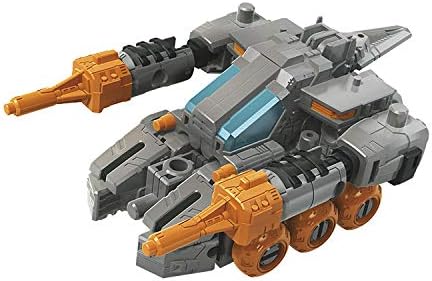
Fasttrack in its futuristic tank vehicle mode.
Transformation to Spear Mode:
Fasttrack can also transform into a spear weapon for larger Transformers figures, such as Scorponok.
- Disassemble the figure into its core components: legs, arms, torso, and cockpit section.
- Connect the robot arms together, end-to-end, using the pegs.
- Attach the tip of the sword to one end of the connected arms.
- Connect the leg sections together, feet first, to form the main shaft of the spear.
- Attach the cockpit section to the leg assembly, ensuring it is split in half and aligned correctly.
- The torso of Fasttrack is not used in this mode.
Weaponizer Configurations:
Fasttrack is a Modulator figure, meaning its parts can be detached and reconfigured to armor up or provide weaponry to other Transformers figures. Experiment with different combinations to enhance your collection.
Official video demonstrating the transformation and modularity of the Transformers Deluxe Fasttrack figure.
Operating Your Fasttrack Figure
Once assembled in your desired mode, Fasttrack offers various play possibilities:
- Robot Modu: Utilize Fasttrack's articulation for dynamic poses. His head swivels 360 degrees, arms rotate and bend at the elbow, wrists rotate, and legs move at the hip, knee, and ankle.
- Araç Modu: The vehicle mode features rolling wheels for movement. The weapon turrets can be adjusted up and down.
- Spear Mode: This mode is designed to be wielded by larger Titan-class figures, providing an imposing melee weapon.
- Weaponizer: Detach Fasttrack's limbs and body sections to create custom armor or weapons for other compatible Transformers figures.
Bakım ve Onarım
To ensure the longevity and optimal condition of your Transformers Fasttrack figure, please follow these care guidelines:
- Temizlik: Wipe the figure gently with a soft, dry cloth to remove dust. Avoid using harsh chemicals or abrasive materials, as these may damage the paint or plastic.
- Depolamak: Renginin solmasını veya eğrilmesini önlemek için figürü serin, kuru ve doğrudan güneş ışığından ve aşırı sıcaklıklardan uzak bir yerde saklayın.
- İşleme: When transforming or posing the figure, apply gentle pressure. Avoid excessive force, which can lead to breakage of joints or parts.
Safety Warning: This product may contain sharp points, small parts that are choking hazards, and other elements that are not suitable for children under 3 years of age. Adult supervision is recommended for younger children.
Sorun giderme
If you encounter any issues with your Decepticon Fasttrack figure, consider the following:
- Sert Eklem: If joints are stiff, gently work them back and forth to loosen them. Do not force movement.
- Uyumsuz Parçalar: Ensure all parts are correctly aligned according to the transformation steps. Refer to the transformation video for visual guidance.
- Gevşek parçalar: If parts become loose over time, they may be re-secured with a small amount of clear nail polish or a similar non-permanent adhesive on the peg, allowing it to dry before reattaching.
Ürün Özellikleri
- Ürün Ölçüleri: 6 x 2.5 x 9.38 inç
- Ürün Ağırlığı: 7.1 ons
- Ürün Model Numarası: E7160
- Üreticinin Tavsiye Ettiği Yaş: 8 yaş ve üzeri
- Üretici: Hasbro
Garanti ve Destek
For any warranty claims, product support, or further inquiries, please contact the manufacturer, Hasbro, directly through their official customer service channels. Keep your proof of purchase for any potential claims.


