giriiş
Bu kılavuz, Dell Inspiron 3593 dizüstü bilgisayarınızı kurmak, çalıştırmak, bakımını yapmak ve sorun gidermek için gerekli bilgileri sağlar. Cihazınızın doğru kullanımını sağlamak ve performansını ve ömrünü en üst düzeye çıkarmak için lütfen bu kılavuzu dikkatlice okuyun.

Şekil 1: Yukarıdan aşağıya view of the Dell Inspiron 3593 laptop, displaying the keyboard, touchpad, and the Windows 10 operating system interface on the screen.
Kurmak
1. İlk Açılış
- Güç Adaptörünü bağlayın: Plug the power adapter into a wall outlet and then into the power port on your laptop.
- Ekranı açın: Ekran panelini dikkatlice kaldırın.
- Güç Açık: Press the power button located on the top-right of the keyboard. The laptop will begin the initial setup process.
2. Windows 10 Kurulumu
Follow the on-screen instructions to complete the Windows 10 setup. This includes selecting your region, language, accepting the license agreement, and creating a user account. Your laptop comes with Windows 10 in S Mode, which is optimized for security and performance by exclusively using apps from the Microsoft Store. You have the option to switch out of S Mode to regular Windows 10 if you require applications not available in the Microsoft Store.
3. Ağ Bağlantısı
During the Windows setup, you will be prompted to connect to a Wi-Fi network. Select your network from the list and enter the password if required. The laptop supports 802.11ac wireless connectivity.
Dizüstü Bilgisayarınızı Çalıştırma
1. Klavye ve Dokunmatik Yüzey
The Dell Inspiron 3593 features a full-size keyboard and a precision touchpad for navigation. The keyboard is backlit, allowing for comfortable typing in low-light conditions. Use the function keys (F1-F12) for quick access to system controls such as volume, brightness, and keyboard backlight toggle.
2. Dokunmatik Ekran
Your laptop is equipped with a 15.6-inch HD touchscreen display. You can interact directly with the screen using touch gestures, similar to a tablet or smartphone. This includes tapping, swiping, pinching to zoom, and scrolling.
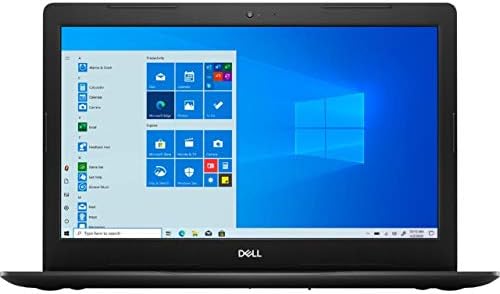
Şekil 2: Ön view of the Dell Inspiron 3593 laptop with the screen active, showing the Windows 10 desktop environment.
3. Bağlantı Noktaları ve Konnektörler
Dizüstü bilgisayarınızdaki çeşitli bağlantı noktalarını tanıyın:
- USB 3.0 Bağlantı Noktaları (x2): Harici sabit diskler, flash sürücüler ve çevre birimleri gibi yüksek hızlı USB cihazlarını bağlamak için kullanılır.
- USB 2.0 Bağlantı Noktası (x1): Standart USB cihazlarını bağlamak için.
- HDMI Bağlantı Noktası (x1): Harici ekranlara veya projektörlere bağlanmak için.
- Combination Audio Jack (x1): Mikrofonlu kulaklık veya mikrofonlu bir kulaklığı bağlamak için.
- 3-in-1 Media Card Reader (SD/SDHC/SDXC): For reading memory cards from cameras and other devices.

Figure 3: Left side of the laptop, typically featuring the power input, HDMI, and USB ports.

Figure 4: Right side of the laptop, typically featuring the SD card reader, USB ports, and audio jack.
4. Integrated Webkam
The laptop includes an integrated Widescreen HD 720P WebVideo görüşmeleri ve çevrimiçi toplantılar için uygun kamera.
Bakım
1. Dizüstü Bilgisayarınızı Temizleme
- Ekran: Hafifçe yumuşak, tüy bırakmayan bir bez kullanın.ampSu veya ekran temizleyici ile temizleyin. Sert kimyasallardan kaçının.
- Klavye ve Şasi: Use a soft cloth. For dust, a can of compressed air can be used to clean between keys.
- Limanlar: Bağlantının düzgün çalışması için portların toz ve kirden arındırılmış olduğundan emin olun.
2. Yazılım Güncellemeleri
Regularly check for and install Windows updates and Dell driver updates to ensure optimal performance, security, and compatibility. You can find Windows updates in the Settings app under "Update & Security." Dell updates can typically be found through the Dell SupportAssist application or Dell's official webalan.
3. Pil Bakımı
To prolong battery life, avoid extreme temperatures and fully discharging the battery frequently. For long-term storage, ensure the battery is charged to about 50%.
Sorun giderme
This section addresses common issues you might encounter with your Dell Inspiron 3593.
- Dizüstü bilgisayar açılmıyor:
- Güç adaptörünün hem dizüstü bilgisayara hem de çalışan bir elektrik prizine güvenli bir şekilde bağlandığından emin olun.
- Başka bir cihazı takarak elektrik prizinin çalışır durumda olduğunu doğrulayın.
- Sert sıfırlamayı gerçekleştirmek için güç düğmesini 15-20 saniye basılı tutmayı deneyin.
- Ekran Boş veya Siyah:
- Connect an external monitor to the HDMI port to check if the display output is working.
- Fonksiyon tuşlarını kullanarak ekran parlaklığını ayarlayın.
- Yukarıda açıklandığı gibi donanımsal sıfırlama işlemi gerçekleştirin.
- Yavaş Performans:
- Arka planda çalışan gereksiz uygulamaları kapatın.
- Check for and install any pending Windows or driver updates.
- Ensure your SSD has sufficient free space (at least 15-20% free).
- Kötü amaçlı yazılım veya virüslere karşı sistem taraması yapın.
- Wi-Fi Bağlantı Sorunları:
- Wi-Fi'nin etkinleştirildiğinden emin olun (işlev tuşlarını veya Windows ayarlarını kontrol edin).
- Yönlendiricinizi ve modeminizi yeniden başlatın.
- Update your wireless adapter drivers.
- Ağı unutun ve yeniden bağlanın.
For more complex issues or if troubleshooting steps do not resolve the problem, please refer to the Dell Support section.
Özellikler
| Özellik | Tanım |
|---|---|
| Örnek | Dell Inspiron 3593 |
| İşlemci | 10. Nesil Intel Core i7-1065G7 |
| Veri deposu | 12 GB DDR4 (2666 MHz) |
| Depolamak | 512 GB SSD |
| Görüntülemek | 15.6-inch HD (1366 x 768) IPS Touchscreen Truelife LED-Backlit Display |
| Grafikler | Paylaşılan grafik belleğine sahip Intel UHD Graphics 620 |
| İşletim Sistemi | S Modunda Windows 10 |
| Kablosuz Bağlantı | 802.11ac, Bluetooth 4.1 |
| Limanlar | 2x USB 3.0, 1x USB 2.0, 1x HDMI, 1x Combination Audio Jack, 3-in-1 Media Card Reader |
| Webkam | Integrated Widescreen HD 720P Webkam |
| Ses | Stereo speakers + MaxxAudio |
| Boyutlar (UxGxY) | 10.85 x 15.28 x 0.94 inç |
| Ağırlık | 6.16 pound |
Garanti ve Destek
Your Dell Inspiron 3593 laptop is covered by Dell's standard warranty. For detailed information regarding warranty terms, service options, and technical support, please visit the official Dell support website. You will need your product's Service Tag, which is typically located on a sticker on the bottom of your laptop.
Dell Desteği Webalan: www.dell.com/support
The Dell SupportAssist application pre-installed on your laptop can also help you with diagnostics, driver updates, and contacting support.


