1. Giriş
The LC-dolida USB C Hub Adapter is a versatile 7-in-1 device designed to expand the connectivity of your USB-C enabled laptop, tablet, or smartphone. It provides multiple ports including HDMI, VGA, Ethernet, USB 3.0, 3.5mm audio, and Power Delivery (PD) charging, enhancing your device's capabilities for various applications such as external display connections, high-speed data transfer, and network access.
2. Temel Özellikler
- Multiport Connectivity: Equipped with HDMI, VGA, RJ45 Ethernet, 3.5mm audio jack, 2x USB 3.0 ports, and a Power Delivery (PD) charging port.
- Yüksek Çözünürlüklü Video Çıkışı: HDMI supports resolutions up to 4K@30Hz, and VGA supports up to 1080P@60Hz. Both can be used simultaneously for dual display at 1080P.
- Fast and Stable Network: RJ45 Ethernet port supports up to 1000Mbps for reliable wired internet connection.
- Verimli Güç Dağıtımı: USB-C PD charging port supports up to 87W to keep your device charged while using the hub.
- Yüksek Hızlı Veri Aktarımı: Two USB 3.0 ports offer data transfer speeds up to 5Gbps, allowing connection of external USB devices.
- Ses Çıkışı: Integrated 3.5mm audio jack for connecting headphones or speakers.
- Geniş Uyumluluk: Compatible with various USB-C devices including 2018/17/16 MacBook/Pro/Air, Google Chromebook Pixel, Surface Book 2, and supports Samsung Dex for compatible smartphones.
3. Paket İçeriği
- LC-dolida USB C Hub Adapter (Model: usb c to hdmi vga ethernet)
- Kullanıcı Kılavuzu
4. Özellikler
| Özellik | Detay |
|---|---|
| Marka | LC-dolida |
| Model Numarası | usb c to hdmi vga ethernet |
| Donanım Platformu | Dizüstü Bilgisayar |
| İşletim Sistemi Uyumluluğu | Windows 10 (and above for some features), macOS, Android (for Samsung Dex) |
| Ürün Ağırlığı | 3.8 ons |
| Paket Boyutları | 6.69 x 3.7 x 0.71 inç |
| HDMI Çıkışı | Up to 4K@30Hz, 1080P@60Hz (backward compatible) |
| VGA Çıkışı | 1080P@60Hz'e kadar |
| Eşzamanlı Ekran | HDMI and VGA can be used simultaneously (both at 1080P) |
| Ethernet Bağlantı Noktası | RJ45, supports up to 1000Mbps |
| USB 3.0 Bağlantı Noktaları | 2 ports, data transfer up to 5Gbps |
| Güç Dağıtımı (PD) Bağlantı Noktası | USB-C, max 87W charging |
| Ses Jakı | 3.5mm |
| Uyumlu Cihazlar | Laptops, Monitors, Projectors, Smartphones (with USB-C video output support) |
5. Kurulum Talimatları
- Hub'ı bağlayın: Plug the USB-C connector of the LC-dolida hub into the USB-C port of your host device (laptop, tablet, or smartphone).
- Connect External Displays (HDMI/VGA):
- For HDMI output, connect an HDMI cable from the hub's HDMI port to your monitor or TV.
- For VGA output, connect a VGA cable from the hub's VGA port to your monitor or projector.
- For audio output via VGA, connect a 3.5mm audio cable from the hub's audio jack to your speakers or headphones.
Not: HDMI and VGA can be used simultaneously, but both displays will output at 1080P resolution.

Figure 1: Connecting to HDMI and VGA displays. HDMI supports up to 4K, VGA up to 1080P. 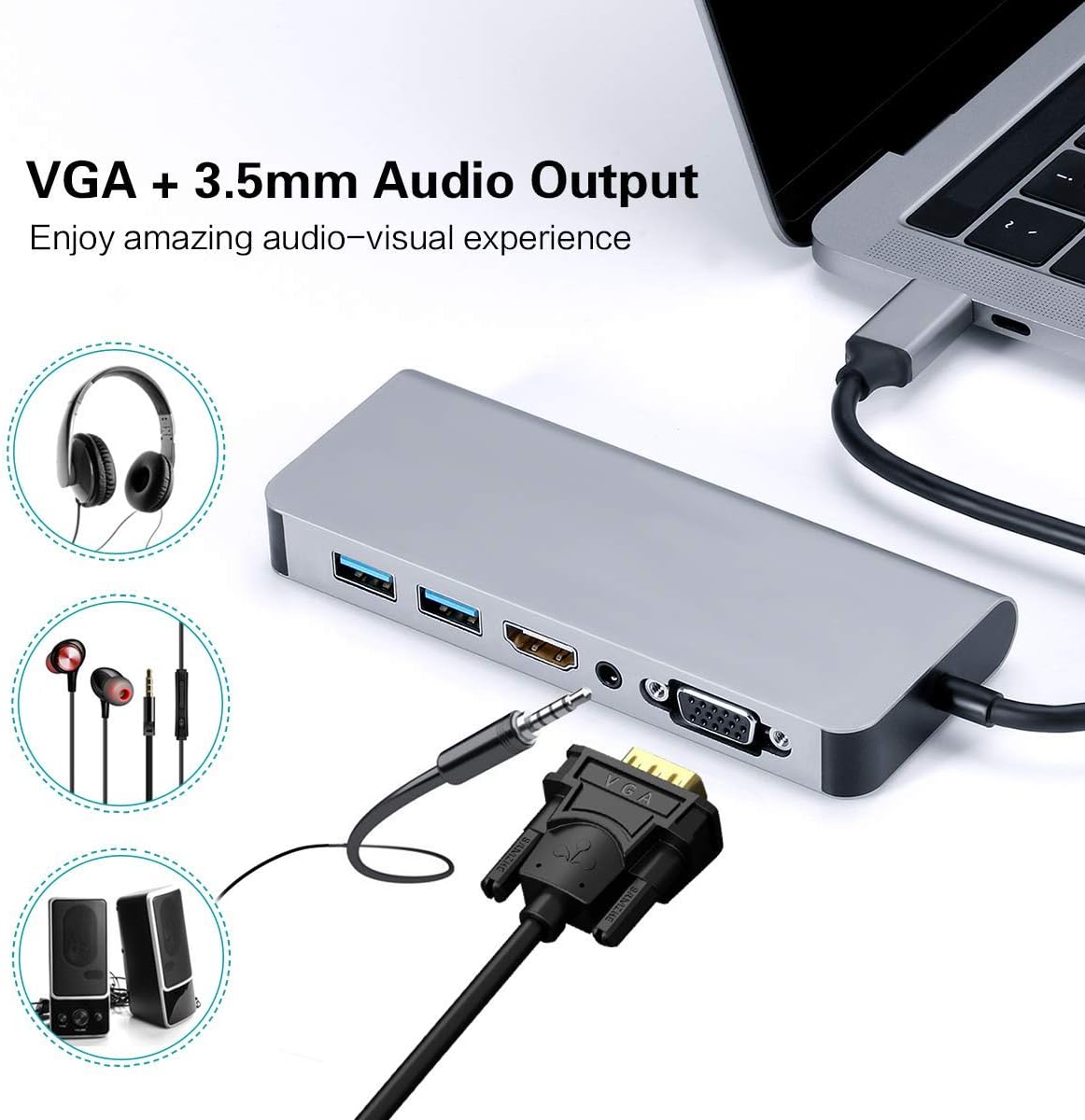
Figure 2: VGA and 3.5mm Audio Output for an enhanced audio-visual experience. - Ağa bağlan: For a stable wired internet connection, plug an Ethernet cable into the RJ45 port on the hub.
- USB Cihazlarını Bağlayın: Plug your USB peripherals (e.g., mouse, keyboard, USB drive) into the USB 3.0 ports.
- Power the Host Device: If your host device requires charging, connect your USB-C power adapter to the Power Delivery (PD) port on the hub. This allows your device to charge while using the hub's other functions.

Figure 3: Power Delivery and Data Transfer via USB 3.0 ports.
6. Kullanım Talimatları
6.1 Görüntü Modları
The hub supports both Mirror Mode and Extend Mode when connecting to external displays.
- Ayna Modu: Duplicates your host device's screen onto the external display(s). This is ideal for presentations or sharing content.
- Uzatma Modu: Extends your desktop across multiple screens, allowing for increased workspace. This mode is typically supported by laptops.
Not: Extend Mode functionality is primarily for laptops. For smartphones, it typically mirrors the display or activates specific desktop environments like Samsung Dex.

6.2 Samsung Dex Experience
For compatible Samsung smartphones (S10/S10+/S10e/S9/S9+/S8/S8+/S8 Active/Huawei Mate10/Pro), the hub can enable a PC-like desktop experience via Samsung Dex. To activate Dex mode, ensure external power is supplied to the hub via the PD charging port.
Not: Samsung Dex functionality may require your phone's operating system to be upgraded to Windows 10 or above. Always ensure your device is compatible and updated.


6.3 Resmi Ürün Videosu
Video 1: An official demonstration of the 7-in-1 USB C Multiport Hub by LC-Dolida, showcasing its various functions and connectivity options.
7. Sorun Giderme
- Görüntü Çıkışı Yok:
- Ana cihazınızın USB-C bağlantı noktasının video çıkışını (DisplayPort Alternatif Modu) desteklediğinden emin olun.
- Check all cable connections (USB-C to hub, HDMI/VGA to display).
- Verify the input source on your monitor/TV is set correctly (e.g., HDMI 1, VGA).
- Ana cihazınızı yeniden başlatmayı deneyin.
- For Samsung Dex, ensure external power is connected to the hub.
- USB Aygıtları Tanınmıyor:
- Hub'ın ana cihazınıza güvenli bir şekilde bağlandığından emin olun.
- USB aygıtının çalıştığını doğrulamak için aygıtı doğrudan ana bilgisayarınıza bağlamayı deneyin.
- If using high-power USB devices, ensure external power is supplied to the hub via the PD port.
- Yavaş Ethernet Hızı:
- Check your Ethernet cable for damage.
- Ensure your network drivers are up to date on your host device.
- Verify your router/modem is functioning correctly.
- Şarj Sorunları:
- USB-C güç adaptörünüzün hub'ın PD portuna bağlı ve çalışır durumda olduğundan emin olun.
- Verify your host device supports USB-C Power Delivery.
- Some devices, like the Samsung S8+, may not charge fully or quickly through the hub if the power input is insufficient for both the hub and the device.
8. Bakım ve Onarım
- Keep the hub away from water, fire, and corrosive materials.
- Göbek kısmını düşürmekten veya şiddetli darbelere maruz bırakmaktan kaçının.
- Cihazı kendiniz sökmeye veya onarmaya çalışmayın. Yardım için müşteri desteğine başvurun.
- Clean the hub with a soft, dry cloth. Avoid using harsh chemicals or abrasive cleaners.
- Kullanmadığınız zamanlarda göbeği serin ve kuru bir yerde saklayın.
9. Garanti ve Destek
LC-dolida products are designed for reliability and performance. For any issues or questions regarding your LC-dolida USB C Hub Adapter, please contact our customer support team. We are committed to providing assistance and ensuring your satisfaction.
Please refer to the product packaging or the official LC-dolida webBelirli garanti detayları ve iletişim bilgileri için siteyi ziyaret edin.


