1. Giriş
The Maxell Bass 13 Wireless Headphones (Model B13-WHPS) are designed to provide a versatile audio experience. These headphones feature 40mm drivers for clear sound, an integrated microphone for communication, and comfortable ear pads for extended listening. They offer both wireless Bluetooth connectivity and a traditional 3.5mm wired option.
2. Kutuda Neler Var?
- Maxell Bass 13 Wireless Headphones
- USB Şarj Kablosu
- 3.5mm Audio Cable (if applicable, not explicitly listed but common for hybrid headphones)
- Kullanıcı Kılavuzu
3. Ürün Bittiview
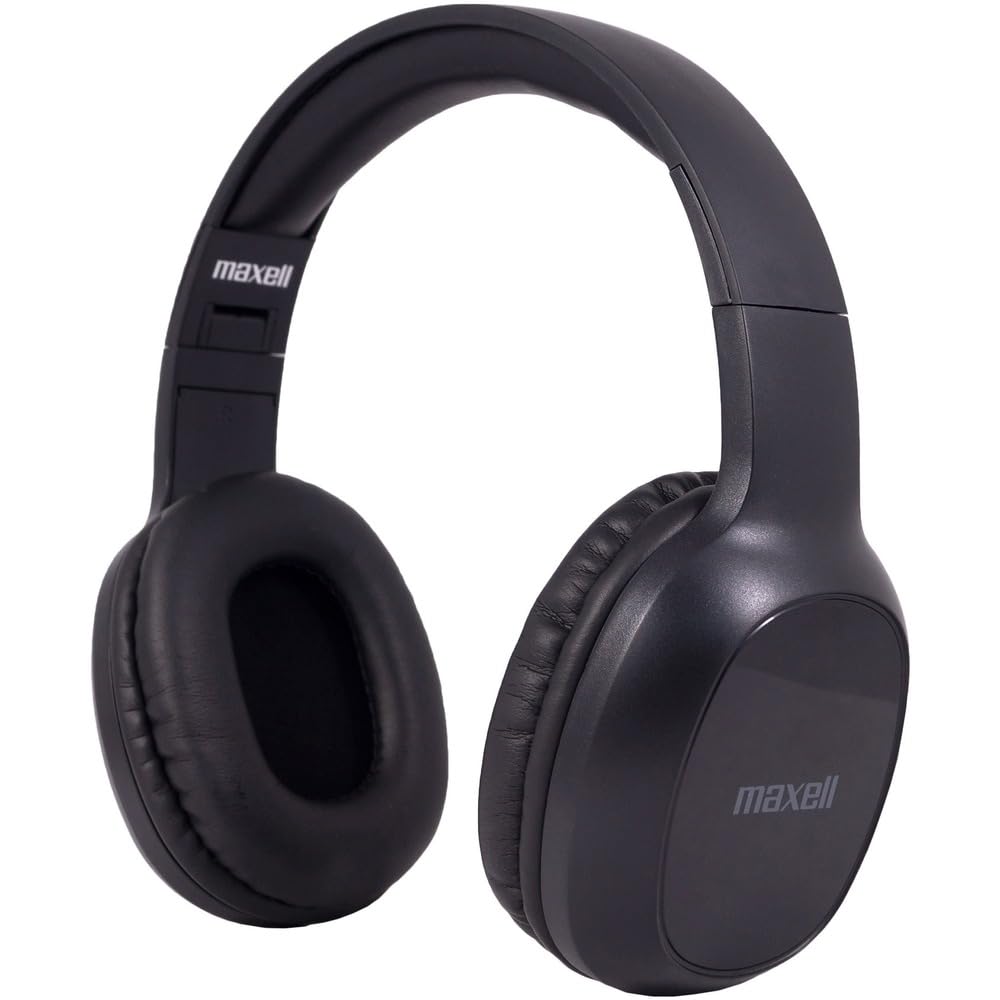
Figure 1: Maxell Bass 13 Wireless Headphones

Figure 2: Earcup Controls (Power, Volume, Play/Pause)
Temel Özellikler:
- 40mm Dinamik Sürücüler: Deliver clear and powerful audio performance.
- Entegre Mikrofon: Eller serbest görüşme imkanı sağlar.
- Noise-Isolating Earpads: Provide comfort and help reduce external distractions.
- Bluetooth 5.0 Bağlantısı: İstikrarlı kablosuz bağlantı için.
- 3.5 mm Ses Jakı: Allows for wired connection to compatible devices.
- Ayarlanabilir Kafa Bandı: Ensures a comfortable fit for various head sizes.
- 8 saate kadar pil ömrü: For extended listening and talk time.
4. Kurulum
4.1 Kulaklıkların Şarj Edilmesi

Figure 3: Connecting the USB Charging Cable
- Locate the charging port on the headphone earcup.
- Connect the small end of the provided USB charging cable to the headphone's charging port.
- USB kablosunun daha büyük ucunu bir USB güç kaynağına (örneğin, bilgisayarın USB portuna, USB duvar adaptörüne) bağlayın.
- The LED indicator on the headphones will illuminate to show charging status. It will typically turn off or change color when fully charged.
- A full charge provides up to 8 hours of continuous talk/play time.
4.2 Bluetooth Eşleştirme
- Kulaklığın tam şarjlı olduğundan emin olun.
- Eşleştirme modunu gösteren mavi ve kırmızı LED göstergesi yanıp sönene kadar kulaklığın üzerindeki Güç düğmesine basılı tutun.
- Cihazınızda (akıllı telefon, tablet, bilgisayar) Bluetooth ayarlarına gidin.
- Arama available devices. Select "Maxell Bass 13" from the list.
- Once paired, the LED indicator will typically show a solid blue light or flash blue slowly.
- Şifre sorulursa "0000" girin.
4.3 Kablolu Bağlantı (3.5 mm Ses Jakı)

Figure 4: Connecting the 3.5mm Audio Cable
For devices without Bluetooth or when battery is low, you can use the 3.5mm audio cable:
- Plug one end of the 3.5mm audio cable into the audio input jack on the headphone earcup.
- Plug the other end into the 3.5mm audio output jack of your device.
- Kulaklıklar pasif modda çalışacak ve Bluetooth işlevi devre dışı bırakılacaktır.
5. Kullanım Talimatları
5.1 Güç Açma/Kapatma
- Güç Açık: LED göstergesi yanana kadar Güç düğmesini yaklaşık 3 saniye basılı tutun.
- Kapat: LED göstergesi sönene kadar Güç düğmesini yaklaşık 3-5 saniye basılı tutun.
5.2 Ses Kontrolü
- Sesi arttır: Sesi Açma (+) tuşuna basın.
- Sesi Azalt: Sesi Azalt (-) tuşuna basın.
5.3 Müzik Oynatma
- Oynat/Duraklat: Press the Multi-function button (often the Power button or a dedicated Play/Pause button) once.
- Sonraki Parça: Press and hold the Volume Up (+) button (or double-press, refer to specific product button layout).
- Önceki parça: Press and hold the Volume Down (-) button (or double-press, refer to specific product button layout).
5.4 Çağrı Yönetimi
- Çağrıyı Cevapla/Sonlandır: Çok işlevli düğmeye bir kez basın.
- Çağrıyı Reddet: Çok fonksiyonlu düğmeye yaklaşık 2 saniye basılı tutun.
- Son Numarayı Tekrar Ara: Çok işlevli düğmeye iki kez basın.
6. Bakım
6.1 Temizlik
- Kulaklığınızı yumuşak, kuru ve tiftiksiz bir bezle silin.
- Aşındırıcı temizleyiciler, çözücüler veya aerosol spreyler kullanmayın.
- Herhangi bir açıklıktan içeriye nem girmesini önleyin.
6.2 Depolama

Figure 5: Headphones Folded for Storage
- Kulaklıklarınızı aşırı sıcaklıklardan uzak, serin ve kuru bir yerde saklayın.
- When not in use for extended periods, ensure the headphones are fully charged before storage to preserve battery health.
- The headphones feature a foldable design for compact storage and portability.
6.3 Pil Bakımı
- Pilin sık sık tamamen boşaltılmasından kaçının.
- Charge the headphones regularly, even if not used often.
- Pili aşırı ısıya veya doğrudan güneş ışığına maruz bırakmayın.
7. Sorun Giderme
| Sorun | Olası Neden | Çözüm |
|---|---|---|
| Kulaklıklar açılmıyor | Düşük pil | Kulaklığı tam şarj edin. |
| Bluetooth üzerinden eşleştirilemiyor | Kulaklık eşleştirme modunda değil; Cihazın Bluetooth'u kapalı; Cihazdan çok uzakta | Kulaklıkların eşleştirme modunda olduğundan emin olun (mavi/kırmızı yanıp sönüyor). Cihazın Bluetooth'unu açın. Kulaklıkları cihaza yaklaştırın. |
| Ses yok | Volume too low; Incorrect audio source; Headphones not connected | Increase headphone and device volume. Check if headphones are properly paired/connected. Verify audio output settings on your device. |
| Kötü çağrı kalitesi | Weak Bluetooth signal; Microphone obstructed | Cihazınıza daha yaklaşın. Mikrofonun örtülmediğinden emin olun. |
8. Özellikler
| Özellik | Detay |
|---|---|
| Model Numarası | B13-WHPS |
| Marka | Maxell |
| Bağlantı Teknolojisi | Bluetooth 5.0 |
| Ses Sürücüsü Boyutu | 40 mm |
| Pil Ömrü | Up to 8 Hours (continuous talk/play time) |
| Kulaklık Girişi | 3.5 mm Jak |
| Gürültü Kontrol Özellikleri | Sound Isolation, Noise Cancelling |
| Empedans | 32 Ohm |
| Hassasiyet | 100 dB |
| Frekans Tepkisi | 20 Hz |
| Kulak Yerleşimi | Kulakta |
| Form Faktörü | Kulak Üstü |
| Ürün Boyutları | 7.25 x 3 x 9 inç |
| Ürün Ağırlığı | 8.4 ons |
| Malzeme | Electronic Components, Foam, Plastic, Wire |
| Uyumlu Cihazlar | Tablets, Laptops, Desktops, Portable Devices with 3.5mm Audio Jack |
9. Resmi Ürün Videosu
Video 1: Maxell Bass 13 Bluetooth Headphones Overview. This video provides a visual demonstration of the headphones' features and design.
10. Garanti ve Destek
Maxell products are designed for reliability and performance. For specific warranty information, please refer to the warranty card included with your purchase or visit the official Maxell website. For technical support or customer service inquiries, please contact Maxell customer support through their official channels.


