1. Giriş
Welcome to the user manual for your Fujitsu FMV LIFEBOOK A574 laptop. This guide provides essential information to help you set up, operate, maintain, and troubleshoot your device. Please read this manual thoroughly to ensure proper use and to maximize the performance and longevity of your laptop.
2. Kurulum
2.1 Kutudan Çıkarma ve İlk İnceleme
Carefully remove the laptop and all accessories from the packaging. Verify that all components are present: the Fujitsu FMV LIFEBOOK A574 laptop, AC adapter, and power cord. Inspect the laptop for any physical damage. If any damage is found or components are missing, contact your vendor immediately.
2.2 Gücün Bağlanması
- Connect the AC adapter to the power input port on the side of the laptop.
- Güç kablosunu AC adaptörüne takın.
- Güç kablosunun diğer ucunu topraklı bir elektrik prizine takın.
The laptop battery will begin charging automatically. It is recommended to fully charge the battery before initial use.
2.3 İlk Önyükleme ve Windows 10 Kurulumu
Press the power button to turn on the laptop. The system will guide you through the initial setup process for Windows 10. Follow the on-screen instructions to configure language, region, user accounts, and privacy settings.
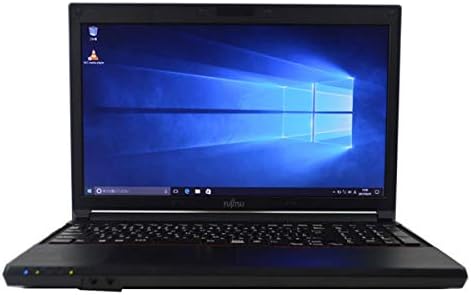
Figure 2.3.1: Fujitsu FMV LIFEBOOK A574 laptop powered on, displaying the Windows 10 desktop.
2.4 Wi-Fi'ye Bağlanma
- After Windows 10 setup, click the Wi-Fi icon in the taskbar (usually in the bottom-right corner).
- Select your desired wireless network from the list of available networks.
- Click 'Connect' and enter the network security key (password) if prompted.
- Once connected, the Wi-Fi icon will indicate an active connection.
2.5 Bluetooth Eşleştirme
- Git Ayarlar > Cihazlar > Bluetooth ve diğer cihazlar.
- Bluetooth'un açık olduğundan emin olun. On.
- Bluetooth cihazınızı eşleştirme moduna alın.
- Tıklamak Bluetooth veya başka bir cihaz ekleyin ve seç Bluetooth.
- Listeden cihazınızı seçin ve eşleştirmeyi tamamlamak için ekrandaki talimatları izleyin.
3. Kullanım Talimatları
3.1 Klavye ve Dokunmatik Yüzey
The Fujitsu FMV LIFEBOOK A574 features a full-size keyboard with a dedicated numeric keypad for efficient data entry. The integrated touchpad allows for precise cursor control and supports multi-touch gestures.

Şekil 3.1.1: Ayrıntılı view of the laptop's keyboard and touchpad area.
Klavye İşlevleri:
- Fonksiyon Tuşları (F1-F12): Often combined with the 'Fn' key for special functions like brightness control, volume adjustment, Wi-Fi toggle, etc.
- Sayısal tuş takımı: Provides a convenient layout for number input, similar to a desktop keyboard.
Dokunmatik Yüzey Hareketleri:
- Tek Dokunuş: Sol tık.
- İki Parmakla Dokunma: Sağ tık.
- İki Parmakla Kaydırma: Yukarı veya aşağı kaydırın.
- Yakınlaştırmak için sıkıştırma: İçeriği yakınlaştırın veya uzaklaştırın.
3.2 Optical Drive (DVDROM)
Your laptop is equipped with a DVDROM drive, allowing you to read CDs and DVDs.

Figure 3.2.1: The optical drive tray extended from the side of the laptop.
Using the Optical Drive:
- Press the eject button on the drive or right-click the drive icon in 'This PC' and select 'Eject'.
- Carefully place a CD or DVD onto the tray with the label side facing up.
- Gently push the tray back into the laptop until it clicks into place.
- The disc content should automatically appear or can be accessed via 'This PC'.
3.3 USB Ports and Audio Output
The laptop includes multiple USB ports for connecting peripherals such as external hard drives, mice, and keyboards. A 3.5mm audio jack is provided for connecting headphones or external speakers.
3.4 Pre-installed Office Software
This laptop comes with office software pre-installed, enabling you to perform productivity tasks such as word processing, spreadsheets, and presentations immediately.
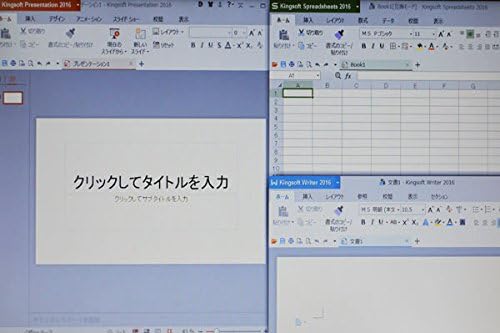
Figure 3.4.1: The laptop display showing multiple office applications running simultaneously.
4. Bakım
4.1 Temizleme Talimatları
- Ekran: Yumuşak, tiftiksiz bir bez kullanın ve hafifçe kurulayın.ampSu veya ekran temizleyici ile temizleyin. Sert kimyasallardan kaçının.
- Klavye ve Casing: Yumuşak ve kuru bir bez kullanın. İnatçı kirler için hafifçe kurulayın.amp Cihaza sıvı girmemesine dikkat ederek, yumuşak sabunlu bir bez kullanılabilir.
- Limanlar: Bağlantı noktalarındaki tozu temizlemek için basınçlı hava kullanın.
4.2 Yazılım Güncellemeleri
Regularly update your Windows 10 operating system and drivers to ensure optimal performance, security, and compatibility. Go to Ayarlar > Güncelleme ve Güvenlik > Windows Güncellemesi güncellemeleri kontrol etmek ve yüklemek için.
4.3 Pil Bakımı
- Pilin sık sık tamamen boşaltılmasından kaçının.
- Uzun süre kullanmayacağınız zaman dizüstü bilgisayarınızı serin ve kuru bir yerde saklayın.
- If storing for a long time, ensure the battery is charged to about 50-60%.
5. Sorun Giderme
This section addresses common issues you might encounter with your Fujitsu FMV LIFEBOOK A574.
5.1 Güç Yok
- AC adaptörünün hem dizüstü bilgisayara hem de çalışan bir elektrik prizine güvenli bir şekilde bağlandığından emin olun.
- Başka bir cihaz takarak prizin çalışıp çalışmadığını kontrol edin.
- Başka bir elektrik prizini deneyin.
5.2 Wi-Fi Not Connecting
- Windows ayarlarında Wi-Fi'nin etkinleştirilmiş olduğundan emin olun.
- Kablosuz yönlendiricinizi ve modeminizi yeniden başlatın.
- Doğru Wi-Fi şifresini girdiğinizden emin olun.
- Mümkünse farklı bir Wi-Fi ağına bağlanmayı deneyin.
5.3 Yavaş Performans
- Arka planda çalışan gereksiz uygulamaları kapatın.
- Bekleyen Windows güncelleştirmelerini kontrol edin ve yükleyin.
- (HDD için) Disk temizleme ve birleştirme işlemi gerçekleştirin.
- Güvenilir bir antivirüs yazılımı kullanarak kötü amaçlı yazılım veya virüs taraması yapın.
If you continue to experience issues, please refer to the official Fujitsu support webDaha fazla yardım için siteyi ziyaret edin veya müşteri hizmetleriyle iletişime geçin.
6. Özellikler
Below are the key technical specifications for the Fujitsu FMV LIFEBOOK A574 laptop:
| Özellik | Şartname |
|---|---|
| Marka | Fujitsu |
| Model Adı | A574 |
| Form Faktörü | Dizüstü bilgisayar |
| İşletim Sistemi | Windows 10 |
| CPU Türü | Intel Core i3 4000M (4th Gen) |
| RAM Kapasitesi | 8 GB DDR3 |
| Depolamak | 500 GB Sabit Disk |
| Ekran Boyutu | 15.6 inç |
| Çözünürlük | 1366 x 768 piksel |
| Grafik İşlemcisi | Intel Entegre Grafikler |
| Optik Sürücü | DVDROM'u |
| Kablosuz Bağlantı | Wi-Fi, Bluetooth |
| Limanlar | USB, Headphone Jack |
7. Garanti ve Destek
Your Fujitsu FMV LIFEBOOK A574 laptop is covered by a manufacturer's warranty. Please refer to the warranty card included with your product for specific terms and conditions, including warranty duration and coverage details.
For technical support, driver downloads, or service inquiries, please visit the official Fujitsu support website or contact their customer service department. Keep your product's serial number handy when seeking support.
Fujitsu Desteği Webalan: https://www.fujitsu.com/global/support/


