1. Giriş
This manual provides essential information for the safe and efficient operation of your Eurom DryBest 30 WiFi dehumidifier. Please read these instructions carefully before use and retain them for future reference. This appliance is designed to reduce humidity levels in indoor environments, improving air quality and preventing issues related to excessive moisture.
2. Güvenlik Talimatları
Yangın, elektrik çarpması veya yaralanma riskini azaltmak için her zaman aşağıdaki güvenlik önlemlerine uyun.
- Güç kaynağı hacmini sağlayıntage değeri, cihaz üzerindeki etikette belirtilen değerle eşleşir.
- Hasarlı bir kablo veya fiş ile nem alma cihazını çalıştırmayın.
- Cihazı ısı kaynaklarından, doğrudan güneş ışığından ve yanıcı maddelerden uzak tutun.
- Hava giriş veya çıkışını kapatmayın. Ünitenin etrafında en az 20 cm boşluk bırakın.
- Havalandırma deliklerine asla bir cisim sokmayın.
- Temizlik, bakım veya kullanılmadığı zamanlarda cihazın fişini çekin.
- Do not use the appliance in bathrooms or other excessively wet environments where it could come into contact with water.
- Bu cihaz, fiziksel, duyusal veya zihinsel yetenekleri kısıtlı olan veya deneyim ve bilgi eksikliği bulunan kişiler (çocuklar dahil) tarafından, güvenliklerinden sorumlu bir kişi tarafından cihazın kullanımıyla ilgili olarak gözetim veya talimat sağlanmadığı sürece kullanılmak üzere tasarlanmamıştır.
- Çocukların cihazla oynamamalarını sağlamak için gözetim altında tutulmaları gerekir.
- Elektrik kablosu hasarlı ise tehlikeyi önlemek için üretici, servis temsilcisi veya benzer şekilde yetkili kişiler tarafından değiştirilmelidir.
3. Ürün Bittiview
The Eurom DryBest 30 WiFi is a powerful and efficient dehumidifier designed for domestic use. It features a quiet operation and can be controlled via WiFi for convenience.
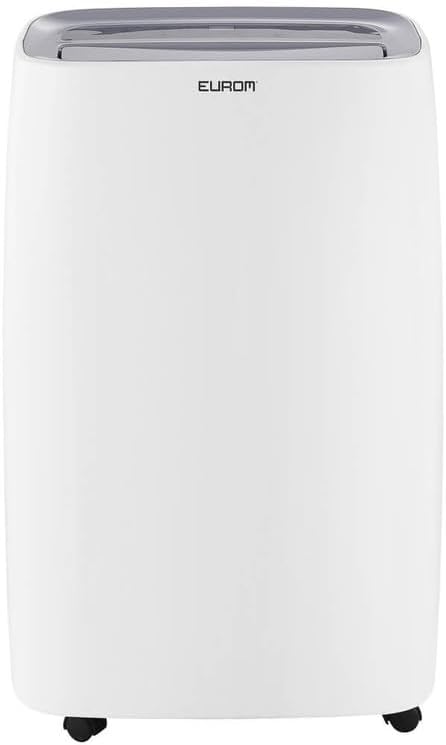
Şekil 3.1: Ön view of the Eurom DryBest 30 WiFi dehumidifier. This image displays the unit's overall appearance, highlighting its modern white casing and integrated handles for portability.
3.1 Ana Bileşenler
- Kontrol Paneli: Located on the top of the unit for easy access to settings and indicators.
- Hava çıkışı: Top-mounted grille for expelling dry air.
- Hava Girişi/Filtre: Rear-mounted for drawing in humid air, equipped with a removable air filter.
- Su Tankı: Yoğuşmuş suyu toplamak için çıkarılabilir tank.
- Sürekli Tahliye Çıkışı: Sürekli drenaj için hortum bağlantı noktası.
- Tekerlekler: Kolay hareket ettirme için tabanında tekerlekler bulunmaktadır.
4. Kurulum
4.1 Paketin açılması
- Nem alma cihazınızı ambalajından dikkatlice çıkarın.
- Tüm ambalaj malzemelerini, bantları ve koruyucu filmleri çıkarın.
- Inspect the unit for any signs of damage. If damaged, do not operate and contact your retailer.
4.2 Yerleştirme
- Place the dehumidifier on a firm, level surface to prevent vibration and water leakage.
- Ensure there is at least 20 cm (8 inches) of space around the unit for proper airflow. Do not place it against a wall or furniture that could obstruct the air inlets or outlets.
- For optimal performance, place the unit in the center of the room or area requiring dehumidification.
- Üniteyi ısı üreten cihazların yakınına veya doğrudan güneş ışığına maruz kalacak şekilde yerleştirmekten kaçının.
4.3 Güç Bağlantısı
- Güç kablosunu topraklı bir elektrik prizine takın.
- Ensure the outlet meets the electrical requirements of the unit (230V, 50Hz).
4.4 Drenaj Seçenekleri
The dehumidifier offers two drainage methods: manual tank emptying or continuous drainage.
4.4.1 Manuel Drenaj (Su Deposu)
- When the water tank is full, the "FULL" indicator light will illuminate, and the unit will automatically stop operating.
- Su deposunu ünitenin ön tarafından dikkatlice dışarı çekin.
- Toplanan suyu boşaltın.
- Boş su tankını yerine tam oturana kadar kaydırın. Cihaz çalışmaya devam edecektir.
4.4.2 Sürekli Drenaj
- For continuous operation without emptying the tank, connect a suitable drain hose (not included) to the continuous drain outlet at the back of the unit.
- Ensure the hose is sloped downwards to allow gravity to drain the water into a floor drain or larger container.
- Sızıntıları önlemek için hortum bağlantısının güvenli olduğundan emin olun.
4.5 WiFi Setup
The DryBest 30 WiFi can be controlled remotely via a smartphone app.
- Download the "Eurom Smart" app (or similar specified app) from your device's app store.
- Follow the in-app instructions to register an account and add your dehumidifier.
- Ensure your dehumidifier is powered on and the WiFi indicator light is blinking, indicating pairing mode.
- Once connected, the WiFi indicator light will become solid.
5. Kullanım Talimatları

Şekil 5.1: Control Panel of the Eurom DryBest 30 WiFi. This image details the various buttons and indicators for operating the dehumidifier.
5.1 Kontrol Paneli Üstüview
- Güç düğmesi: Üniteyi açar veya kapatır.
- MOD Düğmesi: Cycles through operating modes (e.g., Auto, Continuous, Laundry).
- YUKARI/AŞAĞI Düğmeleri: Adjust desired humidity level or timer settings.
- HIZ Düğmesi: Fan hızını seçer (Yüksek, Düşük).
- ZAMANLAYICI Düğmesi: Otomatik açma veya otomatik kapatma zamanlayıcısını ayarlar.
- SALINIM Düğmesi: Activates or deactivates the oscillating air outlet.
- POMPA Düğmesi: Activates the internal pump for continuous drainage (if applicable and hose connected).
- Kilit tuşu: Child lock function to prevent accidental changes.
- WIFI Göstergesi: WiFi bağlantı durumunu gösterir.
- FULL Indicator: Su deposu dolduğunda yanar.
- LAUNDRY Indicator: Illuminates when Laundry mode is active.
- FAN Indicator: Illuminates when fan is operating.
5.2 Temel İşlemler
- Güç Açık: Basın GÜÇ button. The unit will start in its default or last-used mode.
- İstenilen Nem Seviyesini Ayarlayın: Kullanın UP Ve AŞAĞI buttons to set the target humidity level (e.g., 40% - 60% relative humidity is generally recommended). The unit will operate until this level is reached, then cycle on and off to maintain it.
- Mod seç: Basın MOD Farklı çalışma modları arasında seçim yapmak için kullanılan düğme.
- Otomatik mod: The unit automatically adjusts operation based on the ambient humidity.
- Sürekli Mod: Cihaz, nem seviyesinden bağımsız olarak sürekli çalışır. Çok nemli ortamlar için idealdir.amp veya sürekli drenajlı kullanım koşulları için.
- Çamaşır Modu: Designed to quickly dry clothes indoors. The unit operates at high fan speed and continuous dehumidification.
- Fan Hızını Ayarlayın: Basın HIZ Yüksek ve düşük fan hızları arasında geçiş yapmak için kullanılan düğme.
- Zamanlayıcıyı Kur: Basın ZAMANLAYICI düğmesine basın ve ardından kullanın UP Ve AŞAĞI to set the desired operating duration (e.g., 2 hours, 4 hours).
- Salınım Fonksiyonu: Basın SWING button to activate the oscillating louvers, distributing dry air more evenly.
- Çocuk Kilidi: Basılı tutun KİLİT button for a few seconds to activate/deactivate the child lock.
- Kapat: Basın GÜÇ üniteyi kapatmak için tekrar düğmesine basın.

Şekil 5.2: Dehumidifier in use, illustrating its application for drying laundry. The image shows the unit positioned near a clothes rack, indicating its effectiveness in reducing drying times indoors.
6. Bakım
Düzenli bakım, nem alma cihazınızın optimum performansını sağlar ve kullanım ömrünü uzatır.
6.1 Hava Filtresinin Temizlenmesi
Hava filtresinin kullanıma ve hava kalitesine bağlı olarak iki haftada bir veya daha sık temizlenmesi gerekir.
- Nem gidericinin fişini prizden çekin.
- Ünitenin arkasından hava filtresini çıkarın.
- Gently vacuum any dust or debris from the filter. For heavy dirt, wash the filter with lukewarm water and a mild detergent.
- Filtreyi iyice durulayın ve yeniden takmadan önce tamamen kuruması için hava ile kurumaya bırakın. Doğrudan güneş ışığına veya yüksek ısıya maruz bırakmayın.
- Kuru filtreyi tekrar üniteye takın.
6.2 Su Deposunun Temizlenmesi
Küf ve mantar oluşumunu önlemek için su deposunu düzenli olarak temizleyin.
- Cihazın fişini çekin.
- Su deposunu çıkartıp boşaltın.
- Wash the tank with warm water and a mild detergent. Rinse thoroughly.
- Dry the tank completely before placing it back into the unit.
6.3 Depolama
Nem alma cihazı uzun süre kullanılmayacaksa:
- Cihazın fişini çekin ve su tankını boşaltın.
- Hava filtresini ve cihazın dış yüzeyini temizleyin.
- Allow the unit to dry for at least 24 hours in a well-ventilated area to prevent mold growth inside.
- Nem alma cihazını serin, kuru bir yerde, doğrudan güneş ışığından ve aşırı sıcaklıklardan uzakta, dik konumda saklayın.
7. Sorun Giderme
Müşteri desteğiyle iletişime geçmeden önce, yaygın sorunlar için lütfen aşağıdaki sorun giderme kılavuzuna bakın.
| Sorun | Olası Neden | Çözüm |
|---|---|---|
| Ünite açılmıyor. | Elektrik yok, güç kablosu gevşek, su deposu dolu. | Güç bağlantısını kontrol edin, tankın boş ve doğru şekilde takılı olduğundan emin olun. |
| Su birikmiyor / Düşük nem alma oranı. | Humidity level too low, air filter clogged, room temperature too low, unit size too small for area. | Increase desired humidity setting, clean air filter, ensure room temperature is above 5°C (41°F), close doors/windows. |
| Birim gürültülü. | Cihaz düz bir zeminde değil, hava filtresi tıkalı. | Düz ve sabit bir yüzeye yerleştirin. Hava filtresini temizleyin. |
| Üniteden su sızıyor. | Water tank not inserted correctly, continuous drain hose loose or blocked. | Reinsert water tank properly. Check continuous drain hose for secure connection and obstructions. |
| WiFi bağlantı sorunları. | Incorrect app, poor WiFi signal, incorrect pairing procedure. | Ensure correct app is used, check router and signal strength, repeat WiFi setup steps. |
8. Özellikler
| Özellik | Şartname |
|---|---|
| Model Adı | DryBest 30 WiFi |
| Referans Numarası | 1052 |
| Marka | Avrupa |
| Nem Alma Kapasitesi | 30 Litre/24 saat |
| Güç Tüketimi | 580 B |
| Hava Akış Kapasitesi | 350 m³/saat |
| Gürültü Seviyesi | <47 dBA |
| Boyutlar (U x G x Y) | 64.2x43.1x30.1 cm |
| Ağırlık | 15.5 kilo |
| Su Tankı Hacmi | 6 Liters / 10 Liters (depending on mode/configuration) |
| Özel Özellikler | Silent operation, Adjustable humidity control, WiFi connectivity |
| Önerilen Kullanım | Yerel |
| Renk | Beyaz |
9. Garanti ve Destek
For warranty information, please refer to the terms and conditions provided at the time of purchase or contact your retailer. If you encounter any issues not covered in the troubleshooting section, or require further assistance, please contact Eurom customer support or your authorized dealer.
Herhangi bir garanti talebiniz olması durumunda satın alma belgeniz olarak satın alma fişinizi saklayın.


