1. Ürün Bittiview
The Schneider SC600SND is a versatile 2.0 channel soundbar designed to enhance your audio experience. It offers a total output power of 30W (15W x 2) and supports multiple connectivity options including Bluetooth, HDMI (ARC), Optical, and Aux. A unique feature of this soundbar is its convertible design, allowing it to be used as a single horizontal unit or split into two vertical speaker columns.

Image 1.1: The Schneider SC600SND Soundbar in its standard monoblock configuration.
2. Kurulum
2.1 Paketten Çıkarma ve Yerleştirme
Carefully remove all components from the packaging. Ensure you have the soundbar unit, remote control, and 3.5mm Jack cable.
The SC600SND soundbar offers two primary placement options:
- Monoblock Configuration: Use the soundbar as a single horizontal unit, ideal for placing below your television.
- Split Column Configuration: The soundbar can be separated into two vertical speaker columns. This allows for flexible placement on either side of your television or entertainment unit. To split, gently twist and pull the two halves apart at the central connection point. Attach the provided bases to each column for stability.

Image 2.1: Detail of the central connection point, allowing the soundbar to be split into two columns.
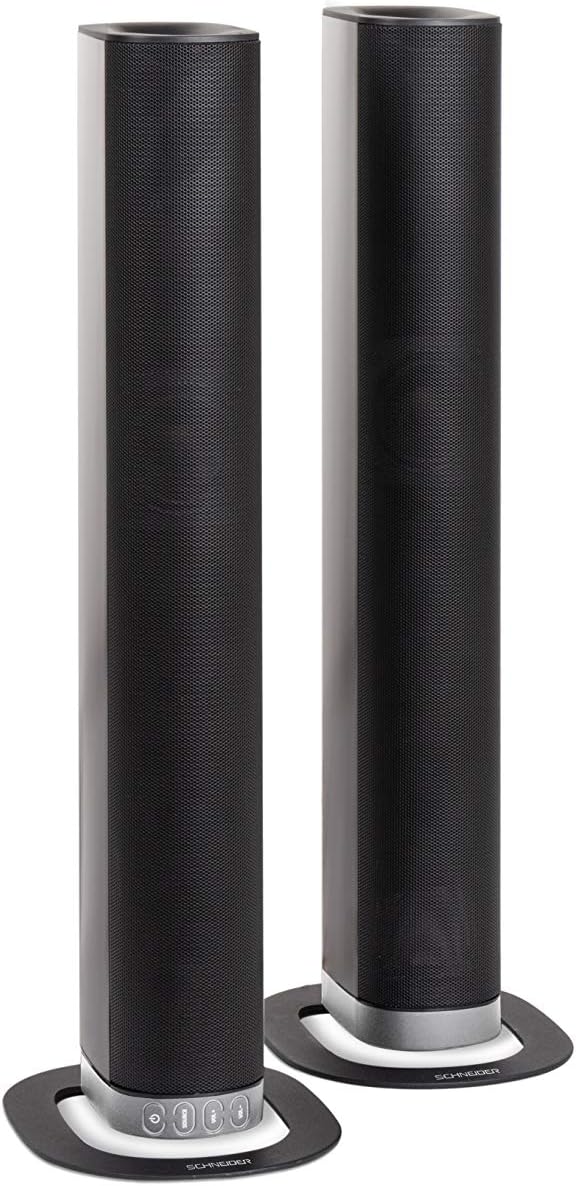
Image 2.2: The soundbar configured as two independent vertical speaker columns.
2.2 Güce Bağlama
Connect the power cable to the soundbar's power input and then to a suitable wall outlet. The soundbar will enter standby mode.
2.3 Ses Bağlantıları
Ses kaynağınızı bağlamak için aşağıdaki yöntemlerden birini seçin:
- HDMI (ARC): For optimal audio quality and control, connect an HDMI cable from the soundbar's HDMI ARC port to your TV's HDMI ARC port. This allows your TV remote to control the soundbar's volume.
- Optik: Connect an optical cable from the soundbar's OPTICAL input to your TV's optical output.
- YARDIMCI: Use the included 3.5mm Jack cable to connect the soundbar's AUX input to the headphone jack or audio output of your device (e.g., TV, smartphone, MP3 player).
- Bluetooth: For wireless connection, refer to the Bluetooth pairing instructions in the Operating section.
3. Kullanım Talimatları
3.1 Güç Açma/Kapatma
Basın Güç Ses çubuğundaki veya uzaktan kumandadaki düğmeyi kullanarak cihazı açıp kapatabilirsiniz.
3.2 Kaynak Seçimi
Basın KAYNAK button on the soundbar or the remote control to cycle through the available input sources: Bluetooth (BT), HDMI (ARC), Optical, and AUX.

Image 3.1: On-unit control buttons for power, source selection, and volume adjustment.
3.3 Ses Kontrolü
Kullanın HACİM+ Ve cilt buttons on the soundbar or remote control to adjust the volume. Press the SESSİZ button on the remote to temporarily silence the audio.
3.4 Bluetooth Eşleştirme
- Select Bluetooth as the source input. The soundbar will enter pairing mode, indicated by a flashing LED.
- Mobil cihazınızda (akıllı telefon, tablet vb.) Bluetooth'u etkinleştirin ve kullanılabilir cihazları arayın.
- Select "SC600SND" from the list of devices.
- Once paired, the LED indicator on the soundbar will stop flashing and remain solid. You can now play audio wirelessly from your device.
3.5 Ses Modu
The remote control includes dedicated buttons for different sound modes to optimize your listening experience:
- HABERLER: Enhances vocal clarity for news broadcasts and dialogue.
- FİLM: Provides a more immersive soundstagFilmler için e.
- MÜZİK: Müzik oynatımı için sesi optimize eder.

Image 3.2: The included remote control with dedicated buttons for power, source, volume, mute, and sound modes.
4. Bakım
Ses çubuğunuzun uzun ömürlü ve en iyi performansı göstermesi için aşağıdaki bakım yönergelerini izleyin:
- Temizlik: Use a soft, dry cloth to clean the exterior surfaces of the soundbar. Do not use liquid cleaners, aerosols, or abrasive materials, as these can damage the finish or internal components.
- Havalandırma: Ses sisteminin havalandırma açıklıklarının tıkanmadığından emin olun. Doğru hava akışı aşırı ısınmayı önler.
- Depolamak: Ses çubuğunu uzun süre saklayacaksanız, güç kaynağından ayırın ve doğrudan güneş ışığından ve aşırı sıcaklıklardan uzak, serin ve kuru bir yerde saklayın.
- İşleme: Ses çubuğunu düşürmekten veya şiddetli darbelere maruz bırakmaktan kaçının.
5. Sorun Giderme
If you encounter issues with your SC600SND soundbar, refer to the following common problems and solutions:
- Güç Yok:
- Ensure the power cable is securely connected to both the soundbar and a working power outlet.
- Başka bir cihaz takarak prizin çalışıp çalışmadığını kontrol edin.
- Ses Yok:
- Verify that the correct input source (HDMI, Optical, AUX, Bluetooth) is selected on the soundbar.
- Increase the volume on both the soundbar and your connected audio source (e.g., TV, smartphone).
- Ensure the soundbar is not muted.
- Check all audio cables for secure connections and damage. Try a different cable if possible.
- If using HDMI ARC, ensure your TV's HDMI ARC function is enabled in its settings.
- Poor Sound Quality / Distorted Audio:
- Adjust the volume levels to avoid distortion.
- Try switching between the different sound modes (NEWS, MOVIE, MUSIC) to see if one improves the audio for your content.
- Ensure the soundbar is placed on a stable surface and not vibrating excessively.
- Bluetooth kullanıyorsanız, cihazınızın menzil içinde olduğundan ve parazite neden olabilecek herhangi bir engel bulunmadığından emin olun.
- Bluetooth Eşleştirme Sorunları:
- Ensure the soundbar is in Bluetooth pairing mode (flashing LED).
- Make sure your device's Bluetooth is enabled and it is searching for new devices.
- Cihazınızı ses çubuğuna daha yaklaştırın.
- Daha önce eşleştirilmişse, cihazın eşleştirmesini kaldırıp yeniden eşleştirmeyi deneyin.
- Uzaktan Kumanda Çalışmıyor:
- Uzaktan kumandanın pillerini kontrol edin ve değiştirin.
- Uzaktan kumanda ile ses çubuğunun sensörü arasında herhangi bir engel bulunmadığından emin olun.
- Uzaktan kumandayı doğrudan soundbar'a doğrultun.
6. Özellikler
| Özellik | Şartname |
|---|---|
| Model Numarası | SC600SND |
| Kanallar | 2.0 |
| Çıkış Gücü | 30W (15Gx2) |
| Bağlantı Teknolojisi | Bluetooth, HDMI (ARC), Optical, Aux |
| Kablosuz İletişim | Bluetooth |
| Kontrol Yöntemi | Uzaktan kumanda |
| Hoparlör Tipi | Ses çubuğu |
| Hoparlör Boyutu | 2 inç |
| Güç Kaynağı | Kablo Elektrik |
| Product Dimensions (Monoblock) | 80.5x6.2x9 cm |
| Ürün Ağırlığı | 2.5 Kilogram |
| Dahil Bileşenler | Remote Control, 3.5mm Jack Cable |
| Renk | Siyah |
7. Garanti ve Destek
7.1 Sınırlı Garanti
This Schneider SC600SND Soundbar is covered by a Limited Warranty. Please refer to the warranty card included with your product or contact your retailer for specific terms and conditions regarding warranty coverage and duration.
7.2 Müşteri Desteği
For technical assistance, troubleshooting beyond this manual, or warranty claims, please contact the retailer where you purchased the product or visit the official Schneider webDestek bilgileri için site.