1. Giriş
This manual provides essential information for the setup, operation, maintenance, and troubleshooting of your ViewSonic VX2758-2KP-MHD 27-inch WQHD 144Hz IPS Gaming Monitor. Please read this manual thoroughly before using the product to ensure optimal performance and safety.
The ViewSonic VX2758-2KP-MHD is designed for gaming and entertainment, offering a 27-inch WQHD (2560x1440p) IPS panel with a 144Hz refresh rate and 1ms (MPRT) response time. It features AMD FreeSync Premium technology to reduce screen tearing and stuttering, and includes Eye Care features for extended viewing comfort. Connectivity options include HDMI and DisplayPort.

2. Paket İçeriği
Aşağıda listelenen tüm öğelerin ürün paketinizde bulunduğundan emin olun. Herhangi bir öğe eksik veya hasarlıysa, lütfen satıcınızla iletişime geçin veya ViewSonic müşteri desteği.
- LCD Monitör (ViewSonic VX2758-2KP-MHD)
- Güç kablosu
- HDMI Kablosu
- Ses kablosu
- Hızlı Başlangıç Kılavuzu

3. Kurulum
3.1 Standın Montajı
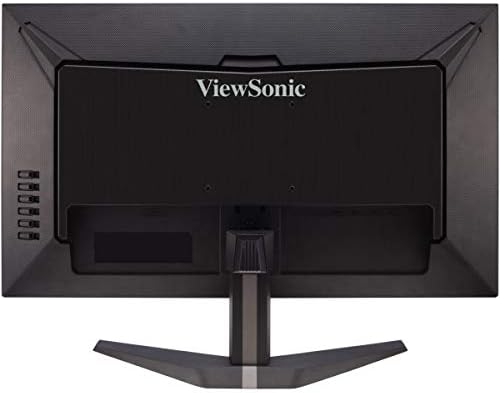
Carefully remove the monitor from its packaging. Attach the stand base to the stand neck, then secure the assembled stand to the back of the monitor. Ensure all screws are tightened appropriately to prevent instability.
3.2 Monitörü Bağlama
Connect the monitor to your computer or other video source using the appropriate cables. The VX2758-2KP-MHD supports HDMI and DisplayPort connections.
- Güç Bağlantısı: Güç kablosunu monitörün güç girişine ve ardından bir elektrik prizine bağlayın.
- Video Bağlantısı: Use either an HDMI cable or a DisplayPort cable to connect your computer's graphics card to the corresponding port on the monitor. For optimal performance, especially at 144Hz and WQHD resolution, a DisplayPort connection is recommended.
- Ses Bağlantısı: If you wish to use external speakers or headphones, connect the audio cable from the monitor's audio output to your audio device.

4. Monitörü Çalıştırma
4.1 Güç Açma/Kapatma
Monitörü açmak veya kapatmak için monitörün sağ alt tarafında bulunan güç düğmesine basın. Monitör açık olduğunda güç gösterge ışığı yanacaktır.
4.2 Ekran Üstü Görüntüleme (OSD) Menüsü
The OSD menu allows you to adjust various monitor settings. Use the control buttons on the right side of the monitor to navigate the menu.
- OSD'yi açmak için menü düğmesine basın.
- Menü seçenekleri arasında gezinmek için yukarı/aşağı düğmelerini kullanın.
- Alt menüye girmek veya seçimi onaylamak için seçim düğmesine basın.
- Geri dönmek veya OSD'yi kapatmak için çıkış düğmesine basın.

4.3 Temel Özellikler ve Ayarlar
- Giriş Seçimi: Choose between HDMI 1, HDMI 2, or DisplayPort inputs.
- ViewMod: Select from various preset display modes optimized for different content types (e.g., Standard, Game, Movie, Web(Metin, Tek Renk).
- Renk Ayarı: Parlaklık, kontrast, renk sıcaklığı ve gama ayarlarını hassas bir şekilde yapın.
- Ses Ayarı: Control volume and mute settings for the integrated speakers or audio output.
- Oyun Modu: Access specific game modes (FPS, RTS, MOBA) for optimized visual settings.
- FreeSync Premium: Enable or disable AMD FreeSync Premium for tear-free gaming. Ensure your graphics card supports FreeSync and is connected via DisplayPort or compatible HDMI.
- Tepki Süresi (MPRT): Adjust the monitor's response time for reduced motion blur. The 1ms MPRT setting provides the fastest response.

Aşağıdaki videoda daha detaylı bilgi verilmektedirview of'un ViewSonic VX58 Series, which includes the VX2758-2KP-MHD, showcasing its features and benefits for an incredible gaming experience.
5. Bakım
5.1 Monitörün Temizlenmesi
Monitör ekranını temizlemek için, yumuşak, tüy bırakmayan bir bezle nazikçe silin. İnatçı lekeler için, hafifçe silin.ampBezi su veya hafif, aşındırıcı olmayan bir ekran temizleyici ile silin. Ekran yüzeyine zarar verebileceğinden, sert kimyasallar, alkol veya amonyak bazlı temizleyiciler kullanmaktan kaçının.
5.2 Genel Bakım
Keep the monitor in a well-ventilated area. Avoid exposing it to direct sunlight, excessive heat, or moisture. Do not block the ventilation openings on the monitor. When moving the monitor, handle it carefully to prevent damage.
6. Sorun Giderme
Monitörünüzde sorunlarla karşılaşırsanız, aşağıdaki yaygın sorunlara ve çözümlere bakın:
- Güç Yok: Güç kablosunun hem monitöre hem de çalışan bir elektrik prizine güvenli bir şekilde bağlı olduğundan emin olun. Güç gösterge ışığının yanıp yanmadığını kontrol edin.
- Sinyal yok: Verify that the video cable (HDMI or DisplayPort) is correctly connected to both the monitor and your computer. Ensure the correct input source is selected in the OSD menu.
- Image Flickering: This can sometimes be related to cable quality, graphics card drivers, or FreeSync settings. Try using a different, high-quality DisplayPort cable. Update your graphics card drivers. Experiment with FreeSync settings (on/off) or different overdrive settings in the OSD.
- Hatalı Çözünürlük/Yenileme Hızı: Check your computer's display settings to ensure the resolution is set to 2560x1440 and the refresh rate to 144Hz. Ensure your video cable and graphics card support these settings.
- Kötü Görüntü Kalitesi: Adjust brightness, contrast, and color settings in the OSD menu. Ensure the monitor is set to its native resolution.
Bu adımları denedikten sonra sorun devam ederse lütfen iletişime geçin. ViewSonic müşteri desteği.
7. Özellikler
Aşağıda, söz konusu ürünün başlıca teknik özellikleri yer almaktadır. ViewSonic VX2758-2KP-MHD monitor:
| Özellik | Şartname |
|---|---|
| Marka | ViewSonik |
| Model Numarası | VX2758-2KP-MHD |
| Ekran Boyutu | 27 inç |
| Ekran Çözünürlüğü | WQHD (2560x1440) |
| Maksimum Ekran Çözünürlüğü | 2560 x 1440 Piksel |
| Yenileme Hızı | 144Hz |
| Tepki Süresi | 1 ms (MPRT) |
| Panel Tipi | IPS |
| En Boy Oranı | 16:9 |
| Bağlantı | HDMI, Ekran Bağlantı Noktası |
| Özellikler | FreeSync Premium, Eye Care (Flicker-Free, Blue Light Filter) |
| Ürün Ağırlığı | 11.66 pound |
| Ürün Boyutları | 24.2 x 17.7 x 7.4 inç |

8. Garanti ve Destek
8.1 Garanti Bilgileri
ViewSonic products are manufactured to the highest standards and deliver high-quality performance. For specific warranty details regarding your VX2758-2KP-MHD monitor, please refer to the warranty card included in your product package or visit the official ViewSonik webalan.
8.2 Müşteri Desteği
If you require technical assistance or have questions about your monitor, please contact ViewSonic müşteri desteği. İletişim bilgileri genellikle şu adreste bulunabilir: ViewSonik webSitede veya ürününüzle birlikte verilen Hızlı Başlangıç Kılavuzunda bulabilirsiniz.


