1. Giriş
The NEDIS VEXT3470AT HDMI Audio Extractor allows you to separate audio signals from an HDMI source and output them to an audio system, while simultaneously passing the video signal to a display. This device is designed to integrate modern HDMI sources with audio systems that may not have HDMI inputs, providing both digital (Toslink) and analog (L/R stereo) audio outputs.
It supports 3D video and amplifies the digital video signal for reliable transmission.
2. Güvenlik Bilgileri
- Kullanmadan önce bu talimatları dikkatlice okuyunuz.
- Cihazı sudan, nemden ve aşırı sıcaklıklardan uzak tutun.
- Cihazı kendiniz açmaya veya onarmaya çalışmayın. Tüm servis işlemlerini yetkili personele yaptırın.
- Yalnızca kutuda bulunan güç adaptörünü kullanın. Yanlış adaptör kullanmak cihaza zarar verebilir ve garantiyi geçersiz kılabilir.
- Aşırı ısınmayı önlemek için cihazın çevresinde uygun havalandırma olduğundan emin olun.
- Yıldırımlı havalarda veya uzun süre kullanılmayacaksa güç adaptörünü çıkarın.
3. Paket İçeriği
Lütfen paket içeriğini kontrol ederek tüm ürünlerin eksiksiz ve iyi durumda olduğundan emin olun:
- NEDIS VEXT3470AT HDMI Audio Extractor
- Güç Adaptörü
- Kullanım Kılavuzu (bu belge)
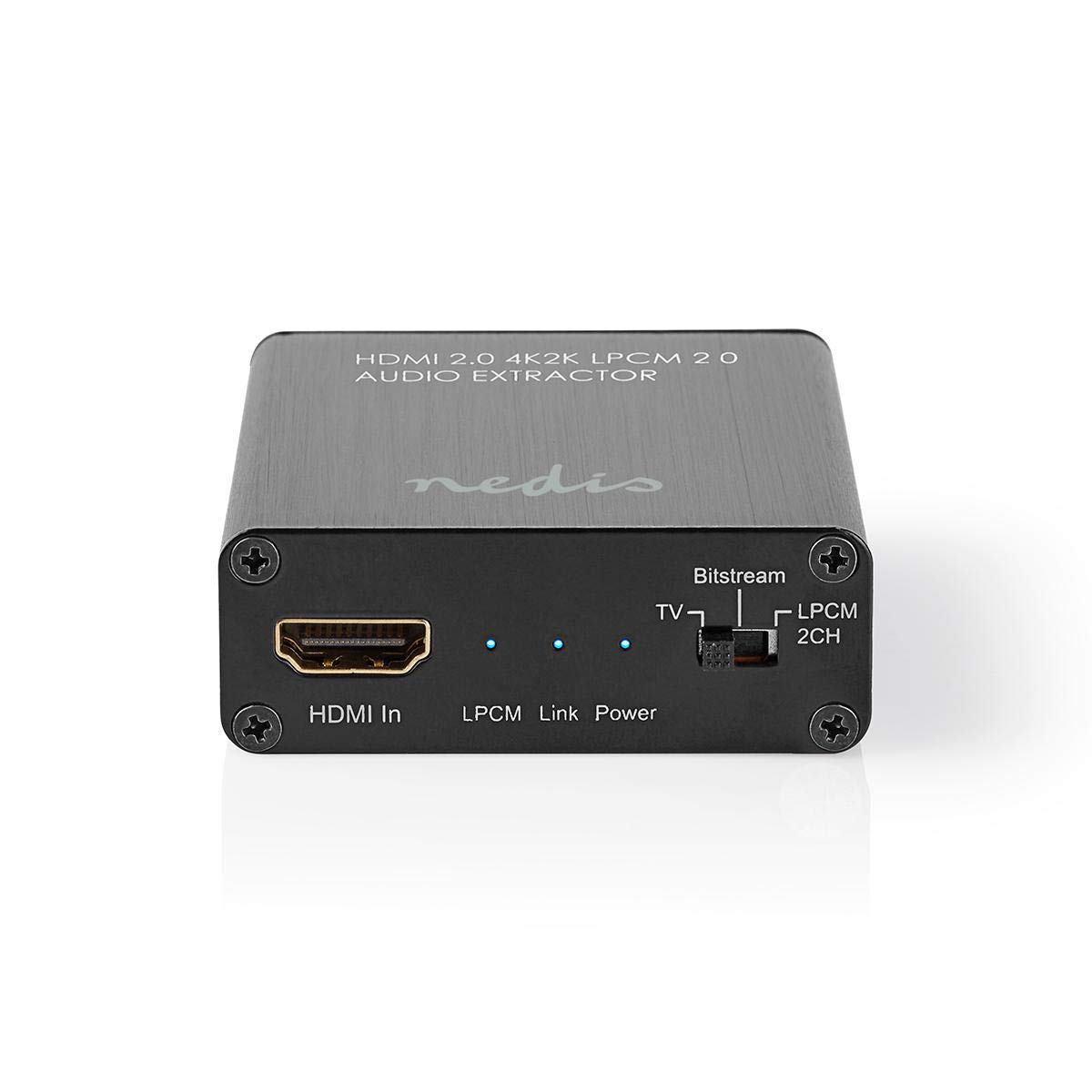
Image: The NEDIS VEXT3470AT HDMI Audio Extractor unit shown alongside its power adapter.
4. Ürün Bittiview
Familiarize yourself with the ports and indicators on the HDMI Audio Extractor:
4.1 Input Side
Image: Close-up of the input side of the audio extractor, showing the HDMI In port, LPCM, Link, and Power indicator LEDs, and the Audio Mode Switch.
- HDMI Girişi: Connect your HDMI source device (e.g., DVD/Blu-ray player, game console).
- LPCM LED: Indicates when LPCM audio format is detected.
- Bağlantı LED'i: Indicates an active HDMI connection.
- Güç LED'i: Cihaz açıldığında yanar.
- Audio Mode Switch:
- Veri akışı: For multi-channel audio formats like Dolby Digital or DTS.
- TV: Passes audio directly from the HDMI source to the TV.
- LPCM2CH: For 2-channel stereo audio output via L/R analog and Toslink.
4.2 Output Side

Image: Close-up of the output side of the audio extractor, showing the 5V/DC power input, Optical (Toslink) audio output, HDMI Out port, and L/R analog audio outputs.
- 5V/DC: Güç giriş portu. Verilen güç adaptörünü buraya bağlayın.
- Optik: Digital audio output (Toslink). Connect to an audio receiver or soundbar.
- HDMI Çıkışı: Connect to your TV or display.
- Sol/Sağ: Analog stereo audio output. Connect to an amplifier or stereo system using RCA cables.
5. Kurulum Talimatları
Follow these steps to connect your HDMI Audio Extractor:
- Cihazları Kapatma: Ensure all devices (HDMI source, TV, audio system) are powered off before making connections.
- HDMI Kaynağını Bağlayın: Connect an HDMI cable from your source device (e.g., Blu-ray player) to the HDMI Girişi port on the audio extractor.
- Ekranı Bağla: Connect another HDMI cable from the HDMI Çıkışı port on the audio extractor to your TV or display.
- Connect Audio System:
- For digital audio, connect an optical Toslink cable from the Optik port on the extractor to your audio receiver or soundbar.
- For analog stereo audio, connect RCA cables from the Sol/Sağ ports on the extractor to your stereo ampdaha lifli veya aktif konuşmacılar.
- Gücü bağlayın: Sağlanan güç adaptörünü prize takın 5V/DC port on the extractor, then plug the adapter into a power outlet. The Power LED should illuminate.
- Cihazları Açma: Power on your TV/display, audio system, and then your HDMI source device.
6. Kullanım Talimatları
Once connected, operate the device as follows:
- Ses Modunu Seçin: Kullanın Ses Modu Anahtarı on the input side to select the desired audio output format:
- Veri akışı: For multi-channel audio (e.g., Dolby Digital, DTS) to be passed through the Optical output. Your audio receiver must support these formats.
- TV: Passes the audio directly to the TV via HDMI. Audio extraction via Optical/L/R may be limited or unavailable in this mode, depending on the source and TV capabilities.
- LPCM2CH: Converts multi-channel audio to 2-channel LPCM for output via Optical and L/R analog ports. This is suitable for stereo systems or when your receiver does not support Bitstream formats.
- Göstergeleri Doğrulayın:
- The Güç LED'i üzerinde olmalıdır.
- The Bağlantı LED'i should be on when an active HDMI signal is detected from the source.
- The LPCM LED will illuminate if the audio signal is in LPCM format.
- Adjust Audio System: Ensure your audio receiver or soundbar is set to the correct input (Optical or Analog L/R) and volume.
7. Bakım
To ensure the longevity and optimal performance of your HDMI Audio Extractor:
- Temizlik: Cihazı temizlemek için yumuşak ve kuru bir bez kullanın. Sıvı temizleyiciler veya aerosoller kullanmayın.
- Depolamak: Cihazı kullanılmadığında serin ve kuru bir yerde saklayın.
- İşleme: Cihazı düşürmekten veya güçlü darbelere maruz bırakmaktan kaçının.
8. Sorun Giderme
Sorunlarla karşılaşırsanız, aşağıdaki sorun giderme kılavuzuna bakın:
| Sorun | Olası Neden / Çözüm |
|---|---|
| Video Çıkışı Yok |
|
| Ses Çıkışı Yok |
|
| Güç LED'i Kapalı |
|
| Intermittent Audio/Video |
|
9. Özellikler
Key technical specifications for the NEDIS VEXT3470AT HDMI Audio Extractor:
- Model Numarası: VEXT3470AT
- Marka: NEDIS
- Giriş: 1x HDMI
- Çıktı: 1x HDMI, 1x Optical (Toslink), 1x L/R Stereo (RCA)
- HDMI Sürümü: Compatible with HDMI 2.0 (implied by 4K2K support in product name)
- Video Çözünürlüğü: Up to 4K (4K2K)
- 3D Desteği: Evet
- Ses Formatları: LPCM 2.0, Bitstream (Dolby Digital, DTS pass-through)
- Güç Kaynağı: 5V DC (via included adapter)
- Boyutlar (U x G x Y): Yaklaşık 7.7x6.4x2.3 cm
- Ağırlık: 240 Gram
- Renk: Anthracite (Black)
- Menşei ülke: Çin
10. Garanti ve Destek
NEDIS products are manufactured to high quality standards. In the unlikely event of a defect during the warranty period, please contact your retailer for support. The warranty period is subject to local consumer laws and regulations.
For technical assistance or further inquiries, please refer to the support information provided by your retailer or visit the official NEDIS webalan.


