giriiş
This manual provides instructions for the Digitus USB to Serial Adapter (Model DA-70167). This device enables data exchange between a personal computer with a USB port and various serial peripherals, such as machine controls, modems, and sensors. It is compliant with the USB 2.0 standard and features a PL2303GT chipset, offering customizable data transfer rates.
The adapter includes one USB 2.0 Male A connector and one D-SUB 9-Pin Male (RS232) connector, with gold-plated contacts for reliable connection. An 80 cm USB extension cable is also included for convenience.
Paket İçeriği
- 1 x Digitus USB to Serial Adapter (DA-70167)
- 1 x 80 cm USB Extension Cable
Ürün Bittiview

Şekil 1: Digitus USB to Serial Adapter. This image shows the main view of the adapter, highlighting its compact design and the D-SUB 9-pin connector.

Şekil 2: Connection points of the adapter. This diagram illustrates the RS232 (D-SUB 9-pin) and USB A 2.0 connectors on the adapter.

Şekil 3: Kapatmak view of the D-SUB 9-pin (RS232) male connector, showing the pin configuration.

Şekil 4: View of the USB-A male connector, which plugs into the computer's USB port.
Kurmak
Follow these steps to set up your Digitus USB to Serial Adapter:
- Sürücü Kurulumu: Before connecting the adapter, it is recommended to install the necessary drivers for the PL2303GT chipset. Drivers are typically available on the Digitus support website or can be automatically installed by your operating system upon first connection.
- Bilgisayara Bağlan: Plug the USB-A male connector of the adapter into an available USB 2.0 port on your computer. You may use the included 80 cm USB extension cable if needed.
- Seri cihaza bağlan: Connect the D-SUB 9-pin male (RS232) connector of the adapter to the serial port of your peripheral device (e.g., modem, machine control, label printer, barcode scanner, POS system, cash register, network switch). Ensure the screws on the D-SUB connector are tightened to secure the connection.

Şekil 5: Diagram showing a one-to-one connection setup, illustrating the adapter connecting a label printer or other RS-232 device to a laptop/PC.

Şekil 6: The USB to Serial Adapter connected to a network switch and a laptop, demonstrating a typical application.
Kullanım Talimatları
Once the adapter is physically connected and drivers are installed, your computer should recognize the new serial port. You can then use software applications that require serial communication to interact with your connected peripheral device.
- Identifying the COM Port: After installation, check your computer's Device Manager (Windows) or System Information (macOS/Linux) to identify the assigned COM port number for the USB to Serial Adapter. This port number will be used by your serial communication software.
- Configuring Software: Open your serial communication software (e.g., PuTTY, Tera Term, HyperTerminal) and configure it to use the identified COM port. Set the appropriate communication parameters such as baud rate (data transfer rate), data bits, parity, stop bits, and flow control, matching the requirements of your serial peripheral device. The adapter supports customizable data transfer rates between 75 bit and 128,000 bit per second.
- Veri Değişimi: Initiate data exchange through your software. The adapter will facilitate the communication between your computer's USB port and the serial device.
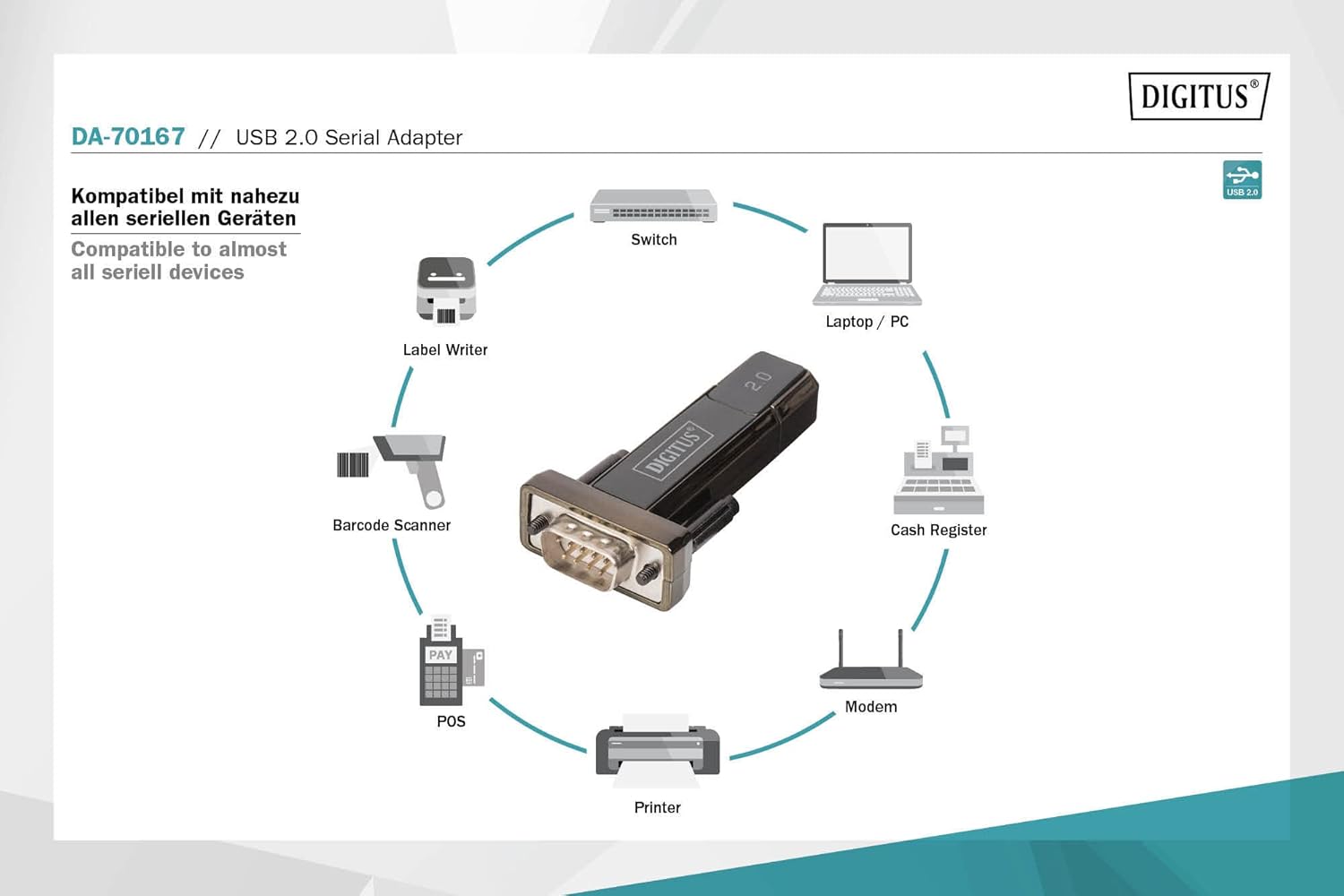
Şekil 7: Diagram illustrating the wide range of devices compatible with the USB to Serial Adapter, including switches, laptops/PCs, label writers, barcode scanners, POS systems, printers, modems, and cash registers.
Bakım
The Digitus USB to Serial Adapter requires minimal maintenance. Follow these guidelines to ensure its longevity:
- Temizlik: Use a soft, dry cloth to clean the exterior of the adapter. Do not use liquid cleaners or solvents.
- Depolamak: Kullanılmadığı zaman adaptörü serin, kuru ve doğrudan güneş ışığından ve aşırı sıcaklıklardan uzak bir yerde saklayın.
- İşleme: Adaptörü düşürmekten veya sert darbelere maruz bırakmaktan kaçının. Kabloyu aşırı derecede bükmeyin veya kıvırmayın.
- Konektör Bakımı: Bağlantı noktalarını toz ve kirden uzak tutun. Gerekirse, bağlantı noktalarını temizlemek için basınçlı hava kullanın.
Sorun giderme
| Sorun | Olası Neden | Çözüm |
|---|---|---|
| Adaptör bilgisayar tarafından tanınmıyor. |
|
|
| Communication errors with serial device. |
|
|
| Slow data transfer. |
|
|
Özellikler
| Model Numarası | DA-70167 |
| Marka | Dijital |
| Bağlayıcılar | 1x USB 2.0 Male A, 1x D-SUB 9-Pin Male (RS232) |
| Yonga seti | PL2303GT |
| USB Standart | USB 2.0 Uyumlu |
| Veri Aktarım Hızı | 75 bit to 128,000 bit per second (customizable) |
| Kablo Uzunluğu | 80 cm (USB extension cable included) |
| Renk | Siyah |
| Ürün Ağırlığı | 2.82 ons |
| Ürün Boyutları (UxGxY) | 3.94 x 5.91 x 1.57 inç |
| Uyumlu Cihazlar | PC, various serial peripherals (machine controls, modems, sensors, etc.) |
Garanti ve Destek
For warranty information and technical support, please refer to the official Digitus webSite üzerinden satın alabilir veya müşteri hizmetleriyle iletişime geçebilirsiniz. Garanti talepleriniz için satın alma belgenizi saklayın.
Digitus Official Webalan: www.digitus.info


