1. Giriş
Thank you for choosing TREBLAB Z2 Hybrid Active Noise Cancelling Wireless Headphones. This manual provides essential information for setting up, operating, and maintaining your headphones to ensure optimal performance and longevity. Please read it carefully before use.
2. Kutuda Neler Var?
- TREBLAB Z2 Headphones
- TREBLAB Z2 Carrying Case
- 3.5 mm Ses Kablosu (AUX)
- USB Type-C Şarj Kablosu
- User Manual; Quick Start Guide; Catalogue; Warranty card
3. Ürün Bittiview
Kulaklık Özellikleri
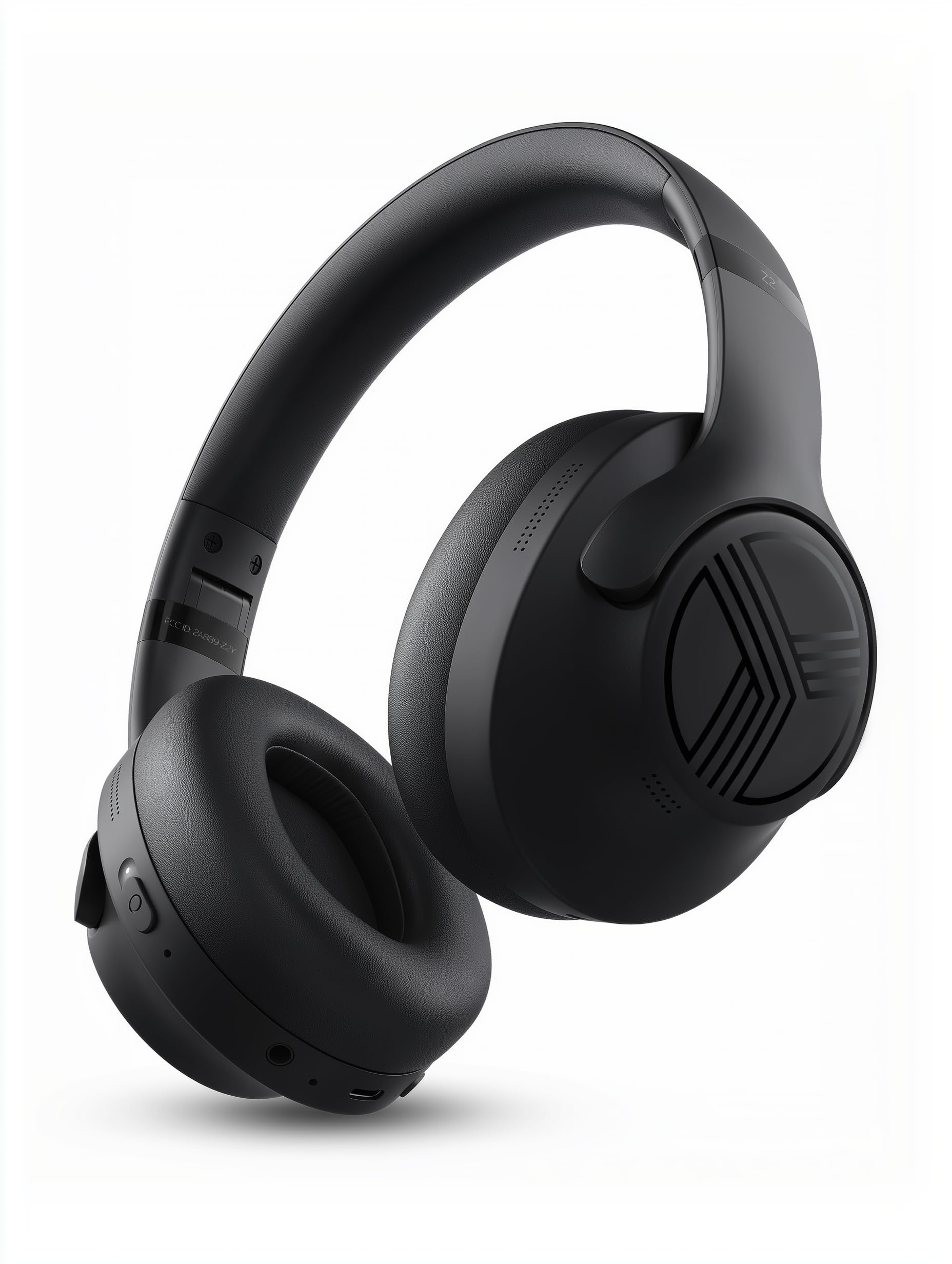
The TREBLAB Z2 headphones are designed for versatility and performance, featuring Hybrid Active Noise Cancelling (ANC) to minimize distractions, a long-lasting battery, and a comfortable, sweat-resistant design suitable for various activities.
- Hibrit Aktif Gürültü Önleme: Blocks external noise for immersive audio.
- Uzatılmış Çalma Süresi: Up to 58 hours of battery life (without ANC, at 70% volume).
- Derin Bas: Powerful audio with balanced sound.
- IPX4 Water Resistant & Sweatproof: Durable for workouts and outdoor use.
- Bluetooth 5.3 ve Çoklu Nokta Bağlantısı: Stable wireless connection to multiple devices.
- Dahili Mikrofon: Clear voice pickup for calls.
- Katlanabilir Tasarım: Lightweight and comfortable for extended wear and easy storage.
Kontroller ve Bağlantı Noktaları
The headphones feature intuitive button controls for playback, volume, calls, and ANC activation. All controls and ports are conveniently located on the earcups.
- Power/Play/Pause/Phone Button: Central control for power, media playback, and call management.
- Sesi Aç/Sonraki Parça Düğmesi: Adjust volume or skip to the next song.
- Sesi Azaltma/Önceki Parça Düğmesi: Adjust volume or go to the previous song.
- ANC Açma/Kapama Düğmesi: Activate or deactivate Active Noise Cancelling.
- Micro USB/USB Type-C Charging Port: Kulaklıkları şarj etmek için.
- AUX Girişi (3.5 mm Jak): Kablolu bağlantı için.
- Mikrofon: Eller serbest görüşmeler ve sesli asistan komutları için.
- LED Göstergesi: Güç, eşleştirme ve şarj durumunu gösterir.
4. Kurulum
4.1 Kulaklıkların Şarj Edilmesi
Before first use, fully charge your TREBLAB Z2 headphones. A full charge takes approximately 3 hours.
- Connect the USB Type-C charging cable to the charging port on the headphone.
- Kablonun diğer ucunu uyumlu bir USB güç kaynağına (örneğin duvar adaptörü, bilgisayar USB portu) bağlayın.
- The LED indicator will show red during charging and turn off when fully charged.
4.2 Bluetooth Eşleştirme
Kulaklıklarınızı Bluetooth üzerinden bir cihaza bağlamak için:
- Kulaklığınızın şarjlı ve kapalı olduğundan emin olun.
- Press and hold the Power/Play/Pause button for a few seconds until the LED indicator flashes blue and red, indicating pairing mode.
- Cihazınızda (akıllı telefon, tablet, bilgisayar) Bluetooth'u etkinleştirin ve kullanılabilir cihazları arayın.
- Select "TREBLAB Z2" from the list of found devices.
- Eşleştirme işlemi başarıyla tamamlandığında, LED göstergesi yavaşça mavi renkte yanıp sönecek ve bir onay sesi duyacaksınız.
For multipoint connection, pair the first device, then disable Bluetooth on the first device. Put the headphones back into pairing mode and connect to the second device. Once connected, re-enable Bluetooth on the first device, and the headphones should connect to both.
5. Kullanım Talimatları
5.1 Güç Açma/Kapatma
- Güç Açık: Press and hold the Power/Play/Pause button for 3 seconds.
- Kapat: Press and hold the Power/Play/Pause button for 5 seconds.
5.2 Müzik Oynatma
- Oynat/Duraklat: Güç/Oynat/Duraklat düğmesine kısa süre basın.
- Sonraki Parça: Long press the Volume Up/Next Track button.
- Önceki parça: Long press the Volume Down/Previous Track button.
- Sesi aç: Sesi Açma/Sonraki Parça düğmesine kısa süre basın.
- Sesi kıs: Ses kısma/önceki parça düğmesine kısa süre basın.
5.3 Çağrı Yönetimi
- Cevap Çağrısı: Güç/Oynat/Duraklat düğmesine kısa süre basın.
- Çağrı Sonu: Short press the Power/Play/Pause button during a call.
- Çağrıyı Reddet: Long press the Power/Play/Pause button for 2 seconds.
- Tekrar arama: Double-press the Power/Play/Pause button.
5.4 Aktif Gürültü Önleme (ANC)
To activate ANC, slide the ANC switch on the left earcup to the 'ON' position. The LED indicator will light up. Slide to 'OFF' to deactivate.
5.5 Sesli Asistan
Activate your device's voice assistant (Siri, Google Assistant, Alexa) by pressing the Power/Play/Pause button for 1 second.
6. Bakım
- Clean headphones with a soft, damp kumaş. Sert kimyasallar kullanmayın.
- Store headphones in the provided carrying case when not in use to protect them from dust and damage.
- Avoid exposing headphones to extreme temperatures, direct sunlight, or excessive moisture.
- Kulaklıkları sökmeye veya üzerinde değişiklik yapmaya çalışmayın, aksi takdirde garanti geçersiz olur.
7. Sorun Giderme
| Sorun | Çözüm |
|---|---|
| Kulaklıklar açılmıyor | Kulaklığınızın tam şarjlı olduğundan emin olun. |
| Bluetooth üzerinden eşleştirilemiyor | Ensure headphones are in pairing mode (flashing blue/red LED). Turn off and on Bluetooth on your device. Clear previous pairings on your device. |
| Ses yok veya düşük ses seviyesi | Check volume levels on both headphones and connected device. Ensure headphones are properly paired. Try a wired connection with the AUX cable. |
| ANC etkili bir şekilde çalışmıyor | Ensure ANC switch is in the 'ON' position. Check for proper fit of earcups over ears. |
8. Özellikler
| Özellik | Detay |
|---|---|
| Model Adı | Z2 |
| Gürültü Kontrolü | Hibrit Aktif Gürültü Önleme |
| Bluetooth Sürümü | 5.3 |
| Bluetooth Menzili | 33 Ayak (10 metre) |
| Pil Ömrü (Maksimum) | Up to 58 hours (No ANC, 70% volume) |
| Pil Ömrü (ANC Açık) | Up to 51 hours (ANC + Wireless, 70% volume) |
| Şarj Süresi | 3 Saat |
| Ses Sürücüsü Boyutu | 40 Milimetre |
| Frekans Tepkisi | 20 Hz - 20 KHz |
| Hassasiyet | 103 dB |
| Empedans | 32 Ohm |
| Su Direnç Seviyesi | IPX4 (Water Resistant & Sweatproof) |
| Ürün Ağırlığı | 8.5 Ons |
| Boyutlar | 6.4 x 3.2 x 8 inç |
9. Garanti ve Destek
Your TREBLAB Z2 headphones are covered by a 1-YEAR WARRANTY & 30-DAY RETURNS. For any questions, suggestions, or issues, please refer to the warranty card included in the box or contact TREBLAB customer support.
10. Medya Galerisi
Ürün Görselleri