1. Giriş
Satın aldığınız için teşekkür ederizasing the VIVIBRIGHT GP100UP LED Projector. This manual provides essential information for the safe and efficient operation of your device. Please read it thoroughly before use and retain it for future reference.
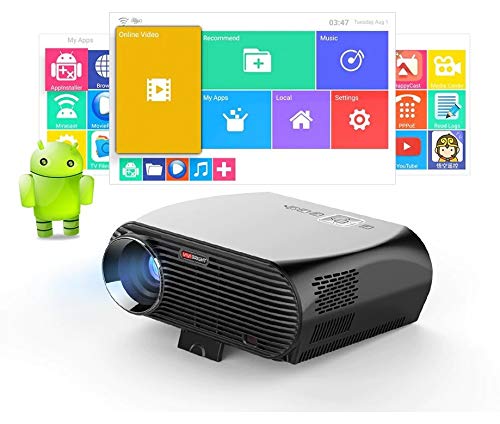
The VIVIBRIGHT GP100UP is an Android 6.0-based LED projector featuring built-in Wi-Fi and Bluetooth, designed for home theater and office presentations. It supports Full HD content and offers a bright projection experience.
2. Güvenlik Bilgileri
- Güç Kaynağı: Yalnızca belirtilen güç adaptörünü kullanın. Voltajın düşük olduğundan emin olun.tage yerel elektrik kaynağınıza uygundur.
- Havalandırma: Havalandırma açıklıklarını kapatmayın. Aşırı ısınmayı önlemek için projektörün etrafında yeterli hava akışı sağlayın.
- Sıvıya Maruz Kalma: Projektörü sudan veya diğer sıvılardan uzak tutun. Su veya başka sıvılarla temas etmeyecek şekilde çalıştırmayın.amp ortamlar.
- Temizlik: Temizlemeden önce elektriği kesin. Yumuşak, kuru bir bez kullanın. Sıvı veya aerosol temizleyicilerden kaçının.
- Nesne Ekleme: Never insert objects of any kind into the projector openings as they may touch dangerous voltage noktaları veya kısa devre parçaları.
- Servis: Bu ürüne kendiniz servis vermeye çalışmayın. Tüm servis işlemleri için kalifiye servis personeline başvurun.
- Göz Koruması: Projektör lensine doğrudan bakmayın.amp Açıktır. Parlak ışık göz hasarına neden olabilir.
3. Paket İçeriği
Aşağıda listelenen tüm öğelerin paketinizde bulunduğunu doğrulayın:
- VIVIBRIGHT GP100UP Projector
- Güç kablosu
- VGA Kablosu
- AV Kablosu
- Uzaktan kumanda
- Kullanım Kılavuzu (bu belge)
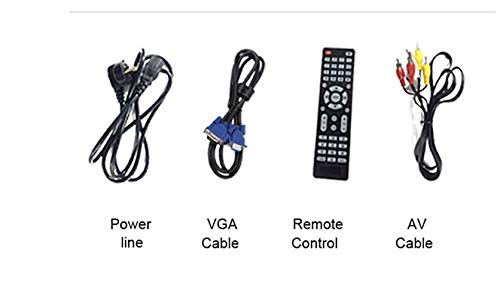
Şekil 3.1: Included accessories with the VIVIBRIGHT GP100UP projector, including power cable, VGA cable, remote control, and AV cable.
4. Ürün Bittiview
4.1. Projector Dimensions
Şekil 4.1: Ön ve üst view of the VIVIBRIGHT GP100UP projector with approximate dimensions: 11 inches (length), 8.85 inches (width), and 4 inches (height).
4.2. Giriş/Çıkış Portları
The projector features various ports for connecting external devices:
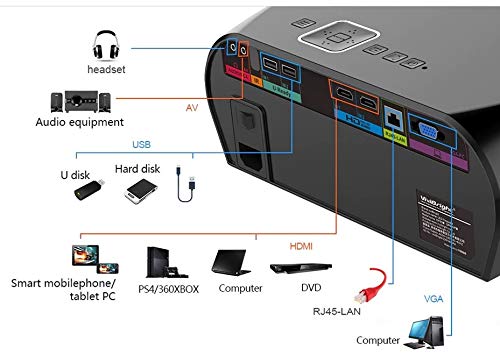
Şekil 4.2: Detailed diagram of the projector's rear panel, illustrating connectivity options including headset, audio equipment (AV), USB ports for U disk and hard disk, HDMI ports, RJ45-LAN, and VGA port.
- HDMI: Connect to Blu-ray players, gaming consoles, laptops, or other HDMI-enabled devices.
- USB BAĞLANTI: For connecting USB drives (U disk) or external hard drives.
- AV: Kompozit video ve stereo ses kullanan eski cihazları bağlamak için.
- VGA: For connecting to computers or laptops with a VGA output.
- RJ45-LAN: Kablolu ağ bağlantısı için.
- Kulaklık girişi: Harici kulaklık veya hoparlör bağlamak için.
4.3. Uzaktan Kumanda
The included remote control allows for convenient operation of the projector.
Şekil 4.3: Remote control layout with key functions: ON/OFF, Volume Up/Down, OK, Menu, Home, Speed, Mute, Back, Mouse Mode, and the USB receiver.
- AÇIK/KAPALI: Power on or off the projector.
- Hacim +/-: Ses seviyesini ayarlayın.
- OK: Seçimi onaylayın.
- Menü: Access projector settings.
- Ev: Return to the main Android interface.
- Geri: Önceki ekrana geri dönün.
- Fare Modu: Activate/deactivate air mouse function (if applicable).
- Sesini kapatmak: Sesi kapatın veya açın.
5. Kurulum
5.1. Yerleşim
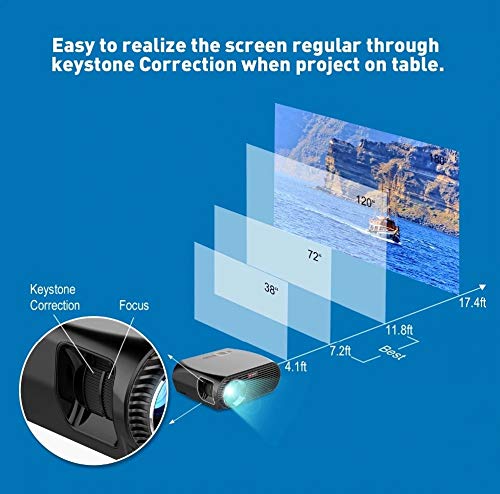
Place the projector on a stable, flat surface or mount it to the ceiling. Ensure there are no obstructions to the lens or ventilation ports. The optimal projection distance for a clear image is between 1 to 5 meters.
Şekil 5.1: Illustration of projection distances and corresponding screen sizes, along with the location of the keystone correction and focus rings on the projector.
- For a 72-inch screen, the recommended distance is approximately 7.2 feet (2.2 meters).
- For a 120-inch screen, the recommended distance is approximately 11.8 feet (3.6 meters).
5.2. Güç Bağlantısı
- Güç kablosunu projektörün güç girişine bağlayın.
- Güç kablosunun diğer ucunu uygun bir elektrik prizine takın.
- Projeksiyon cihazındaki güç gösterge ışığı yanmalıdır.
5.3. Odak ve Trapez Düzeltme
After powering on, adjust the image for clarity and proper geometry.
- Odak: Rotate the focus ring near the lens until the projected image is sharp and clear.
- Keystone Düzeltmesi: If the projected image appears trapezoidal (wider at the top or bottom), use the keystone correction ring or lever (usually located near the focus ring) to adjust the image until it is rectangular. The GP100UP supports +/- 15 degrees vertical keystone correction.
6. Kullanım Talimatları
6.1. Initial Power On and Android Interface
Press the power button on the projector or remote control to turn on the device. The projector will boot into its Android 6.0 operating system interface.
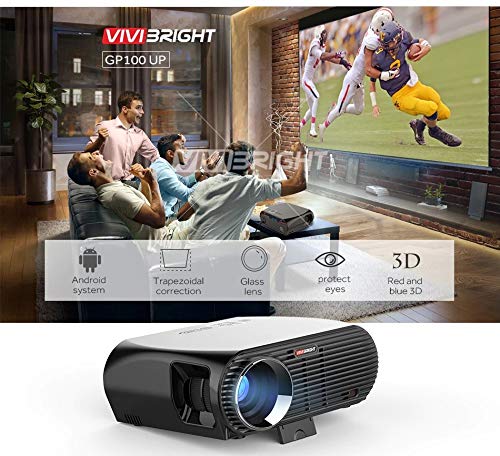
Şekil 6.1: The VIVIBRIGHT GP100UP projector in operation, highlighting its Android system capabilities and other features.
Navigate the Android interface using the remote control. You can access pre-installed applications, settings, and media files.
6.2. Harici Cihazları Bağlama
To project content from external sources:
- Connect your device (e.g., laptop, gaming console, USB drive) to the appropriate port on the projector (HDMI, USB, AV, VGA).
- On the projector's Android interface, navigate to the "Input Source" or "Source" option.
- Select the corresponding input source (e.g., HDMI1, USB, AV, VGA) to display content from your connected device.
6.3. Wireless Connectivity (Wi-Fi, Bluetooth, Screen Mirroring)
The GP100UP supports various wireless functions:
- Wifi:
- Go to "Settings" on the Android interface.
- "Wi-Fi" seçeneğini seçin ve açın.
- Choose your desired network and enter the password to connect.
- Bluetooth:
- Go to "Settings" on the Android interface.
- Select "Bluetooth" and turn it on.
- Kulaklık veya hoparlör gibi Bluetooth ses cihazlarıyla eşleştirin.
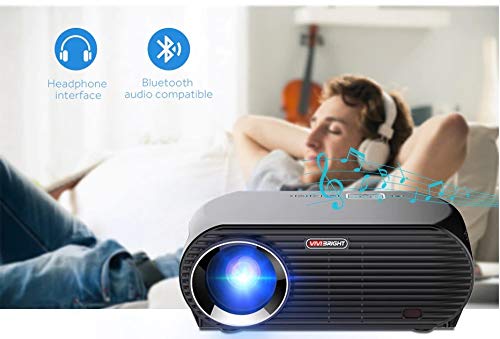
Şekil 6.2: The projector's Bluetooth audio compatibility, allowing connection to wireless headphones or speakers.
- Screen Mirroring (Miracast/Airplay/DLNA):
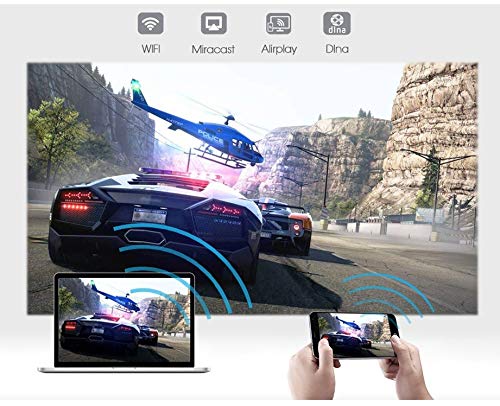
The projector supports mirroring content from compatible smartphones, tablets, and laptops via Wi-Fi, Miracast, Airplay, and DLNA.
- Cihazınızın ve projektörün aynı Wi-Fi ağına bağlı olduğundan emin olun.
- On the projector's Android interface, open the relevant screen mirroring application (e.g., Miracast, Airplay, DLNA).
- On your smartphone/tablet/laptop, activate its screen mirroring function (e.g., "Screen Mirroring," "Smart View," "Cast," "AirPlay").
- Select the projector from the list of available devices to begin mirroring.

Şekil 6.3: Wireless screen mirroring capabilities, enabling content from mobile devices and laptops to be displayed on the projector.
7. Bakım
7.1. Lensin Temizlenmesi
Optik lensler için özel olarak tasarlanmış, yumuşak ve tüy bırakmayan bir bez kullanın. Tozu veya lekeleri gidermek için lensi nazikçe silin. Aşındırıcı malzemeler veya sert kimyasallar kullanmaktan kaçının.
7.2. Projeksiyon Cihazının Temizlenmesiasing
Projektörün dış yüzeyini yumuşak, kuru bir bezle silin. İnatçı lekeler için, hafifçe kuru bir bez kullanın.amp Önce bir bez kullanılabilir, ardından kuru bir bezle silin. Havalandırma açıklıklarından sıvı girmemesine dikkat edin.
7.3. Air Filter (if applicable)
While LED projectors typically have sealed optical engines, regularly check ventilation openings for dust accumulation. Use a soft brush or compressed air to clear any blockages.
8. Sorun Giderme
| Sorun | Olası Neden | Çözüm |
|---|---|---|
| Resim görüntülenmiyor |
|
|
| Görüntü bulanık |
|
|
| Görüntü yamuk şeklindedir. |
|
|
| Ses yok |
|
|
| Wi-Fi/Bluetooth bağlantı sorunları |
|
|
9. Özellikler
| Özellik | Detay |
|---|---|
| Model Numarası | GP100UP |
| Ekran Teknolojisi | LCD |
| Yerel Çözünürlük | 1280x800dpi (WXGA) |
| Parlaklık | 3500 Lümen |
| Kontrast Oranı | 1000:1-2000:1 |
| Işık kaynağı | NEDEN OLMUŞ |
| Işık Kaynağı Yaşam | Not specified (typically 20,000+ hours for LED) |
| Projeksiyon Mesafesi | 1-5m |
| Tahmini Boyut | 40-300 inches (Best image size: 72-120 inches) |
| Ekran ölçeği | 4:3/16:9 |
| Anahtar Ebatı Düzeltme | Manual Correction, +/- 15 degrees (vertical) |
| Sistem | Android 6.0.1, CPU: Quad core ARM Cortex-A53 |
| Bellek (RAM / ROM) | RAM: 1G / ROM: 8G |
| Kablosuz Bağlantı | Wi-Fi, Bluetooth, DLNA, Miracast, Airplay |
| Giriş Portları | HDMI, USB, AV, VGA, RJ45-LAN |
| Güç Kaynağı | AC 90-240V, 50/60Hz |
| Güç Tüketimi | 140W |
| Boyutlar (yaklaşık) | 37x30.5x15.9 cm |
| Ağırlık (yaklaşık) | 2.6 kilo |
| 3D İşlevi | Red-blue 3D |
10. Garanti ve Destek
The VIVIBRIGHT GP100UP Projector comes with a 1 Yıllık Garanti Satın alma tarihinden itibaren geçerlidir. Bu garanti, normal kullanım koşullarındaki üretim hatalarını kapsar.
For technical support, warranty claims, or service inquiries, please contact your retailer or the official VIVIBRIGHT customer service channel. Please have your product model number (GP100UP) and proof of purchase ready when contacting support.


