1. Giriş
The AIYIMA DAC-A2 is a versatile Digital-to-Analog Converter (DAC) and headphone amplifier designed to enhance your audio experience. It features multiple digital input options and provides both RCA line-out and a 3.5mm headphone output, along with adjustable bass and treble controls for personalized sound. This manual provides detailed instructions for setup, operation, and maintenance of your DAC-A2.

Figure 1: AIYIMA DAC-A2 Headphone Ampkaldırıcı DAC
2. Temel Özellikler
- Integrated DAC and Headphone Amplifier: Built-in Hi-Fi headphone amplifier chip capable of driving 16ohm to 200ohm headphones.
- Advanced Chipset: Utilizes SA9023+CS8416+97220+NE5532 for optimal audio performance.
- Multiple Digital Inputs: Supports PC-USB, Optical, and Coaxial S/PDIF inputs, compatible with most home audio systems, PCs, and Macs.
- Versatile Outputs: Features RCA line-out for connecting to powered speakers or external amplifiers, and a 3.5mm headphone output.
- High-Resolution Audio: PC-USB input supports up to 24Bit/96KHz; Optical/Coaxial inputs support up to 24Bit/192kHz.
- Tone Controls: Independent bass and treble controls to customize your audio output.
- Compact and Portable: DC 5V power input allows for a portable and professional desktop audio device.

Figure 2: Internal Chipset and Features Overview
3. Paket İçeriği
Lütfen paketi aşağıdaki öğeler açısından kontrol edin:
- AIYIMA DAC-A2 Unit
- USB Kablosu (Tip A'dan Tip B'ye)
- Optical Cable (Toslink)
- DC 5V Power Cable (USB-C for power)
- Kullanıcı Kılavuzu
4. Kontroller ve Arayüzler

Şekil 3: Ön ve Arka Panel Düzeni
4.1 Ön Panel
- Giriş Anahtarı: Toggle between USB, Optical (OPT), and Coaxial (COA) inputs.
- 3.5 mm Kulaklık Çıkışı: Kulaklıklarınızı buraya bağlayın.
- Bas Kontrol Düğmesi: Adjust the low-frequency response.
- Tiz Ses Kontrol Düğmesi: Adjust the high-frequency response.
- Ses Kontrol Düğmesi: Adjust the overall output volume. This knob also acts as the power switch (push to turn on/off) and has a power indicator light.
4.2 Arka Panel
- DC 5V Güç Girişi: Connect the provided DC 5V power cable.
- RCA Ses Çıkışı (Sol/Sağ): Connect to powered speakers or an external ampcankurtaran.
- Koaksiyel Giriş (COA): Connect a coaxial digital audio source.
- Optik Giriş (OPT): Connect an optical digital audio source.
- PC-USB Girişi: Connect to your computer for USB audio.
5. Kurulum ve Bağlantılar
Follow these steps to connect your AIYIMA DAC-A2 to your audio system:
- Güç Bağlantısı: Connect the provided DC 5V power cable to the "DC 5V" input on the rear panel of the DAC-A2. Connect the other end to a suitable 5V power source (e.g., a USB wall adapter, not included). Ensure the power indicator light on the front panel illuminates when the volume knob is pressed to turn on.
- Giriş Kaynağı Bağlantısı: Aşağıdaki giriş yöntemlerinden birini seçin:
- PC-USB: Connect the provided USB cable from your computer's USB port to the "PC-USB" input on the DAC-A2.
- Optik: Connect an optical cable from your audio source (e.g., TV, game console) to the "OPTICAL" input.
- koaksiyel: Connect a coaxial cable from your audio source to the "COAXIAL" input.
- Çıkış Bağlantısı: Choose one of the following output methods:
- RCA Çıkışı: Connect RCA cables from the "AUDIO OUT" (L/R) ports on the DAC-A2 to your powered speakers or an external amplifier'in girdisi.
- 3.5 mm Kulaklık Çıkışı: Plug your headphones into the 3.5mm jack on the front panel. Note: The headphone output takes priority. If headphones are connected, sound will be routed to them and not the RCA outputs.
- Girişi Seçin: Use the input switch on the front panel to select the desired audio source (USB, OPT, or COA).
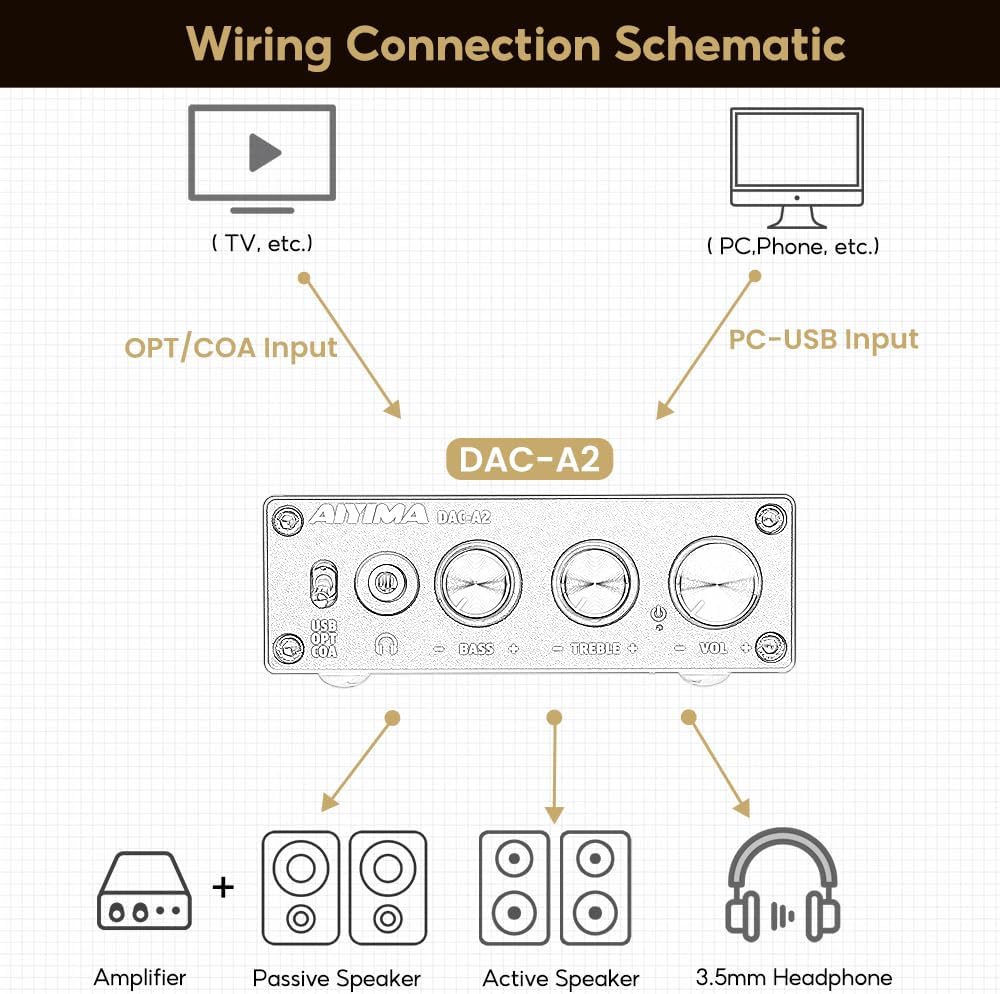
Şekil 4: Bağlantı Şeması
Video 1: Demonstrates connecting the AIYIMA DAC-A2 to a laptop and an amplifier, showing the audio output to speakers and headphones. It illustrates switching between PC-USB input and adjusting volume, bass, and treble controls.
6. Kullanım Talimatları
- Güç Açma/Kapatma: Press the Volume Control Knob to turn the unit on or off. The power indicator light will illuminate when on.
- Giriş Seçimi: Use the Input Switch (USB/OPT/COA) on the front panel to select your active audio source.
- Ses Ayarı: Rotate the Volume Control Knob clockwise to increase volume and counter-clockwise to decrease it.
- Bas Ayarı: Rotate the Bass Control Knob to increase or decrease the bass frequencies according to your preference.
- Tiz Ayarı: Rotate the Treble Control Knob to increase or decrease the treble frequencies according to your preference.

Figure 5: Adjustable Bass and Treble Controls
Video 2: Shows the AIYIMA DAC-A2 in a desktop setup, demonstrating the connection of headphones and the adjustment of volume, bass, and treble controls for an enhanced audio experience.
7. Özellikler

Şekil 6: Ürün Boyutları
| Özellik | Şartname |
|---|---|
| Marka | AYIMA |
| Model Numarası | DAC-A2 |
| Yonga seti | SA9023+CS8416+97220+NE5532 |
| PC-USB Girişi Sampling Oranı | 24Bit/96KHz |
| Optik/Koaksiyel Giriş Sampling Oranı | 24Bit/192kHz |
| Kulaklık Empedans Aralığı | 16ohm to 200ohm |
| Maksimum Arz Hacmitage | 5 Volt |
| Minimum Tedarik Hacmitage | 5 Volt (DC) |
| Arayüz Türü | Koaksiyel, USB, Optik |
| Kanal Sayısı | 1 |
| Ürün Boyutları (U x G) | 3.86"L x 2.89"W (approx. 98mm x 73mm) |
| Ürün Ağırlığı | 14.8 ons (yaklaşık 420g) |
8. Sorun Giderme
If you encounter issues with your DAC-A2, please refer to the following common problems and solutions:
- Ses Çıkışı Yok:
- Ensure the DAC-A2 is powered on and the power indicator is lit.
- Verify that the correct input source (USB, OPT, COA) is selected using the front panel switch.
- Check all cable connections (input and output) are secure.
- If using headphones, ensure they are fully plugged into the 3.5mm jack. Remember the headphone output has priority over RCA.
- Adjust the volume knob on the DAC-A2 and ensure your connected speakers/amplifier also have their volume turned up.
- For PC-USB input, check your computer's sound settings to ensure the DAC-A2 is selected as the default playback device.
- Bozuk veya Zayıf Ses Kalitesi:
- Tüm kabloların düzgün şekilde bağlandığından ve hasar görmediğinden emin olun.
- Ses kaynağında kalite sorunları olup olmadığını kontrol edin.
- Adjust the Bass and Treble controls to see if they are set to extreme levels causing distortion.
- Ensure the power supply is stable and providing sufficient 5V power. An unstable power supply can cause noise.
- Aralıklı Ses:
- Gevşek kablo bağlantılarını kontrol edin.
- Ensure the power supply is consistent.
- If using PC-USB, try a different USB port on your computer or a different USB cable.
9. Bakım
- Temizlik: Cihazın dış yüzeyini temizlemek için yumuşak, kuru bir bez kullanın. Sıvı temizleyiciler veya çözücüler kullanmayın.
- Depolamak: Üniteyi serin, kuru ve doğrudan güneş ışığından ve aşırı sıcaklıklardan uzak bir yerde saklayın.
- İşleme: Cihazı düşürmekten veya şiddetli darbelere maruz bırakmaktan kaçının.
- Havalandırma: Aşırı ısınmayı önlemek için ünitenin etrafında yeterli havalandırma olduğundan emin olun.
10. Garanti ve Destek
AIYIMA products are designed for reliability and performance. For warranty information, technical support, or service inquiries, please refer to the contact information provided with your purchase or visit the official AIYIMA webLütfen garanti talepleriniz için satın alma belgenizi saklayın.
11. Önemli Güvenlik Bilgileri
- Do not expose this unit to rain, moisture, or extreme temperatures.
- C'yi açmayınasing. İçerisinde kullanıcı tarafından bakımı yapılabilecek parça bulunmamaktadır. Tüm bakımlar için yetkili personele başvurun.
- Yalnızca belirtilen güç kaynağını (DC 5V) kullanın.
- Üniteyi ısı kaynaklarının yakınına veya doğrudan güneş ışığına maruz bırakmayın.
- Çocukların erişemeyeceği yerde saklayınız.


