giriiş
Thank you for choosing the NEDIS Wi-Fi Smart Fan Heater. This manual provides essential information for the safe and efficient operation of your new device. Please read these instructions carefully before use and retain them for future reference. Proper use and maintenance will ensure optimal performance and longevity of the product.
Güvenlik Talimatları
Yangın, elektrik çarpması veya yaralanma riskini azaltmak için her zaman aşağıdaki temel güvenlik önlemlerini izleyin:
- Bu ısıtıcıyı kullanmadan önce tüm talimatları okuyun.
- Bu ısıtıcıyı banyo, duş veya yüzme havuzunun hemen yakınında kullanmayınız.
- Isıtıcıyı örtmeyin. Isıtıcıyı örtmek aşırı ısınmaya ve yangına neden olabilir.
- Mobilya, yastık, yatak takımı, kağıt, giysi ve perde gibi yanıcı maddeleri ısıtıcının önünden en az 1 metre (3 fit) uzakta tutun ve yan ve arka taraflarından da uzak tutun.
- Kullanmadığınız zamanlarda ısıtıcının fişini mutlaka çekin.
- Herhangi bir ısıtıcıyı kablosu veya fişi hasarlıyken veya ısıtıcı arızalandıktan, düşürüldükten veya herhangi bir şekilde hasar gördükten sonra çalıştırmayın.
- Kabloyu halının altından geçirmeyin. Kabloyu kilim, yolluk veya benzeri örtülerle örtmeyin. Kabloyu trafik alanından uzakta ve üzerine basılmayacağı bir yere yerleştirin.
- Herhangi bir ısıtıcı çocukların veya engellilerin yakınında kullanıldığında ve ısıtıcı çalışır durumda ve gözetimsiz bırakıldığında aşırı dikkat gösterilmesi gerekir.
- This heater is equipped with a tip-over protection switch that automatically shuts off the heater if it is accidentally knocked over.
- Isıtıcıyı sabit ve düz bir yüzeye yerleştirdiğinizden emin olun.
- Sadece iç mekanda kullanıma uygundur.
Ürün Bittiview
Familiarize yourself with the main components of your NEDIS Wi-Fi Smart Fan Heater.
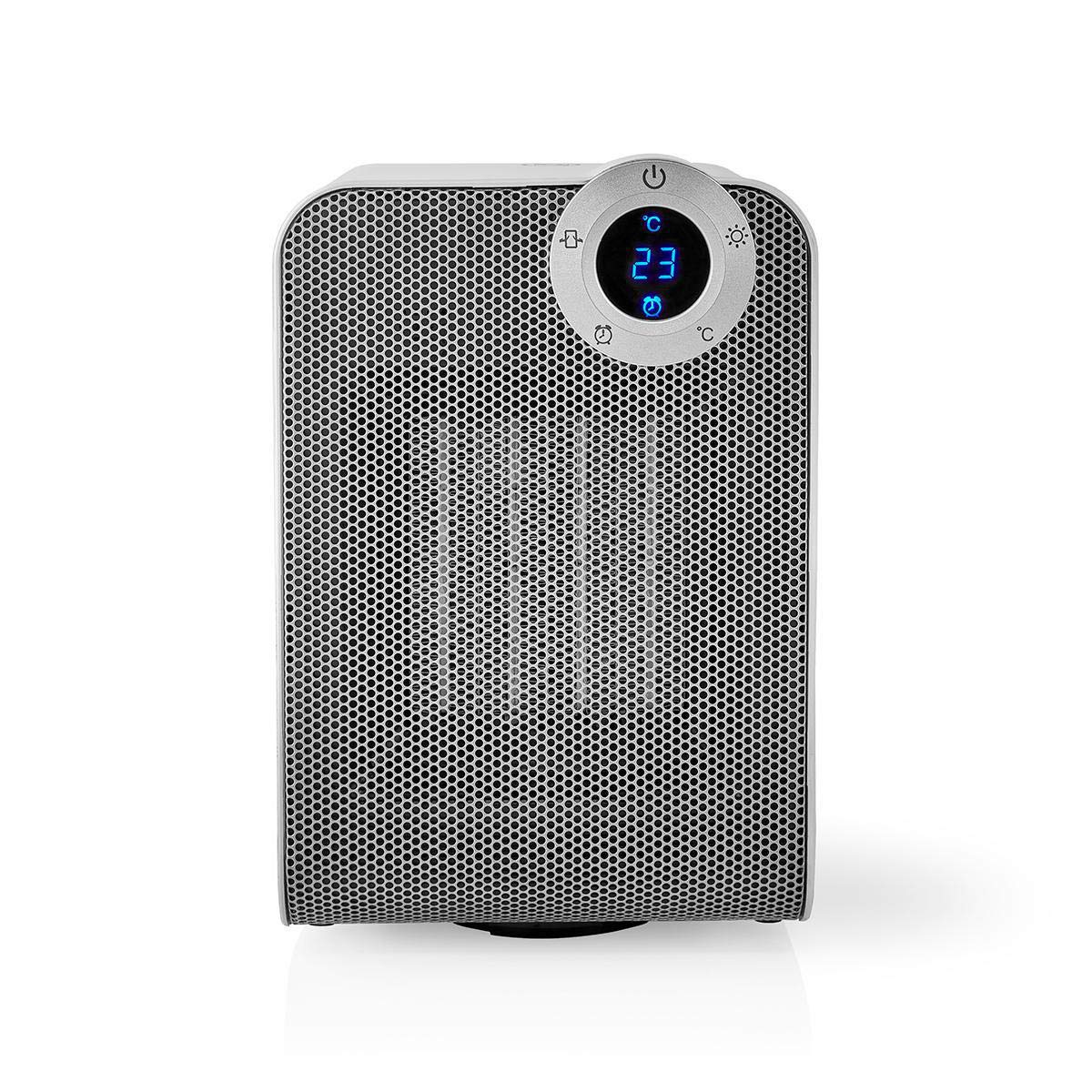
The front panel features a digital display that shows the current temperature and settings. Surrounding the display are touch-sensitive buttons for power, mode selection, oscillation, and timer functions.

The rear of the heater includes the main power switch (often a rocker switch) and the air intake grille. Ensure this area is not obstructed for proper airflow.

The compact design of the heater allows for easy placement in various indoor settings.
Kurmak
Paket açma
- Isıtıcıyı ambalajından dikkatlice çıkarın.
- Taşıma sırasında herhangi bir hasar olup olmadığını kontrol edin. Hasar varsa, cihazı çalıştırmayın ve müşteri desteğiyle iletişime geçin.
- Gelecekteki depolama veya taşıma için ambalajı saklayın.
Atama
- Isıtıcıyı sağlam ve düz bir yüzeye yerleştirin.
- Ensure there is at least 1 meter (3 feet) of clear space around the heater to allow for proper air circulation and to prevent fire hazards.
- Do not place the heater near curtains, drapes, or other loose fabrics that could block the air intake or outlet.
- Güç kablosunun sıkışmamasına veya ağır nesnelerin altına girmemesine dikkat edin.
İlk Güç Açık
- Plug the heater into a suitable electrical outlet (220-240V AC, 50/60Hz).
- Flip the main power switch on the back of the unit to the 'ON' position.
- The digital display on the front will illuminate, indicating the heater is in standby mode.
Wi-Fi Connection & App Setup
The NEDIS Wi-Fi Smart Fan Heater can be controlled via the Nedis SmartLife app, offering advanced features and remote control.
- İndir Nedis Akıllı Yaşam App Store (iOS) veya Google Play Store (Android) uygulamasını indirin.
- Yeni bir hesap için kaydolun veya zaten bir hesabınız varsa giriş yapın.
- Akıllı telefonunuzun 2.4 GHz Wi-Fi ağına bağlı olduğundan emin olun.
- Uygulamada yeni bir cihaz eklemek için '+' simgesine dokunun.
- Follow the on-screen instructions in the app to connect your heater to your Wi-Fi network. This usually involves putting the heater into pairing mode (refer to the app for specific instructions, often by pressing and holding a button on the heater).
- Once connected, you can control the heater from anywhere using the app.
Kullanım Talimatları
Manuel Kontrol
The heater can be operated directly using the touch buttons on the front panel:
- Güç Düğmesi: Isıtıcıyı AÇMAK veya KAPATMAK için basın.
- Mod Düğmesi: Cycle through heating modes (e.g., High Heat 1800W, Low Heat 900W, Fan Only).
- Sıcaklık Ayarı: Use the '+' and '-' buttons (or similar) to set the desired temperature. The heater will operate at 1800W for rapid heating and automatically switch to 900W once the set temperature is approached.
- Salınım Düğmesi: Press to activate or deactivate the horizontal oscillation feature, distributing heat across a wider area.
- Zamanlayıcı Düğmesi: Set a timer for the heater to automatically turn off after a specified duration.
SmartLife App Control
Once connected to the Nedis SmartLife app, you can access advanced control features:
- Uzaktan Açma/Kapama: Isıtıcıyı her yerden kontrol edin.
- Sıcaklık Ayarı: Precisely set and monitor the room temperature.
- Mod Seçimi: Choose between different heating levels or fan-only mode.
- Salınım Kontrolü: Salınım özelliğini açın veya kapatın.
- Planlama: Create custom heating schedules for different times of the day or week.
- Zamanlayıcı Fonksiyonu: Set a countdown timer for automatic shutdown.
Ses Kontrolü
The heater supports voice control through popular smart assistants. To enable this, link your Nedis SmartLife account with your preferred voice assistant (Google Home or Amazon Alexa) via their respective apps. Once linked, you can use voice commands such as:
- "Hey Google, turn on the heater."
- "Alexa, set the heater to 22 degrees."
- "Hey Google, turn off the heater."
Bakım
Temizlik
Düzenli temizlik, ısıtıcının verimliliğini korumaya ve kullanım ömrünü uzatmaya yardımcı olur.
- Temizlemeden önce ısıtıcının fişini mutlaka çekin ve tamamen soğumasını bekleyin.
- Dış yüzeyleri yumuşak, damp bezle silin. Aşındırıcı temizleyiciler veya çözücüler kullanmayın.
- Hava giriş ve çıkış ızgaralarındaki tozu temizlemek için fırçalı bir elektrikli süpürge kullanın.
- Isıtıcının içine su girmemesine dikkat edin.
Depolamak
Uzun süre kullanılmadığında:
- Unplug the heater and clean it as described above.
- Isıtıcıyı tozdan ve hasardan korumak için orijinal ambalajında veya uygun bir kutuda saklayın.
- Serin, kuru ve doğrudan güneş ışığından ve nemden uzak bir yerde saklayın.
Sorun giderme
Isıtıcınızla ilgili sorunlarla karşılaşırsanız, aşağıdaki yaygın sorunlara ve çözümlere bakın:
| Sorun | Olası Neden | Çözüm |
|---|---|---|
| Isıtıcı açılmıyor. | No power, main switch off, tip-over switch activated. | Check power outlet, ensure main switch is ON, place heater upright on a stable surface. |
| Isı çıkışı yok. | Incorrect mode, thermostat setting too low. | Select a heating mode (High/Low), increase the thermostat setting above the current room temperature. |
| Wi-Fi bağlantısı başarısız. | Yanlış Wi-Fi şifresi, 5GHz ağ, yönlendiriciye olan uzaklık. | Verify Wi-Fi password, ensure you are on a 2.4GHz network, move heater closer to the router, try re-pairing. |
| Isıtıcı beklenmedik bir şekilde kapanıyor. | Overheating protection, tip-over protection, timer activated. | Ensure heater is not covered, clear obstructions, place upright, check timer settings. Allow to cool before restarting. |
Özellikler
| Özellik | Şartname |
|---|---|
| Model Numarası | WIFIFNH20CWT |
| Güç Kaynağı | Kablolu Elektrik |
| Güç Çıkışı | 1800W (Yüksek), 900W (Düşük) |
| Isıtma Yöntemi | Konveksiyon |
| Boyutlar (U x G x Y) | 16.5x14.5x25 cm |
| Ürün Ağırlığı | 1.8 kilo |
| Renk | Beyaz gümüş |
| Özel Özellikler | On/Off Timer, Oscillation, Tip-over Protection, Thermostat, Wi-Fi, App Control, Voice Control (Alexa, Google Home) |
| Kurulum Türü | Kat Dağı |
| Önerilen Kullanım | Indoor, Home, Study Room |
| Piller Gerekli | HAYIR |
Garanti ve Destek
Your NEDIS Wi-Fi Smart Fan Heater is covered by a manufacturer's warranty. Please refer to the warranty card included with your purchase for specific terms and conditions, including the warranty period and coverage details.
For technical support, troubleshooting assistance, or warranty claims, please contact NEDIS customer service. Contact information can typically be found on the product packaging, the NEDIS websiteyi veya satın alma fişinizi inceleyebilirsiniz.


