giriiş
This manual provides instructions for the safe and efficient use of your KMC Smart Tap 4-Outlet Wi-Fi Smart Plug. Please read this guide thoroughly before operation and retain it for future reference.
Ürün Bittiview
Temel Özellikler
- 4 Çıkışlı Tasarım: One "always on" outlet and three individually controllable outlets.
- Wi-Fi Bağlantısı: Requires a 2.4GHz Wi-Fi network.
- Uzaktan kumanda: Manage devices via the KMC Smart app.
- Ses Kontrolü: Amazon Alexa ve Google Home ile uyumludur.
- Planlama ve Zamanlayıcılar: Automate power on/off for connected devices.
- Enerji İzleme: Track real-time and historical power consumption.
- Emniyet: ETL Certified, built-in thermal sensor.
Paket İçeriği
- KMC Smart Tap 4-Outlet Wi-Fi Smart Plug
- Kullanım Kılavuzu
Ürün Diyagramı

Ön view of the KMC Smart Tap, showing the four outlets, the main power button, and Wi-Fi indicator.
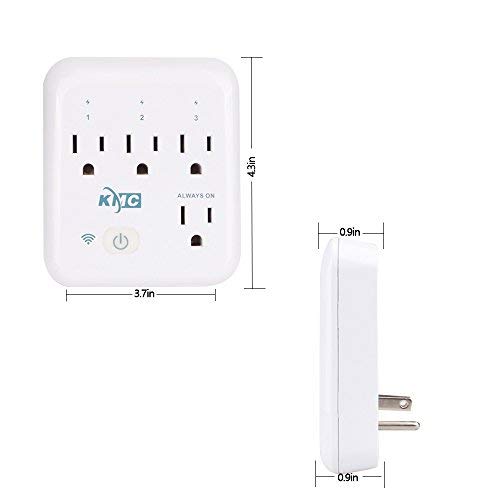
Diagram illustrating the dimensions of the KMC Smart Tap (3.7 inches width, 4.3 inches height, 0.9 inches depth).
Kurulum Kılavuzu
Kurulum
Plug the KMC Smart Tap into a standard 110V wall outlet. Ensure it is securely seated.
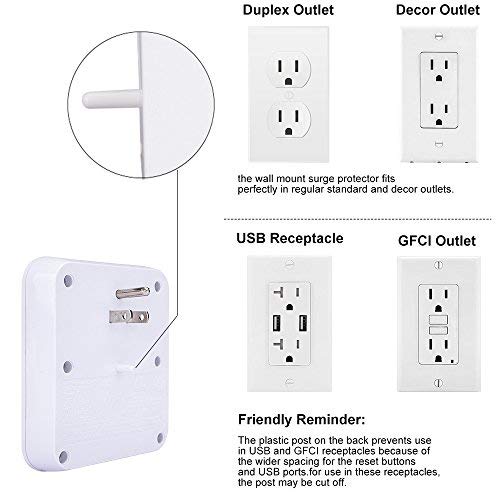
Image showing the KMC Smart Tap plugged into a duplex outlet, with a note about its compatibility and a reminder that the plastic post on the back prevents use in USB and GFCI receptacles due to wider spacing.
App Download and Account Creation
Download the "KMC Smart" or "Smart Life" app from your smartphone's app store (iOS or Android).
Yeni bir hesap için kaydolun veya zaten bir hesabınız varsa giriş yapın.
Cihaz Eşleştirme
- Ensure your smartphone is connected to a 2.4GHz Wi-Fi network. The KMC Smart Tap requires a 2.4GHz network for initial setup and operation.
- Uygulamayı açın ve yeni bir cihaz eklemek için ekrandaki talimatları izleyin.
- The device's Wi-Fi indicator light will blink during pairing.
- Once successfully paired, the indicator light will become solid.
Operasyon
Manuel Kontrol
The main power button on the front of the KMC Smart Tap can be pressed to manually toggle power for all three individually controlled outlets simultaneously. The "Always On" outlet remains powered.
Uygulama Üzerinden Uzaktan Kontrol
Open the KMC Smart app on your smartphone.
Select the KMC Smart Tap device.
You can individually control the three switchable outlets (labeled 1, 2, 3) and monitor the "Always On" outlet status from anywhere with an internet connection.
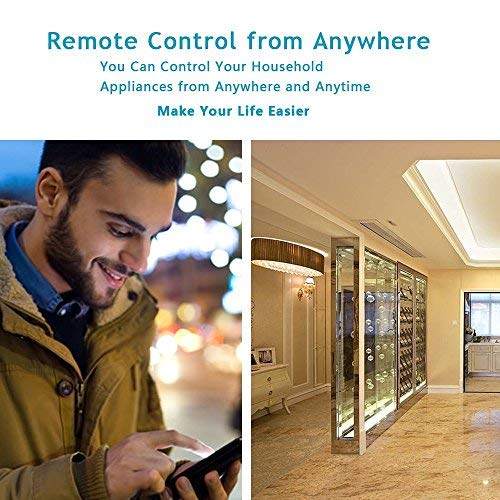
A person using a smartphone to remotely control household appliances, demonstrating the remote control feature of the smart plug.
Ses Kontrolü
The KMC Smart Tap is compatible with Amazon Alexa and Google Home.
To enable voice control, link your KMC Smart account within the Alexa or Google Home app.
For Amazon Alexa, you can name each individual outlet (1, 2, 3) to control them independently using voice commands (e.g., "Alexa, turn on Outlet 1").
For Google Home, overall control of the device is supported.
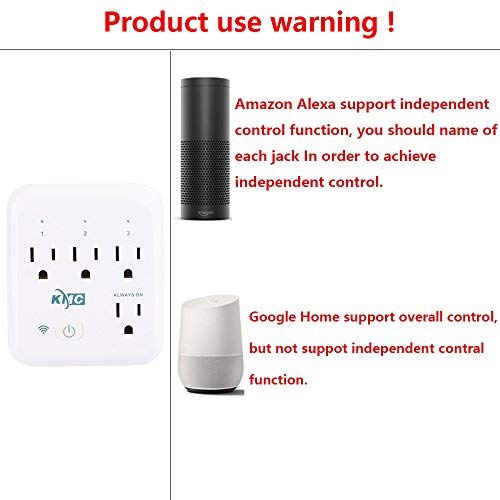
Image showing the KMC Smart Tap alongside Amazon Alexa and Google Home devices, indicating compatibility and control methods.
Planlama ve Zamanlayıcılar
Within the KMC Smart app, navigate to the device settings to set schedules and timers for your connected appliances.
You can program specific times for outlets to turn on or off automatically, enhancing convenience and energy efficiency.

An image depicting a child sleeping peacefully, illustrating how scheduling features can be used to manage device operation for routines, such as ensuring a restful environment.
Enerji İzleme
The KMC Smart app provides real-time and historical energy consumption data for devices connected to the Smart Tap.
Access the "Electricity Statistics" section in the app to view current usage (Current, Power, Voltage) and historical data (daily, monthly, yearly kWh).
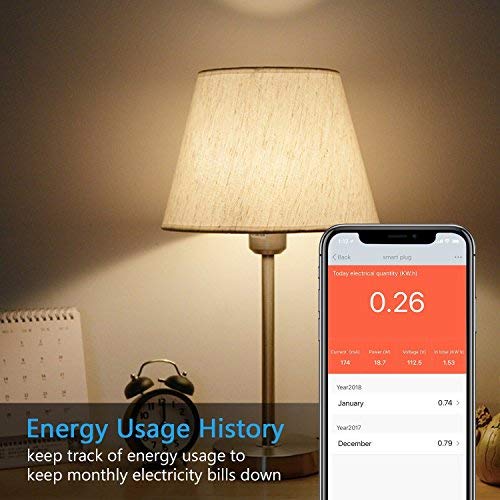
A smartphone screen displaying "Energy Usage History" with current electrical quantity (0.26 kWh) and monthly breakdowns for previous years, next to a lamp.
Bakım
Temizlik
- Disconnect the smart plug from the power outlet before cleaning.
- Use a dry, soft cloth to wipe the surface. Do not use liquid or aerosol cleaners.
Güvenlik Önlemleri
- Cihazı sökmeyin veya üzerinde değişiklik yapmayın.
- Cihazı suya veya nemli ortamlara maruz bırakmaktan kaçının.
- Do not exceed the maximum load of 15A, 1875W.
- The built-in thermal sensor will automatically turn off overheating appliances.
Sorun giderme
Cihaz Wi-Fi'ye bağlanmıyor.
- Wi-Fi ağınızın 2.4 GHz olduğundan emin olun. 5 GHz ağlar desteklenmez.
- Wi-Fi şifrenizin doğru olup olmadığını kontrol edin.
- Akıllı prizi Wi-Fi yönlendiricinize daha yakın bir yere taşıyın.
- Reset the smart plug by holding the power button for 5-10 seconds until the Wi-Fi indicator blinks rapidly, then attempt pairing again.
Uzaktan Kumanda Çalışmıyor
- Akıllı telefonunuzun aktif bir internet bağlantısına sahip olduğundan emin olun.
- Ensure the smart plug is connected to your home Wi-Fi network (solid Wi-Fi indicator light).
- Uygulama güncellemelerini kontrol edin.
Ses Kontrolü Sorunları
- Confirm that your KMC Smart account is correctly linked in the Alexa or Google Home app.
- Akıllı ev uygulamasındaki cihaz adlarının sesli komutlarınızla eşleştiğinden emin olun.
- Sesli asistan cihazınızın internet bağlantısını kontrol edin.
Özellikler
| Özellik | Değer |
|---|---|
| Kutup Sayısı | 2 |
| Tel sayısı | 2 |
| Fiş Biçimi | A tipi |
| Şartname Karşılandı | ETL |
| Ampöfke | 15 Amps |
| UPC | 743267670332 |
| Üretici | KT-KMC |
| Paket Boyutları | 8.58 x 4.84 x 2.24 inç |
| Ürün Ağırlığı | 14.9 ons |
| ASIN | B07SWZ2N4J |
| İlk Mevcut Tarih | 10 Haziran 2019 |
| Marka | KMC |
| Renk | Beyaz |
| Cilttage | 110 Volt |
| Malzeme | Akrilonitril Bütadien Stiren (ABS) |
| Bağlayıcı Türü | Tak ve çalıştır |
Garanti ve Destek
Garanti Bilgileri
The KMC Smart Tap includes a 30-day money-back guarantee and lifetime support.
Müşteri Desteği
For technical assistance or warranty claims, please refer to the contact information provided on the KMC official website or within the KMC Smart app.


