1. Giriş
Thank you for choosing the Ozeri 360 Duo Tower Fan. This manual provides essential information for the safe and efficient operation of your new fan. Please read these instructions thoroughly before use and retain them for future reference.
The Ozeri 360 Duo Tower Fan features a unique dual oscillation system and advanced airflow patterns designed to circulate air effectively throughout your room.
2. Önemli Güvenlik Talimatları
- Bu fanı kullanmadan önce tüm talimatları okuyun.
- Güç kaynağının ses seviyesiyle eşleştiğinden emin oluntage, fanın derecelendirme etiketinde belirtilmiştir.
- Hasarlı bir kablo veya fişle hiçbir fanı çalıştırmayın. Fanı atın veya inceleme ve/veya onarım için yetkili bir servis tesisine iade edin.
- Kabloyu halının altından geçirmeyin. Kabloyu kilim, yolluk veya benzeri örtülerle örtmeyin. Kabloyu trafik alanından uzakta ve üzerine basılmayacağı bir yere yerleştirin.
- To disconnect the fan, turn controls to OFF, then remove plug from outlet.
- Havalandırma veya egzoz açıklıklarına yabancı cisimler sokmayın veya girmesine izin vermeyin; bu durum elektrik çarpmasına, yangına veya fanın hasar görmesine neden olabilir.
- Hava açıklıklarını kapatmayın veya hava akışını engelleyebilecek perdeler veya diğer malzemelerin yakınında çalışmayın.
- Bu fan ıslak veya ıslak zeminde kullanım için tasarlanmamıştır.amp Konumlar.
- Always place the fan on a stable, flat surface during operation.
- Herhangi bir cihazın çocuklar tarafından veya çocukların yakınında kullanılması durumunda yakın gözetim gereklidir.
3. Paket İçeriği
Carefully unpack your Ozeri 360 Duo Tower Fan and ensure all items are present:
- Ozeri 360 Duo Tower Fan Unit
- Fan Base (consisting of two halves)
- Uzaktan kumanda
- Kullanım Kılavuzu (bu belge)
4. Ürün Bittiview
Familiarize yourself with the components of your Ozeri 360 Duo Tower Fan.
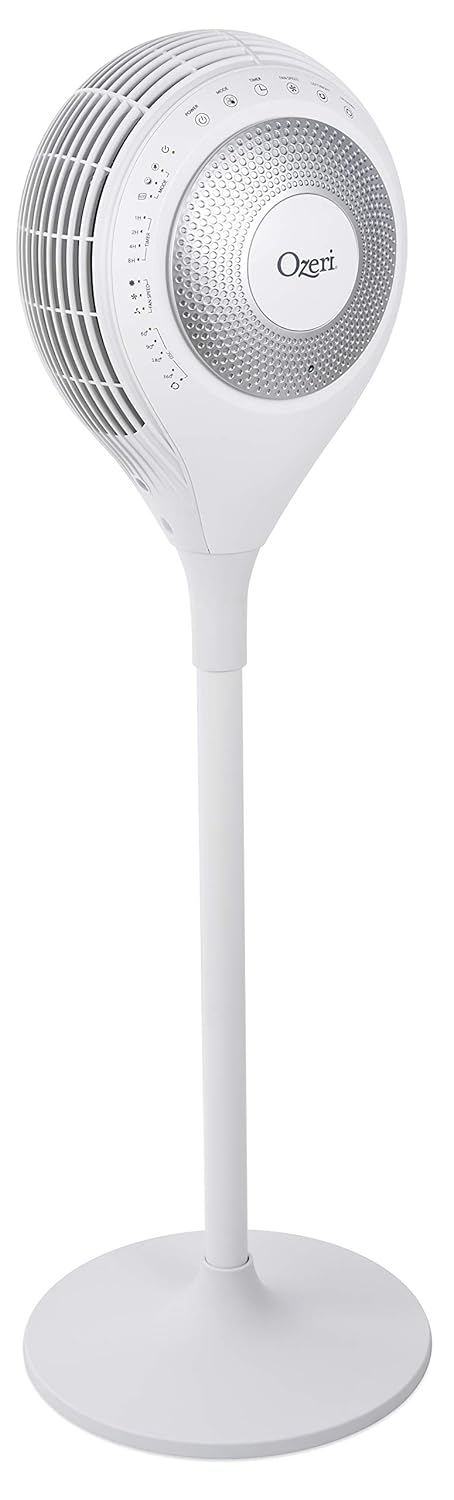


5. Kurulum
The Ozeri 360 Duo Tower Fan is designed for easy assembly without special tools.
- Tabanı birleştirin: Connect the two halves of the fan base together. Ensure they snap securely into place.
- Attach Fan Unit to Base: Carefully align the main fan unit with the assembled base. Push down firmly until it is securely seated.
- Fanı Konumlandırın: Place the fan on a firm, level surface, ensuring there are no obstructions to airflow.
- Güce Bağlanın: Güç kablosunu standart bir AC elektrik prizine takın.
6. Kullanım Talimatları
Your Ozeri 360 Duo Tower Fan can be operated using the touch control panel on the unit or the included remote control.

6.1. Kontrol Paneli ve Uzaktan Kumanda Fonksiyonları
| Düğme/İşlev | Tanım |
|---|---|
| Güç (⏻) | Vantilatörü açar veya kapatır. |
| Mod (☸) | Cycles through Normal, Natural, Sleeping, and Eco modes. |
| Fan Hızı (☠) | Adjusts fan speed (Low, Medium, High) in Normal mode. Speed adjusts automatically in other modes. |
| Left/Right Oscillation (↻) | Activates or deactivates horizontal oscillation (60°, 90°, 180°, 360°). Press repeatedly to cycle through options. |
| Up/Down Oscillation (⇅) | Activates or deactivates vertical oscillation. |
| Zamanlayıcı (⏲) | Sets the auto-off timer for 1, 2, 4, or 8 hours. |

6.2. Çalışma Modları
- Normal Mod: Provides continuous airflow at a selected speed (Low, Medium, High).
- Doğal Mod: Simulates natural breezes by alternating between low, medium, and high airflow speeds.
- Uyku Modu: Provides soothing, patterned airflow. The fan speed gradually reduces after 30 minutes to promote restful sleep. The LED display dims automatically.
- Eko Modu: Adjusts fan speed automatically based on ambient temperature to maintain comfort and optimize energy use.
6.3. Dual Oscillation
The Ozeri 360 Duo Tower Fan features both horizontal (Left/Right) and vertical (Up/Down) oscillation. These can be used independently or simultaneously to create helical wind currents, ensuring comprehensive air circulation throughout the room.
- Yatay Salınım: Press the Left/Right Oscillation button to cycle through 60°, 90°, 180°, or 360° rotation angles.
- Dikey Salınım: Press the Up/Down Oscillation button to activate or deactivate vertical movement of the fan head.
7. Bakım
Düzenli temizlik, vantilatörünüzün performansını korumanıza ve ömrünü uzatmanıza yardımcı olacaktır.
- Temizlemeden Önce: Temizlemeden önce vantilatörün fişini mutlaka prizden çekin.
- Dış Temizlik: Yumuşak bir d kullanınamp Vantilatörün dış yüzeylerini silmek için bir bez kullanın. Aşındırıcı temizleyiciler veya çözücüler kullanmayın.
- Hava Giriş/Çıkış Menfezleri: Use a vacuum cleaner with a brush attachment to gently remove dust from the air intake and output vents. Do not attempt to disassemble the fan for cleaning.
- Depolamak: If storing the fan for an extended period, cover it to protect it from dust and store it in a cool, dry place.
8. Sorun Giderme
If you experience issues with your Ozeri 360 Duo Tower Fan, please refer to the following common problems and solutions:
| Sorun | Olası Neden | Çözüm |
|---|---|---|
| Fan çalışmıyor. | Not plugged in; power outlet not active; power button not pressed. | Ensure the fan is securely plugged into a working outlet. Press the Power button on the unit or remote. |
| Zayıf hava akışı. | Fan speed set too low; vents obstructed; dust accumulation. | Increase fan speed. Ensure vents are clear. Clean dust from vents as per Maintenance section. |
| Salınım çalışmıyor. | Salınım fonksiyonu aktif değil. | Press the Left/Right or Up/Down Oscillation button to activate. |
| Uzaktan kumanda çalışmıyor. | Batteries depleted; remote not aimed at sensor. | Replace remote control batteries. Ensure the remote is aimed at the fan's control panel sensor. |
9. Özellikler
| Özellik | Detay |
|---|---|
| Marka | Özeri |
| Model Adı | Ozeri 360 Duo Tower Fan, with Dual Oscillation |
| Ürün Model Numarası | OZF7 |
| Renk | Beyaz |
| Elektrikli Fan Tasarımı | Zemin Fan |
| Güç Kaynağı | AC |
| Ürün Boyutları | 14.5"D x 14.5"G x 45.5"Y |
| Ürün Ağırlığı | 14.96 pound (6.8 Kilogram) |
| Özel Özellik | Oscillating (Dual Oscillation: Horizontal and Vertical) |
| Kontrol Yöntemi | Dokunmatik, Uzaktan Kumanda |
| Şartname Karşılandı | Energy Star, FCC |
| UPC | 815817012654 |
10. Garanti ve Destek
Ozeri products are manufactured to high-quality standards. For specific warranty information, please refer to the warranty card included with your purchase or visit the official Ozeri webalan.
For technical support, replacement parts, or customer service inquiries, please contact Ozeri customer support through their official channels.
Çevrimiçi destek: Ziyaret edin Ozeri Store on Amazon Daha fazla ürün bilgisi ve destek kaynakları için.


