giriiş
This manual provides detailed instructions for the setup, operation, and maintenance of your Sunbuck TAV-339BT Wireless Karaoke Bluetooth Power Amplifier System. This 2-channel stereo amplifier is designed for home audio and karaoke applications, featuring Bluetooth connectivity, USB/SD card playback, FM radio, and dual microphone inputs. Please read this manual thoroughly before using the product to ensure proper operation and to prevent damage.

Şekil 1: Ön view of the Sunbuck TAV-339BT amplifier. This image displays the main unit with its various controls and inputs on the front panel, including the power switch, microphone inputs, volume knobs, and digital display.
Güvenlik Bilgileri
- Güç Kaynağı: Bağlan amplifier only to the specified power supply (AC 110V or DC 12V 5A). Ensure the voltage matches the requirements before plugging in.
- Havalandırma: Havalandırma açıklıklarını kapatmayın. Aşırı ısınmayı önlemek için ünitenin etrafında yeterli hava akışı olduğundan emin olun.
- Su ve Nem: Cihazı yağmur, nem veya damlayan/sıçrayan sıvılara maruz bırakmayın. Vazo gibi sıvı dolu nesneleri cihazın üzerine koymayın.
- Isı Kaynakları: Üniteyi radyatörler, kalorifer ızgaraları, sobalar veya diğer cihazlar (dahil) gibi ısı kaynaklarından uzak tutun. amp(ısı üreten)
- Temizlik: Temizlemeden önce cihazı elektrik prizinden çıkarın. Temizlik için kuru bir bez kullanın.
- Servis: Bu ürüne kendiniz servis vermeye çalışmayın. Tüm servis işlemleri için kalifiye servis personeline başvurun.
- Çocuklar: Cihazı ve aksesuarlarını çocukların erişemeyeceği yerde saklayın.
Paket İçeriği
Lütfen paketi aşağıdaki öğeler açısından kontrol edin:
- 1 x Sunbuck TAV-339BT Ampkaldırıcı (110V)
- 1 x Uzaktan Kumanda
- 1 x Kullanım Kılavuzu
Ürün Özellikleri
- Compact and powerful 2-channel stereo amplif sistemi.
- Integrated Bluetooth for wireless audio streaming from compatible devices (smartphones, tablets, PCs).
- Supports USB flash drive and SD memory card playback.
- Dahili FM radyo alıcısı.
- Dual 1/4-inch microphone input jacks for karaoke functions.
- RCA (L/R) audio input for external devices.
- Front panel controls for master volume, bass, treble, microphone volume, echo, and microphone bass/treble.
- Traditional VU meter display.
- Kullanım kolaylığı için uzaktan kumanda dahildir.
Ön Panel Üstüview
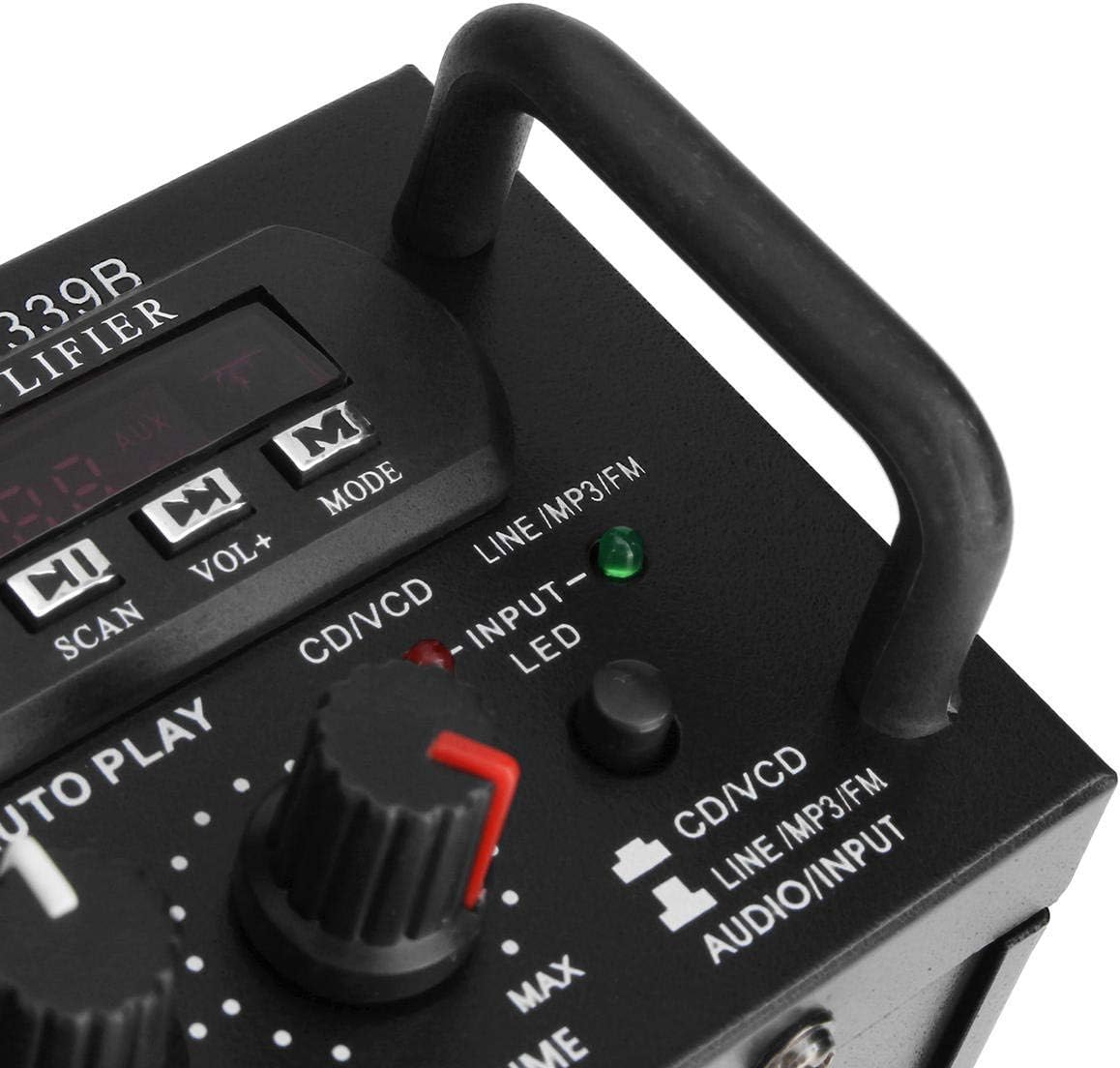
Şekil 2: Ayrıntılı view of'un amplifier's front panel, highlighting the various knobs, buttons, and input ports.
- Güç düğmesi: Döner amplifier açık veya kapalı.
- ECHO Kontrolü: Mikrofonlar için yankı efektini ayarlar.
- MIC1/MIC2 Input: 1/4-inch jacks for connecting microphones.
- M.BASS/M.TREBLE: Adjusts bass and treble for microphone input.
- MİKROFON/SES SEVİYESİ: Adjusts the volume level for microphones.
- VU METRE: Displays audio output level.
- USB/SD Card Slot: For connecting USB flash drives or SD memory cards.
- Dijital gösterge: Mevcut modu, parça numarasını veya FM frekansını gösterir.
- Control Buttons (SCAN, VOL-, VOL+, MODE): For navigating USB/SD/FM functions.
- BAS/TİZ: Adjusts the main audio bass and treble levels.
- SES: Tüm ses kaynakları için ana ses seviyesi kontrolü.
- GİRİŞ Seçici: Cycles through input sources (CD/VCD, LINE, MP3/FM, Bluetooth).
- INPUT LED Indicators: Lights up to show the currently selected input source.
Arka Panel Üstüview

Şekil 3: Arka view of'un amplifier, showing the various input and output terminals for connecting speakers and audio sources.
- INPUT (CD/VCD, LINE): RCA (L/R) audio input jacks for connecting external audio sources like CD/DVD players, TVs, or other line-level devices.
- HOPARLÖR SİSTEMİ: Spring clip terminals for connecting passive speakers. Ensure correct polarity (+ to + and - to -).
- POWER DC 12V INPUT: DC power input for 12V power supply (e.g., car battery, not included).
- AC 110V 60Hz: AC power input for standard household power.
- FM Anteni: Connector for the included FM antenna.
Uzaktan Kumandaview
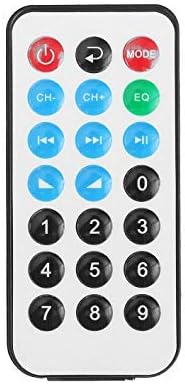
Şekil 4: Uzaktan kumanda düğmelerinin yerleşimi.
Uzaktan kumanda, cihazın rahat bir şekilde çalıştırılmasını sağlar amplifier's functions from a distance. It typically includes buttons for power, mode selection, volume adjustment, track navigation (for USB/SD), and FM radio controls.
Uzaktan Kumanda için Pil Kurulumu

Figure 5: Step-by-step guide for installing the CR2025 lithium battery into the remote control.
The remote control requires a CR2025 lithium battery (3V). To install or replace the battery:
- Uzaktan kumandanın arkasındaki pil bölmesini bulun.
- Push the small tab to release the battery tray.
- Pil tepsisini dışarı kaydırın.
- CR2025 pili pozitif (+) tarafı yukarı bakacak şekilde yerleştirin.
- Slide the battery tray back into the remote until it clicks into place.
Kurmak
1. Hoparlör Bağlantısı
Connect your passive speakers to the "SPEAKER SYSTEM" terminals on the rear panel. Ensure that the positive (+) terminal of the amplifier connects to the positive (+) terminal of the speaker, and the negative (-) terminal of the amplifier connects to the negative (-) terminal of the speaker. Incorrect polarity can affect sound quality.
2. Ses Girişi Bağlantısı
- RCA Inputs (CD/VCD, LINE): Use RCA cables to connect external audio sources (e.g., CD player, DVD player, TV audio output) to the corresponding "INPUT" jacks on the rear panel.
- USB/SD Kart: Insert a USB flash drive or SD memory card into the respective slot on the front panel.
- Bluetooth: Bluetooth için fiziksel bağlantı gerekmez. Eşleştirme için "Kullanım Talimatları" bölümüne bakın.
3. Mikrofon Bağlantısı
Connect up to two 1/4-inch microphones to the "MIC1" and "MIC2" input jacks on the front panel for karaoke use.
4. FM Anten Bağlantısı
Connect the included FM antenna to the FM antenna terminal on the rear panel for improved radio reception.
5. Güç Bağlantısı
Connect the power cord to the AC 110V 60Hz input on the rear panel and then plug it into a standard wall outlet. Alternatively, for DC operation, connect a 12V DC power source (not included) to the "POWER DC 12V INPUT" terminals.
Kullanım Talimatları
1. Güç Açma/Kapatma
Press the "POWER" switch on the front panel to turn the amplifier on or off. The digital display will illuminate when the unit is powered on.
2. Kaynak Seçimi
Press the "INPUT" button on the front panel or the "MODE" button on the remote control to cycle through available input sources: CD/VCD, LINE, MP3/FM, and Bluetooth. The corresponding LED indicator on the front panel will light up.
3. Bluetooth Çalışması
- Select "Bluetooth" as the input source using the "INPUT" or "MODE" button. The digital display will show "BLUE" or a similar indicator.
- Enable Bluetooth on your mobile device (smartphone, tablet, PC).
- Arama available Bluetooth devices and select "TAV-339BT" or "Sunbuck" from the list.
- Once paired, you can stream audio wirelessly from your device to the ampcankurtaran.
4. USB/SD Karttan Oynatma
- MP3 ses dosyaları içeren bir USB flash sürücü veya SD kart takın. files'yi ön paneldeki ilgili yuvaya yerleştirin.
- Select "MP3/FM" as the input source. The amplifier will automatically detect and begin playing audio files.
- Use the "SCAN", "VOL-", "VOL+" buttons on the front panel or the corresponding buttons on the remote control to navigate tracks (play/pause, next/previous).
5. FM Radyonun Çalıştırılması
- FM anteninin bağlı olduğundan emin olun.
- Select "MP3/FM" as the input source.
- Press the "SCAN" button to automatically scan and store available FM radio stations.
- Use the "VOL-" and "VOL+" buttons (or remote control) to manually tune or select stored stations.
6. Karaoke Fonksiyonu
- Connect microphones to the "MIC1" and "MIC2" jacks.
- Adjust the "MIC/VOL" knob to control the microphone volume.
- Use the "ECHO" knob to add an echo effect to the vocals.
- Adjust "M.BASS" and "M.TREBLE" to fine-tune the microphone's tone.
7. Ses Seviyesi ve Ton Kontrolü
- SES: Use the large "VOLUME" knob on the front panel to adjust the overall output volume.
- BAS/TİZ: Use the "BASS" and "TREBLE" knobs to adjust the low and high frequencies of the main audio output.
Bakım
- Temizlik: Temizlemeden önce gücü kesin. Cihazın dış yüzeyini yumuşak, kuru bir bezle silin. Sıvı temizleyiciler veya aerosol temizleyiciler kullanmayın.
- Havalandırma: Ensure that the ventilation openings are clear of dust and debris to maintain proper cooling.
- Depolamak: Cihazı uzun süre saklayacaksanız, güç kaynağından ayırın ve serin, kuru bir yerde muhafaza edin.
Sorun giderme
| Sorun | Olası Neden | Çözüm |
|---|---|---|
| Güç yok | Power cord not connected; Power switch off; No power from outlet. | Ensure power cord is securely connected. Turn the POWER switch on. Check the power outlet with another device. |
| Ses çıkışı yok | Incorrect input source selected; Speaker wires loose or incorrectly connected; Volume too low; Mute activated (if applicable). | Select the correct input source. Check speaker connections and polarity. Increase the VOLUME. Ensure no mute function is active. |
| Bluetooth bağlanmıyor | Amplifier not in Bluetooth mode; Device too far; Device already connected to another amplifier; Bluetooth on device is off. | Select Bluetooth input on the amplifier. Move device closer. Disconnect from other devices. Enable Bluetooth on your device. |
| USB/SD kart oynatılmıyor | Incorrect input source; Files not in supported format (MP3); USB/SD card corrupted or empty. | Select MP3/FM input. Ensure files are MP3 format. Try another USB/SD card. |
| Uzaktan kumanda çalışmıyor | Battery depleted or incorrectly installed; Obstruction between remote and ampAsansör; Uzaktan sensör engellendi. | Replace battery (CR2025) and ensure correct polarity. Remove any obstructions. Ensure the remote sensor on the ampLifer'ın durumu açık. |
Özellikler
| Özellik | Detay |
|---|---|
| Örnek | TAV-339BT |
| Anma Empedans | 4 ila 8 Ohm |
| RMS Güç Çıkışı | 200W + 200W (Recommended for speaker boxes with speakers less than 8") |
| Peak Music Power Output (P.M.P.O) | 300W + 300W (Toplam 600W) |
| Güç Kaynağı | AC: 110V 60Hz or DC: 12V 5A |
| Kanallar | 2 Kanal |
| Ses Girişi | Multi-channel signal input (RCA L/R), USB, SD, Bluetooth |
| Mikrofon Girişi | Dual 1/4-inch Jack |
| Bağlantı Teknolojisi | Bluetooth, USB, RCA |
| Kablosuz Tip | Bluetooth, Infrared (for remote) |
| Ürün Boyutları (U x G x Y) | 25.4 x 20.32 x 7.01 cm (10 x 8 x 2.76 inç) |
| Ürün Ağırlığı | 2.72 kg (6 lbs) |
| Uyumlu Cihazlar | Headphones, Laptops, Smartphones |
Garanti ve Destek
Garanti bilgileri veya teknik destek için lütfen satın alma sırasında verilen belgelere bakın veya satıcınızla iletişime geçin. Garanti talepleri için satın alma belgenizi saklayın.


