giriiş
The Amazon Echo Show 8 (1st Gen, 2019 release) is a smart display designed to enhance your daily life with Alexa. Featuring an 8-inch HD screen and stereo sound, it allows you to manage your day, connect with loved ones through video calls, enjoy entertainment, control smart home devices, and personalize your experience. This manual provides detailed instructions to help you get the most out of your device.
Kutuda Neler Var?
Upon unboxing your Echo Show 8, ensure all components are present:
- Echo Show 8 cihazı
- 30 W'lık güç adaptörü ve kablosu (4.9 metre).
- Hızlı başlangıç kılavuzu
Kurmak
Setting up your Echo Show 8 is a straightforward process, often simplified by Amazon Wi-Fi simple setup technology.
- Güç Açık: Güç adaptörünü Echo Show 8'inize bağlayın ve duvardaki prize takın. Cihaz otomatik olarak açılacaktır.
- Dil Seçimi: Tercih ettiğiniz dili seçmek için ekrandaki talimatları izleyin.
- Wi-Fi Bağlantısı: Select your Wi-Fi network from the list and enter the password. The Echo Show 8 supports dual-band Wi-Fi (802.11a/b/g/n/ac).
- Amazon Hesabına Giriş: Log in with your Amazon account credentials. If you don't have one, you will be prompted to create one.
- Cihaz Kaydı: Your device will register to your Amazon account.
- Saat Dilimi ve Konum: Confirm your time zone and location settings.
- Eğitim: The device may offer a brief tutorial on how to navigate and use its features.
The Alexa app is compatible with Fire OS, Android, and iOS devices and is also accessible via your web browser for further management and customization.
Echo Show 8'inizi Çalıştırma
The Echo Show 8 can be operated using voice commands with Alexa or through its touch screen interface.
Sesli Komutlar (Alexa)
Simply say "Alexa" followed by your command. ExampBunlar şunları içerir:
- "Alexa, hava nasıl?"
- "Alexa, müzik çal."
- "Alexa, [kişinin adı]'nı ara."
- "Alexa, show me my photos."
- "Alexa, ışıkları kapat."

Image: Echo Show 8 displaying current weather conditions, demonstrating its ability to provide glanceable information.
Dokunmatik Ekran Gezinme
Swipe down from the top of the screen to access quick settings and the home menu. Swipe left from the right edge to view cards with suggestions and information. Tap on icons and options to interact with the device.
Özellikler
The Echo Show 8 offers a wide range of features to simplify and enrich your daily routines:
- Video Calling & Messaging: Connect with friends and family who have the Alexa app or an Echo device with a screen. Make announcements to other devices in your home.

Image: A user making a video call on the Echo Show 8, highlighting its communication capabilities.
- Eğlence: Ask Alexa to show you movie trailers, TV shows, movies, or the news. Listen to radio stations, podcasts, and audiobooks.
- Akıllı Ev Kontrolü: Voice control compatible devices or manage them on the easy-to-use display. Ask Alexa to show you security cameras, control lights, and adjust thermostats.

Image: The Echo Show 8 displaying a live feed from a nursery camera, illustrating its smart home monitoring feature.
- Kişiselleştirme: Show off your albums from Amazon Photos. Customize your home screen. Create morning routines to start your day.
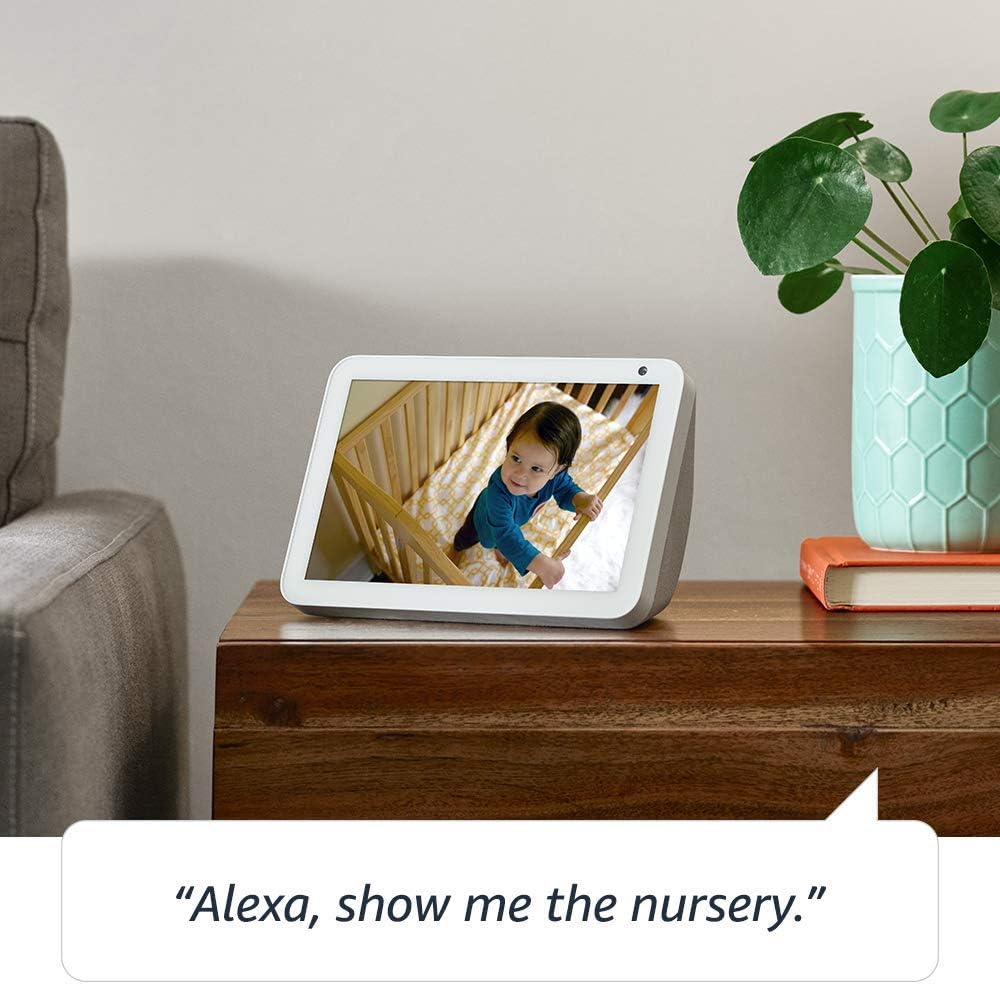
Image: The Echo Show 8 displaying a scenic photo from a user's Amazon Photos album, demonstrating its personalization options.
- Daily Assistance: Cook along to step-by-step recipes. Easily update to-do lists and calendars. Glance at weather and traffic on your way out.
Gizlilik Özellikleri
The Echo Show 8 is designed with privacy in mind, offering several controls:
- Mikrofon/Kamera Kapatma Düğmesi: Electronically disconnect the microphones and camera with one press of a button.
- Dahili Kamera Deklanşörü: Slide the built-in shutter to physically cover the camera lens.

Image: A finger activating the physical camera shutter on the Echo Show 8, demonstrating a privacy control feature.
- Wake Word Teknolojisi: Alexa devices are designed to detect only your chosen wake word (e.g., "Alexa").
- Akış Göstergeleri: Visual indicators show when Alexa is streaming your request to the cloud.
- Ses Kayıt Yönetimi: Yeteneği view and delete your voice recordings through the Alexa app or Alexa Privacy Hub.
Daha fazla bilgi için Alexa Gizlilik Merkezi'ni ziyaret edin.
Bakım
Echo Show 8'inizin uzun ömürlü ve en iyi performansı göstermesi için aşağıdaki bakım yönergelerini izleyin:
- Temizlik: Ekranı ve dış yüzeyi temizlemek için yumuşak, tüy bırakmayan bir bez kullanın. Aşındırıcı temizleyicilerden veya spreylerden doğrudan cihaza temas ettirmekten kaçının.
- Atama: Cihazı sabit, düz bir yüzeye, doğrudan güneş ışığından, ısı kaynaklarından ve nemden uzak bir yere yerleştirin. Yeterli havalandırma sağlayın.
- Yazılım Güncellemeleri: The device automatically receives software updates. Ensure it is connected to Wi-Fi to receive these updates, which improve performance and add new features.
Sorun giderme
If you encounter issues with your Echo Show 8, try the following steps:
- Güç Yok:
- Güç adaptörünün hem cihaza hem de çalışan bir elektrik prizine güvenli bir şekilde bağlandığından emin olun.
- Başka bir elektrik prizini deneyin.
- Wi-Fi Bağlantı Sorunları:
- Wi-Fi şifrenizin doğru olduğundan emin olun.
- Wi-Fi yönlendiricinizi ve modeminizi yeniden başlatın.
- Echo Show 8'i Wi-Fi yönlendiricinize daha yakın bir yere taşıyın.
- Alexa Yanıt Vermiyor:
- Ensure the microphone is not muted (check the microphone/camera off button).
- Açık ve normal ses tonunuzda konuşun.
- Cihazı birkaç saniye fişten çekip tekrar takarak yeniden başlatmayı deneyin.
- Ekran Sorunları:
- Ekran yanıt vermiyorsa, cihazı yeniden başlatmayı deneyin.
- Ensure the screen is clean and free of smudges.
- Fabrika ayarları: As a last resort, you can perform a factory reset. This will erase all your personal data and settings. To do this, go to Settings > Device Options > Reset to Factory Defaults.
Özellikler
| Özellik | Detay |
|---|---|
| Boyut | 7.9”x 5.4”x 3.9” (200mm x 135mm x 99mm) |
| Ağırlık | 36.6 ons (1037 gram) |
| Görüntülemek | 8.0 inç dokunmatik ekran |
| Kamera | 1MP camera with built-in shutter |
| Wi-Fi Bağlantısı | Çift bantlı Wi-Fi, 802.11a/b/g/n/ac Wi-Fi ağlarını destekler. Ad-hoc (veya eşler arası) Wi-Fi ağlarına bağlanmayı desteklemez. |
| Bluetooth Bağlantısı | Gelişmiş Ses Dağıtımı Profesyonelifile (A2DP) support for audio streaming from your mobile device to Echo Show 8 or from Echo Show 8 to your Bluetooth speaker. Audio/Video Remote Control Profile (AVRCP), bağlı mobil cihazların sesle kontrolü içindir. Mac OS X cihazları için eller serbest ses kontrolü desteklenmemektedir. PIN kodu gerektiren Bluetooth hoparlörler desteklenmemektedir. |
| Ses | 2.0” (52 mm) neodymium speakers with passive bass radiator |
| Sistem Gereksinimleri | Echo Show 8 comes ready to connect to your WiFi. The Alexa app is compatible with Fire OS, Android, and iOS devices and also accessible via your web browser. Supported operating systems. Certain skills and services may require subscription or other fees. |
| İşlemci | MediaTek MT 8163 |
| Dil | Alexa İngilizce ve İspanyolca konuşuyor |
Erişilebilirlik Özellikleri
The Echo Show 8 includes various accessibility features to personalize Alexa to your abilities:
- Alexa'ya dokunun: Ekrandaki kutucuklar aracılığıyla dokunmatik olarak veya klavye kullanarak Alexa'ya erişin.
- Uyarlanabilir Dinleme: Alexa yanıt vermeden önce konuşmayı bitirmek için daha fazla zaman sağlar.
- Tercih Edilen Konuşma Oranı: Alexa'nın konuşma hızını veya yavaşlığını kontrol edin.
- Alexa Altyazı, Çağrı Altyazısı, Kapalı Altyazı: Desteklenen içerikler için metin alt yazıları sağlayın.
- Göster ve Anlat: Helps customers who are blind or visually impaired identify products by saying “Alexa, what am I holding.”
- SesView Ekran okuyucu: Enables access for customers who are blind or visually impaired.
- Ekran Büyüteci: Enables zooming in/out and panning around the screen.
- Yakında Olduğunuzda Bildir: Plays notification sounds when you’re detected near your Echo device.
- Kindle Sesli Okuma: Alexa, Kindle kitaplarınızı sesli olarak okuyabilir.
- Gerçek Zamanlı Metin: Video görüşmesi sırasında canlı metin yazmayı sağlar.
- Ek ayarlar arasında Renk Ters Çevirme, Renk Düzeltme, Ses İsteği ve daha fazlası yer almaktadır.
To enable these features, go to Settings → Accessibility on your Echo Show 8.
Garanti ve Destek
Your Certified Refurbished Echo Show 8 comes with a 1-year limited warranty and service, similar to a new device. Use of Echo Show 8 is subject to Amazon's terms and conditions.
Daha fazla yardım için Amazon Cihaz Desteği sayfasını ziyaret edin veya Amazon Müşteri Hizmetleri ile iletişime geçin.


