1. Giriş
The AIWA KSTB6043 Network Video Player is designed to transform your existing television into a smart Android TV. This device allows you to access various network video services and play media content from external storage devices. It operates on Android 8.0 Oreo and supports HDMI 2.0 for high-definition video output.
Included accessories are a Bluetooth remote control, a 1.5m Premium HDMI cable, an instruction manual, and a warranty card.
2. Ürün Bittiview
2.1. Cihaz Bileşenleri
Familiarize yourself with the various ports and components of your AIWA KSTB6043 Network Video Player.
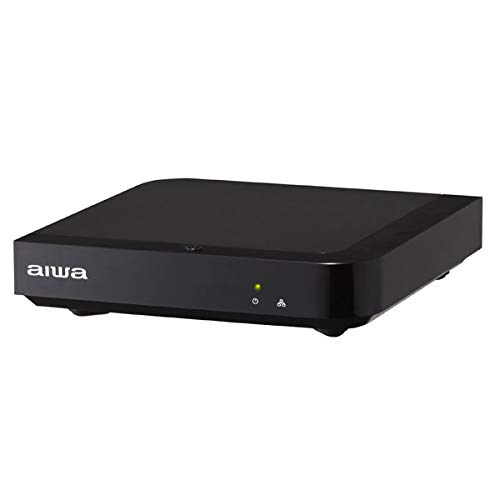
Resim 1: Ön View. This image displays the front of the AIWA KSTB6043 unit, featuring the AIWA logo and indicator lights.

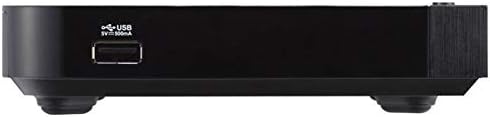
Resim 2: Yan View. This image shows the side of the device, highlighting a USB port for connecting external storage.
Resim 3: Arka View. This image illustrates the rear panel of the player, featuring the LAN port, HDMI output, S/PDIF port, power input (12V=1.5A IN), and a reset button.
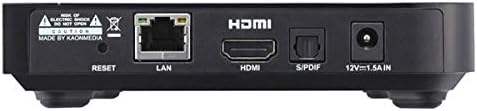
Image 4: Setup Exampley. The player is shown connected to a television, with the remote control placed nearby, demonstrating a typical setup.
2.2. Uzaktan Kumanda
The included Bluetooth remote control allows for easy navigation and control of the network video player. Refer to the remote control diagram in the included physical manual for specific button functions.
3. Kurulum
Follow these steps to set up your AIWA KSTB6043 Network Video Player:
- Televizyona bağlanın: Use the provided Premium HDMI cable to connect the HDMI OUT port on the network video player to an HDMI input port on your television.
- Gücü bağlayın: Plug the power adapter into the 12V=1.5A IN port on the back of the player, then plug the adapter into a wall outlet.
- Güç Açık: Press the power button on the remote control or the device. The indicator light on the front of the player will illuminate.
- Girişi Seçin: On your TV, select the corresponding HDMI input source using your TV's remote control.
- İlk kurulum: Follow the on-screen prompts for initial Android TV setup, including language selection, network connection (Wi-Fi or Ethernet), and Google account login.
3.1. Connection Demonstration Video
Video 1: Basic Connection and Media Playback. This video demonstrates how to connect a media player to a TV and play content from an SD card or USB drive. Note: The specific product shown in this video may differ from the AIWA KSTB6043, but the connection principles are similar.
Video 2: Detailed Port Overview ve Kurulum. This video provides a closer look at the ports on a media player, including HDMI, USB, and power, and shows the connection process. It also demonstrates basic menu navigation. Note: The specific product shown in this video may differ from the AIWA KSTB6043, but the connection principles and interface navigation are generally applicable.
4. Kullanım Talimatları
4.1. Navigating the Android TV Interface
Once powered on and connected, the Android TV home screen will appear. Use the directional buttons (up, down, left, right) and the OK button on your remote control to navigate through apps, settings, and content.
- Ana Ekran: Access your installed apps, recommended content, and system settings.
- Uygulamalar: 'Uygulamalar' simgesini seçin. view ve yüklü tüm uygulamaları başlatın.
- Ayarlar: Access network settings, display options, audio settings, and device preferences.
4.2. Playing Media from External Storage
The AIWA KSTB6043 supports playback of video, image, and music fileUSB sürücülerden veya SD kartlardan.
- Ekleme Depolama Alanı: Insert your USB drive into a USB port or your SD card into the SD card slot on the device.
- Erişim Files: Navigate to the 'File Manager' or 'Media Player' app on the Android TV interface.
- İçerik Seçin: Browse your external storage for the desired video, image, or music files and select them for playback.
4.3. Using Network Services
With an internet connection, you can access various streaming services. The device supports Netflix, among others.
- Ağa bağlan: Ensure your device is connected to Wi-Fi or via an Ethernet cable.
- Uygulamayı başlat: Select the desired streaming app (e.g., Netflix) from the home screen or app list.
- Login/Subscribe: Log in with your existing account or follow the prompts to subscribe to the service.
5. Bakım
- Temizlik: Cihazın dışını temizlemek için yumuşak ve kuru bir bez kullanın. Sıvı temizleyiciler veya aşındırıcı malzemeler kullanmayın.
- Yazılım Güncellemeleri: En iyi performansı sağlamak ve en yeni özelliklere erişmek için ayarlar menüsünden düzenli olarak sistem güncellemelerini kontrol edin.
- Havalandırma: Cihazın aşırı ısınmasını önlemek için iyi havalandırılan bir alana yerleştirildiğinden emin olun. Havalandırma açıklıklarını kapatmayın.
6. Sorun Giderme
| Sorun | Olası Neden | Çözüm |
|---|---|---|
| Güç yok | Güç kablosu bağlı değil; Elektrik prizi çalışmıyor. | Güç kablosu bağlantısını kontrol edin; farklı bir elektrik prizi deneyin. |
| Televizyonda sinyal yok. | Incorrect HDMI input selected; HDMI cable loose or faulty | Select correct HDMI input on TV; Reconnect or replace HDMI cable |
| Uzaktan kumanda çalışmıyor | Batteries depleted; Obstruction between remote and device | Replace batteries; Ensure clear line of sight to the device |
| Wi-Fi'ye bağlanılamıyor | Incorrect password; Router issue; Device too far from router | Verify Wi-Fi password; Restart router; Move device closer to router |
7. Özellikler
| Özellik | Detay |
|---|---|
| Model Numarası | KSTB6043 |
| İşletim Sistemi | Android 8.0 Oreo |
| HDMI Sürümü | 2.0 |
| HDMI Port Count | 1 |
| Bağlantı Teknolojisi | Bluetooth, HDMI |
| Desteklenen Ses Biçimleri | Dolby Dijital, DTS, PCM |
| İnternet Hizmetleri | Netflix (and others via Android apps) |
| Çözünürlük | 1920 x 1080 piksel (Tam HD) |
| Ürün Boyutları | 12.5 cm (U) x 12.5 cm (G) x 3 cm (Y) |
| Ağırlık | Approx. 760 g (packaged) |
| Özellikler | High-definition video output, Android TV compatible |
8. Garanti ve Destek
The AIWA KSTB6043 Network Video Player comes with a warranty. Please refer to the warranty card included in the product packaging for detailed terms and conditions, including the warranty period and coverage.
For technical support or inquiries, please contact AIWA customer service through the contact information provided in your warranty documentation or on the official AIWA webalan.