giriiş
This manual provides essential information for the installation, operation, and maintenance of your Lorex LBV8541XB 4K Security Camera. This add-on bullet camera is designed for both indoor and outdoor surveillance, offering 4K resolution, color night vision, and active deterrence features.
Paket İçeriği
- Lorex LBV8541XB 4K HD Bullet Camera
- Montaj Kiti (vidalar ve duvar dübelleri)
- 60ft UL Extension Cable
- Güç Adaptörü
- Hızlı Başlangıç Kılavuzları
Kurulum ve Yükleme
The Lorex LBV8541XB camera is designed for wall mounting and requires a wired connection to a compatible Lorex Digital Video Recorder (DVR) system. Ensure you have a compatible DVR from the LHV5100, LHV5100W, D841, D841B, D861, D862, D862B, or D871 series.
1. Kameranın Montajı
Select a suitable location for the camera, ensuring it provides the desired field of view and is within reach of the 60ft extension cable. Use the provided mounting kit to securely attach the camera to a wall or other stable surface. The camera's durable housing is IP65-rated, making it suitable for both indoor and outdoor environments, capable of withstanding temperatures from -22°F to 140°F.
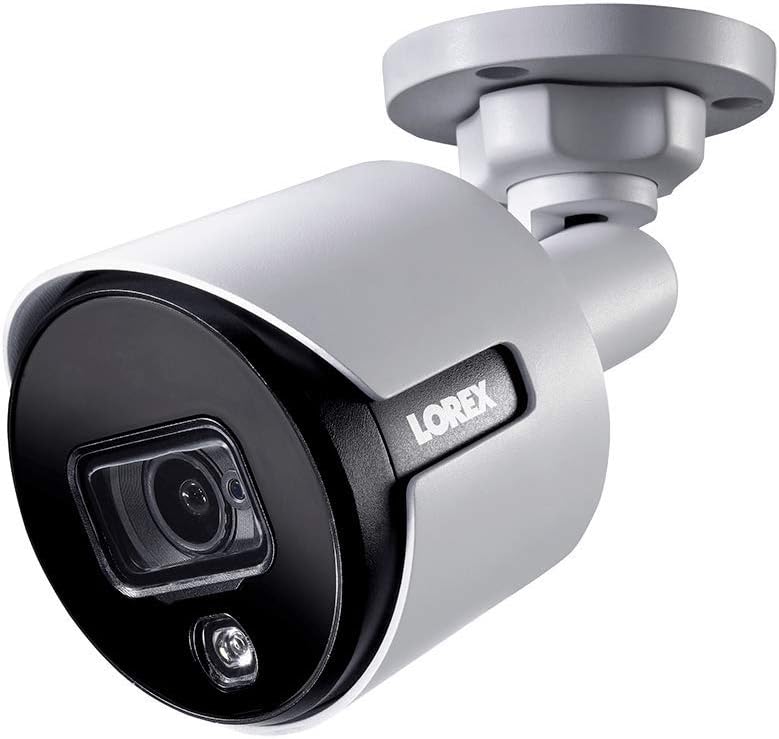
Image: The Lorex LBV8541XB 4K Bullet Security Camera, showing its compact design and mounting bracket. This camera is designed for robust surveillance in various conditions.

Image: Icons representing the camera's weather resistance, including protection against rain, extreme heat, and freezing temperatures. The camera is rated IP65 for outdoor use.
2. Kamerayı Bağlama
- Connect the 60ft UL Extension Cable to the camera's BNC video output.
- Connect the other end of the extension cable to an available BNC input on your compatible Lorex DVR.
- Connect the power adapter to the camera's power input and then plug it into a standard electrical outlet.
- Sinyal kaybını veya güç kesintilerini önlemek için tüm bağlantıların güvenli olduğundan emin olun.
Kameranın Çalıştırılması
Once connected to your Lorex DVR, the camera will begin transmitting video. You can access and control the camera's features through your DVR interface or via the Lorex mobile application on compatible smartphones and tablets.
Temel Özellikler:
- 4K Çözünürlük: Provides ultra-high-definition video for clear and detailed surveillance.
- 87 Derecelik Alan View: Captures a wide area, reducing the need for multiple cameras in certain locations.
- Renkli Gece Görüşü: Utilizes ambient light to provide full-color video in low-light conditions. In complete darkness, infrared LEDs provide crisp black and white video up to 135 feet.
- Aktif Caydırıcılık: Features a motion-activated LED warning light and a remote-triggered siren to deter intruders. The siren can be activated manually via the Lorex app or DVR interface.
- Motion-Only Alerts: The camera is configured to trigger alerts based on motion detection, which can be customized through your DVR settings.

Image: A close-up of the camera's front, highlighting the lens and the integrated LED warning light, which activates upon motion detection.

Image: The Lorex camera mounted on a brick wall, demonstrating its active deterrence LED light illuminating an area. This feature helps to deter unwanted activity.

Image: A graphic illustrating the camera's 135ft infrared night vision range and its capability for color night vision in low-light conditions.
Bakım
Regular maintenance ensures optimal performance and longevity of your Lorex security camera.
- Temizlik: Kamera merceğini ve muhafazasını düzenli olarak yumuşak bir bezle temizleyin.amp tıkanıklığa neden olabilecek toz, kir veya su lekelerini gidermek için bir bez kullanın viewAşındırıcı temizleyicilerden kaçının.
- Kablo Denetimi: Regularly inspect the video and power cables for any signs of wear, damage, or loose connections. Secure or replace damaged cables promptly.
- Donanım Yazılımı Güncellemeleri: Lorex'i kontrol edin. website or your DVR system for available firmware updates for your camera and DVR to ensure you have the latest features and security enhancements.
Sorun giderme
If you encounter issues with your Lorex LBV8541XB camera, refer to the following common troubleshooting steps:
- Video Sinyali Yok:
- Kameranın düzgün şekilde güç aldığından ve güç adaptörünün çalıştığından emin olun.
- Verify that the BNC cable is securely connected at both the camera and the DVR.
- Check if the camera is connected to a compatible DVR input.
- Kötü Görüntü Kalitesi:
- Fotoğraf makinesinin objektifini lekelerden ve kirlerden arındırmak için temizleyin.
- Ensure the camera is focused correctly (if adjustable).
- Check the cable for damage or interference.
- Gece Görüşü Sorunları:
- Kızılötesi LED'lerin önünü kapatacak herhangi bir engel olmadığından emin olun.
- Verify that the camera's night vision settings are correctly configured on your DVR.
- Note that color night vision requires some ambient light; in complete darkness, the camera will switch to black and white infrared mode.
- Siren Sesi Düşük:
- Confirm that the siren volume settings on your DVR or Lorex app are set to the maximum level.
- Ensure the camera's speaker is not obstructed.
Özellikler
| Model Numarası | LBV8541XB |
| Çözünürlük | 4K (8 Megapiksel) |
| Alanı View | 87 derece |
| Gece Görüş Aralığı | 135 fite kadar (IR) |
| Hava Direnci | IP65 (İç/Dış Mekan) |
| Çalışma Sıcaklığı | -22°F ila 140°F (-30°C ila 60°C) |
| Bağlantı | Wired (BNC), Wi-Fi for app control |
| Güç Kaynağı | Kablolu Elektrik (12 Volt) |
| Boyutlar (U x G x Y) | 5 x 13.1 x 4.2 inç |
| Ağırlık | 2.29 pound |
| Malzeme | Metal |
| UPC | 695529017129 |
Garanti ve Destek
For warranty information, technical support, or further assistance, please visit the official Lorex website or contact Lorex customer service. Keep your purchase receipt and model number (LBV8541XB) handy when contacting support.
Official Lorex Webalan: www.lorex.com


