1. Giriş
This manual provides detailed instructions for the setup, operation, and maintenance of your Tera Wireless Barcode Scanner, Model 8541733886. Please read this manual thoroughly before using the device to ensure proper functionality and to prevent damage.
The Tera Wireless Barcode Scanner offers versatile connectivity and efficient scanning capabilities for various barcode types, both printed and digital.
2. Ürün Bittiview
2.1 Bileşenler
Paket genellikle şunları içerir:
- Tera Wireless Barcode Scanner
- Hands-Free Stand
- 2.4GHz Kablosuz USB Dongle
- USB Şarj/Veri Kablosu
- Kullanım Kılavuzu (bu belge)

Image: Tera Wireless Barcode Scanner, showing the scanner unit, flexible stand, 2.4GHz USB dongle, and USB cable.
2.2 Temel Özellikler
- 3 Bağlantı Modu: Supports Bluetooth, 2.4GHz wireless, and USB 2.0 wired connections.
- Geniş Uyumluluk: Works with POS systems, iOS, Android, Windows, Mac OS, and Linux. Supports Bluetooth HID, SPP, and BLE protocols.
- Hızlı ve Doğru Tarama: Equipped with an ARM32Bit Cortex CPU and a Japan-manufactured scanner head, achieving decoding speeds up to 500 scans per second.
- Çift Yükleme Modları:
- Anında Yükleme Modu: Barcodes are transmitted to your device immediately upon scanning.
- Çevrimdışı Depolama Modu: Stores up to 50,000 barcodes internally when out of range, allowing for later upload.
- Multi-Language Barcode Support: Capable of scanning barcodes in English, Spanish, German, French, Italian, and Japanese. Ensure your keyboard language matches the selected language for correct input.
- Versatile Barcode Symbologies:
- 1D: UPC-A, UPC-E, EAN-8, EAN-13, Code 128, Code 39, Code 93, Code 11, Interleaved 2 of 5, Matrix 2 of 5, Standard 2 of 5, Coda bar, MSI Plessey, RSS, etc.
- 2D: QR Kodu, Veri Matrisi, PDF417, Aztek kodu, Maxicode vb.
- Dayanıklılık: Designed to withstand impacts from drops of up to 1.5 meters (5 feet) onto concrete.
- Uzun Pil Ömrü: Built-in 2200mAh battery supports approximately 57,000 scans on a full charge, with up to 15 days of standby time.
3. Kurulum
3.1 Tarayıcının Şarj Edilmesi
Before first use, fully charge the scanner. Connect the USB charging cable to the scanner's charging port and to a USB power source (e.g., computer USB port, USB wall adapter). The indicator light will show charging status.

Image: Illustration showing the scanner's 2200mAh battery capacity and its ability to withstand a 1.5-meter drop.
3.2 Bağlantı Modları
Tarayıcı üç bağlantı yöntemini destekler:

Image: Visual representation of the three connection modes: Bluetooth, 2.4G Wireless via USB dongle, and USB Wired connection.
3.2.1 USB Wired Mode (Plug & Play)
- Tarayıcıyı, verilen USB kablosunu kullanarak doğrudan bilgisayarınıza bağlayın.
- The computer will typically recognize the device automatically without requiring driver installation.
- Tarayıcı kullanıma hazırdır.

Image: The scanner connected to a laptop, illustrating its plug-and-play functionality and compatibility with various operating systems including Windows, Mac OS, Linux, and Android.
3.2.2 2.4 GHz Kablosuz Modu
- Insert the 2.4GHz USB dongle into an available USB port on your computer or device.
- Barkod okuyucuyu açın. Otomatik olarak dongle ile eşleşmelidir.
- A successful connection is usually indicated by a specific sound or light on the scanner.
3.2.3 Bluetooth Modu
- Ensure your device (smartphone, tablet, computer) has Bluetooth enabled.
- Put the scanner into Bluetooth pairing mode (refer to the scanner's quick start guide for specific instructions, usually by scanning a special barcode).
- On your device, search for available Bluetooth devices and select "Tera Barcode Scanner" (or similar name).
- İstendiğinde eşleştirmeyi onaylayın.
Not: Wireless range varies. Indoors with obstacles, Bluetooth range is approximately 33ft, and 2.4GHz wireless is approximately 98ft. Outdoors in barrier-free environments, Bluetooth range is approximately 65ft, and 2.4GHz wireless is approximately 328ft.
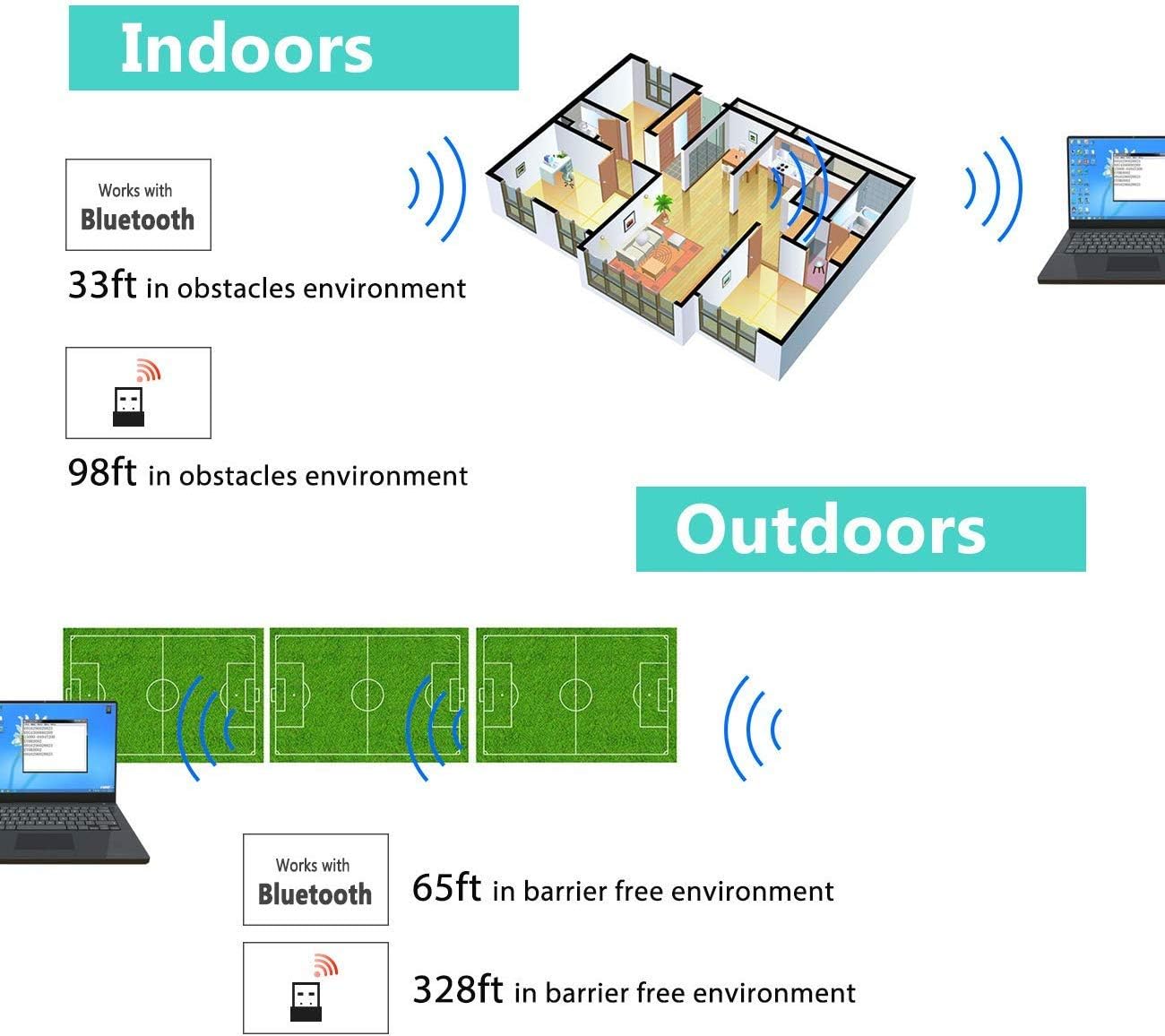
Image: Diagram illustrating the effective wireless range of the scanner in both indoor (with obstacles) and outdoor (barrier-free) environments for Bluetooth and 2.4GHz connections.
4. Kullanım Talimatları
4.1 Barkodların Taranması
The scanner can read both 1D and 2D barcodes, including QR codes, from printed materials and digital screens.
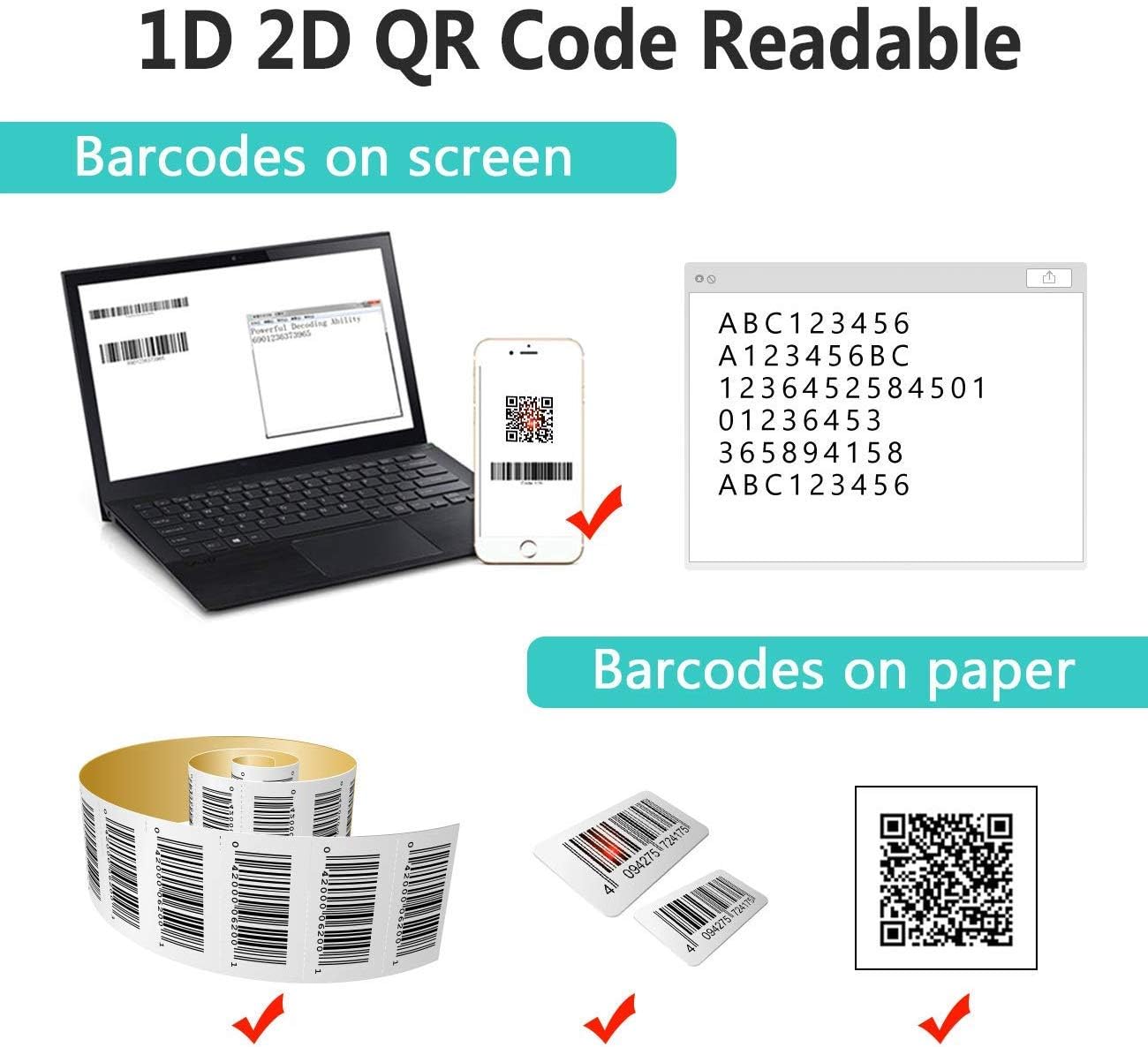
Image: The scanner demonstrating its ability to read 1D and 2D barcodes from both digital screens (laptop, smartphone) and physical printed labels.
Bir barkodu taramak için:
- Point the scanner's window at the barcode.
- Press the trigger button (or allow the sensor to activate in automatic modes).
- A successful scan is indicated by a beep and/or a green light.
4.2 Tarama Modları
Tarayıcı üç temel tarama modunu destekler:

Image: The barcode scanner mounted on its stand, highlighting its 360-degree rotation capability and the three available scanning modes: Key Trigger Mode, Sensor Activated Mode, and Continuous Scan Mode.
- Anahtar Tetikleme Modu: Scan by manually pressing the trigger button for each barcode.
- Sensor Activated Mode: The scanner automatically activates when a barcode is detected in its field of view.
- Sürekli Tarama Modu: The scanner continuously emits a scan beam, reading any barcode that passes through it.
Refer to the quick start guide or programming barcodes for instructions on how to switch between these modes.
4.3 Veri Yükleme Modları
Tarayıcı, taranan verileri yüklemek için iki yöntem sunar:
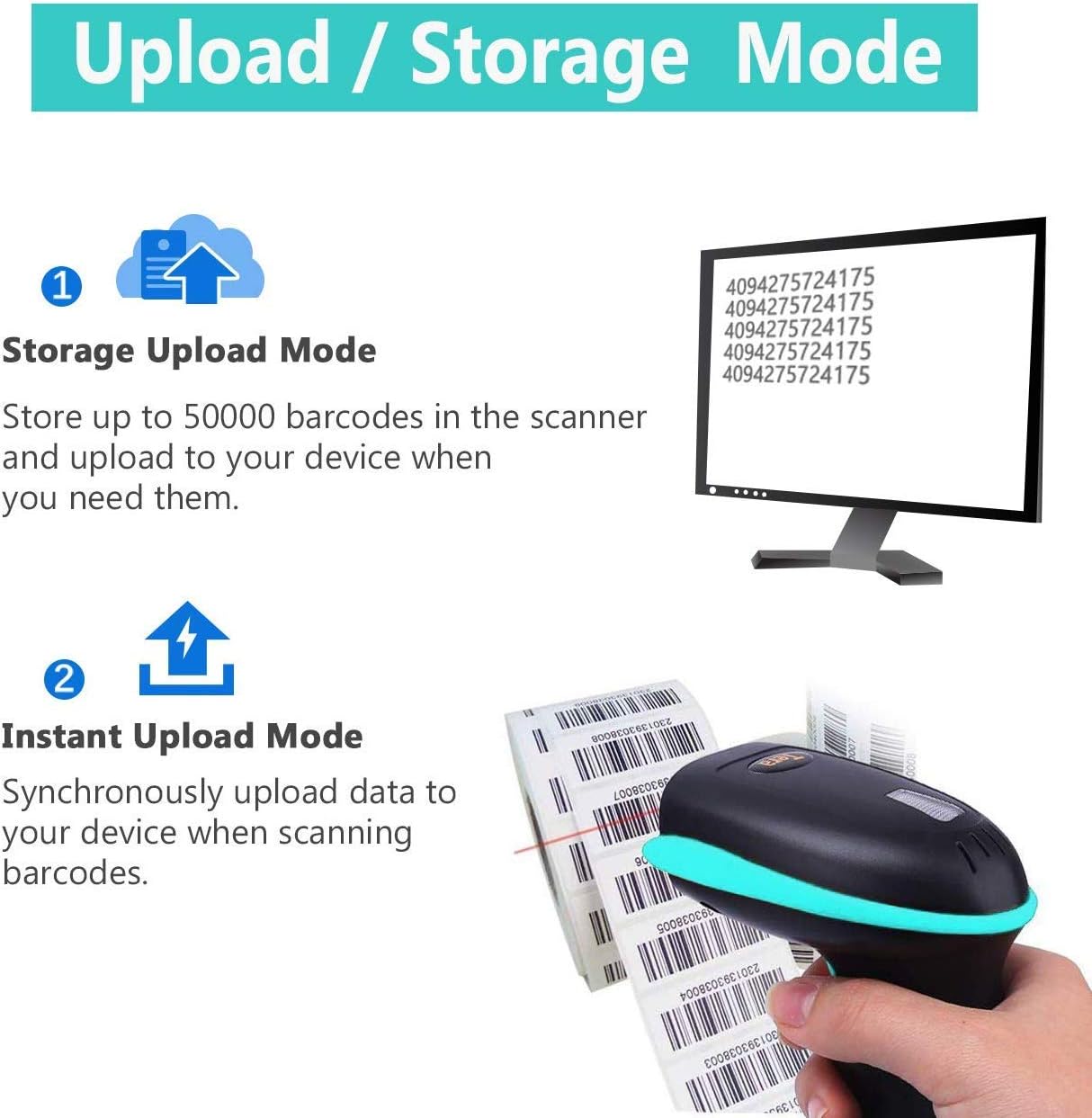
Image: Illustration of the two data upload modes: Storage Upload Mode, where barcodes are stored internally and uploaded later, and Instant Upload Mode, where data is transmitted immediately.
- Anında Yükleme Modu: Barcodes are sent to your connected device immediately after scanning. This is suitable for real-time data entry.
- Çevrimdışı Depolama Modu: If the scanner is out of range or not connected, it will store scanned barcodes internally. Up to 50,000 barcodes can be stored. Once reconnected, you can upload the stored data to your device.
To switch between upload modes, scan the appropriate programming barcode found in the quick start guide.
5. Bakım
5.1 Temizlik
- Yumuşak, temiz bir bez kullanın ve hafifçe kurulayın.ampened with water or a mild cleaning solution to wipe the scanner's exterior.
- Do not use abrasive cleaners, solvents, or excessive liquid, as these can damage the device.
- Keep the scanning window clean and free of dust or smudges to ensure optimal reading performance.
5.2 Pil Bakımı
- Charge the scanner regularly, especially if it will be stored for an extended period.
- Pilin ömrünü kısaltabileceğinden, pili sık sık tamamen boşaltmaktan kaçının.
- Tarayıcıyı kullanmadığınız zamanlarda serin ve kuru bir yerde saklayın.
5.3 Depolama
When not in use, store the scanner in a safe place to prevent physical damage. The included stand can be used for convenient storage and hands-free operation.
6. Sorun Giderme
| Sorun | Olası Neden | Çözüm |
|---|---|---|
| Tarayıcı açılmıyor. | Pil zayıf. | Tarayıcıyı en az 2-3 saat şarj edin. |
| Tarayıcı barkodları okumuyor. |
|
|
| No data transmitted to device. |
|
|
| Scanner beeps continuously or behaves erratically. | Configuration error or internal issue. | Perform a factory reset (refer to the quick start guide for the reset barcode). If the issue persists, contact support. |
7. Özellikler
- Model Numarası: 8541733886
- Ürün Ölçüleri: 6.1 x 2.55 x 3.54 inç
- Ürün Ağırlığı: 1.05 pound
- Pil: 1 Lityum İyon pil (2200 mAh)
- Bağlantı: Bluetooth, 2.4GHz Wireless, USB 2.0 Wired
- Uyumlu Cihazlar: Desktop, Laptop, Smartphone (POS, iOS, Android, Windows, Mac OS, Linux)
- Güç Kaynağı: Kablolu Elektrikli (şarj için)
- Üretici: Tera
- İlk Mevcut: 7 Mayıs 2019
8. Garanti ve Destek
8.1 Garanti Bilgileri
For specific warranty details, please refer to the warranty card included with your product or visit the official Tera webSite. Satın alma fişinizi, garanti talepleriniz için satın alma belgeniz olarak saklayın.
8.2 Müşteri Desteği
If you encounter any issues not covered in this manual or require further assistance, please contact Tera customer support. Contact information can typically be found on the product packaging, the official Tera websitenizden veya perakendeciniz aracılığıyla.
Destek ekibiyle iletişime geçerken lütfen ürün model numaranızı (8541733886) ve satın alma bilgilerinizi hazır bulundurun.


Image: Illustrations representing customer service and technical support teams available to assist users.


