1. Giriş
This manual provides comprehensive instructions for the setup, operation, and maintenance of your Drawmer CMC2 Compact Monitor Controller. Please read this manual thoroughly before using the device to ensure proper functionality and to maximize its performance.
2. Güvenlik Bilgileri
- Güç Kaynağı: Use only the factory-supplied 15V DC power supply. Using an incorrect power supply may damage the unit and void the warranty.
- Havalandırma: Ünitenin etrafında yeterli havalandırma olduğundan emin olun. Havalandırma açıklıklarını kapatmayın.
- Nem: Cihazı yağmura, neme veya aşırı rutubete maruz bırakmayın.
- Temizlik: Disconnect power before cleaning. Use a dry, soft cloth. Do not use liquid cleaners or aerosols.
- Servis: Tüm bakım işlemlerini yetkili servis personeline yaptırın. Üniteyi kendiniz açmaya veya onarmaya çalışmayın.
3. Paket İçeriği
Paketinizin aşağıdaki öğeleri içerdiğini doğrulayın:
- Drawmer CMC2 Compact Monitor Controller
- 15V DC Power Supply Unit
- Kullanım Kılavuzu (bu belge)
4. Ürün Bittiview
4.1 Ön Panel Kontrolleri
The front panel provides all primary controls for audio monitoring and source selection.

Şekil 4.1: Ön view of the Drawmer CMC2 Compact Monitor Controller, showing all knobs and buttons for input selection, speaker selection, master volume, headphone control, and mix check functions.
- AUX INPUT Knob: Adjusts the level of the auxiliary input.
- SOURCE SELECT Buttons (I/P1, I/P2, AUX): Aktif ses giriş kaynağını seçer.
- SPEAKER SELECT Buttons (A, B, SUB): Activates the selected speaker outputs.
- ANA SES DÜZEYİ Düğmesi: Controls the overall output level to the selected speakers.
- Sessiz tuşu: Mutes all speaker outputs.
- HEADPHONE Knob: Kulaklık çıkışının ses seviyesini ayarlar.
- MIX CHECK Buttons (ØREV, MONO, DIM): Provides phase reverse, mono sum, and dim functions for mix analysis.
- AUX INPUT (3.5mm Jack): Front panel auxiliary input for portable devices.
- HEADPHONE Output (6.35mm Jack): Front panel headphone output.
4.2 Arka Panel Bağlantıları
The rear panel houses all audio input and output connectors, along with the power input.

Şekil 4.2: Arka view of the Drawmer CMC2 Compact Monitor Controller, displaying the DC power input, speaker outputs (Mono/Sub, R-B-L, R-A-L), and inputs (R-2-L, R-1-L).
- DC=15V Input: Connect the supplied 15V DC power adapter here.
- Güç düğmesi: Toggles the unit's power on/off.
- SPEAKER OUTPUTS (MONO/SUB, R-B-L, R-A-L): Balanced XLR outputs for connecting up to two pairs of stereo monitors (A and B) and a mono subwoofer.
- INPUTS (R-2-L, R-1-L): Balanced XLR inputs for two stereo audio sources.
5. Kurulum
Follow these steps to set up your CMC2 controller:
- Güç Bağlantısı: Connect the supplied 15V DC power adapter to the 'DC=15V' input on the rear panel. Plug the adapter into a suitable power outlet. Do not power on the unit yet.
- Giriş Bağlantıları:
- Connect your primary audio source (e.g., audio interface, mixer) to the 'INPUTS R-1-L' using balanced XLR cables.
- Connect a secondary audio source to the 'INPUTS R-2-L' using balanced XLR cables.
- For portable devices, connect to the front panel 'AUX INPUT' (3.5mm jack) or the rear panel RCA auxiliary inputs (if available on your model, refer to specific product documentation).
- Hoparlör Bağlantıları:
- Connect your main studio monitors to the 'SPEAKER OUTPUTS R-A-L' using balanced XLR cables.
- If using a second pair of monitors, connect them to 'SPEAKER OUTPUTS R-B-L'.
- If using a subwoofer, connect it to the 'SPEAKER OUTPUTS MONO/SUB'.
- Kulaklık Bağlantısı: If desired, connect your headphones to the front panel 'HEADPHONE' 6.35mm jack.
- Güç Açık: Once all connections are secure, press the power switch on the rear panel to turn on the CMC2.
6. Kullanım Talimatları
This section details the functions of the CMC2's controls.
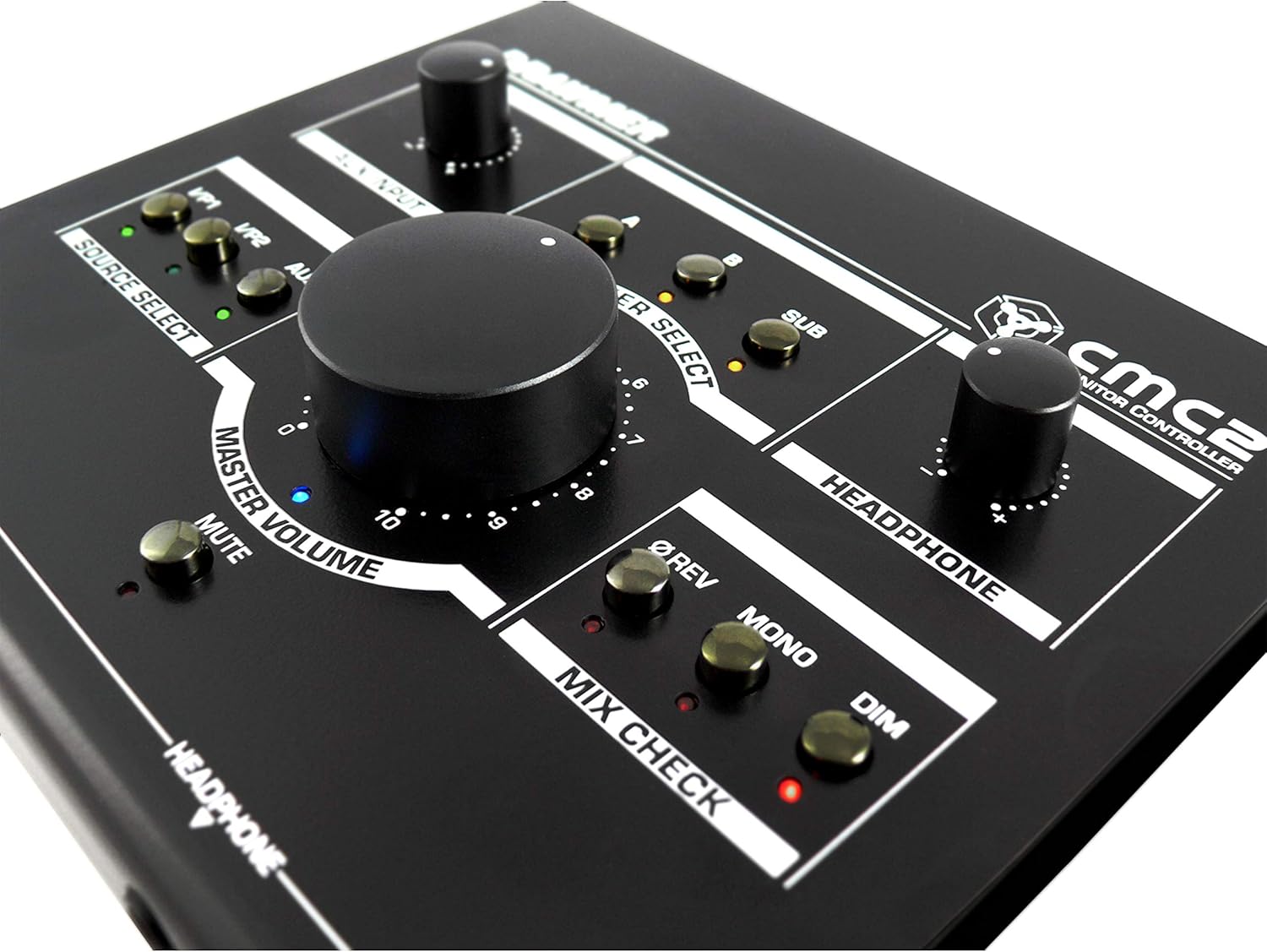
Şekil 6.1: Yakın çekim view of the Drawmer CMC2 front panel, highlighting the master volume, source select, speaker select, headphone, and mix check controls.
6.1 Kaynak Seçimi
- Basın Ben/P1 button to select the audio source connected to Input 1.
- Basın Ben/P2 button to select the audio source connected to Input 2.
- Basın Yardımcı button to select the auxiliary input (front panel 3.5mm jack).
- Only one source can be active at a time. The LED next to the selected button will illuminate.
6.2 Konuşmacı Seçimi
- Basın A button to route the selected source to Speaker Output A.
- Basın B button to route the selected source to Speaker Output B.
- Basın ALT button to route the selected source to the Subwoofer Output.
- Multiple speaker outputs can be active simultaneously (e.g., A and SUB). The LEDs indicate active outputs.
6.3 Ses Kontrolü
- Büyük olanı döndür ANA SES knob clockwise to increase the output level to the selected speakers, and counter-clockwise to decrease it.
- Döndür KULAKLIK knob to adjust the listening level for connected headphones.
- Döndür AUX GİRİŞİ knob to adjust the input level of the auxiliary source.
6.4 Mix Check Functions
- Basın ØREV button to reverse the phase of the right channel, useful for checking phase compatibility.
- Basın MONO button to sum the stereo signal to mono, allowing you to check for mono compatibility issues in your mix.
- Basın Sönük button to temporarily reduce the output volume by a fixed amount, useful for quick listening level changes without losing your main volume setting.
6.5 Sessize Alma İşlevi
- Basın SESSİZ button to instantly silence all active speaker outputs. The LED will illuminate when mute is active. Press again to unmute.
7. Bakım
The Drawmer CMC2 is designed for reliable operation with minimal maintenance.
- Temizlik: Keep the unit clean by wiping it with a dry, soft, lint-free cloth. Avoid abrasive cleaners or solvents.
- Çevre: Operate the unit in a clean, dry environment, away from direct sunlight, heat sources, and excessive dust.
- Havalandırma: Aşırı ısınmayı önlemek için havalandırma deliklerinin tıkanmadığından emin olun.
8. Sorun Giderme
If you encounter issues with your CMC2, refer to the following common problems and solutions:
- Güç Yok:
- Ensure the 15V DC power adapter is securely connected to the unit and a working power outlet.
- Check that the rear panel power switch is in the 'ON' position.
- Ses Çıkışı Yok:
- Verify that the correct input source (I/P1, I/P2, or AUX) is selected and its LED is illuminated.
- Ensure that at least one speaker output (A, B, or SUB) is selected and its LED is illuminated.
- Check that the MASTER VOLUME knob is turned up and the MUTE button is not active (LED off).
- Confirm all audio cables are securely connected to both the CMC2 and your speakers/audio sources.
- Test with different cables or audio sources to isolate the problem.
- Bozuk Ses:
- Ses kaynağınızdan gelen giriş seviyesini düşürün.
- Lower the MASTER VOLUME on the CMC2.
- Ses kablolarında hasar olup olmadığını kontrol edin.
- Headphone Output Not Working:
- Ensure headphones are fully plugged into the front panel jack.
- Adjust the HEADPHONE volume knob.
- Test with a different pair of headphones.
If the problem persists, contact Drawmer customer support or your authorized dealer for assistance.
9. Özellikler
| Model Adı | CMC2 |
| Marka | Çekmece |
| Önerilen Kullanımlar | Ses İzleme |
| Bağlantı Teknolojisi | XLR, RCA (Auxiliary) |
| Ses Çıkışı Modu | Stereo |
| Hoparlör Tipi | İzlemek |
| Ürün Boyutları | 13 x 9 x 3 inç (33 x 22.86 x 7.62 cm) |
| Ürün Ağırlığı | 3 pound (1.36 kg) |
| Üretici | Çekmece |
10. Garanti ve Destek
The Drawmer CMC2 Compact Monitor Controller is covered by a manufacturer's warranty. Please refer to the warranty card included with your product or visit the official Drawmer webAyrıntılı garanti şartları ve koşulları için siteyi ziyaret edin.
For technical support, service, or further inquiries, please contact your authorized Drawmer dealer or the Drawmer customer support team through their official channels.


