1. Giriş
This manual provides detailed instructions for the proper use and maintenance of your Traceable Calibrated Thermohygrometer with RS-232. This device is designed for accurate measurement of temperature and humidity, featuring microprocessor-based technology for easy calibration and an RS-232 output for data communication. For optimal performance and longevity, please read these instructions thoroughly before operation.
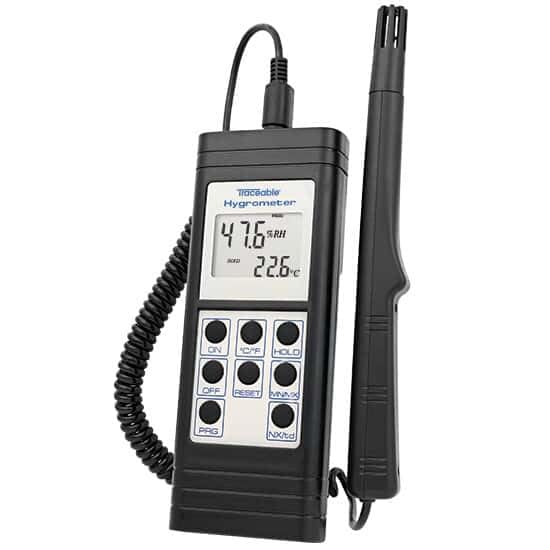
Image 1: The Traceable Calibrated Thermohygrometer. The device features a digital display showing humidity and temperature, with several control buttons below. A probe is connected via a coiled cable.
2. Özellikler
- Accurately measures temperature and relative humidity.
- Includes a NIST-Traceable certificate from an A2LA accredited calibration laboratory (1750.01), ensuring measurement accuracy.
- Microprocessor-based design facilitates quick and straightforward calibration procedures.
- Equipped with RS-232 output for data transmission to compatible systems.
3. Kutuda Neler Var?
Upon unpacking, verify that the following items are present:
- Traceable Calibrated Thermohygrometer unit
- Humidity/Temperature Probe
- NIST-Traceable Calibration Certificate
- Kullanım Kılavuzu
4. Kurulum
- Pil Montajı: Open the battery compartment (typically on the back of the unit) and insert the required batteries, observing correct polarity.
- Prob Bağlantısı: Connect the humidity/temperature probe to the designated port on the main unit. Ensure a secure connection.
- İlk Güç Açma: Basın ON button to power on the device. The display should illuminate and show initial readings.
- Unit Selection (if applicable): If your model allows, select your preferred temperature unit (Celsius or Fahrenheit) using the °C/°F düğme.
- Atama: Position the thermohygrometer in the environment where measurements are required. Ensure the probe is exposed to the air and not obstructed.
5. Kullanım Talimatları
5.1 Temel İşlemler
- Güç AÇIK/KAPALI: Basın ON button to turn the unit on. Press the KAPALI kapatmak için düğmesine basın.
- Okuma Ekranı: The display will show current relative humidity (RH%) and temperature (°C/°F).
- Sıcaklık birimi: Toggle between Celsius (°C) and Fahrenheit (°F) by pressing the °C/°F düğme.
- Veri tutma: Basın TUTMAK Ekrandaki mevcut değerleri dondurmak için düğmeye basın. Serbest bırakmak için tekrar basın.
- Minimum/Maximum Readings: Basın EN AZ EN ÇOK düğmeye bas view the minimum and maximum temperature and humidity readings recorded since the last reset. Press repeatedly to cycle through MIN, MAX, and current readings.
- Reset MIN/MAX: Sırasında viewing MIN/MAX readings, press the SIFIRLAMA button to clear the stored minimum and maximum values.
5.2 RS-232 Output
The device is equipped with an RS-232 port for connecting to a computer or data logger. This allows for real-time data acquisition and analysis. Refer to the specific software or interface instructions for your data collection system for details on establishing communication and data transfer protocols.

Image 2: A hand in a blue glove interacting with a Traceable device, demonstrating typical laboratory use. This image illustrates the practical application of Traceable instruments in a controlled environment.
6. Bakım
- Temizlik: Wipe the unit and probe with a soft, damp bezle silin. Aşındırıcı temizleyiciler veya çözücüler kullanmayın.
- Pil Değişimi: Replace batteries when the low battery indicator appears on the display. Ensure proper battery type and polarity.
- Depolamak: When not in use for extended periods, remove the batteries and store the device in a cool, dry place away from direct sunlight and extreme temperatures.
- yeniden kalibrasyon: Due to the nature of humidity sensors, periodic recalibration is recommended to maintain accuracy. Refer to the NIST-Traceable certificate for recommended recalibration intervals.
7. Sorun Giderme
| Sorun | Olası Neden | Çözüm |
|---|---|---|
| Ekran yok veya soluk ekran | Dead or weak batteries; incorrect battery installation. | Pilleri yenileriyle değiştirin, kutupların doğru olmasına dikkat edin. |
| Yanlış okumalar | Sensor contamination; need for recalibration; probe not properly connected. | Clean the probe gently; perform recalibration; ensure probe is securely connected. |
| RS-232 communication failure | Incorrect cable; software settings mismatch; port issue. | Verify cable connection and type; check software communication settings (baud rate, parity); try a different USB/serial port. |
8. Özellikler
| Parametre | Değer |
|---|---|
| Model Numarası | B07R5N7QYS |
| Üretici | COLE-PARMER |
| Kalibrasyon | NIST-Traceable (A2LA accredited 1750.01) |
| Arayüz | RS-232 |
| İlk Mevcut Tarih | 29 Nisan 2019 |
9. Garanti ve Destek
For warranty information and technical support, please contact the manufacturer, Cole-Parmer, or your authorized distributor. Keep your purchase receipt and NIST-Traceable certificate for reference.
Üretici: COLE-PARMER
Marka: İZLENEBİLİR
Daha fazla yardım için şu adresi ziyaret edin: Traceable Brand Store on Amazon.


