1. Giriş
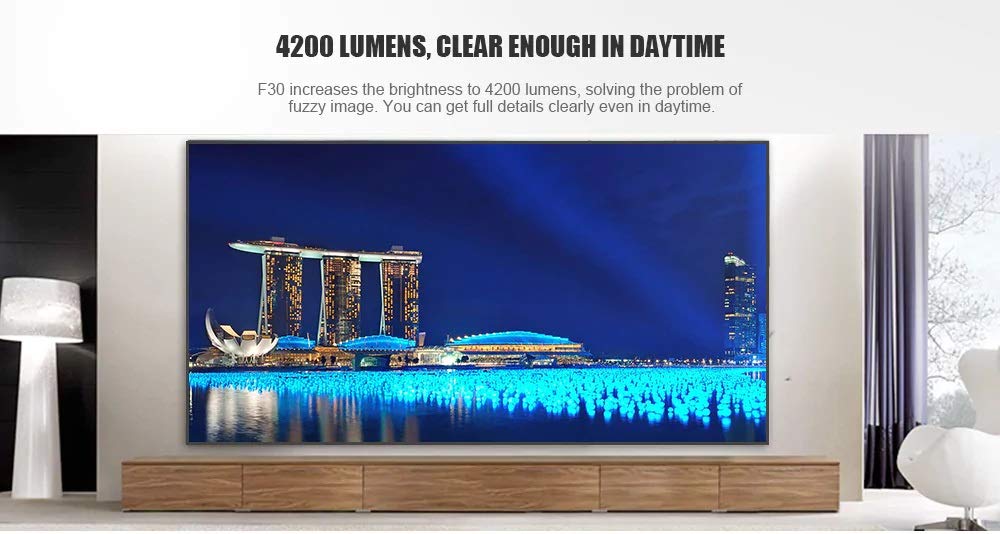
This manual provides essential instructions for the safe and efficient use of your Vivibright F30 Projector. Please read this manual thoroughly before operating the device and retain it for future reference. The Vivibright F30 is a Full HD 1080p LED projector designed for home theater, education, and business presentations, offering 4200 lumens brightness and multiple connectivity options.
2. Güvenlik Bilgileri
- Güç Kaynağı: Yalnızca belirtilen güç adaptörünü kullanın. Voltajın düşük olduğundan emin olun.tage, projektörün gereksinimlerini karşılıyor.
- Havalandırma: Havalandırma açıklıklarını kapatmayın. Aşırı ısınmayı önlemek için projektörün etrafında yeterli hava akışı sağlayacak boşluk bırakın.
- Sıcaklık: projektör lamp generates heat. Avoid touching the lens or vents immediately after use.
- Göz Koruması: Projektör lensine doğrudan bakmayın.amp Açık durumda. Parlak ışık göz yorgunluğuna veya hasarına neden olabilir.
- Atama: Projeksiyon cihazını sabit ve düz bir yüzeye yerleştirin. Doğrudan güneş ışığına, ısı kaynaklarının yakınına veya yüksek nemli ya da tozlu ortamlara koymaktan kaçının.
- Temizlik: Temizlemeden önce elektriği kesin. Yumuşak, kuru bir bez kullanın. Sıvı veya aerosol temizleyiciler kullanmayın.
- Servis: Do not attempt to service the projector yourself. Refer all servicing to qualified personnel.
3. Paket İçeriği
Paketin içinde tüm öğelerin mevcut olduğundan emin olun:
- Vivibright F30 Projector
- Güç kablosu
- Uzaktan kumanda
- Kullanım Kılavuzu (bu belge)
- HDMI Kablosu (bölgeye/pakete göre değişiklik gösterebilir)
4. Ürün Bittiview
Projektörün bileşenlerini ve arayüzlerini iyice öğrenin.
Şekil 4.1: Ön view of the Vivibright F30 Projector, showing the lens and ventilation.

Şekil 4.2: Taraf view of the Vivibright F30 Projector, highlighting the various input ports.
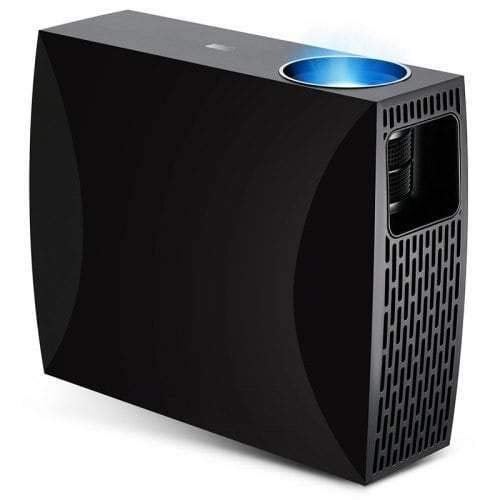
Şekil 4.3: Top or rear view of the Vivibright F30 Projector, showing control buttons or additional vents.
4.1. Arayüzler
- HDMI Bağlantı Noktaları: For connecting devices like laptops, gaming consoles, Blu-ray players, and media players.
- VGA Bağlantı Noktası: For connecting older computers or other VGA-compatible devices.
- USB Bağlantı Noktaları: USB depolama aygıtlarını bağlayarak medyayı doğrudan oynatmak için.
- Ses çıkışı: Harici hoparlör veya kulaklık bağlamak için.
- Güç Girişi: Güç kablosunu bağlamak için.
5. Kurulum
5.1. Yerleşim
Position the projector on a stable surface or mount it appropriately. Ensure the projector is perpendicular to the projection screen for optimal image geometry. The projection distance can range from 1.2 to 6.8 meters, depending on the desired screen size.
5.2. Güç Bağlantısı
- Güç kablosunu projektörün güç giriş portuna bağlayın.
- Güç kablosunun diğer ucunu topraklı bir elektrik prizine takın.
5.3. Giriş Aygıtlarının Bağlanması
Connect your desired source device (e.g., laptop, media player) to the projector using an appropriate cable (HDMI, VGA, USB). Ensure the cable is securely connected to both the projector and the source device.
5.4. Odak ve Trapez Düzeltme
- Odak: Projeksiyon cihazının merceğindeki odak halkasını, ekranda görüntü net ve berrak görünene kadar çevirin.
- Kilit taşı: If the projected image is trapezoidal (wider at the top or bottom), use the keystone correction feature (manual or digital, depending on model) to adjust the image to a rectangular shape.
6. Kullanım Talimatları
6.1. Açma/Kapama
- Güç Açık: Press the power button on the projector or the remote control. The indicator light will change, and the lamp aydınlatacaktır.
- Kapat: Press the power button again. Confirm shutdown if prompted. Allow the projector to cool down before unplugging it.
6.2. Giriş Kaynağı Seçimi
Press the "Source" button on the remote control or the projector's control panel to cycle through available input sources (HDMI1, HDMI2, VGA, USB). Select the input corresponding to your connected device.
6.3. Menü Navigasyonu
Use the arrow buttons on the remote control or projector to navigate through the on-screen display (OSD) menu. Press "OK" or "Enter" to select an option and "Exit" or "Menu" to go back or close the menu.
6.4. Görüntü ve Ses Ayarları
Adjust picture settings such as brightness, contrast, color, and aspect ratio via the OSD menu to optimize image quality. Adjust volume levels for the built-in speaker or connected external audio devices.
7. Bakım
7.1. Lensin Temizlenmesi
Projeksiyon merceğini, optik yüzeyler için özel olarak tasarlanmış, yumuşak ve tüy bırakmayan bir bezle nazikçe silin. Aşındırıcı malzemeler veya sert kimyasallar kullanmayın.
7.2. Projektör Gövdesinin Temizlenmesi
Projektörün dış yüzeyini temizlemek için yumuşak, kuru bir bez kullanın. İnatçı lekeler için, biraz daha yumuşak bir bez yeterli olacaktır.amp Önce bir bez kullanılabilir, ardından kuru bir bezle silin. Havalandırma açıklıklarından sıvı girmemesine dikkat edin.
7.3.Lamp Hayat
The Vivibright F30 Projector utilizes an LED lamp with an estimated lifespan of up to 50,000 hours, requiring no regular replacement under normal usage conditions.
8. Sorun Giderme
| Sorun | Olası Neden | Çözüm |
|---|---|---|
| Resim görüntülenmiyor |
|
|
| Görüntü bulanık |
|
|
| Görüntü yamuk şeklindedir (keystone etkisi). |
|
|
| Ses yok |
|
|
| Projektör aşırı ısınıyor veya kapanıyor. |
|
|
9. Özellikler
| Özellik | Detay |
|---|---|
| Marka | Vivibright |
| Örnek | F30 |
| Yerel Çözünürlük | 1920x1080 (Tam HD) |
| Desteklenen Çözünürlük | 4K'ya kadar |
| Parlaklık | 4200 Lumens (LED Luminous) |
| Kontrast Oranı | 2200:1 |
| Ekran Teknolojisi | LCD |
| Lamp Tip | NEDEN OLMUŞ |
| Lamp Hayat | 50,000 saate kadar |
| Projeksiyon Mesafesi | 1.2 ila 6.8 metre |
| Gürültü Seviyesi | 29 Desibel |
| Bağlantı | HDMI, VGA, USB |
| Özel Özellikler | Portable, Built-in Speaker |
| Ürün Ağırlığı | 3 kilo |
| Montaj Tipi | Masa Üstü Montaj |
10. Garanti ve Destek
10.1. Garanti Bilgileri
The Vivibright F30 Projector comes with a 1 Yıl Garanti Satın alma tarihinden itibaren geçerlidir. Bu garanti, üretim hatalarını ve normal kullanımdaki arızaları kapsar. Garanti talepleriniz için lütfen satın alma belgenizi saklayın.
Garanti, yanlış kullanım, kaza, yetkisiz onarımlar veya normal aşınma ve yıpranma nedeniyle oluşan hasarları kapsamaz.
10.2. Müşteri Desteği
For technical assistance, warranty claims, or further inquiries, please contact Vivibright customer support through their official website or the contact information provided with your purchase documentation. When contacting support, please have your product model (F30) and purchase details ready.


