giriiş
Thank you for choosing the Baseus 10W Automatic Clamping Wireless Car Charger Mount. This device is designed to provide convenient and fast wireless charging for your Qi-enabled smartphone while securely holding it in your vehicle. Please read this manual carefully before use to ensure proper operation and to maximize the product's lifespan.
Güvenlik Bilgileri
- Ürünü sökmeyin veya üzerinde değişiklik yapmayın.
- Sudan, ateşten ve yüksek sıcaklıklardan uzak tutun.
- Cihazı sert darbelere maruz bırakmaktan veya düşürmekten kaçının.
- Kullanım sırasında şarj cihazı çevresinde uygun havalandırma olduğundan emin olun.
- Use only with compatible power sources (QC 3.0 car charger recommended for fast charging).
Paket İçeriği
- Baseus Wireless Car Charger Mount
- Air Vent Clip (1x)
- Micro USB Cable (4.9ft)
- Kullanıcı Kılavuzu
Ürün Bittiview
The Baseus Wireless Car Charger Mount features an automatic clamping mechanism, Qi wireless charging, and an air vent mounting system. It is designed for easy one-hand operation.
Temel Bileşenler:
- Şarj Pedi: The surface where the phone rests for wireless charging.
- Otomatik ClampSilahlanma: Securely hold the phone in place.
- Infrared Induction Sensor: Detects the phone for automatic clampIng.
- One-Tap Release Button: Located on the side, releases the clampkollar.
- Hava Menfezi Klipsi: Attaches the mount to your car's air vent.
- Mikro USB Bağlantı Noktası: Güç girişi için.
Kurulum Talimatları
1. Attaching the Air Vent Clip
- Unscrew the nut on the back of the charger mount.
- Insert the ball joint of the air vent clip into the nut, then into the socket on the back of the charger.
- Tighten the nut to secure the clip to the charger.
2. Mounting to the Car Air Vent
- Choose a suitable air vent in your vehicle. The clip is designed for various vent types, as shown in the image below.
- Gently push the air vent clip onto one of the vent blades until it is securely attached.
- Adjust the angle of the charger mount for optimal viewIng.

This image illustrates the different types of car air vents that are compatible with the charger mount's clip. Ensure your car's vent matches one of the compatible designs for secure installation.
3. Gücü Bağlama
- Connect the Micro USB cable to the charging port on the bottom of the charger mount.
- Plug the other end of the USB cable into a car charger (not included). For 10W fast charging, a QC 3.0 car charger is required. Standard 5V/2A car chargers will provide 5W charging.
- Şarj cihazının üzerindeki gösterge ışığı yanarak cihazın açık ve kullanıma hazır olduğunu belirtir.
Kullanım Talimatları
1. Placing Your Phone
- Hold your Qi-enabled smartphone near the charging pad. The infrared induction sensor will detect your phone.
- Otomatik clamping arms will open. Place your phone onto the charging pad.
- clamping arms will automatically close, securing your phone and initiating wireless charging.
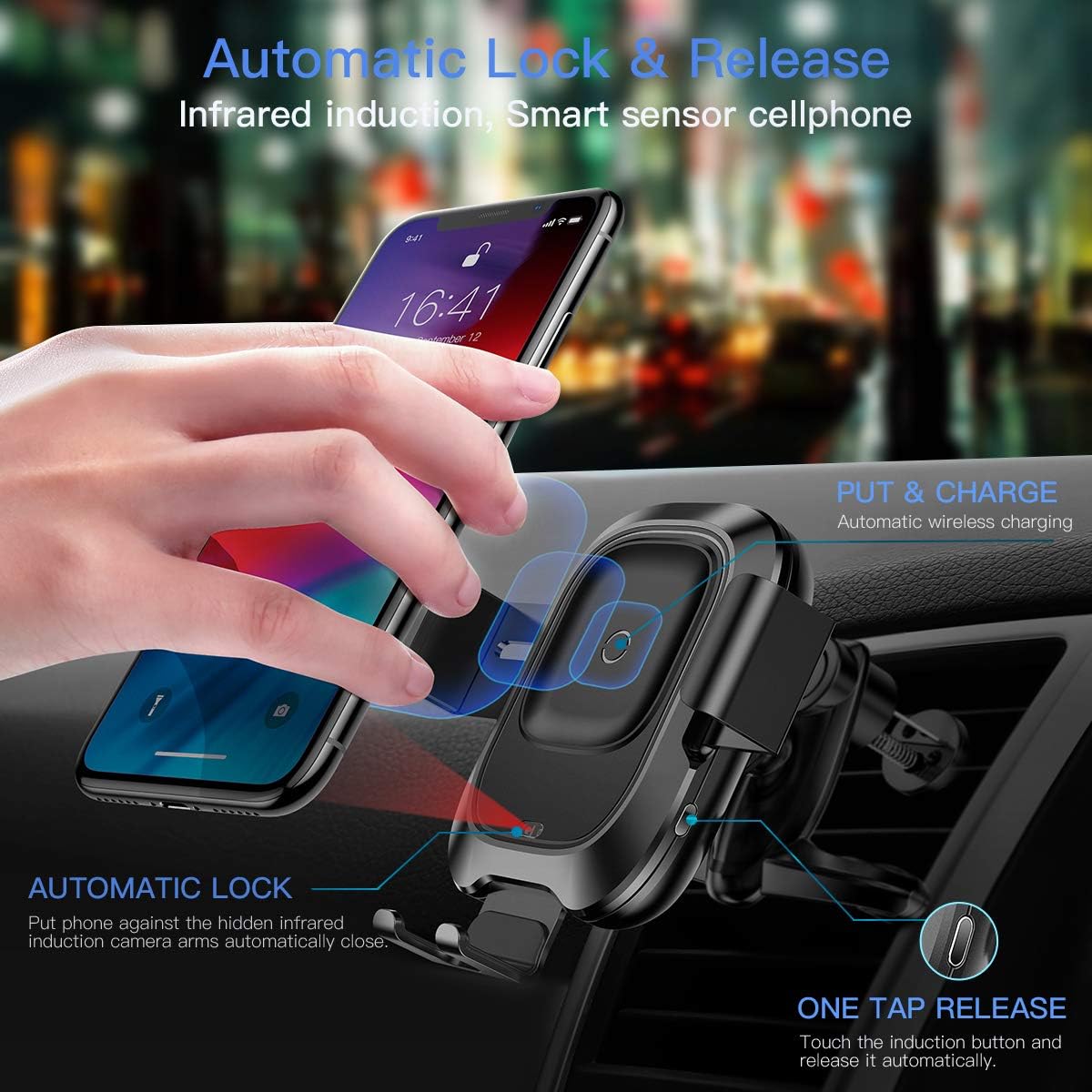
This image illustrates how the infrared sensor detects a phone, causing the arms to automatically open and then clamp shut once the phone is placed, initiating charging.
2. Removing Your Phone
- To release your phone, gently touch the sensor button located on the right side of the charger mount.
- clamping arms will automatically open, allowing you to remove your phone.
3. Wireless Charging Functionality
The charger supports Qi-enabled phones between 4.0 and 6.5 inches. Charging speeds vary:
- 10W Hızlı Şarj: For compatible Samsung phones (e.g., Galaxy S10/S9/Note 9). Requires a QC 3.0 car charger.
- 7.5W Hızlı Şarj: For compatible iPhones (e.g., iPhone Xs/XR/X/8). Requires a QC 3.0 car charger.
- 5W Standart Şarj: For other Qi-enabled devices. Requires a 5V/2A car charger.
Önemli Not:
- The thickness of your phone case should not exceed 4mm for optimal charging.
- Metal cases or foreign objects between the phone and charger will interfere with wireless charging.
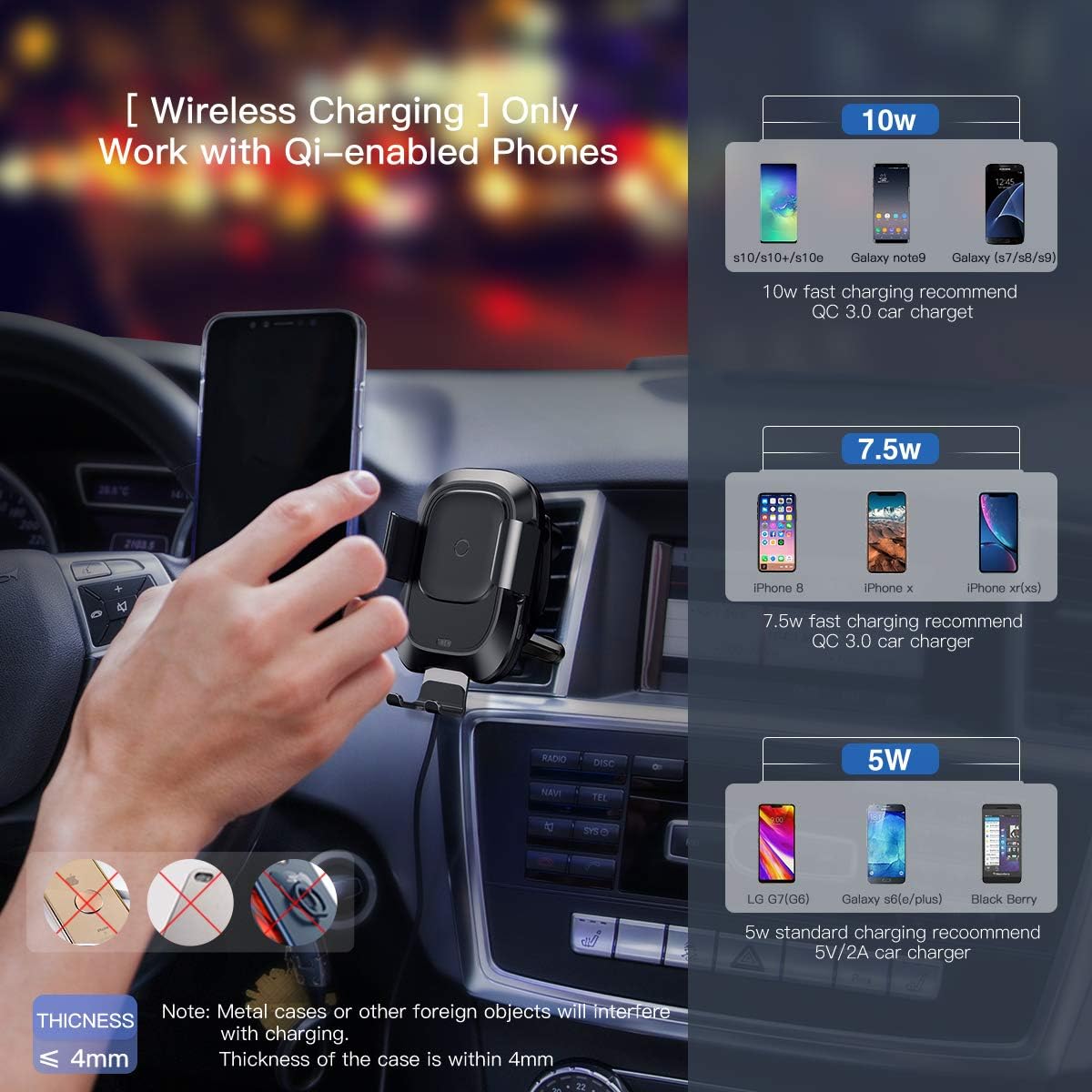
This image provides a visual guide to the wireless charging capabilities, showing 10W, 7.5W, and 5W charging for various phone models and the requirement for a QC 3.0 car charger for fast charging.
4. Ürün Tanıtım Videosu
Watch this video for a visual demonstration of the Baseus Wireless Car Charger Mount's features and operation.
Bu video, ayrıntılı bir genel bakış sunmaktadır.view and demonstration of the Baseus Wireless Car Charger Mount, showcasing its automatic clamping, wireless charging, and ease of use.
Bakım
- Clean the surface of the charger with a soft, dry cloth. Do not use abrasive cleaners or solvents.
- Ensure the air vent clip is free from dust and debris to maintain a secure grip.
- Regularly check the Micro USB cable for any signs of wear or damage.
Sorun giderme
| Sorun | Olası Neden | Çözüm |
|---|---|---|
| Telefon kablosuz olarak şarj olmuyor. | 1. Phone not Qi-enabled. 2. Phone not properly aligned. 3. Phone case too thick or contains metal. 4. Insufficient power input. | 1. Verify phone supports Qi wireless charging. 2. Re-position phone on the charging pad. 3. Remove phone case or use a thinner, non-metallic case. 4. Ensure a QC 3.0 car charger is used for fast charging, or a 5V/2A for standard charging. |
| Clamping arms not opening/closing automatically. | 1. Şarj cihazına güç gelmiyor. 2. Sensörün girişi engellenmiş. 3. Arıza. | 1. Check power connection and car charger. 2. Ensure the infrared sensor is clean and unobstructed. 3. Sorun devam ederse müşteri desteğiyle iletişime geçin. |
| Charger mount is loose on the air vent. | Improper installation or incompatible vent type. | Ensure the air vent clip is fully engaged with a vent blade and the nut is tightened. Verify vent compatibility. |
Özellikler
- Marka: Bazus
- Bağlantı Tipi: USB, Kablosuz
- Uyumlu Cihazlar: Qi-enabled Smartphones (4.0"-6.5")
- Uyumlu Telefon Modelleri: iPhone Xs, Xs Max, XR, X, 8, 8 Plus; Samsung Galaxy S10, S10 Plus, S10e, S9, S9 Plus, S8, S8 Plus, S7, S7 edge, S6 edge plus, Note 9, Note 5 series devices.
- Özellik: Hızlı Şarj
- Renk: Siyah
- Giriş Voltage: 9 Volt
- Ampöfke: 1.67 Amps
- Toplam USB Bağlantı Noktaları: 1
- Ürün Ağırlığı: 10.2 ons
- Paket Boyutları: 8.15 x 4.45 x 2.91 inç
Garanti ve Destek
This Baseus Wireless Car Charger Mount comes with an 18 ay garanti from the date of purchase. Baseus also provides ömür boyu müşteri hizmeti Bu ürün için.
For warranty claims, technical support, or any inquiries, please refer to the contact information provided with your purchase or visit the official Baseus webalan.


