1. Giriş
This manual provides detailed instructions for the installation, operation, and maintenance of your Anlapus FULL HD 1080P H.265+ Surveillance Kit. This system includes an 8-channel DVR with a pre-installed 1TB hard drive, 4 bullet cameras, and 4 dome cameras, designed to provide comprehensive security monitoring for your property.

Figure 1.1: Anlapus 8-channel DVR surveillance system components.
2. Paket İçeriği
Aşağıda listelenen tüm ürünlerin paketinizde mevcut olduğundan emin olun. Eksik veya hasarlı bir ürün varsa, lütfen müşteri hizmetleriyle iletişime geçin.
- 1x 8-Channel DVR (with 1TB HDD pre-installed)
- 4x 1080P Bullet Surveillance Cameras
- 4x 1080P Dome Surveillance Cameras
- 8x 60ft BNC Video Cables
- 3x Power Adapters (12V 2A)
- 2x 1-to-4 Power Splitters
- 1x USB Fare
- 1x Kullanım Kılavuzu (bu belge)
- 8 adet Montaj Vidası Torbası
- 8 adet Uyarı Etiketi

Figure 2.1: Contents of the Anlapus surveillance kit package.
3. Ürün Özellikleri
- Tam HD 1080P Çözünürlük: Captures clear and detailed images with 2.0-megapixel quality.
- Advanced H.265+ Video Compression: Azaltır file sizes by up to 50% compared to H.264, allowing for longer recording times and more efficient storage.
- Gelişmiş Gece Görüşü: Equipped with 24 IR LEDs and an IR-CUT filter, providing clear black and white night vision up to 24 meters (80 feet).
- IP66 Hava Koşullarına Dayanıklılık Derecesi: Cameras are designed for both indoor and outdoor use, capable of withstanding various extreme weather conditions.
- Hareket Algılama ve Uyarılar: Configurable motion detection zones with instant email alerts and push notifications to your smartphone.
- Çoklu Kayıt Modları: Supports 24/7 continuous recording, motion-activated recording, scheduled recording, and manual recording.
- Uzaktan Erişim: View canlı yayınlar ve kayıtlı fotoğraflartage from anywhere using the free mobile application on your smartphone or tablet.
- Önceden yüklenmiş 1TB Sabit Disk: Ready for immediate use, eliminating the need to purchase and install a separate hard drive.

Şekil 3.1: Gündüz ve Gece Görüşü.
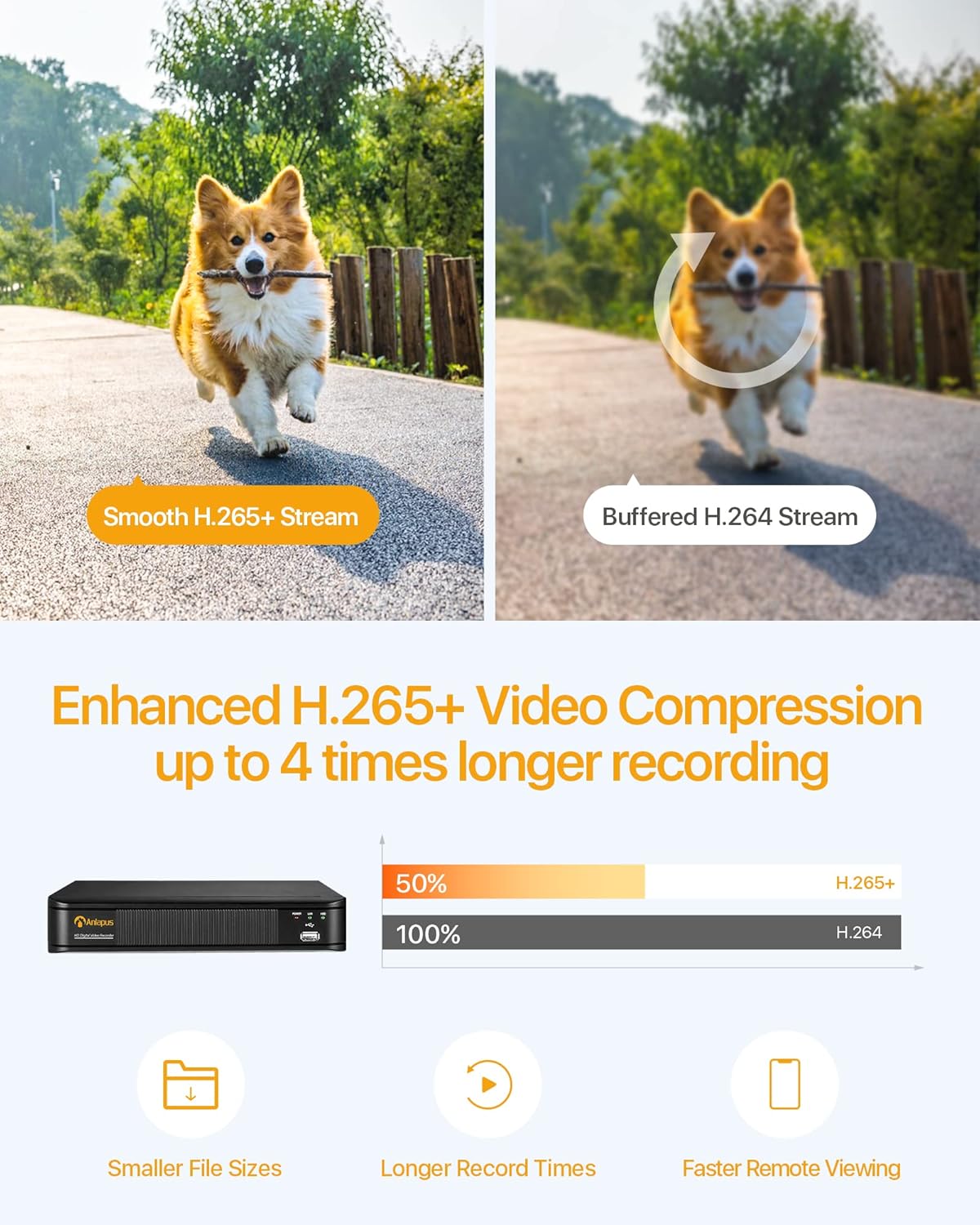
Figure 3.2: H.265+ Video Compression Benefits.

Figure 3.3: Day and Night Surveillance Exampley.

Figure 3.4: All-Weather Protection and Applications.
4. Sistem Bileşenleri Üzerineview
4.1 DVR (Dijital Video Kaydedici)
The DVR is the central unit for recording, storing, and managing video footage from all connected cameras. It features multiple video input ports, audio input/output, VGA and HDMI outputs for display, and USB ports for mouse control and data backup.
4.2 Surveillance Cameras
The kit includes both bullet and dome cameras. Both types offer 1080P resolution, night vision capabilities, and IP66 weatherproof housing. Bullet cameras are typically used for directional surveillance, while dome cameras offer a more discreet appearance and are often vandal-resistant.

Figure 4.1: Camera and DVR Connection Diagram.
5. Kurulum Kılavuzu
5.1 İlk Bağlantı
- Kameraları Bağlayın: Use the provided BNC video cables to connect each camera to the 'VIDEO IN' ports on the back of the DVR.
- Güçlü Kameralar: Use the power adapters and 1-to-4 power splitters to provide power to all cameras.
- Connect DVR to Display: Connect the DVR to a monitor or TV using either an HDMI or VGA cable.
- DVR'ı Ağa Bağlayın: Connect the DVR's 'NETWORK' port to your router using an Ethernet cable for remote access.
- USB Fareyi Bağlayın: Plug the USB mouse into one of the DVR's USB ports for navigation.
- DVR'ı Açın: Connect the DVR to its power adapter and plug it into an electrical outlet. The system will boot up.

Figure 5.1: Simple Connection for Mobile Access.
5.2 Mobil Uygulama Kurulumu
- İndir uygulaması: Arama the official Anlapus security app on Google Play Store or Apple App Store and install it on your smartphone.
- Hesap Kaydı: Uygulamayı açın ve yeni bir kullanıcı hesabı kaydetmek için ekrandaki yönergeleri izleyin.
- Cihaz Ekle: Scan the QR code displayed on your DVR's monitor or manually enter the device ID to add your DVR to the app.
- View Kameralar: Bir kez eklendiğinde, şunları yapabilirsiniz: view live feeds from your cameras and access recorded footage uzaktan.
6. Kullanım Talimatları
6.1 Kayıt Modları
Your DVR supports several recording modes:
- Continuous Recording (24/7): Records continuously, overwriting the oldest footage sabit disk dolduğunda.
- Hareket Algılama Kaydı: Yalnızca hareket algılandığında kayıt yapar, böylece depolama alanından tasarruf sağlar.
- Planlanmış Kayıt: Kayıt için belirli zamanlar belirleyin.
- Manuel Kayıt: Kaydı manuel olarak başlatın ve durdurun.
Configure these settings via the DVR's main menu using the USB mouse.

Figure 6.1: 24/7 Recording View.
6.2 Hareket Algılama ve Uyarılar
Sistem, hareketi algılayacak ve uyarı gönderecek şekilde yapılandırılabilir:
- Algılama Bölgelerini Yapılandır: In the DVR settings, define specific areas within the camera's view hareket algılama için.
- Hassasiyeti Ayarla: Yanlış alarmları en aza indirmek için hareket algılama hassasiyetini ayarlayın.
- Uyarıları Etkinleştir: Activate email alerts and push notifications through the DVR settings and mobile app. When motion is detected, you will receive an alert on your smartphone.

Figure 6.2: Motion Detection and Smartphone Alert.

Figure 6.3: Smart Motion Detection Features.
6.3 Remote Access & Playback
Access your surveillance system from anywhere:
- Canlı View: Mobil uygulamayı açın view Bağlı tüm kameralardan canlı video akışları.
- Playback: Use the app's playback function to review kaydedilmiş footage stored on the DVR's hard drive. You can select specific dates and times.
- Çok Cihazlı ViewTürkçe: The system supports simultaneous viewing on multiple devices, including smartphones, tablets, and desktop computers.

Figure 6.4: Mobile App Playback Interface.

Figure 6.5: Multi-Device Remote ViewIng.
7. Bakım
- Kameraları Temizleyin: Periyodik olarak fotoğraf makinesi lenslerini yumuşak bir bezle temizleyin.amp Net görüntü kalitesi sağlamak için bezle silin. Aşındırıcı temizleyicilerden kaçının.
- Kabloları Kontrol Edin: Ensure all cables are securely connected and free from damage. Replace any damaged cables immediately.
- DVR Havalandırması: DVR cihazının aşırı ısınmayı önlemek için iyi havalandırılan bir alana yerleştirildiğinden emin olun. Havalandırma deliklerinin tıkanıklıklardan arındırılmış olduğundan emin olun.
- Donanım Yazılımı Güncellemeleri: Üreticinin kontrol edin webEn iyi performans ve güvenliği sağlamak için siteyi düzenli olarak yazılım güncellemeleri için kontrol edin.
- Veri Yedekleme: Önemli dosyaları düzenli olarak yedekleyintage from the DVR's hard drive to an external USB device.

Figure 7.1: USB Data Backup.
8. Sorun Giderme
- Video Sinyali Yok: Check all cable connections between cameras and DVR, and between DVR and display. Ensure cameras and DVR are powered on.
- Kötü Görüntü Kalitesi: Clean camera lenses. Ensure cameras are properly focused (if adjustable). Check cable integrity.
- Uzaktan Erişim Yok: Verify the DVR is connected to the internet. Check network settings on the DVR and ensure your router is functioning correctly. Confirm the mobile app is properly configured and the device is added.
- Hareket Algılama Çalışmıyor: Review motion detection settings in the DVR menu. Adjust sensitivity and detection zones. Ensure alerts are enabled in both DVR and mobile app settings.
- DVR Kayıt Yapmıyor: Check hard drive status in DVR settings. Ensure recording schedules or motion detection settings are correctly configured.
Daha fazla yardım için lütfen destek bölümüne bakın veya müşteri hizmetleriyle iletişime geçin.
9. Özellikler
| Marka | Anlapüs |
| Model Numarası | AJ-AM8A4B-4W441E-106202S |
| Video Çözünürlüğü | 1080p Full HD |
| Video Sıkıştırma | H.265 + |
| DVR Kanalları | 8 Kanal |
| Depolama Kapasitesi | 1 TB HDD (önceden takılı) |
| Kamera Türü | Bullet and Dome Cameras |
| Gece Görüş Aralığı | 24 metreye (80 feet) kadar |
| Hava koşullarına dayanıklılık | IP66 |
| Bağlantı Teknolojisi | Kablolu |
| Güç Kaynağı | Cable Electric (12 Volts DC) |
| Ürün Boyutları (U x G x Y) | 19.99 x 19.99 x 19.99 cm (DVR) |
| Ürün Ağırlığı | 7.36 kilograms (total package) |
| Üretici | Anlapüs |
10. Garanti ve Destek
The manufacturer, ZOSI (parent company of Anlapus), provides the following support and warranty:
- 30 Günlük Memnuniyet Garantisi: If you are not satisfied, you may be eligible for a refund or exchange within 30 days.
- Ömür Boyu Teknik Destek: Comprehensive technical support is available for the lifetime of the product.
- 2 Yıllık Garanti: The product is covered by a 2-year warranty against manufacturing defects.
For technical support or warranty claims, please refer to the contact information provided with your product packaging or visit the official Anlapus/ZOSI webalan.


