1. Giriş
The AGPTEK A2B cable is designed to provide both charging and data synchronization capabilities for a variety of portable electronic devices. This cable features a 3.5mm TRRS jack on one end and a USB 2.0 Type-A male connector on the other, allowing for convenient power and data transfer.
Please read this manual carefully to ensure proper usage and to understand the full capabilities and limitations of your AGPTEK A2B cable.
2. Ürün Özellikleri
- 2'si 1 arada İşlevsellik: Supports both charging and data synchronization simultaneously.
- Yüksek Kaliteli Yapı: Features gold-plated 3.5mm and USB plugs for enhanced oxidation resistance and electrical conductivity.
- Dayanıklı Kablolama: Utilizes 4-core tinned copper wire, offering improved oxidation resistance and conductivity compared to pure copper.
- Hızlı Veri Aktarımı: Capable of data transfer speeds up to 480 Mbps (USB 2.0 standard).
- Optimum Uzunluk: 0.8 meters (2.6 feet) in length for flexible use and easy storage.
3. Uyumluluk
3.1 Uyumlu Cihazlar
This cable is designed for portable electronic devices equipped with a 3.5 mm şarj bağlantı noktası (TRRS type). Compatible devices include, but are not limited to:
- iPod Shuffle (specific models that charge via 3.5mm jack)
- MP3 / MP4 Oyuncular
- Pocket Recorders
- Bluetooth Headphones (with 3.5mm charging port)
- Portable Speakers (with 3.5mm charging port)

Image: The AGPTEK 3.5mm Jack to USB 2.0 Cable demonstrating compatibility with an iPod Shuffle, a portable MP3 player, Bluetooth headphones, and a voice recorder. The 3.5mm jack connects to the device, and the USB end connects to a power source or computer.
3.2 Incompatible Devices and Usage
Önemli: Bu kablo Olumsuz an audio cable and cannot transmit sound. It is exclusively for charging and data transfer for devices with a 3.5mm şarj portu, not an AUX port.
- Cep Telefonları: Not compatible with any mobile phone for charging or as an audio cable.
- Amazon Echo: Does not work with Amazon Echo devices.
- Other Charging Ports: Not suitable for devices with Type-C, Lightning, or proprietary charging ports (e.g., Nintendo Switch, DJI Mobile).
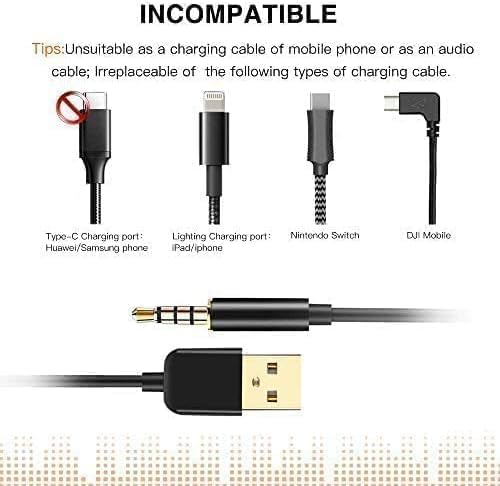
Image: Visual representation of incompatible charging port types, including USB-C, Lightning, Nintendo Switch, and DJI Mobile, emphasizing that this cable is not designed for these connections.
4. Kurulum ve Çalıştırma
4.1 Cihazınızı Şarj Etme
- Identify the 3.5mm charging port on your compatible portable electronic device.
- Insert the 3.5mm jack end of the AGPTEK A2B cable firmly into your device's charging port.
- Connect the USB 2.0 Type-A end of the cable to a power source. This can be:
- A USB port on a computer or laptop.
- A USB wall adapter (e.g., for smartphones, tablets).
- A portable power bank with a USB output.
- A USB car charger.
- Ensure the power source is active. Your device should indicate that it is charging.

Image: A voice recorder connected to a wall charger via the AGPTEK 3.5mm Jack to USB 2.0 Cable, illustrating the charging process.
4.2 Veri Senkronizasyonu
- Connect the 3.5mm jack end of the cable to your compatible device.
- Connect the USB 2.0 Type-A end of the cable to an available USB port on your computer.
- Your computer should recognize the connected device. Follow your device's specific instructions or your computer's prompts to access and transfer files.
- Data transfer speeds can reach up to 480 Mbps, depending on your device and computer's capabilities.

Image: A voice recorder connected to a laptop via the AGPTEK 3.5mm Jack to USB 2.0 Cable, demonstrating the data synchronization function.
5. Özellikler
| Bağlanmak | Detay |
|---|---|
| Model Numarası | A2B |
| Connector Type (Device End) | 3.5mm TRRS Jack (Male) |
| Connector Type (Host End) | USB 2.0 Type-A (Male) |
| Kablo Uzunluğu | 0.8 metre (2.6 fit) |
| Veri Aktarım Hızı | 480 Mbps'ye kadar (USB 2.0) |
| Kablo Malzemesi | Tinned Copper Wire |
| Fiş Malzemesi | Altın kaplama |
| Renk | Siyah |
| Ürün Ağırlığı | 18 Gram (0.635 ons) |

Image: Detailed dimensions of the cable, including the overall length of 80cm (31.4 inches) and specific measurements for the 3.5mm jack (3.5mm diameter, 17mm length, 23mm housing).

Resim: Yakın çekim view of the gold-plated 3.5mm and USB 2.0 connectors, emphasizing their quality for better oxidation resistance and conductivity, and mentioning the 480 Mbit/s USB 2.0 speed.
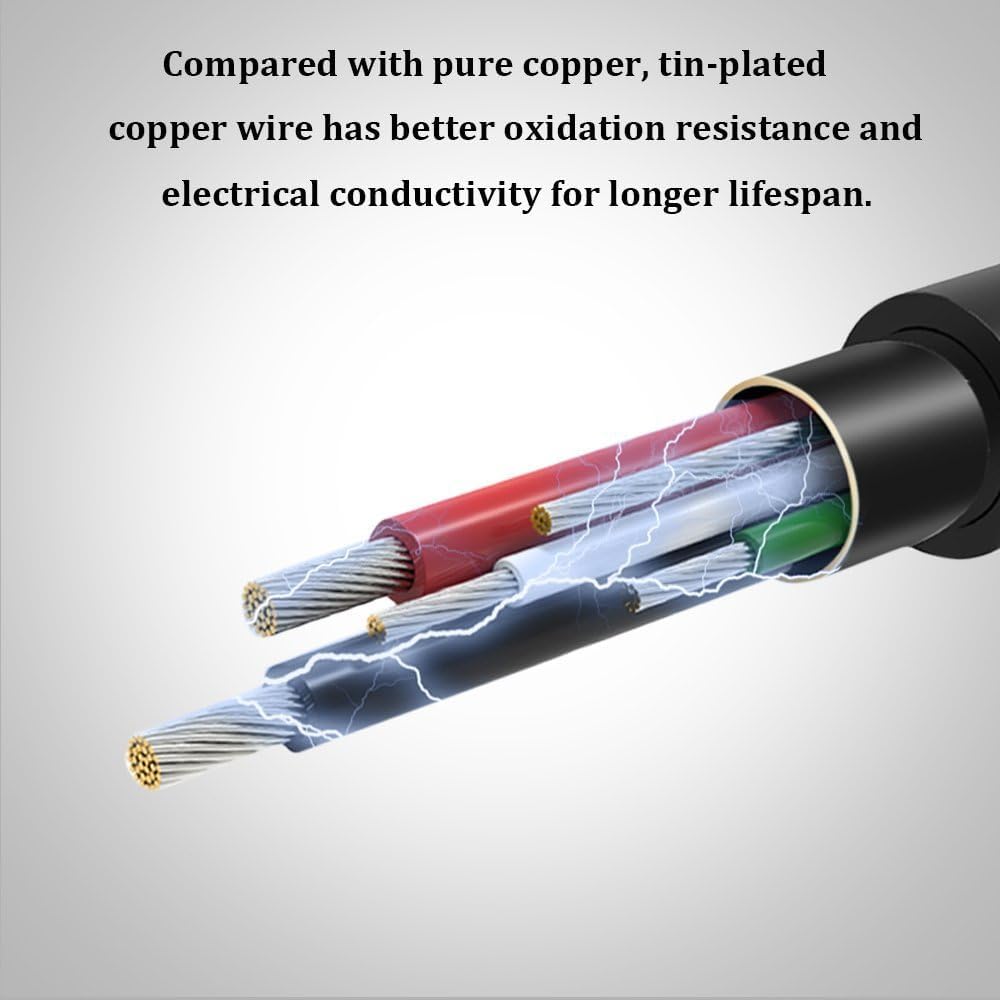
Image: Cross-section diagram of the cable, showing the internal tinned copper wires, which provide superior oxidation resistance and electrical conductivity compared to pure copper, contributing to a longer lifespan.
6. Sorun Giderme
- Device Not Charging/Syncing:
- Ensure your device has a 3.5mm şarj portu, not just an audio (AUX) port. This cable is not for audio transmission.
- Verify that the 3.5mm jack is fully inserted into your device.
- Check that the USB end is securely connected to a functional power source or computer USB port.
- Confirm your device is compatible with this type of charging/sync cable (refer to Section 3).
- Yavaş Veri Aktarımı:
- Ensure your computer's USB port is functioning correctly.
- The actual transfer speed may vary depending on the device, computer, and file boyutları.
- Kablo Hasarı: Inspect the cable for any visible signs of damage, such as frayed wires or bent connectors. Discontinue use if damage is found.
7. Bakım
- Store the cable in a clean, dry place away from extreme temperatures.
- Avoid bending or twisting the cable sharply, especially near the connectors, to prevent internal wire damage.
- Do not pull the cable by the cord; always grasp the connector when plugging or unplugging.
- Keep the connectors free from dust and debris.
8. Garanti ve Destek
For warranty information or technical support, please refer to the documentation included with your purchase or contact AGPTEK customer service directly through their official webÜrünün satın alındığı site veya perakendeci.
You can visit the AGPTEK Store for more information: AGPTEK Store


