1. Ürün Bittiview
The JBL TUNE 110 In-Ear Headphones are designed to deliver JBL Pure Bass Sound in a lightweight, comfortable, and compact form factor. These wired headphones feature 9mm drivers for powerful audio reproduction and include a convenient one-button remote with a built-in microphone for easy control of music playback and calls. The tangle-free flat cable ensures hassle-free use and storage.

Image 1.1: The JBL TUNE 110 In-Ear Headphones in Blue, showcasinşık tasarımlarıyla dikkat çekiyor.
2. Kutuda Neler Var?
Upon unboxing your JBL TUNE 110 In-Ear Headphones, you should find the following components:
- JBL TUNE 110 In-Ear Headphones
- Multiple sizes of ear tips (typically Small, Medium, Large) to ensure a comfortable and secure fit.
- A carrying pouch for convenient storage and portability.
Video 2.1: Resmi bir açıklamaview of the JBL TUNE 110 In-Ear Headphones, demonstrating key features and components.
3. Kurulum
Follow these steps to set up your JBL TUNE 110 In-Ear Headphones:
- Kulak Uçlarını Seçin: Choose the ear tips that provide the most comfortable and secure fit for your ears. A good seal is crucial for optimal sound quality and bass performance. Gently attach them to the earbuds.
- Kulaklıkları takın: Carefully insert the earbuds into your ear canals. Ensure they are seated snugly.
- Cihaza Bağlan: Plug the 3.5mm audio jack into the headphone port of your audio device (smartphone, tablet, laptop, etc.).

Resim 3.1: Yan view of the JBL TUNE 110 earbud, illustrating its in-ear design.
4. Kullanım Talimatları
The JBL TUNE 110 features a convenient one-button remote for easy control:
- Müziği Oynat/Duraklat: Press the button once to play or pause your music.
- Çağrıyı Cevapla/Sonlandır: Gelen aramayı cevaplamak veya devam eden aramayı sonlandırmak için düğmeye bir kez basın.
- Çağrıyı Reddet: Gelen aramayı reddetmek için düğmeye yaklaşık 2 saniye basılı tutun.
- Sonraki Parça: Sonraki parçaya geçmek için düğmeye hızlıca iki kez basın.
- Önceki parça: Önceki parçaya geri dönmek için düğmeye üç kez hızlıca basın.
- Sesli Asistan: Press and hold the button for approximately 3 seconds to activate your device's voice assistant (if supported).
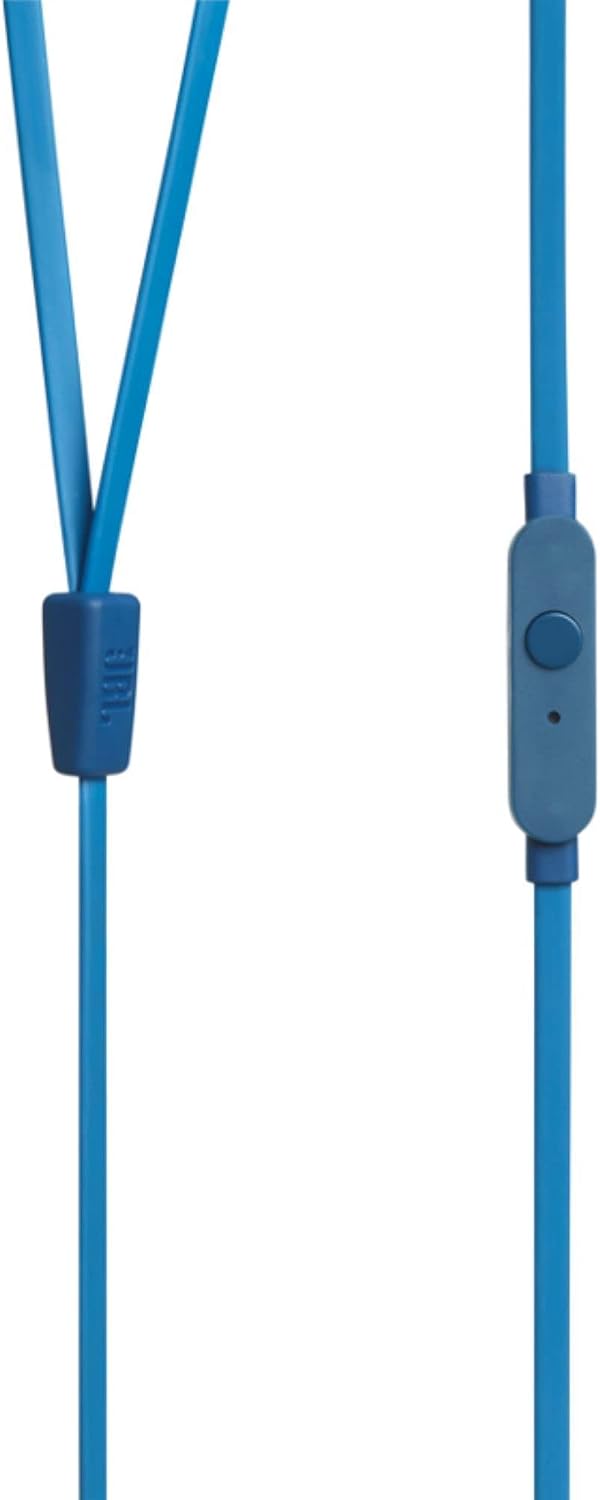
Image 4.1: Close-up of the one-button remote control and built-in microphone on the JBL TUNE 110 cable.
5. Özellikler
- JBL Saf Bas Sesi: Experience powerful and clear bass, a signature of JBL audio.
- 9 mm Sürücüler: Equipped with dynamic 9mm drivers for high-quality sound reproduction.
- One-Button Remote with Microphone: Seamlessly manage music playback and hands-free calls.
- Dolaşmayan Düz Kablo: Designed to prevent tangles, making the headphones easy to store and use.
- Hafif ve Rahat: Ergonomically designed for extended listening comfort.
- Pasif Gürültü Önleme: The in-ear design provides a degree of passive noise isolation.
6. Özellikler
| Özellik | Şartname |
|---|---|
| Marka | JBL |
| Model Adı | JBL TUNE 110 |
| Model Numarası | JBLT110BLUAM |
| Bağlantı Teknolojisi | Kablolu |
| Kulaklık Girişi | 3.5 mm Jak |
| Sürücü Boyutu | 9mm Dinamik Sürücü |
| Empedans | 16 Ohm |
| Gürültü Kontrolü | Pasif Gürültü Önleme |
| Ürün Ağırlığı | 0.32 ons (yaklaşık 9 gram) |
| Ürün Boyutları | 2.36 x 1.18 x 6.89 inç |
| Malzeme | Plastik |
| Renk | Mavi |
| Kablo Özelliği | Dolaşmayan |
7. Bakım
Doğru bakım, kulaklıklarınızın ömrünü ve performansını uzatacaktır:
- Kulak Temizleme İpuçları: Regularly remove the silicone ear tips and wash them with mild soap and water. Ensure they are completely dry before reattaching.
- Kulaklık Temizleme: Gently wipe the earbuds with a soft, dry cloth. Avoid using harsh chemicals or abrasive materials.
- Kablo Bakımı: Although the cable is tangle-free, avoid excessive pulling or sharp bends to prevent internal damage. When not in use, coil the cable neatly.
- Depolamak: Store your headphones in the provided carrying pouch to protect them from dust, dirt, and physical damage.
8. Sorun Giderme
If you encounter any issues with your JBL TUNE 110 headphones, refer to the following common solutions:
- Ses Yok:
- 3.5 mm jakın cihazınızın ses girişine tam olarak takıldığından emin olun.
- Ses cihazınızın ses seviyesini kontrol edin.
- Cihaza özgü bir sorunu elemek için kulaklıkları başka bir ses cihazıyla test edin.
- Poor Sound Quality / Lack of Bass:
- Verify that the ear tips are correctly sized and provide a good seal in your ear canal.
- Ensure the ear tips are clean and free from debris.
- Mikrofon Çalışmıyor:
- Confirm the 3.5mm jack is fully inserted.
- Cihazınızın ses giriş ayarlarını kontrol ederek harici mikrofonun seçili olduğundan emin olun.
- Mikrofonu başka bir cihaz veya uygulama ile test edin.
9. Garanti ve Destek
JBL products are manufactured to high standards and undergo rigorous quality control. For detailed warranty information, product registration, and technical support, please visit the official JBL website or contact your local JBL customer service center. Keep your proof of purchase for warranty claims.