giriiş
This manual provides instructions for the safe and effective use of your T&G TG504 Portable Bluetooth Speaker. Please read it thoroughly before use and retain it for future reference. This speaker is designed for portable audio playback with wireless Bluetooth connectivity and water resistance.
Ürün Bittiview
The T&G TG504 is a cylindrical, portable Bluetooth speaker featuring a robust design and a built-in microphone for hands-free calling. It offers high-definition sound with bass boost and multiple connectivity options.
Temel Özellikler:
- Portable and Cylindrical Design
- Water Resistant Construction
- Built-in Microphone for Calls
- Bluetooth Kablosuz Bağlantı
- AUX and USB Port for versatile playback
- Bass Boost and High Definition Sound
- Battery Powered for on-the-go use
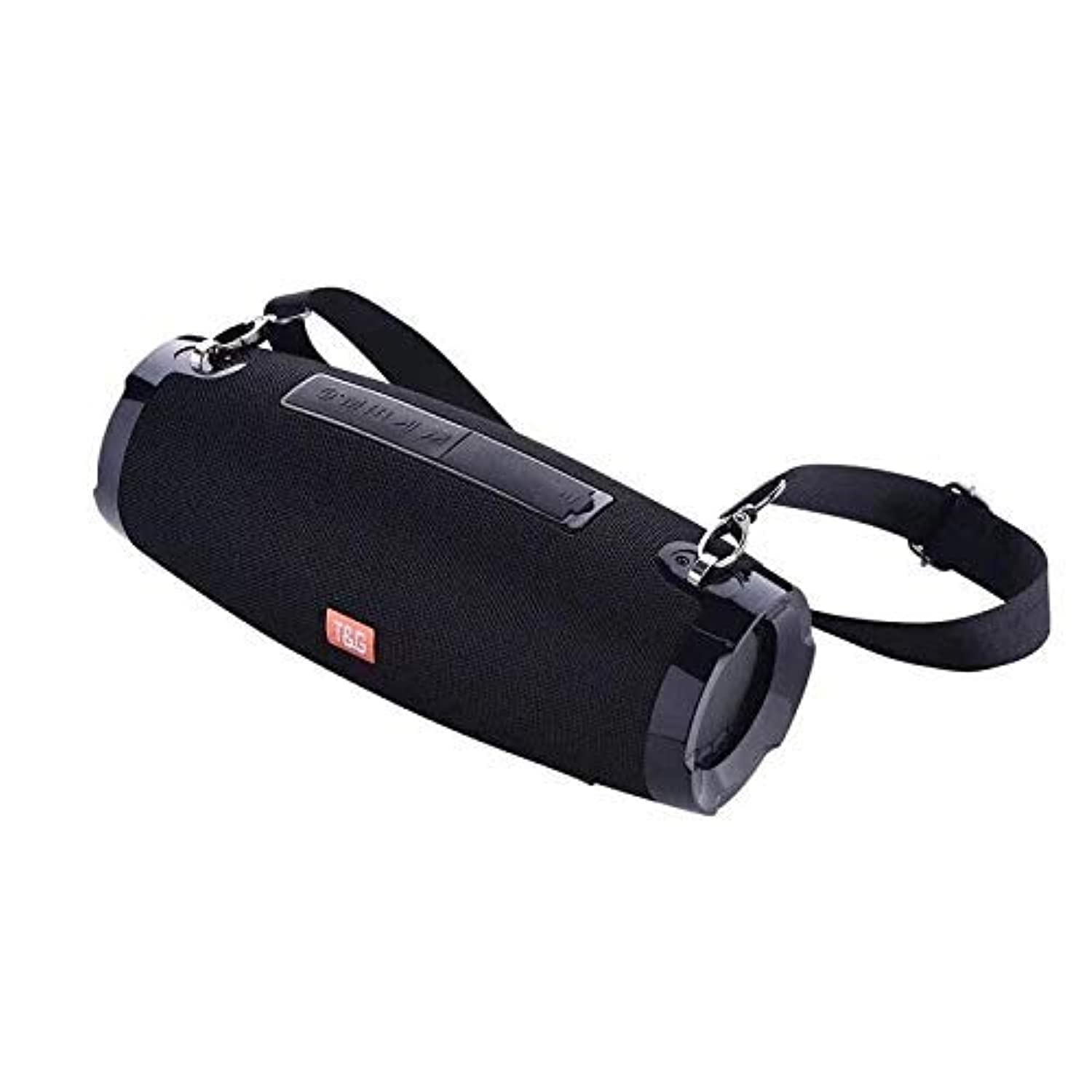
This image shows the T&G TG504 Portable Bluetooth Speaker. It features a black cylindrical design with a mesh grille covering the speaker. The T&G brand logo is visible in orange on the front. The speaker has attachment points on the sides, suggesting portability.
Paket İçeriği
- T&G TG504 Taşınabilir Bluetooth Hoparlör
- AUX Kablosu
- USB Şarj Kablosu
- Kullanıcı Kılavuzu
Kontroller ve Göstergeler
Familiarize yourself with the speaker's controls and ports for optimal operation.
- Güç Düğmesi: Hoparlörü açmak veya kapatmak için basılı tutun.
- Oynat/Duraklat Düğmesi: Sesi çalmak veya duraklatmak için basın.
- Sesi Aç (+): Sesi artırmak için basın. Sonraki parçaya geçmek için basılı tutun.
- Sesi kıs (-): Sesi azaltmak için basın. Önceki parçaya geçmek için basılı tutun.
- Mod Düğmesi (M): Bluetooth, AUX ve USB modları arasında geçiş yapmak için basın.
- Arama tuşu: Press to answer or end a phone call. Hold to reject a call.
- AUX Bağlantı Noktası: Ses cihazlarına kablolu bağlantı için.
- USB Bağlantı Noktası: For playing music from a USB drive or charging other devices (if supported).
- Şarj Portu: USB şarj kablosunu bağlamak için.
- LED Göstergesi: Güç durumunu, şarj durumunu ve Bluetooth eşleştirme durumunu gösterir.
Kurmak
1. Hoparlörü Şarj Etme
- USB şarj kablosunun küçük ucunu hoparlörün şarj portuna takın.
- USB şarj kablosunun büyük ucunu bir USB güç adaptörüne (dahil değildir) veya bilgisayarın USB portuna bağlayın.
- LED göstergesi şarj durumunu gösterecektir (örneğin, şarj olurken kırmızı, tamamen şarj olduğunda kapalı).
- İlk kullanımdan önce tam şarj için yaklaşık 3-4 saat bekleyin.
2. Açma/Kapama
- To power on, press and hold the Power button until the LED indicator lights up and you hear an audible prompt.
- To power off, press and hold the Power button again until the LED indicator turns off and you hear an audible prompt.
3. Bluetooth Eşleştirme
- Ensure the speaker is powered on and in Bluetooth pairing mode (LED indicator will typically flash blue). If not, press the Mode button to switch to Bluetooth mode.
- Mobil cihazınızda (akıllı telefon, tablet, dizüstü bilgisayar) Bluetooth'u etkinleştirin.
- Arama available Bluetooth devices. The speaker will appear as "TG504" or similar.
- Select "TG504" to connect. Once paired, the LED indicator will turn solid blue, and you will hear a confirmation sound.
- Hoparlör açıldığında, cihaz menzil dahilindeyse ve Bluetooth etkinse, son eşleştirilen cihaza otomatik olarak yeniden bağlanacaktır.
4. AUX üzerinden bağlantı
- Connect one end of the provided AUX cable to the speaker's AUX port.
- Connect the other end of the AUX cable to the headphone jack of your audio device.
- The speaker will automatically switch to AUX mode, or you may need to press the Mode button to select AUX.
Kullanım Talimatları
Müzik Çalmak
- Bluetooth Modu: Once paired, start playing music on your connected device. Audio will stream through the speaker.
- AUX Modu: Start playing music on your connected audio device.
- USB Modu: MP3 içeren bir USB flash sürücü takın files into the USB port. The speaker will automatically detect and play music. Press the Mode button to switch to USB mode if needed.
- Oynat/Duraklat düğmesini kullanarak hoparlörünüzdeki veya cihazınızdaki oynatmayı kontrol edebilirsiniz.
Sesi Ayarlama
- Press the Volume Up (+) button to increase the volume.
- Press the Volume Down (-) button to decrease the volume.
- Volume can also be adjusted from your connected device.
Handling Calls (Bluetooth Mode)
- Cevap Çağrısı: When a call comes in, press the Call button once to answer.
- Çağrı Sonu: During a call, press the Call button once to end the call.
- Çağrıyı Reddet: When a call comes in, press and hold the Call button to reject it.
- Son Numarayı Tekrar Ara: In standby mode, double-press the Call button to redial the last number.
Ses Kontrolü
The speaker supports voice control. Depending on your connected device, you may be able to activate your device's voice assistant (e.g., Siri, Google Assistant) by pressing and holding the Play/Pause button (or a dedicated voice button if available) for a few seconds.
Bakım
Temizlik
- Hoparlörü yumuşak, kuru bir bezle silin.
- Aşındırıcı temizleyiciler, alkol veya kimyasal çözücüler kullanmayın.
Depolamak
- Hoparlörü serin, kuru ve doğrudan güneş ışığından ve aşırı sıcaklıklardan uzak bir yerde saklayın.
- Uzun süre saklayacaksanız, pil ömrünü uzatmak için düzenli olarak şarj edin.
Suya Dayanıklı Bakım
- Hoparlörü suya maruz bırakmadan önce tüm port kapaklarının güvenli bir şekilde kapatıldığından emin olun.
- Do not submerge the speaker in water. Water resistance protects against splashes and light rain, not full immersion.
- Suya maruz kaldıktan sonra, şarj etmeden veya bağlantı noktası kapaklarını açmadan önce hoparlörü kurulayın.
Sorun giderme
Hoparlörünüzle ilgili sorunlarla karşılaşırsanız, sık karşılaşılan sorunlar ve çözümler için aşağıdaki tabloya bakın.
| Sorun | Olası Neden | Çözüm |
|---|---|---|
| Hoparlör açılmıyor | Düşük pil; Güç düğmesine doğru basılmamış | Hoparlörü şarj edin; Güç düğmesine 3-5 saniye basılı tutun. |
| Bluetooth üzerinden eşleştirilemiyor | Hoparlör eşleştirme modunda değil; Cihazın Bluetooth'u kapalı; Hoparlör cihazdan çok uzakta. | Ensure speaker LED is flashing blue; Turn on Bluetooth on your device; Move speaker closer to device (within 10 meters). |
| Ses yok | Ses çok düşük; Yanlış mod seçildi; Cihaz ses çalmıyor | Increase speaker and device volume; Press Mode button to select correct input; Ensure audio is playing on your device. |
| Ses bozulması | Ses seviyesi çok yüksek; Pil zayıf; Parazit | Reduce volume; Charge the speaker; Move away from other wireless devices. |
| Mikrofon çalışmıyor | Not in call mode; Microphone blocked | Ensure you are on a call; Check for obstructions around the microphone. |
Özellikler
| Model Adı | TG504 |
| Marka | T&G |
| Renk | Siyah |
| Şekil | Silindirik |
| Ürün Ağırlığı | 735 grams (approx. 1 kg / 2.2 pounds) |
| Maksimum Hoparlör Çıkış Gücü | 10 watt |
| Bağlantı Teknolojisi | Bluetooth, Auxiliary (AUX) |
| Kablosuz İletişim Teknolojisi | Bluetooth |
| Su geçirmez | Evet |
| Güç Kaynağı | Pil ile çalışır |
| Kontrol Yöntemi | Ses |
| Ses Çıkışı Modu | Çevrelemek |
| Montaj Tipi | Masaüstü |
| Uyumlu Cihazlar | Tablet, Laptop, Smartphone |
| Özel Özellikler | Bass Boost, High Definition Sound, Water Resistant, USB Port |
| Dahil Bileşenler | AUX kablosu |
Güvenlik Bilgileri
- Hoparlörü aşırı sıcaklıklara, doğrudan güneş ışığına veya yüksek neme maruz bırakmayın.
- Hoparlörü düşürmekten veya sert darbelere maruz bırakmaktan kaçının.
- Hoparlörü çocuklardan ve evcil hayvanlardan uzak tutun.
- Hoparlörü kendiniz sökmeye, onarmaya veya değiştirmeye çalışmayın. Bu, garantiyi geçersiz kılar ve hasara veya yaralanmaya neden olabilir.
- Use only the specified charging cable and a compatible power adapter.
- Do not use the speaker near water sources if port covers are not securely closed.
- Yüksek ses seviyelerinde uzun süreli dinleme, işitme hasarına neden olabilir.
Garanti ve Destek
Specific warranty details are not provided in the product information. For warranty claims or technical support, please refer to the retailer or manufacturer's official website where you purchased the product. Keep your proof of purchase for any warranty-related inquiries.


