1. Giriş
This manual provides instructions for the installation, setup, and operation of your Lepro Smart GU10 LED Bulbs. These bulbs offer advanced features including tunable white light, dimming capabilities, and smart control via app or voice assistants.
Temel Özellikler:
- Ayarlanabilir Beyaz Işık: Renk sıcaklığını sıcak beyazdan (2700K) soğuk beyaza (6500K) ayarlayın.
- Kısılabilir: Adjust brightness via the app or voice control. Note: Do not use with external dimmer switches.
- Ses Kontrolü: Eller serbest kullanım için Amazon Alexa ve Google Assistant ile uyumludur.
- Uygulama Kontrolü: Manage lights from anywhere using the 'Smart Life' app.
- Planlama: Set timers and schedules for automatic light control.
- Hub Gerekmez: 2.4GHz Wi-Fi ağınıza doğrudan bağlanır.

Resim 1.1: Üzeriview of Lepro Smart GU10 LED Bulb capabilities, including dimming, tunable white light, scheduling, and smart control options.
2. Önemli Güvenlik Bilgileri
Please read and follow all safety instructions carefully before installation and use. Failure to do so may result in electric shock, fire, or other injuries.
- Elektriksel Güvenlik: Always turn off power at the circuit breaker before installing or removing the bulb.
- Dimmer Uyumluluğu: These smart bulbs are not compatible with traditional dimmer switches. Using them with a dimmer switch will cause flickering and may damage the bulb. Control dimming exclusively through the 'Smart Life' app or voice commands.
- Sadece İç Mekanda Kullanım: This product is designed for indoor use in dry locations.
- Çalışma Hacmitage: Ensure your fixture provides 120 Volts, 60 Hertz.
- Doğru Kurulum: Install the bulb securely into a GU10 base fixture.
- Aşırı Isınmayı Önleyin: Do not enclose the bulb in fixtures that restrict airflow excessively, as this can lead to overheating and reduced lifespan.
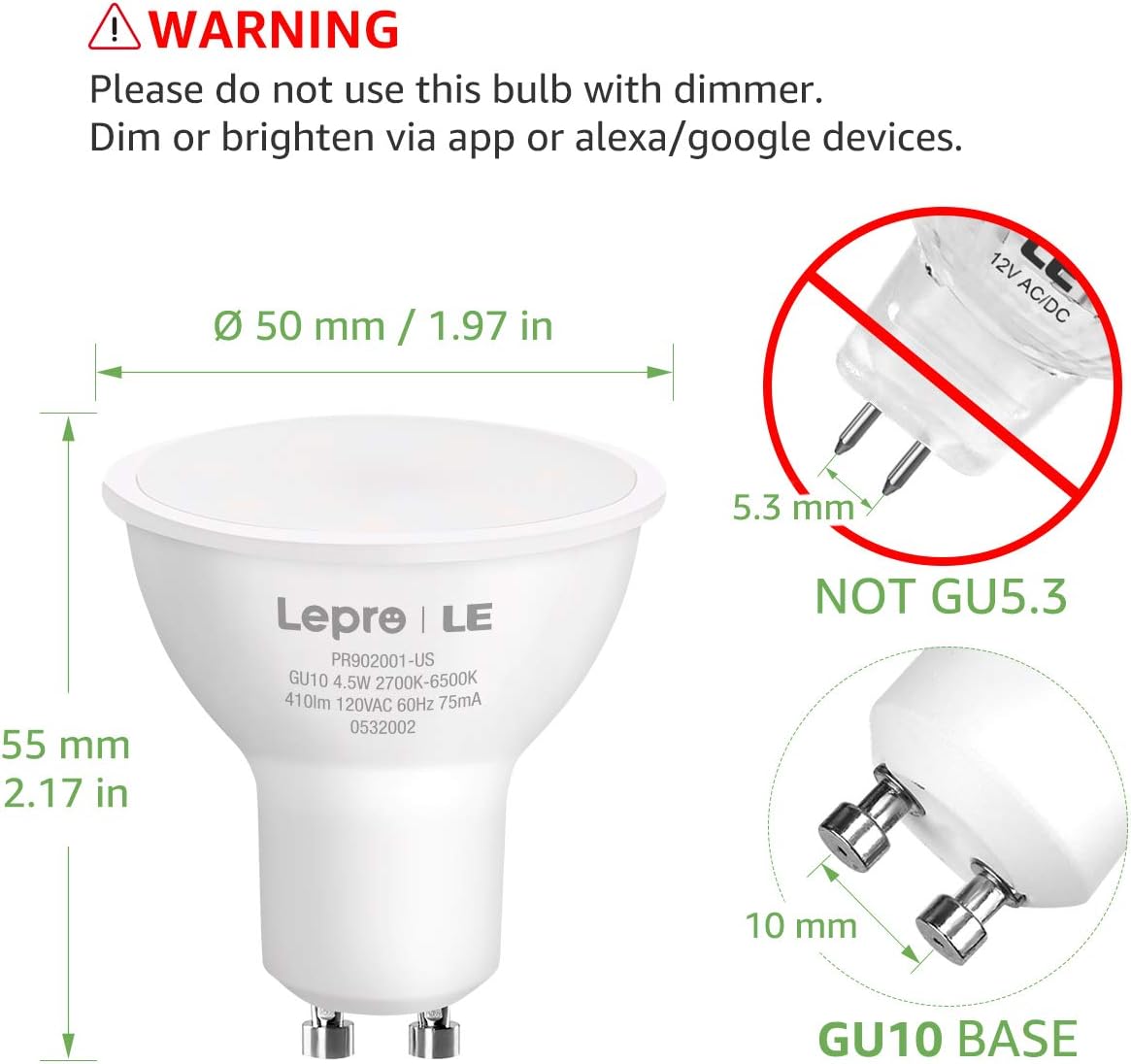
Image 2.1: Important warning regarding dimmer switch incompatibility and correct GU10 base identification.
3. Paket İçeriği
Paketinizde tüm öğelerin mevcut olduğundan emin olun:
- Lepro Smart GU10 LED Bulb(s) (Quantity as purchased, e.g., 2-pack)
- Kullanım Kılavuzu (Bu belge)

Image 3.1: Lepro Smart GU10 LED Bulbs and packaging.
4. Ürün Özellikleri
| Şartname | Detay |
|---|---|
| Marka | Cüzzam |
| Model Adı | LampUX GU10 WiFi Smart Light Bulbs |
| Hafif Tip | NEDEN OLMUŞ |
| Ampul Tabanı | GU10 |
| Netage | 4.5 Watt |
| Akkor Eşdeğeri | 50 Watt |
| Parlaklık | 350 Lümen |
| Renk Sıcaklığı | 2700K - 6500K (Ayarlanabilir Beyaz) |
| Cilttage | 120 Volt |
| Sıklık | 60 Hertz |
| Bağlantı | Yalnızca 2.4GHz Wi-Fi |
| Kontrol Yöntemi | Uygulama (Smart Life), Sesli Asistan (Alexa, Google Asistan) |
| Ortalama Hayat | 25,000 Saat |
| Ürün Boyutları | 1.97"G x 2.17"Y |
| Malzeme | Alüminyum, Plastik |
| Sertifikasyon | FCC |
5. Kurulum Kılavuzu
5.1 Fiziksel Kurulum
- Gücü Kapatın: Before installation, ensure the power to the light fixture is turned off at the circuit breaker to prevent electric shock.
- Eski Ampulü Çıkarın: Carefully remove the existing GU10 bulb from the fixture.
- Akıllı Ampulü Takın: Insert the Lepro Smart GU10 LED Bulb into the GU10 base. Push and twist clockwise until it is securely seated.
- Gücü Geri Yükle: Turn the power back on at the circuit breaker. The bulb should flash, indicating it is in pairing mode. If it does not flash, turn the light switch off and on 3-5 times until it begins to flash rapidly.
5.2 Uygulama İndirme ve Hesap Oluşturma
- İndir uygulaması: Scan the QR code provided in the packaging or search for 'Smart Life' in your smartphone's app store (iOS or Android).
- Kayıt Ol/Giriş Yap: Open the 'Smart Life' app and register for a new account or log in if you already have one.
5.3 Wi-Fi'ye Bağlanma
Wi-Fi ağınızın güvenli olduğundan emin olun 2.4 GHz. These bulbs do not support 5GHz Wi-Fi networks.
- Cihaz Ekle: In the 'Smart Life' app, tap the '+' icon in the top right corner to add a device.
- Aydınlatmayı Seçin: Choose 'Lighting' or 'Light Source (Wi-Fi)' from the device list.
- Confirm Flashing: Confirm that the bulb is flashing rapidly. If not, cycle the power (off-on 3-5 times) until it flashes.
- Wi-Fi Ayrıntılarını Girin: 2.4GHz Wi-Fi ağınızı seçin ve şifrenizi girin.
- Eşleştirme: The app will begin connecting to the bulb. Once connected, the bulb will stop flashing and glow steadily.
- Cihazı Yeniden Adlandır: You can rename the bulb for easier control (e.g., "Living Room Spotlight 1").

Image 5.1: Illustration of easy setup, highlighting physical installation and 2.4GHz Wi-Fi requirement.
6. Kullanım Talimatları
6.1 Uygulama Kontrolü
Once connected, you can control your bulb(s) through the 'Smart Life' app:
- Açık/Kapalı: Tap the power icon to turn the bulb on or off.
- Karartma: Use the brightness slider to adjust the light intensity.
- Renk Sıcaklığı: Select the 'White' mode and use the slider or color wheel to choose any shade from warm white (2700K) to cool white (6500K).
- Sahneler: The app offers pre-set scenes for different moods or activities. You can also create custom scenes.

Image 6.1: Adjusting color temperature via the 'Smart Life' app, showing warm, natural, and cool white light examples.
6.2 Sesli Kontrol (Alexa/Google Asistan)
To enable voice control:
- Hesabı Bağla: In your Amazon Alexa or Google Home app, enable the 'Smart Life' skill/action and link your 'Smart Life' account.
- Cihazları Keşfedin: Sesli asistanınıza "Cihazları keşfet" demesini söyleyin.
- Sesli Komutlar: Şu tür komutları kullanın:
"Alexa, turn on Living Room Spotlight."
"Hey Google, dim the kitchen light to 50%."
"Alexa, set the bedroom light to warm white."
6.3 Planlama ve Zamanlayıcılar
Set up automated schedules for your lights:
- In the 'Smart Life' app, select your bulb and navigate to the 'Schedule' or 'Timer' section.
- Set desired times for turning lights on/off, or for activating specific scenes.
- Repeat for specific days of the week as needed.
6.4 Grup Kontrolü
Control multiple bulbs simultaneously:
- In the 'Smart Life' app, select one of your bulbs.
- Tap the pencil icon (edit) or 'Settings' and look for 'Create Group'.
- Select all bulbs you wish to include in the group and confirm.
- You can now control the entire group with a single command or app action.

Resim 6.2: Örn.amples of scheduling and group control features.
7. Bakım
To ensure optimal performance and longevity of your Lepro Smart GU10 LED Bulbs:
- Temizlik: Temizlemeden önce ampulün kapalı ve soğuk olduğundan emin olun. Yumuşak, kuru bir bezle silin. Sıvı veya aşındırıcı temizleyiciler kullanmayın.
- Depolamak: If storing the bulbs for an extended period, keep them in a cool, dry place away from direct sunlight.
- Zorlu Ortamlardan Kaçının: Do not expose the bulbs to extreme temperatures, high humidity, or corrosive substances.
8. Sorun Giderme Kılavuzu
If you encounter issues with your Lepro Smart GU10 LED Bulbs, refer to the following common problems and solutions:
| Sorun | Olası Neden | Çözüm |
|---|---|---|
| Ampul Wi-Fi'ye bağlanmıyor | Incorrect Wi-Fi band (5GHz), incorrect password, bulb not in pairing mode, weak Wi-Fi signal. | Ensure your router is broadcasting a 2.4GHz network. Confirm Wi-Fi password. Cycle power to the bulb (off-on 3-5 times) until it flashes rapidly to enter pairing mode. Move closer to the router. |
| Bulb flickering or not working correctly | Used with a traditional dimmer switch. | Remove the bulb from any fixture connected to a traditional dimmer switch. These bulbs require a constant power supply and are dimmed via the app or voice control. |
| Bulb appears "Offline" in the app | Loss of Wi-Fi connection, power outage, router issues. | Check your Wi-Fi router and internet connection. Ensure the bulb has constant power. Try restarting the bulb by turning its power off and on at the switch. If the issue persists, re-pair the bulb. |
| Ses kontrolü yanıt vermiyor | 'Smart Life' skill/action not enabled or linked, incorrect device name, internet connectivity issues. | Verify that the 'Smart Life' skill/action is enabled and linked in your Alexa/Google Home app. Ensure the device name used in voice commands matches the name in the app. Check your internet connection. |
| Multiple bulbs not working together in a group | One or more bulbs are offline, group not properly configured. | Check individual bulb status in the app. Ensure all bulbs are online. Recreate the group in the 'Smart Life' app. |
9. Garanti ve Destek
9.1 Garanti Bilgileri
Lepro Smart GU10 LED Bulbs come with a 2 yıllık garanti from the date of purchase. This warranty covers manufacturing defects and malfunctions under normal use. It does not cover damage caused by misuse, improper installation, or external factors.
9.2 Müşteri Desteği
For technical assistance, warranty claims, or further inquiries, please contact Lepro customer support through their official webLütfen destek ekibiyle iletişime geçerken ürün modelinizi ve satın alma işleminizle birlikte verilen iletişim bilgilerini kullanın.


