giriiş
Welcome to the Ipega PG-9033 Bluetooth Gamepad user manual. This guide provides detailed instructions for setting up, operating, maintaining, and troubleshooting your new wireless controller. Please read this manual carefully before use to ensure optimal performance and longevity of your device.
Ürün Bittiview
The Ipega PG-9033 is a versatile Bluetooth gamepad designed for an enhanced gaming experience across multiple platforms, including Android, iOS, and PC. It features an adjustable phone holder, dual analog sticks, a D-pad, and action buttons.

Figure 1: The Ipega PG-9033 Bluetooth Gamepad with a smartphone securely mounted in its adjustable holder, actively displaying a racing game. This illustrates the controller's primary use for mobile gaming.
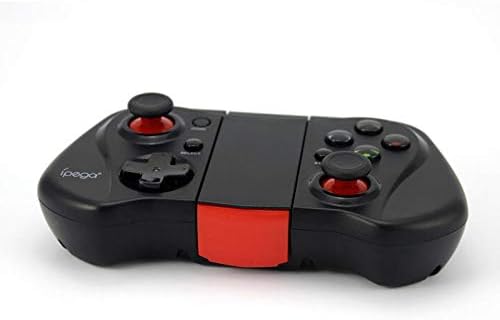
Şekil 2: Bir taraf view of the Ipega PG-9033 Bluetooth Gamepad, showcasing its ergonomic design and compact form factor when not in use. The red accent on the central hinge is visible.
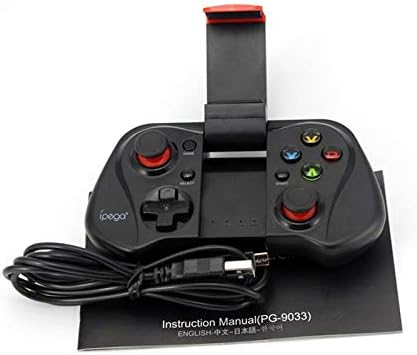
Figure 3: The Ipega PG-9033 Bluetooth Gamepad displayed alongside its USB charging cable and the included instruction manual, which clearly indicates the model number PG-9033.

Şekil 4: Arka kısım view of the Ipega PG-9033 Bluetooth Gamepad, featuring a label with technical details such as "BLUETOOTH CONTROLLER," working voltage, working current, and input specifications.
Kurmak
Gamepad'i şarj etme
Before first use, fully charge the gamepad using the provided USB cable.
- Connect the micro-USB end of the charging cable to the gamepad's charging port.
- Connect the USB-A end to a USB power source (e.g., computer, USB wall adapter).
- The charging indicator light will illuminate. It will typically turn off or change color when fully charged.
Bir Cihazla Eşleştirme
The PG-9033 supports different pairing modes for various operating systems.
Android Eşleştirme
- Ensure the gamepad is off.
- Basılı tutun EV düğme ve X button simultaneously until the indicator light flashes rapidly. This puts the gamepad into Android pairing mode.
- Android cihazınızda Bluetooth ayarlarına gidin ve kullanılabilir cihazları arayın.
- Select "PG-9033" from the list to pair. The indicator light will become solid when connected.
iOS Pairing (iCade Mode)
- Ensure the gamepad is off.
- Basılı tutun EV düğme ve B button simultaneously until the indicator light flashes rapidly. This puts the gamepad into iOS iCade pairing mode.
- On your iOS device, go to Bluetooth settings and search for available devices.
- Select "PG-9033" from the list to pair. The indicator light will become solid when connected.
Note: iCade mode has limited game compatibility. For broader iOS compatibility, check specific game requirements.
Bilgisayar Eşleştirme
- Ensure the gamepad is off.
- Basılı tutun EV düğme ve A button simultaneously until the indicator light flashes rapidly. This puts the gamepad into PC pairing mode.
- On your PC, go to Bluetooth settings and search for available devices.
- Select "PG-9033" from the list to pair. The indicator light will become solid when connected.
Note: A Bluetooth adapter may be required for PCs without built-in Bluetooth.
Kullanım Talimatları
Akıllı Telefonunuzu Bağlama
- Gently extend the adjustable phone holder located on the top of the gamepad.
- Carefully place your smartphone into the holder, ensuring it is securely gripped and centered.
- Optimum açıyı ayarlayın viewIng.
Game Mode Selection
The gamepad automatically enters the last used mode upon reconnection. To switch modes, disconnect the gamepad and re-pair using the desired mode's button combination (HOME + X for Android, HOME + B for iOS, HOME + A for PC).
Güç Açık/Kapalı
Açmak için, düğmesine basın. EV düğmesine basın. Kapatmak için, düğmesine basın ve basılı tutun. EV button for approximately 5 seconds until the indicator light turns off. The gamepad will automatically power off after a period of inactivity.
Bakım
To ensure the longevity and proper functioning of your Ipega PG-9033 gamepad, follow these maintenance guidelines:
- Cihazı kuru tutun. Neme veya sıvılara maruz bırakmaktan kaçının.
- Oyun kumandasını yumuşak, kuru bir bezle temizleyin. Sert kimyasallar veya aşındırıcı temizleyiciler kullanmayın.
- Gamepad'inizi serin, kuru ve doğrudan güneş ışığından ve aşırı sıcaklıklardan uzak bir yerde saklayın.
- Oyun kumandasını düşürmekten veya sert darbelere maruz bırakmaktan kaçının.
- Pil sağlığını korumak için, kullanmasanız bile pili düzenli olarak şarj edin.
Do not attempt to disassemble the gamepad. This will void the warranty and may cause damage.
Sorun giderme
Gamepad not connecting or pairing:
- Gamepad'in tam şarjlı olduğundan emin olun.
- Cihazınızda Bluetooth'un etkin olduğunu doğrulayın.
- Make sure the gamepad is in the correct pairing mode for your device (Android, iOS, or PC).
- Bluetooth ayarlarınızda cihazı unutup yeniden eşleştirmeyi deneyin.
- Hem gamepad'inizi hem de cihazınızı yeniden başlatın.
Düğmeler veya joystickler yanıt vermiyor:
- Oyun kumandasının doğru şekilde bağlı olup olmadığını kontrol edin.
- Oynadığınız oyunun harici kontrol cihazlarını desteklediğinden emin olun.
- Some games may require specific controller mapping or settings adjustments within the game.
- If the issue persists, try resetting the gamepad (if a reset button is available, typically a small pinhole).
Gecikme veya giriş gecikmesi:
- Ensure your device is not too far from the gamepad. Maintain a clear line of sight.
- Diğer kablosuz cihazlardan kaynaklanan paraziti azaltın.
- Cihazınızda gereksiz arka plan uygulamalarını kapatın.
Phone not fitting in holder:
- The holder is designed for most smartphones. Ensure your phone's dimensions are within the supported range.
- Telefonun güvenli bir şekilde oturmasını engelleyebilecek kalın telefon kılıflarını çıkarın.
Özellikler
| Özellik | Detay |
|---|---|
| Örnek | PG-9033 |
| Marka | Ipega |
| Bağlantı | Bluetooth |
| Uyumluluk | Android, iOS (iCade), PC |
| Çalışma Hacmitage | Doğru Akım 3.7V |
| Çalışma Akımı | 30mA |
| Giriş Voltage | DC 5V 500mA |
| ASIN | B07P52YH7M |
Garanti ve Destek
For warranty information and technical support, please refer to the official Ipega webSiteden satın alabilir veya perakendecinizle iletişime geçebilirsiniz. Satın alma belgenizi satın alma belgesi olarak saklayın.
Bu kılavuz yalnızca bilgilendirme amaçlıdır. Teknik özellikler önceden haber verilmeksizin değiştirilebilir.


