1. Giriş
This manual provides instructions for the Altec Lansing Mini LifeJacket Jolt Bluetooth Speaker. This portable speaker features Bluetooth connectivity, Qi wireless charging, a built-in USB charging port, and a durable, waterproof design. Please read this manual thoroughly before using the device to ensure proper operation and longevity.

Şekil 1: Ön view of the Altec Lansing Mini LifeJacket Jolt Bluetooth Speaker.
2. Paket İçeriği
Paketinizde tüm öğelerin mevcut olduğundan emin olun:
- Altec Lansing Mini LifeJacket Jolt Bluetooth Speaker
- Şarj Kablosu (USB-C'den USB-A'ya)
- Hızlı Başlangıç Kılavuzu (bu dijital kılavuza dahil değildir)
3. Ürün Bittiview
Hoparlörün bileşenlerini ve kontrollerini tanıyın.

Şekil 2: Üst view of the speaker, highlighting control buttons and the Qi wireless charging pad.
3.1. Kontrol Düğmeleri
- Güç Düğmesi: Açmak/kapatmak için basılı tutun.
- Bluetooth Eşleştirme Düğmesi: Bluetooth eşleştirme modunu başlatır.
- Sesi Aç (+): Sesi artırır.
- Sesi kıs (-): Sesi azaltır.
- Oynat/Duraklat Düğmesi: Ses dosyasını oynatır veya duraklatır. Ayrıca gelen aramaları yanıtlar/sonlandırır.
- Sesli Asistan Düğmesi: Cihazınızın sesli asistanını (Siri, Google Asistan) etkinleştirir.
- House Party Pairing Button: Connects multiple Altec Lansing speakers.
3.2. Bağlantı Noktaları ve Göstergeler

Şekil 3: Yan view of the speaker, showing the protected charging port.
- USB-C Şarj Portu: Hoparlörün dahili pilini şarj etmek için.
- USB-A Çıkış Bağlantı Noktası: Harici cihazları şarj etmek için.
- LED Göstergesi: Güç, şarj ve Bluetooth durumunu gösterir.
- Qi Kablosuz Şarj Pedi: Located on the top surface for wireless charging compatible devices.
4. Kurulum
4.1. Hoparlörü Şarj Etme
Before first use, fully charge the speaker. The speaker provides up to 16 hours of playback on a single charge.

Figure 4: The speaker offers up to 16 hours of play time.
- USB-C şarj bağlantı noktasına erişmek için hoparlörün yan tarafındaki koruyucu kapağı açın.
- Sağlanan USB-C kablosunu hoparlörün şarj portuna bağlayın.
- USB-C kablosunun diğer ucunu bir USB güç adaptörüne (dahil değildir) veya bilgisayarın USB portuna bağlayın.
- LED göstergesi şarj durumunu gösterecek ve tam şarj olduğunda kapanacaktır.
4.2. Açma/Kapama
- Açmak için, düğmesine basın ve basılı tutun. Güç Düğmesi until you hear an audible prompt and the LED indicator illuminates.
- Kapatmak için tuşunu basılı tutun. Güç Düğmesi again until you hear an audible prompt and the LED indicator turns off.
4.3. Bluetooth Eşleştirme
The speaker can connect to your device via Bluetooth 4.2, offering a range of up to 100 feet.
- Ensure the speaker is powered on. The LED indicator will flash, indicating it is in pairing mode.
- Akıllı telefonunuzda, tabletinizde veya Bluetooth özellikli diğer cihazınızda Bluetooth ayarlarına gidin.
- Select "Mini LifeJacket Jolt" from the list of available devices.
- Once paired, the LED indicator will glow solid, and you will hear a confirmation tone.
- Eşleştirme başarısız olursa, hoparlörü ve cihazınızın Bluetooth'unu kapatın, ardından adımları tekrarlayın.
5. Kullanım Talimatları
5.1. Ses Çalma
- Oynat/Duraklat: Basın Oynat/Duraklat Düğmesi bir kere.
- Ses Kontrolü: Basın Sesi Aç (+) or Sesi kıs (-) düğmeler.
- Parçayı Atla: Basılı tutun Sesi Aç (+) for next track, or Sesi kıs (-) Önceki parça için.
5.2. Qi Kablosuz Şarj
The speaker features a Qi wireless charging pad on its top surface to charge compatible devices.
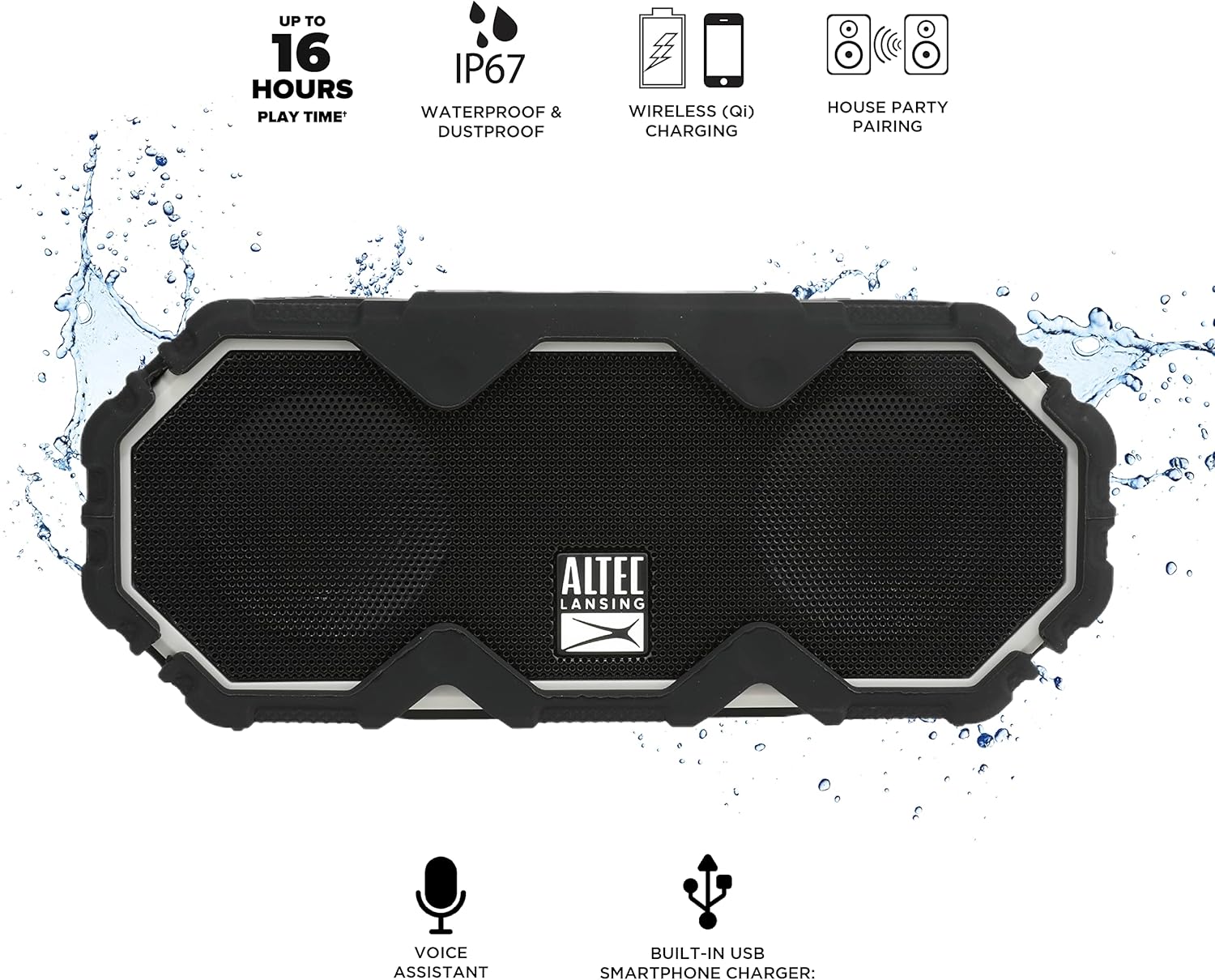
Figure 5: A smartphone being charged wirelessly on the speaker's Qi pad.
- Hoparlörün açık olduğundan emin olun.
- Place your Qi-enabled device directly on the charging pad located on the top of the speaker.
- The device should begin charging automatically. Adjust its position if charging does not start immediately.
5.3. USB Cihaz Şarjı
Use the built-in USB-A port to charge other devices via a cable.

Figure 6: The speaker's USB-A port can charge external devices.
- Hoparlörün açık olduğundan emin olun.
- Hoparlörün yan tarafındaki koruyucu kapağı açın.
- Connect your device's USB charging cable to the USB-A output port on the speaker.
- Cihazınız şarj olmaya başlayacaktır.
5.4. Sesli Asistan Entegrasyonu
Access your smartphone's voice assistant directly through the speaker.

Figure 7: The speaker supports voice assistant integration.
- Hoparlörün akıllı telefonunuzla eşleştirildiğinden emin olun.
- Basın Sesli Asistan Düğmesi hoparlörde.
- Speak your command into the speaker's microphone.
5.5. House Party Pairing
Connect multiple Altec Lansing speakers for a synchronized audio experience.

Figure 8: Multiple speakers can be paired for a wider sound experience.
- Her iki hoparlörün de açık olduğundan ve herhangi bir Bluetooth cihazına bağlı olmadığından emin olun.
- On the first speaker, press the House Party Pairing Button. The LED indicator will flash.
- İkinci hoparlörde, tuşuna basın. House Party Pairing Button.
- The speakers will connect automatically. Once connected, the LED indicators will glow solid.
- Now, connect your device to one of the paired speakers via Bluetooth. Audio will play through both speakers.
6. Dayanıklılık Özellikleri
The Mini LifeJacket Jolt is designed for rugged use with an IP67 rating, making it waterproof, shockproof, snowproof, and dustproof.

Figure 9: The speaker is designed to withstand water exposure.
- Su geçirmez: Can be submerged in water up to 1 meter for 30 minutes. Ensure all port covers are securely closed before exposure to water.
- Darbeye dayanıklı: Düşmelere ve darbelere dayanacak şekilde tasarlanmıştır.
- Snowproof: Operates reliably in snowy conditions.
- Toz geçirmez: Toz girişine karşı korumalıdır.
Important: Always ensure the protective flap covering the charging ports is securely closed when using the speaker near water or in dusty environments.
7. Bakım
- Temizlik: Yumuşak bir d kullanınamp cloth to clean the speaker. Avoid abrasive cleaners or solvents.
- Depolamak: Hoparlörü serin, kuru ve doğrudan güneş ışığından ve aşırı sıcaklıklardan uzak bir yerde saklayın.
- Pil Bakım: Pil ömrünü uzatmak için pili sık sık tamamen boşaltmaktan kaçının. Hoparlörü, uzun süre kullanılmasa bile düzenli olarak şarj edin.
8. Sorun Giderme
8.1. Speaker Not Powering On or Charging
If your speaker stops working or does not charge, a connection issue or a system freeze might be the cause. This procedure requires careful handling and may void your warranty if not performed correctly. Proceed with caution.
- Remove the Rubber Exterior: Gently pry off the rubberized outer casing. It is designed to snap off at the seams around the speaker mesh.
- Dahili Bileşenlere Erişim: Using a small flat-head tool, carefully insert it between the speaker mesh and the main body, particularly on the back of the speaker. Slowly work your way around to loosen the mesh.
- Locate and Remove Screws: You will find six small Phillips head screws deep inside the holes. Use a long, thin Phillips screwdriver to remove them. Keep track of these screws.
- Separate the Casing: Gently pull the front and back sections of the speaker apart along the seam that becomes visible after removing the rubber protector.
- Inspect Internal Connections: Inside, you will see the motherboard, buttons, wires, and the cylindrical battery. Locate the battery holder and remove any screw securing it.
- Reset Battery Connection: Carefully disconnect the battery's wiring connector from the motherboard. Ensure you pull the entire plastic insert, not just the wires, to avoid damage.
- Yeniden Bağlan ve Test Et: Reconnect the battery connector firmly. Press the power button. If you hear the "Welcome to Altec Lansing!" prompt, the issue may be resolved.
- Yeniden birleştirme: If the speaker functions, carefully re-adjust any wires to ensure they have sufficient slack and are not pinched. Ensure the battery is centered and not clinging to speaker magnets. Re-secure the battery holder, then carefully align and re-screw the casing. Finally, reattach the speaker mesh and the rubber exterior.
This process can reset the motherboard and address issues caused by loose internal connections. If the problem persists after these steps, contact customer support.
8.2. Bluetooth Bağlantı Sorunları
- Hoparlörün, cihazınızın 100 fitlik Bluetooth menzili içinde olduğundan emin olun.
- Verify that the speaker is in pairing mode (flashing LED).
- Cihazınızın Bluetooth ayarlarından hoparlörü kaldırın ve yeniden eşleştirmeyi deneyin.
- Hem hoparlörünüzü hem de Bluetooth cihazınızı yeniden başlatın.
9. Özellikler

Şekil 10: Ürün boyutları.
| Özellik | Detay |
|---|---|
| Model Adı | Mini LifeJacket Jolt |
| Marka | Altec Lansing |
| Bağlantı Teknolojisi | Bluetooth, USB |
| Kablosuz İletişim | Bluetooth 4.2 |
| Bluetooth Menzili | 100 feet'e kadar |
| Güç Kaynağı | Pille Çalışır (1 adet Lityum İyon pil dahildir) |
| Pil Ömrü | 16 saate kadar |
| Özel Özellikler | Waterproof (IP67), Shockproof, Snowproof, Dustproof, Qi Wireless Charging, USB Charging Output, Voice Assistant Integration, House Party Pairing |
| Hoparlör Tipi | Dış mekan |
| Ses Çıkışı Modu | Stereo |
| Ürün Boyutları | 7.2"D x 3"G x 4.3"Y |
| Ürün Ağırlığı | 1.52 pound |
| Malzeme | Kauçuk veya Silikon |
10. Garanti ve Destek
The Altec Lansing Mini LifeJacket Jolt Bluetooth Speaker comes with a Limited Warranty. For specific warranty terms and conditions, please refer to the documentation included with your product or visit the official Altec Lansing webalan.
Daha fazla yardım veya teknik destek için lütfen şu adresi ziyaret edin: Altec Lansing Brand Store on Amazon veya resmiyete danışın Kullanım Kılavuzu (PDF).