1. Giriş
This manual provides essential information for the installation, operation, and maintenance of your GIGABYTE GeForce GTX 1660 Ti Windforce OC 6G graphics card. Please read this manual thoroughly before installation and retain it for future reference.
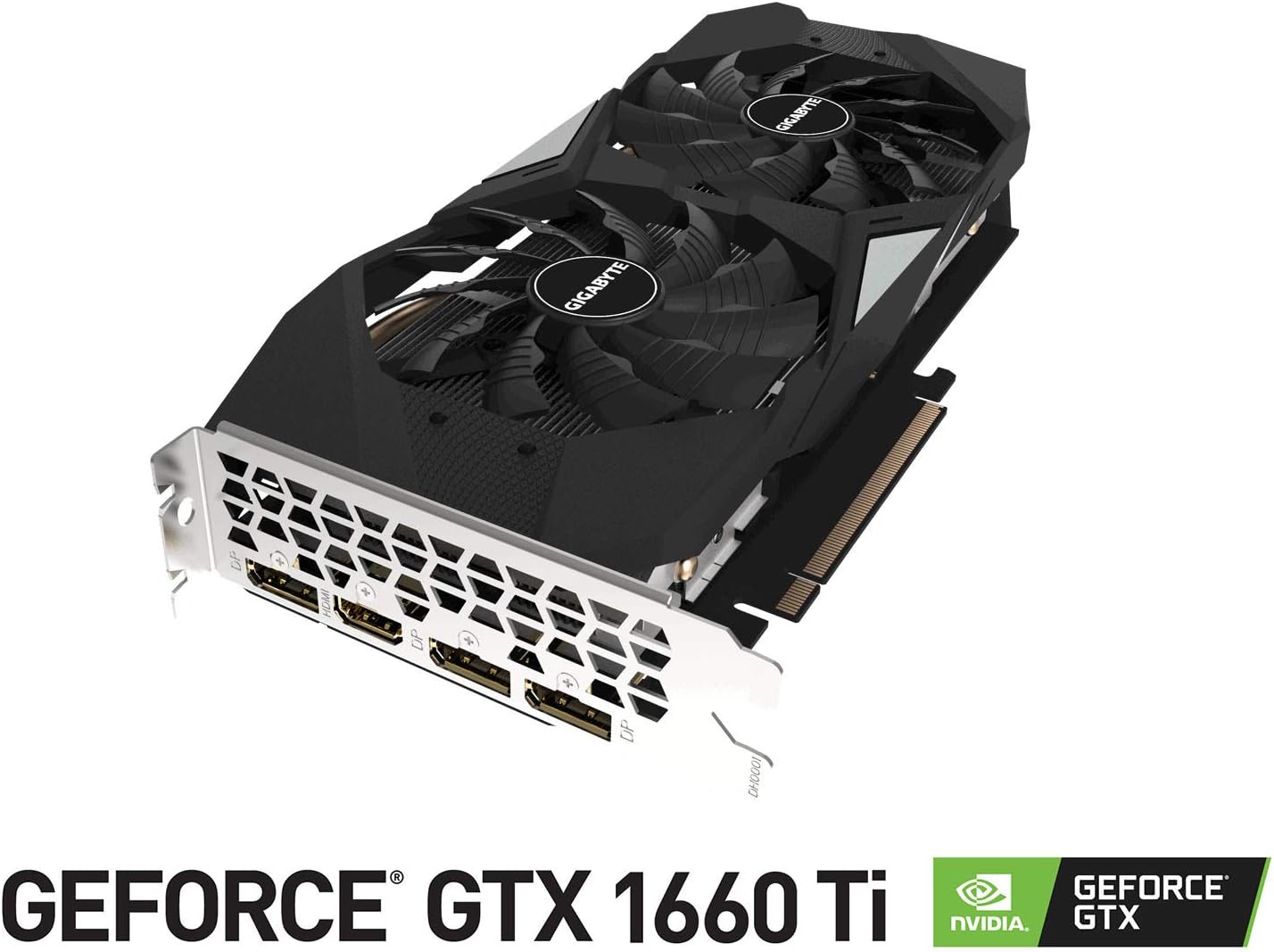
The GIGABYTE GeForce GTX 1660 Ti Windforce OC 6G is designed for enhanced graphics performance, featuring:
- Powered by GeForce GTX 1660 Ti integrated with 6GB GDDR6
- Windforce 2x cooling system with alternate spinning fans
- Intuitive controls with AORUS engine
- 6GB 192-bit GDDR6 memory interface
- Multiple display outputs: 1 x HDMI, 3 x DisplayPort
- PCI Express 3.0 x16 interface
2. Kutuda Neler Var?
Paketin içinde tüm öğelerin mevcut olduğundan emin olun:
- GIGABYTE GeForce GTX 1660 Ti Windforce OC 6G Graphics Card
- Kullanıcı Kılavuzu
3. Özellikler
| Özellik | Şartname |
|---|---|
| Grafik İşlem Birimi | NVIDIA GeForce GTX 1660 Ti |
| Video Belleği | 6 GB GDDR6 |
| Bellek Hızı | 12000 MHz |
| Bellek Arayüzü | 192 bitlik |
| Maksimum Ekran Çözünürlüğü | 7680x4320 |
| Çıkış Portları | 1 x HDMI 2.0B, 3 x DisplayPort 1.4 |
| Otobüs Standardı | PCI Express 3.0 x16 |
| Soğutma Sistemi | WINDFORCE 2X alternatif dönüşlü fanlarla |
| Boyutlar (UxGxY) | 10.43 x 4.76 x 1.57 inç |
| Ürün Ağırlığı | 15.9 ons |
4. Kurulum ve Kurulum
Before proceeding with the installation, ensure your system meets the minimum requirements and that your power supply unit (PSU) has sufficient wattage and the necessary PCIe power connectors.
4.1 Kurulum Öncesi Kontroller
- Kapat: Bilgisayarınızı kapatın ve güç kablosunu duvardaki prizden çıkarın.
- Davayı Aç: Bilgisayar kasanızın yan panelini çıkarın.
- Statik deşarj: Ground yourself by touching a metal part of your computer chassis to discharge any static electricity.
- Gümrükleme: Ensure there is enough physical space in your case for the graphics card.
4.2 Fiziksel Kurulum
- Anakartınızda kullanılabilir bir PCI Express 3.0 x16 yuvası bulun.
- Remove any expansion slot covers that correspond to the graphics card's size (typically two slots).
- Carefully align the graphics card with the PCIe slot and press down firmly until it is securely seated. A click may be heard.
- Ekran kartını vidalarla kasaya sabitleyin.
- Connect the appropriate PCIe power cable(s) from your power supply to the graphics card. This model typically requires an 8-pin connector.
- Bilgisayar kasasının yan panelini değiştirin.
4.3 Sürücü Kurulumu
- Connect your monitor to one of the graphics card's output ports (HDMI or DisplayPort).
- Bilgisayarınızı açın.
- Once the operating system loads, download the latest drivers from the official GIGABYTE or NVIDIA webalan.
- Sürücü kurulumunu tamamlamak için ekrandaki talimatları izleyin.
- Değişikliklerin uygulanması için bilgisayarınızı yeniden başlatın.
5. Grafik Kartının Çalıştırılması
Once installed and drivers are updated, your GIGABYTE GeForce GTX 1660 Ti is ready for use. It will automatically handle graphics processing for applications and games. For optimal performance, ensure your operating system and game titles are up-to-date.
You can use NVIDIA's control panel or GIGABYTE's AORUS Engine software to monitor performance, adjust fan curves, and customize settings for specific applications or games.
6. Bakım
Doğru bakım, ekran kartınızın uzun ömürlü olmasını ve optimum performans göstermesini sağlar.
- Toz Temizleme: Basınçlı hava kullanarak fanları ve soğutucu bloğu düzenli olarak tozdan temizleyin. Temizlemeden önce bilgisayarın kapalı ve fişinin çekilmiş olduğundan emin olun.
- Sürücü Güncellemeleri: Performans iyileştirmelerinden ve hata düzeltmelerinden yararlanmak için grafik sürücülerinizi güncel tutun.
- Sıcaklık İzleme: Use monitoring software to keep an eye on the GPU temperature, especially during heavy loads. Ensure adequate airflow within your PC case.
- Fiziksel Muayene: Periodically check for any loose cables or connections.
7. Sorun Giderme
Grafik kartınızla ilgili sorunlarla karşılaşırsanız aşağıdaki sorun giderme adımlarını deneyin:
- Görüntü yok: Ensure the monitor cable is securely connected to the graphics card and the monitor is powered on. Verify the graphics card is fully seated in the PCIe slot and power cables are connected.
- Sürücü Sorunları: Reinstall the latest drivers from the official GIGABYTE or NVIDIA website. Try using Display Driver Uninstaller (DDU) to completely remove old drivers before installing new ones.
- Aşırı Isınma: Check for proper airflow in your PC case. Clean dust from the graphics card fans and heatsink. Ensure fan speeds are adequate using monitoring software.
- Performans Sorunları: Ensure your game or application settings are not excessively high for the card's capabilities. Check for background applications consuming resources.
- Sistem Kararsızlığı: If your system crashes or freezes, ensure your power supply unit (PSU) is sufficient for the graphics card and other components. Check for any conflicts with other hardware.
8. Ürün Görselleri



9. Ürün Videoları
10. Garanti ve Destek
GIGABYTE products are covered by a limited warranty. For detailed warranty terms and conditions, please refer to the official GIGABYTE webSatın alma belgenizi veya ürününüzle birlikte verilen garanti belgesini saklayın. Garanti talepleriniz için satın alma belgenizi saklayın.
For technical support, driver downloads, and further assistance, visit the official GIGABYTE support page. You can also find FAQs and community forums for common issues and solutions.


