1. Giriş
The GameMax Mirage 120mm PC Cooling Fan is designed to provide efficient cooling for computer components while offering customizable RGB lighting. This fan features a dual-ring Rainbow LED design, a hydraulic bearing for quiet operation, and a 7-blade fan structure. It is compatible with 5V addressable 3-pin Aura Sync systems, allowing for synchronized lighting effects with compatible motherboards or controllers.

Resim 1.1: Ön view of the GameMax Mirage fan with active Rainbow LED lighting.
2. Güvenlik Bilgileri
- Ensure your computer system is powered off and unplugged from the wall outlet before installation or maintenance.
- Statik elektrikten kaynaklanan hasarı önlemek için parçaları dikkatlice tutun. Antistatik bileklik kullanmayı düşünün.
- Konnektörleri zorlamayın. Kabloları takmadan önce doğru yönde olduklarından emin olun.
- Vantilatörü sıvılardan ve aşırı nemden uzak tutun.
- Do not attempt to disassemble the fan unit beyond what is described in this manual.
3. Paket İçeriği
Paketinizde tüm öğelerin mevcut olduğundan emin olun:
- 1 x GameMax Mirage 120mm PC Cooling Fan
- 4 x Montaj Vidaları
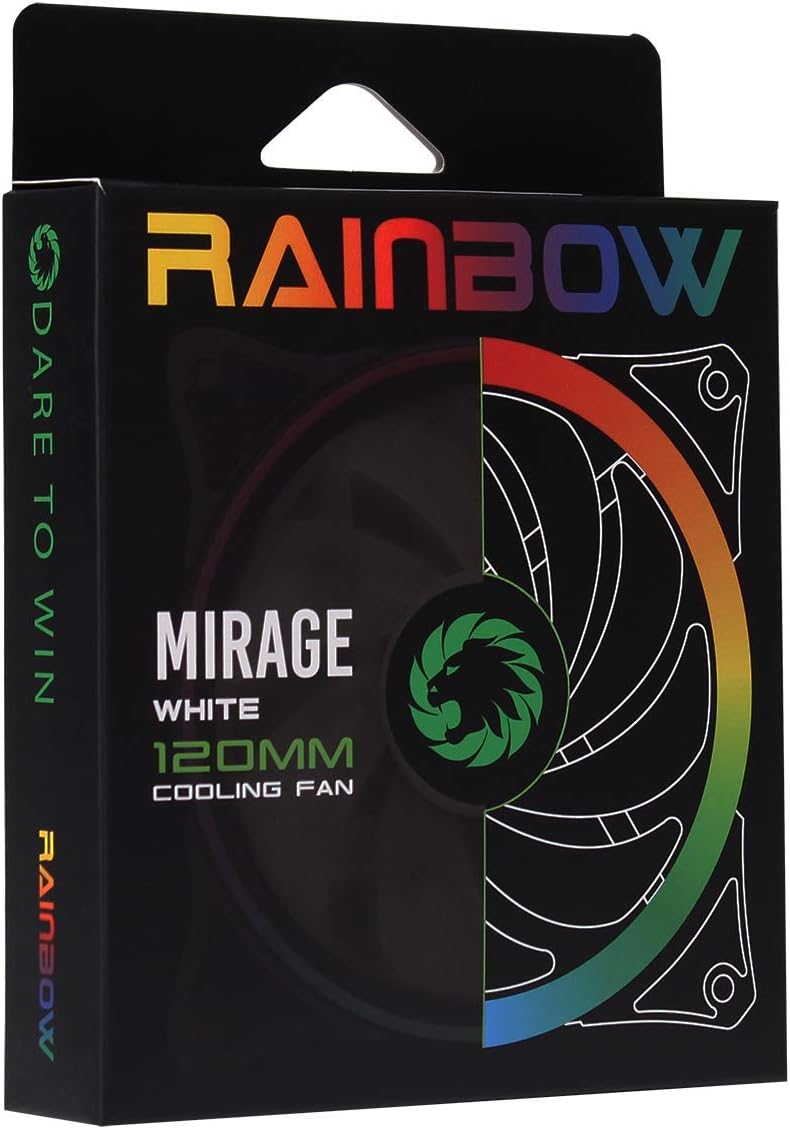
Image 3.1: Retail packaging for the GameMax Mirage fan.
4. Kurulum ve Kurulum
Follow these steps to install your GameMax Mirage 120mm PC Cooling Fan:
- Sisteminizi Hazırlayın: Power off your computer and unplug it from the power outlet. Open your computer case to access the fan mounting locations.
- Fanı Monte Edin: Position the fan in your desired location (e.g., case front, rear, top, or radiator). Ensure the airflow direction is correct for your cooling setup. Use the four included mounting screws to secure the fan to the chassis or radiator. The fan features rubber pads on the corners to help reduce vibration.
- Fan Gücünü Bağlayın: Locate the 3-pin power connector on the fan cable. Connect this cable to an available 3-pin fan header on your motherboard or a fan controller.
- RGB Aydınlatmayı Bağlayın: Locate the 5V addressable 3-pin Aura connector on the fan cable. Connect this to a compatible 5V ARGB header on your motherboard (often labeled 'VDG' or 'ARGB') or an external RGB controller/hub. Warning: Do not connect this to a 12V RGB header, as it will damage the LEDs.

Image 4.1: The 3-pin power connector (top) and 5V addressable 3-pin Aura connector (bottom).
The fan cables are braided for improved aesthetics and durability, helping to keep your build neat and tidy.
5. Kullanım Talimatları
Once installed, the GameMax Mirage fan operates as follows:
- Fan Hız Kontrolü: The fan speed is controlled via the 3-pin power connector. If connected to a motherboard fan header, the speed can typically be adjusted through your motherboard's BIOS/UEFI settings or dedicated software.
- RGB Aydınlatma Kontrolü: The Rainbow LED lighting is controlled via the 5V addressable 3-pin Aura connector.
- If connected to a compatible motherboard (e.g., ASUS Aura Sync, MSI Mystic Light, Gigabyte RGB Fusion, ASRock Polychrome Sync), you can use the motherboard's software to customize lighting effects, colors, and synchronization with other ARGB components.
- If connected to an external RGB hub/controller, refer to the instructions provided with your specific hub/controller for lighting customization options.

Resim 5.1: Açısal view of the GameMax Mirage fan showcasing its dual-ring Rainbow LED lighting.
6. Bakım
Düzenli bakım, soğutma fanınızın optimum performans göstermesini ve uzun ömürlü olmasını sağlar:
- Toz Temizleme: Periodically inspect the fan blades and frame for dust accumulation. Use compressed air or a soft brush to gently remove dust. Ensure the fan is powered off and unplugged before cleaning.
- Kablo Denetimi: Occasionally check the power and RGB cables for any signs of wear or damage.
7. Sorun Giderme
- Fan Dönmüyor:
- Ensure the 3-pin power connector is securely plugged into a functional fan header on the motherboard or controller.
- Check motherboard BIOS/UEFI settings to ensure the fan header is enabled and configured correctly.
- LEDs Not Lighting Up or Incorrect Colors:
- Verify the 5V addressable 3-pin Aura connector is securely connected to a compatible 5V ARGB header (not 12V RGB).
- Ensure your motherboard's RGB software or external controller is properly installed and configured.
- If using a splitter or hub, ensure it is powered and functioning correctly.
- Aşırı Gürültü:
- Fan kanatlarının hareketini engelleyen herhangi bir kablo veya engel olup olmadığını kontrol edin.
- Ensure the fan is securely mounted and the rubber pads are properly seated to absorb vibrations.
- Dust accumulation can cause imbalance and noise; clean the fan as described in the Maintenance section.
8. Özellikler
| Özellik | Şartname |
|---|---|
| Örnek | MIRAGEWHITE FINS |
| Fan Boyutu | 120 mm x 120 mm x 25 mm (0.98 x 4.72 x 4.72 inç) |
| Rulman Tipi | Hidrolik Rulman |
| Fan Bıçakları | 7 Bıçak |
| LED Tipi | Addressable Rainbow LED (Dual-Ring) |
| Fan Güç Bağlantısı | 3-Pin |
| RGB Konektörü | 5V Addressable 3-Pin Aura Connector |
| Çalışma Hacmitage | 5 Volts (for RGB) / 12 Volts (for fan motor, typical for 3-pin) |
| Anma Watttage | 3 Watt |
| Maksimum Dönme Hızı | 1800 RPM |
| Gürültü Seviyesi | Yaklaşık 25 dB(A) |
| Malzeme | Rubber (for vibration damp(son) |

Resim 8.1: Arka view of the GameMax Mirage fan, displaying the product label with model and electrical specifications.
9. Garanti ve Destek
Garanti bilgileri ve teknik destek için lütfen resmi GAMEMAX web sitesine başvurun. webSiteyi ziyaret edin veya perakendecinizle iletişime geçin. Satın alma belgenizi garanti talepleriniz için saklayın.


