giriiş
This manual provides instructions for the operation and maintenance of your Senville Remote Control, model AR2015-IR. This remote is designed for use with Senville AURA Series and LETO Series mini split air conditioning systems. Please read this manual thoroughly before using the remote control to ensure proper function and longevity.
Ürün Bittiview
The Senville AR2015-IR remote control allows you to manage various functions of your compatible Senville mini split system, including temperature settings, operating modes, fan speed, and special features.
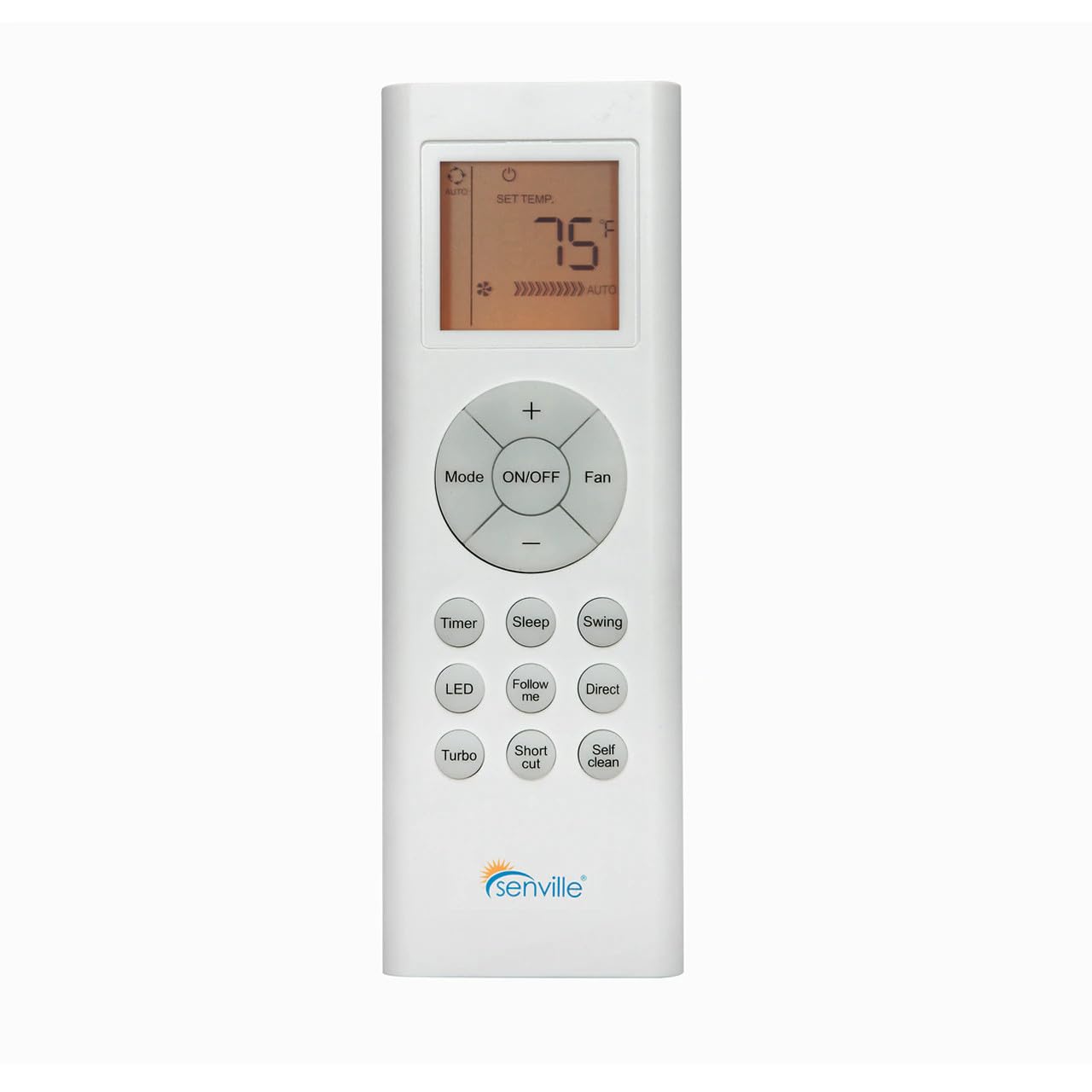
Şekil 1: Ön view of the Senville AR2015-IR Remote Control. It features an LCD screen at the top, a central circular button cluster for power, mode, fan, and temperature adjustment, and additional function buttons below.
Kurmak
1. Pil Kurulumu
- Uzaktan kumandanın arkasındaki pil bölmesi kapağını bulun.
- Kapağı aşağı doğru kaydırın veya mandalı bastırarak açın.
- Bölmenin içinde belirtildiği gibi doğru kutuplara (+ ve -) dikkat ederek iki adet AAA pil takın (pil dahil değildir).
- Pil bölmesi kapağını yerine takın.
Not: The remote control does not require programming and should function immediately upon battery installation with compatible Senville AURA and LETO series units.
Kullanım Talimatları
Düğme Fonksiyonları
- AÇIK/KAPALI: Klima ünitesini açmak veya kapatmak için basın.
- Mod: Çalışma modları arasında geçiş yapar: Otomatik, Soğutma, Kurutma, Isıtma, Fan.
- Fan: Fan hızını ayarlar: Otomatik, Düşük, Orta, Yüksek.
- Temperature (+/-): Increases or decreases the set temperature. The display shows the set temperature in Fahrenheit or Celsius.
- Zamanlayıcı: Otomatik açma veya otomatik kapatma zamanlayıcısını ayarlar.
- Uyumak: Activates or deactivates the Sleep mode for energy-efficient operation during sleep.
- Salıncak: Dikey panjur salınım fonksiyonunu kontrol eder.
- NEDEN OLMUŞ: Turns the indoor unit's display LED light on or off.
- Beni takip et: Activates the Follow Me function, which senses the temperature at the remote's location.
- Doğrudan: Adjusts the horizontal louver direction.
- Turbo: Kısa süreliğine hızlı soğutma veya ısıtma özelliğini etkinleştirir.
- Kısayol: Tercih ettiğiniz ayarları hatırlar.
- Kişisel temizlik: Initiates the self-cleaning function of the indoor unit.
Sıcaklık Birimi Seçimi
To switch between Fahrenheit (°F) and Celsius (°C), ensure the unit is off. Press and hold the Temperature (+) and Temperature (-) buttons simultaneously for approximately 3 seconds. The display will change to the alternate unit.
Bakım
Pil Değişimi
Replace batteries when the display becomes dim or the remote's range decreases. Always replace both batteries at the same time with new AAA batteries. Dispose of used batteries according to local regulations.
Uzaktan Kumandayı Temizleme
Uzaktan kumandayı yumuşak, kuru bir bezle silin. Sıvı temizleyiciler veya aşındırıcı malzemeler kullanmayın, çünkü bunlar uzaktan kumandanın yüzeyine veya iç bileşenlerine zarar verebilir.
Sorun giderme
- Uzaktan kumanda yanıt vermiyor:
- Pillerin doğru takılıp takılmadığını ve bitmemiş olup olmadığını kontrol edin. Gerekirse değiştirin.
- Ensure there are no obstructions between the remote control and the indoor unit's receiver.
- Confirm the remote is pointed directly at the indoor unit.
- Ekran loş veya boş:
- Pilleri değiştirin.
- Unit not responding to specific functions:
- Verify that your specific Senville unit model supports the function you are trying to use. Refer to your air conditioner's manual for compatibility.
Özellikler
| Model Numarası | AR2015-IR |
| Uyumlu Cihazlar | Senville AURA Series, Senville LETO Series mini split air conditioners (HF, HF/Z, CD/X Models) |
| Bağlantı Teknolojisi | Kızılötesi |
| Güç Kaynağı | 2 x AAA Piller (dahil değildir) |
| Boyutlar (U x G x Y) | 6.89 x 2.68 x 0.83 inç |
| Ağırlık | 2.89 ons (piller hariç) |
Garanti ve Destek
For warranty information or technical support regarding your Senville Remote Control or compatible air conditioning unit, please refer to the documentation provided with your main Senville product or visit the official Senville website. Contacting Senville customer service directly is recommended for specific inquiries.
Daha fazla bilgi ve destek kaynaklarına şu adresten ulaşabilirsiniz: Amazon'da Senville Mağazası.


