giriiş
This manual provides essential information for the safe and efficient operation of your AuKing Mini Projector. Please read it thoroughly before use and retain it for future reference.
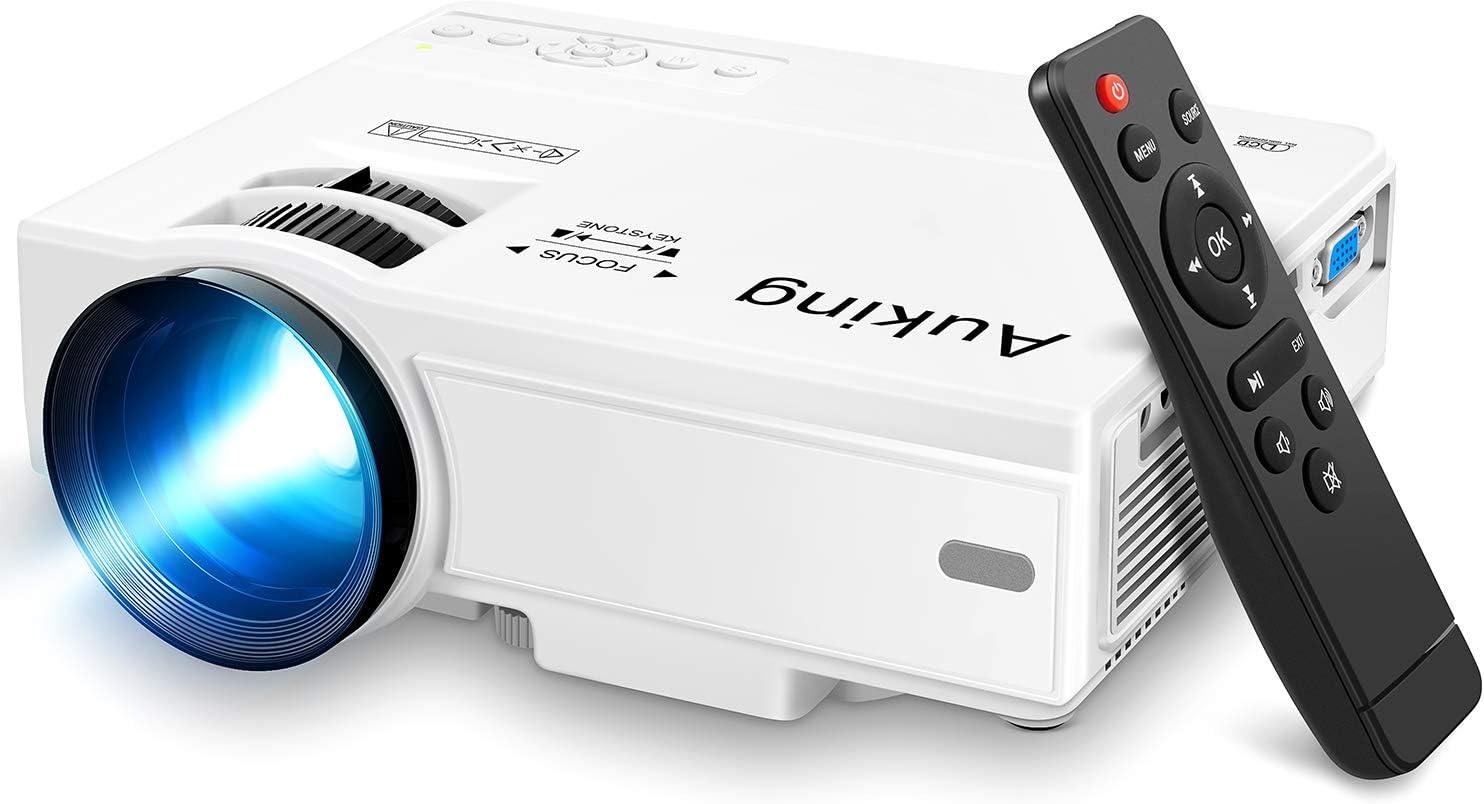
Image: The AuKing Mini Projector, a compact white device, is shown alongside its black remote control. The projector features a prominent lens and control buttons on its top surface.
Ürün Özellikleri
- Full HD 1080P Support: Experience clear and sharp detailed images with the latest color reproduction technology for a vibrant viewing etkisi.
- Large Projection Screen: Sürükleyici bir deneyimin tadını çıkarın viewing experience with a projection size ranging from 35 to 200 inches, suitable for distances between 3.6ft and 16.4ft.
- Uzun Ampul Ömrü: The powerful cooling system effectively dissipates heat, extending the lamp's life up to 55,000 hours for over 15 years of use.
- Low Noise & Dual Stereo Speakers: Advanced noise reduction technology reduces fan noise by 80%. Built-in dual stereo speakers provide clear sound quality. External speakers can be connected for enhanced audio.
- Çoklu Cihaz Bağlantısı: Equipped with HDMI, VGA, AV, and USB interfaces, compatible with smartphones, laptops, pads, USB drives, and TV boxes. (Note: An extra HDMI adapter may be needed for phone connection, and copyrighted apps like Netflix, Prime Video, Hulu require a TV Stick or Roku.)

Image: A split image demonstrating the AuKing projector's superior color reproduction and 1080P support compared to a generic projector.
Kutuda Neler Var?
Your AuKing Projector package includes:
- AuKing Mini Projektör
- Uzaktan kumanda
- Güç kablosu
- AV Kablosu
- HDMI Kablosu
- Kullanıcı Kılavuzu
Kurulum Kılavuzu
1. Yerleşim
Choose a suitable location for your projector. It can be placed on a table, mounted on a tripod, or ceiling-mounted. Ensure the projection surface is flat and clear.

Image: Demonstrates various placement options for the AuKing projector, including tripod installation, ceiling mount, and simple table placement.
2. Güç Bağlantısı
Connect the power cable to the projector and then to a power outlet.
3. Cihaz Bağlantısı
Connect your desired input device (e.g., laptop, USB drive, smartphone) to the projector using the appropriate cable (HDMI, USB, AV, VGA). For smartphone connections, an additional HDMI adapter may be required (sold separately).

Image: Illustrates the projector's compatibility with multiple devices, showing connections for smartphones, laptops/PCs, PS4, DVD players, memory cards, and USB drives.
4. Odak ve Trapez Düzeltme
Use the FOCUS and KEYSTONE rings on the projector to adjust the image clarity and shape until it appears rectangular and sharp on your screen.
Kullanım Talimatları
1. Güç Açma/Kapatma
Cihazı açmak veya kapatmak için projektördeki veya uzaktan kumandadaki güç düğmesine basın.
2. Giriş Kaynağı Seçimi
Use the "Source" button on the remote or projector to select the correct input source (HDMI, USB, AV, VGA) corresponding to your connected device.
3. Medya Oynatma
Medya dosyalarınızda gezinin files using the remote control. For streaming services like Netflix, Prime Video, or Hulu, ensure you are using a compatible TV Stick or Roku device connected to the projector due to copyright restrictions.

Image: A living room setup showcasing the projector's ability to create a large 200-inch projection, providing an immersive home theater experience.
4. Ses Çıkışı
The projector has built-in dual stereo speakers. For a higher sound quality, connect external speakers via the audio output port.
Bakım
To ensure optimal performance and longevity of your AuKing projector:
- Toz Temizleme: Regularly clean the lens with a soft, lint-free cloth. Avoid abrasive cleaners.
- Havalandırma: Ensure the projector's ventilation ports are not blocked to allow proper airflow and prevent overheating. The advanced cooling system is designed to manage heat effectively.
- Depolamak: Uzun süre kullanılmayacaksa projektörü serin, kuru, doğrudan güneş ışığından ve aşırı sıcaklıklardan uzak bir yerde saklayın.

Image: An illustration highlighting the projector's advanced cooling system, showing arrows indicating airflow to prevent overheating and extend lamp hayat.
Sorun giderme
| Sorun | Olası Neden | Çözüm |
|---|---|---|
| No image or "No Signal" | Yanlış giriş kaynağı seçildi; Kablo bağlantısı gevşek; Cihaz açık değil. | Select the correct input source. Check all cable connections. Ensure the input device is powered on. |
| Bulanık görüntü | Netlik sorunu; Yanlış trapez düzeltme. | Adjust the FOCUS ring until the image is clear. Adjust the KEYSTONE ring to correct image distortion. |
| Ses yok | Ses seviyesi çok düşük; Ses kapalı; Harici hoparlörler düzgün bağlanmamış. | Sesi artırın. Projektörün sesini açın. Harici hoparlör bağlantılarını kontrol edin. |
| Projektör aşırı ısınıyor | Havalandırmanın engellenmesi; Sıcak ortamda uzun süre kullanım. | Ensure vents are clear. Turn off and allow to cool. Use in a well-ventilated area. |
Özellikler
| Özellik | Detay |
|---|---|
| Marka | AuKing |
| Model Numarası | M8-F |
| Ekran Çözünürlüğü | 1920 x 1080 (Full HD supported) |
| Projeksiyon Boyutu | 35-200 inç |
| Projeksiyon Mesafesi | 3.6 fit ila 16.4 fit |
| Lamp Hayat | 55,000 saate kadar |
| Bağlantı Teknolojisi | VGA, USB, HDMI, AV |
| Hoparlör Tipi | Built-In Dual Stereo Speakers |
| Ürün Ağırlığı | 2.87 pound |
| Ürün Boyutları | 7.95 x 6.3 x 2.91 inç |
Garanti ve Destek
AuKing offers a 2 yıl ürün değiştirme garantisi and lifetime after-sales service for your projector. If you encounter any issues or have questions, please do not hesitate to contact our support team. We are committed to providing 100% customer satisfaction.
Destek için lütfen şu adresi ziyaret edin: AuKing Store on Amazon veya ürün ambalajınızda yer alan iletişim bilgilerine başvurun.


