1. Güvenlik Bilgileri
Lütfen montaj ve kullanımdan önce tüm talimatları dikkatlice okuyun. Bu kılavuzu ileride başvurmak üzere saklayın.
- Montaj Gerekli: This desk requires self-assembly. Follow the provided assembly instructions meticulously to prevent injuries.
- Ağırlık sınırı: This desk is not designed to carry heavy objects. The maximum weight capacity is approximately 17 kg (37.5 lbs) to ensure stability.
- Nezaret: Children should be supervised while using the desk, especially during adjustments.
- Atama: Masayı düz ve sağlam bir yüzeye yerleştirin.
2. Ürün Bittiview
The TecTake Children's Desk is designed to provide a comfortable and adaptable workspace for various activities such as drawing, homework, and crafts. Its thoughtful design allows for height and tilt adjustments to suit the user's needs.
Temel Özellikler:
- Eğimli Masaüstü: The work surface can be tilted to provide an ergonomic position for different tasks.
- Ayarlanabilir yükseklik: The desk legs are adjustable in 7 steps, allowing the desk to grow with your child.
- Integrated Drawer: A convenient drawer provides storage for school supplies, drawing materials, and other items.
- Removable Stopper Strips: Two removable stopper strips on the lower edge of the desktop prevent materials from sliding off when the surface is tilted.
- Sabit Yapı: Built with robust materials for durability and stability during daily use.
- Yuvarlak Köşeler: The desktop features rounded corners for enhanced safety.
- Kolay Temizlenir: The surface is washable with a damp Kumaş.

Figure 1: TecTake Children's Desk, showcasinTasarımı ve özellikleri.

Şekil 2: Üzeriview of key features including adjustable height, tilting desktop, and storage.
3. Kurulum
The desk comes with detailed assembly instructions in the package. Please refer to the included manual for step-by-step guidance on assembling your TecTake Children's Desk.
Genel Kurul Adımları:
- Tüm parçaları ambalajından çıkarın ve birlikte verilen kılavuzdaki parça listesiyle karşılaştırın.
- Assemble the main frame structure using the provided hardware.
- Attach the desktop to the frame, ensuring the tilting mechanism is correctly installed.
- Install the storage drawer and stopper strips.
- Kullanmadan önce tüm vidaların ve bağlantı elemanlarının iyice sıkıldığından emin olun.

Figure 3: The desk's flexible design allows for various adjustments to suit user needs.
4. Kullanım Talimatları
4.1 Adjusting Desk Height
- Locate the height adjustment mechanisms on the desk legs.
- Carefully loosen the fasteners or pins that secure the legs at their current height.
- Adjust the desk to one of the 7 available height positions (from approximately 63 cm to 94 cm).
- Ensure both sides are adjusted to the same height and securely fasten the mechanisms before use.
4.2 Tilting the Desktop
- The desktop features a tilting mechanism for ergonomic positioning.
- To tilt, lift the desktop slightly and adjust it to the desired angle.
- Ensure the desktop is securely locked into place at the chosen angle.
- Utilize the two removable stopper strips to prevent items from sliding off the tilted surface.
4.3 Saklama Çekmecesinin Kullanımı
- The integrated drawer provides convenient storage.
- Pull the drawer out to access its contents.
- Push the drawer back in until it is fully closed to keep items secure and maintain a tidy workspace.
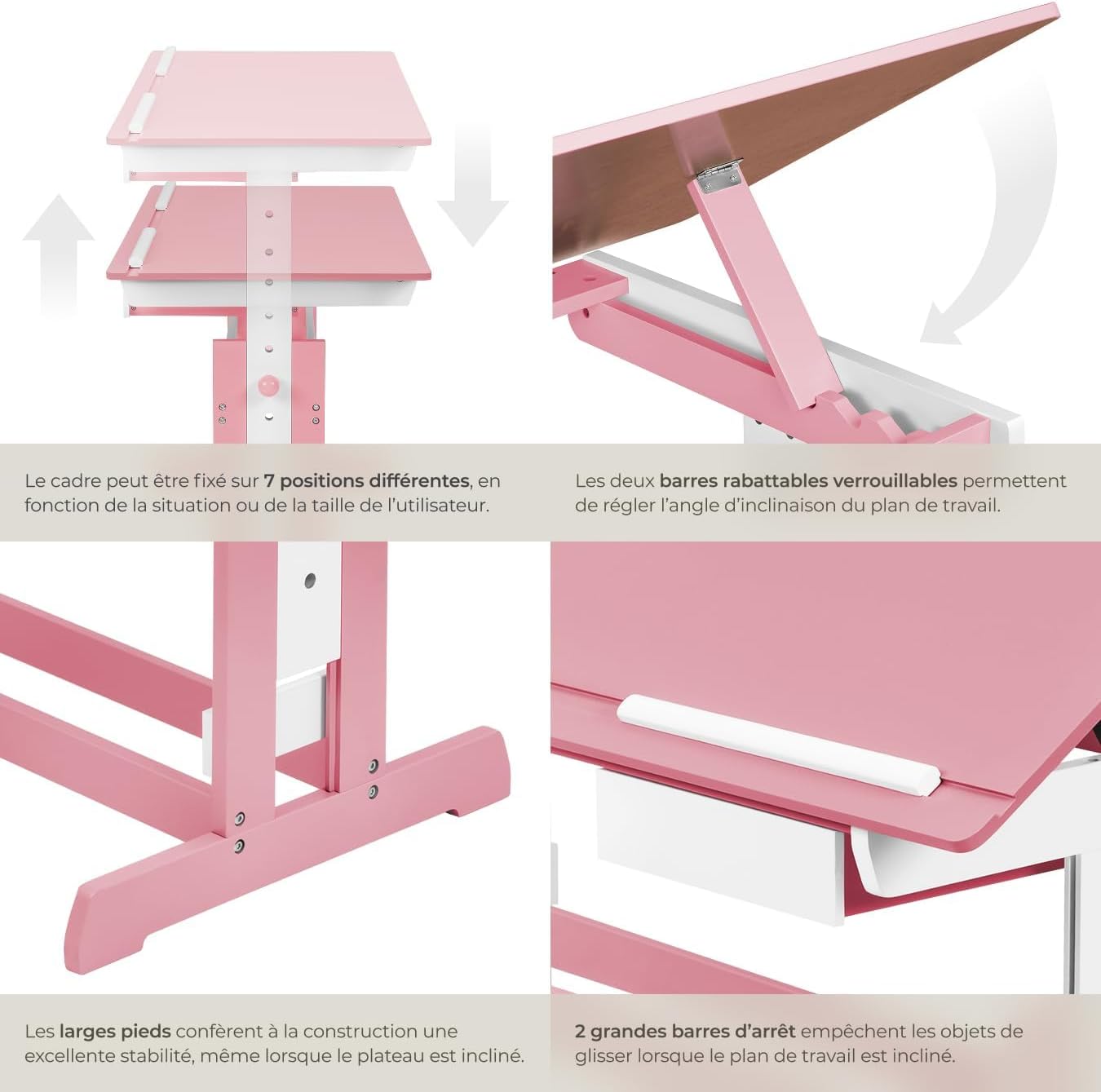
Figure 4: Close-up of the height adjustment and tilting mechanism.
5. Bakım
- Temizlik: Masa yüzeylerini ad ile silin.amp Kumaşı aşındırmayın. Cilaya zarar verebilecek aşındırıcı temizleyicilerden veya sert kimyasallardan kaçının.
- Denetleme: Tüm vidaların ve bağlantı elemanlarının sıkı kaldığından emin olmak için periyodik olarak kontrol edin. Gerektiğinde yeniden sıkın.
- Aşırı Nemden Kaçının: Do not expose the desk to excessive moisture or direct sunlight for prolonged periods to prevent warping or discoloration.
6. Sorun Giderme
If you encounter any issues with your TecTake Children's Desk, please refer to the following common solutions:
- Masa Sallantıları: Ensure the desk is placed on a level surface. Check that all assembly screws and bolts are securely tightened.
- Yükseklik/Eğim Ayarlamasında Zorluk: Verify that no obstructions are present in the adjustment mechanisms. Ensure fasteners are sufficiently loosened before attempting to adjust.
- Eksik veya Hasarlı Parçalar: If any parts are missing or damaged upon arrival, please contact TecTake customer support for assistance.
7. Özellikler
| Özellik | Şartname |
|---|---|
| Marka | TecTake |
| Model Numarası | 800117 |
| Çalışma Yüzeyi Boyutları | Yaklaşık 109 x 55 cm (43 x 21.7 inç) |
| Yükseklik Ayar Aralığı | Approx. 63 cm to 94 cm (24.8 to 37 inches) in 7 steps |
| Drawer Interior Dimensions (HxWxD) | Yaklaşık 6 x 27 x 22 cm (2.4 x 10.6 x 8.7 inç) |
| Ağırlık | Yaklaşık 17 kg (37.5 lbs) |
| Malzeme | Plywood (lacquered) / Metal |
| Özel Özellik | Adjustable, Tilting Desktop |
| Bakım Talimatları | Reklamla silamp bez |

Figure 5: Detailed dimensions and technical specifications of the desk.
8. Garanti ve Destek
For warranty information, product support, or to order replacement parts, please refer to the documentation included with your purchase or visit the official TecTake webLütfen destek ekibiyle iletişime geçerken model numaranızı (800117) ve satın alma tarihini hazır bulundurun.


