1. Giriş
This manual provides instructions for the Superior Electronics Universal Replacement Remote Control, model SUPTRB015. This remote is designed to be a direct replacement for original remote controls of LG, Samsung, and Sony televisions, including Smart TV models. It is ready to use without any programming.
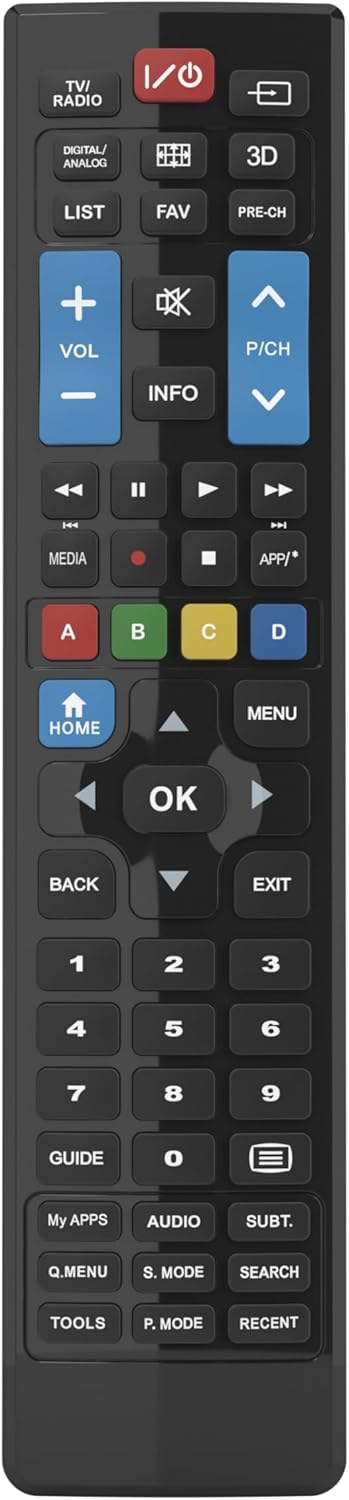
Figure 1: Superior Electronics Universal Remote Control (SUPTRB015)
2. Kurulum
2.1. Pil Kurulumu
Uzaktan kumanda iki adet AAA pil gerektirir (dahil değildir). Pilleri takmak için şu adımları izleyin:
- Uzaktan kumandanın arkasındaki pil bölmesini bulun.
- Mandalı aşağı doğru bastırın ve pil kapağını kaydırarak çıkarın.
- İki adet AAA pil takın ve pozitif (+) ve negatif (-) kutupların bölmenin içindeki şemalara uygun olduğundan emin olun.
- Pil kapağını güvenli bir şekilde yerine oturana kadar yerine kaydırın.

Figure 2: Battery Compartment on the back of the remote.
2.2. İlk Kullanım (Programlama Gerekmez)
This universal remote control is designed for immediate use with LG, Samsung, and Sony televisions. Once batteries are installed, it is ready to operate your TV without any additional programming or code setup.
3. Kullanım Talimatları
The remote control features an intuitive layout with dedicated buttons for common functions and Smart TV access. Refer to Figure 3 for a visual guide to the buttons.

Şekil 3: Uzaktan Kumanda Düğme Yerleşimi.
3.1. Temel TV Fonksiyonları
- Güç düğmesi (ⓘ)Televizyonu açar veya kapatır.
- Sesi Artırma/Azaltma (SES +/-)Ses seviyesini ayarlar.
- Channel Up/Down (P/CH +/-)Televizyon kanallarını değiştirir.
- Sessiz Düğmesi (🔇)Televizyonun sesini kapatır veya açar.
- Sayı Düğmeleri (0-9): Doğrudan TV kanallarını seçin.
- Giriş/Kaynak Düğmesi (⎌)Giriş kaynağını seçer (HDMI, AV, vb.).
3.2. Navigation and Menu Functions
- Directional Pad (Up, Down, Left, Right Arrows)Menüler ve seçenekler arasında gezinmeyi sağlar.
- Tamam DüğmesiSeçimleri onaylar.
- ANA SAYFA Düğmesi: Accesses the TV's main home screen or Smart Hub.
- MENÜ DüğmesiTelevizyonun ana menüsünü açar.
- GERİ Düğmesi: Önceki ekrana veya menüye döner.
- ÇIKIŞ DüğmesiGeçerli menüyü veya uygulamayı kapatır.
- BİLGİ DüğmesiGeçerli program veya giriş hakkında bilgi görüntüler.
3.3. Smart TV and Media Functions
- Dedicated Smart TV Buttons: Access popular streaming apps directly (e.g., Netflix, YouTube, Prime Video). These buttons are typically labeled or have recognizable logos.
- Medya Kontrol Düğmeleri (Oynat, Duraklat, Durdur, Geri Sar, İleri Sar)Medya oynatımını kontrol eder.
- Renkli Düğmeler (Kırmızı, Yeşil, Sarı, Mavi): These buttons often have specific functions within Smart TV apps or teletext, as indicated on your TV screen.
4. Bakım
4.1. Uzaktan Kumandanın Temizlenmesi
Uzaktan kumandanın görünümünü ve işlevselliğini korumak için:
- Yüzeyi yumuşak, kuru bir bezle silin.
- İnatçı kirler için hafifçeampBezi suyla veya yumuşak, aşındırıcı olmayan bir temizleyiciyle silin.
- Do not use harsh chemicals, solvents, or abrasive cleaning pads, as these can damage the remote's finish or internal components.
4.2. Pil Değişimi
Replace batteries when the remote's response becomes sluggish or it stops functioning. Always replace both batteries at the same time with new AAA batteries. Do not mix old and new batteries, or different types of batteries.
5. Sorun Giderme
If you experience issues with your remote control, try the following solutions:
- Uzaktan kumanda yanıt vermiyor:
- Check if the batteries are correctly inserted with the correct polarity (+/-).
- Pilleri yenileriyle değiştirin.
- Uzaktan kumanda ile televizyonun kızılötesi alıcısı arasında herhangi bir engel bulunmadığından emin olun.
- Make sure you are within the effective operating range (up to 10 meters).
- Bazı düğmeler çalışmıyor:
- This remote is designed for LG, Samsung, and Sony TVs. Ensure your TV is one of these brands.
- Some advanced functions or very specific buttons might not be universally supported across all TV models, especially older ones.
- Clean the remote control, especially around the unresponsive buttons, to ensure no debris is preventing contact.
- Smart TV buttons not working:
- Ensure your TV is a Smart TV and is connected to the internet.
- The dedicated Smart TV buttons (e.g., Netflix, YouTube) are compatible with most LG, Samsung, and Sony Smart TV models. If they don't work, you may need to access these apps through your TV's main Smart Hub/Home menu using the navigation buttons.
6. Özellikler
| Marka | Üstün Elektronik |
| Model Adı | Superior Electronics Replacement LG/Samsung/Sony SUPTRB015 |
| Özel Özellik | Evrensel |
| Renk | Siyah |
| Maksimum Desteklenen Cihazlar | 3 (LG, Samsung, Sony) |
| Uyumlu Cihazlar | Televizyon |
| Bağlantı Teknolojisi | Kızılötesi |
| Denetleyici Türü | Düğme Kontrolü |
| Maksimum Menzil | 10 Metre |
| Pil Sayısı | 2 AAA (Required) |

Figure 4: Remote Control Dimensions (approx. 20 cm length, 4.5 cm width).
7. Garanti ve Destek
Superior Electronics products are manufactured to high-quality standards. For information regarding warranty coverage, please refer to the documentation provided with your purchase or visit the official Superior Electronics website. For technical support or further assistance, please contact Superior Electronics customer service through their official channels.
Lütfen bu kılavuzu ileride başvurmak üzere saklayın.


