1. Giriş
This user manual provides detailed instructions for the installation, operation, and troubleshooting of the SIIG HDMI 2.0 Audio Extractor (Model: CE-H24F11-S1). This device is designed to split an incoming HDMI audio signal into stereo analog audio and Toslink optical outputs, enabling connection to various audio systems that may lack HDMI input.
The extractor supports high-resolution video up to 4K/60Hz with HDR and is compliant with HDCP 2.2. It also features ARC (Audio Return Channel) support via Toslink and CEC bypass, ensuring compatibility with modern home theater setups. Please read this manual thoroughly before use to ensure proper setup and optimal performance.
2. Ürün Özellikleri
- HDMI 2.0a and HDCP 2.2 compliant.
- Supports HDCP 2.2, HDR, and CEC bypass.
- Video resolutions up to 4Kx2K@60Hz YUV 4:4:4 8-bit and 4K HDR YUV 4:2:0 10-bit.
- Supports 480p, 720p, 1080i, 1080p resolutions.
- Video bandwidth: 18Gbps (600MHz per channel).
- Audio extraction via 3.5mm stereo jack and Toslink optical output.
- ARC audio extraction via Toslink (S/PDIF).
- Supports audio embedded via stereo and S/PDIF (Toslink).
- Desteklenen ses biçimleri:
- HDMI: PCM 2/5.1/7.1, Dolby 5.1/7.1, DTS 5.1/7.1
- Toslink (S/PDIF): PCM 2, Dolby 5.1, DTS 5.1
- 3.5mm Stereo: PCM 2
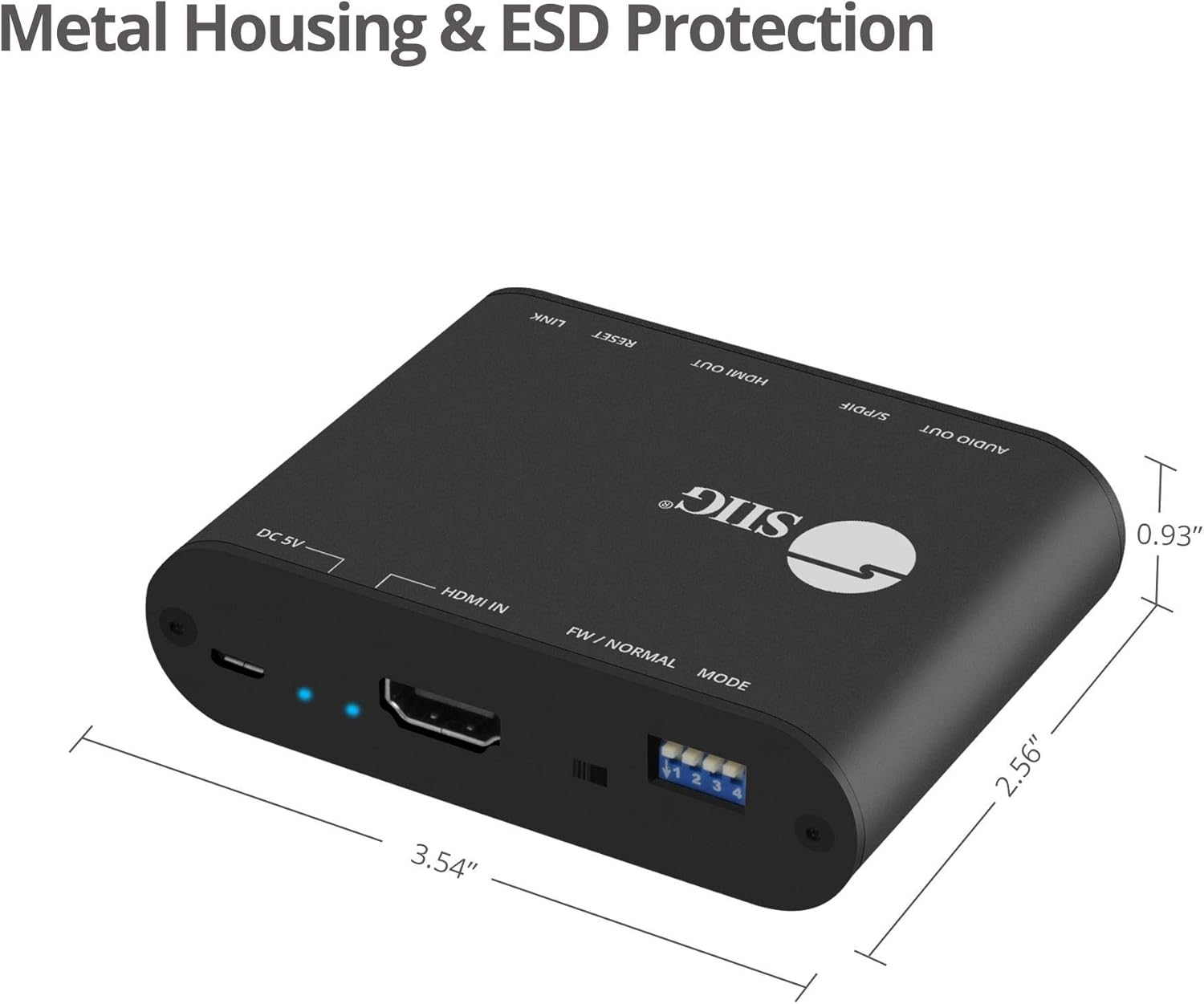
- Sturdy metal enclosure for durability and EMI/RFI noise interference minimization.
- ESD protection: ±15kV Air & ±8kV Contact.
- Country of origin: Taiwan.
- Regulatory approvals: FCC, CE, RoHS.

3. Paket İçeriği
Please verify that all items are present and in good condition. If any items are missing or damaged, contact your vendor for assistance.
- 1x HDMI 2.0 Audio Extractor/Embedder (CE-H24F11-S1)
- 1x USB Type-A to Micro B Cable (for power)
- 1x Installation Guide (this document)
4. Ürün Bittiview ve Liman Açıklamaları


Ön Panel:
- 3.5mm Stereo Output: Connect to analog audio devices (e.g., headphones, stereo speakers).
- S/PDIF (Toslink) Output: Connect to digital optical audio receivers or soundbars.
- HDMI Çıkışı: Connect to an HDMI display (e.g., TV, monitor, projector).
- Output Signal LED Indicator: Illuminates when an HDMI output signal is detected.
- Sıfırlama Düğmesi: Cihazı sıfırlamak için kullanılır.
- Slide Switch (FW/NORMAL Mode):
- Left (FW): Firmware update mode.
- Right (NORMAL): Normal operating mode. Ensure this is set to NORMAL for regular use.
Arka panel:
- Micro-USB Port (DC 5V): Connect the provided USB power cable for device power. Also used for firmware updates.
- Güç LED Göstergesi: Cihaz açıldığında yanar.
- Input Signal LED Indicator: HDMI giriş sinyali algılandığında yanar.
- HDMI Girişi: Connect to an HDMI source device (e.g., Blu-ray player, game console, streaming device).
- 4-pin DIP Switch: Used to configure EDID settings and enable/disable ARC and audio extraction functions.
5. Kurulum Talimatları
Follow these steps to set up your SIIG HDMI 2.0 Audio Extractor:
- Cihazları Kapatma: Ensure all source devices, displays, and audio systems are powered off before making any connections.
- HDMI Girişini Bağlayın: Kaynak cihazınızdan (örneğin Blu-ray oynatıcı, oyun konsolu) bir HDMI kablosu bağlayın HDMI IN port on the audio extractor.
- HDMI Çıkışını Bağlayın: HDMI kablosunu şuradan bağlayın: HDMI ÇIKIŞI port on the audio extractor to your display device (e.g., TV, monitor, projector).
- Connect Audio Output (Digital): For digital audio, connect a Toslink (optical) cable from the S/PDIF (Toslink) Output port on the extractor to your audio receiver, soundbar, or ampcankurtaran.
- Connect Audio Output (Analog): Analog stereo ses için, 3.5 mm ses kablosunu şuradan bağlayın: 3.5 mm Stereo Çıkış port on the extractor to your headphones or stereo speakers.
- Gücü bağlayın: Connect the provided USB Type-A to Micro B cable to the Mikro-USB Bağlantı Noktası (DC 5V) on the extractor and the other end to a USB power source (e.g., USB wall adapter, TV USB port). The Power LED Indicator will illuminate.
- Verify Slide Switch: Ensure the slide switch on the front panel is set to the NORMAL position (right).
- Cihazları Açma: Power on your display, audio system, and source device in that order.

6. Kullanım Talimatları
6.1 EDID and Function Configuration (DIP Switch)
The 4-pin DIP switch on the back panel allows you to configure the EDID (Extended Display Identification Data) settings and control the ARC and audio extraction functions. Adjust these settings based on your connected devices and desired audio output.

| DIP Anahtarı Konumu | Tanım |
|---|---|
| PIN1: OFF, PIN2: OFF | EDID geçişi |
| PIN1: OFF, PIN2: ON | Ultra HD (4K2K@60Hz) – 8/10/12bit, 3D, HDR video & 5.1ch audio |
| PIN1: ON, PIN2: OFF | Ultra HD (4K2K@60Hz) – 8/10/12bit, 3D, HDR video & 2ch audio |
| PIN1: ON, PIN2: ON | Learning EDID from Output |
| PIN3: OFF | Disable ARC Function |
| PIN3: ON | Enable ARC Function |
| PIN4: OFF | Disable Audio Extractor Function |
| PIN4: ON | Enable Audio Extractor Function (via Toslink & 3.5mm) |
Not: After changing DIP switch settings, it is recommended to power cycle the audio extractor and all connected devices to ensure the new settings are applied correctly.
6.2 ARC (Audio Return Channel) Function
When ARC is enabled (PIN3 ON) and your display supports ARC, audio from your TV's internal tuner or smart apps can be sent back to the audio extractor via the HDMI cable and then output through the Toslink (S/PDIF) port to your audio system.

6.3 CEC Bypass
The device supports CEC (Consumer Electronics Control) bypass, allowing CEC commands to pass through the extractor to control connected HDMI devices. This means you can use a single remote to control multiple CEC-enabled devices in your setup.
7. Sorun Giderme
If you encounter issues with the SIIG HDMI 2.0 Audio Extractor, please refer to the following common troubleshooting steps:
- Video Çıkışı Yok:
- Tüm HDMI kablolarının güvenli bir şekilde bağlandığından emin olun.
- Verify the input source is selected correctly on your display.
- Check the power connection to the extractor; the Power LED should be illuminated.
- Farklı bir HDMI kablosu deneyin.
- Adjust DIP switch settings for EDID (PIN1 & PIN2) to match your display's capabilities or try "EDID bypass".
- Power cycle all connected devices (source, extractor, display).
- No Audio Output (Toslink/3.5mm):
- Ensure audio cables (Toslink or 3.5mm) are securely connected to the correct output ports on the extractor and input ports on your audio system.
- Verify the audio input is selected correctly on your audio receiver/soundbar.
- Check DIP switch PIN4 is set to ON to enable audio extraction.
- If using ARC, ensure DIP switch PIN3 is set to ON and your TV's ARC function is enabled.
- Confirm the audio format from your source is supported by your audio system and the extractor (refer to "Product Features" for supported formats). Some audio systems may not support certain multi-channel formats.
- Try setting DIP switch PIN1: ON, PIN2: OFF for 2ch audio output if your audio system only supports stereo.
- Power cycle all connected devices.
- Kesintili Görüntü/Ses:
- Gevşek kablo bağlantılarını kontrol edin.
- Güç kaynağının stabil olduğundan emin olun.
- Reduce cable lengths if possible, especially for HDMI.
- Verify that the slide switch is in the NORMAL konum.
- Farklı HDMI kablolarıyla test edin.
- HDR/4K Issues:
- Ensure all connected HDMI cables are rated for HDMI 2.0 or higher and support 18Gbps bandwidth.
- Verify your source and display devices both support 4K/60Hz and HDR.
- Adjust EDID settings (PIN1 & PIN2) to ensure the correct video mode is selected.
8. Özellikler
| Özellik | Detay |
|---|---|
| Model Numarası | CE-H24F11-S1 |
| HDMI Uyumluluğu | HDMI 2.0a |
| HDCP Uyumluluğu | HDCP2.2 |
| Video Bant Genişliği | 18Gbps (600MHz per channel) |
| Desteklenen Çözünürlükler | Up to 4Kx2K@60Hz (YUV 4:4:4 8-bit), 4K HDR (YUV 4:2:0 10-bit), 1080p, 1080i, 720p, 480p |
| HDR Desteği | Yes (4K@60Hz YUV 4:2:0 10-bit) |
| Ses çıkışları | 1x Toslink (S/PDIF), 1x 3.5mm Stereo |
| ARC Desteği | Yes (via Toslink) |
| CEC Desteği | Baypas |
| ESD Koruması | ±15kV Air & ±8kV Contact |
| Malzeme | Metal muhafaza |
| Ürün Boyutları (U x G) | 4.56" x 0.78" (11.58 cm x 1.98 cm) |
| Ürün Ağırlığı | 6.4 ons (181.4 gram) |
| Güç Kaynağı | DC 5V (via Micro-USB) |
| Çalışma Sıcaklığı | 104 °F'ye (40 °C) kadar |
| Sertifikalar | FCC, CE, RoHS, TAA compliant |
| Menşei ülke | Tayvan |
9. Bakım
The SIIG HDMI 2.0 Audio Extractor is designed for reliable operation with minimal maintenance.
- Temizlik: Use a soft, dry cloth to clean the device. Avoid using liquid or aerosol cleaners, as they may damage the unit.
- Havalandırma: Aşırı ısınmayı önlemek için cihazın iyi havalandırılan bir alana yerleştirildiğinden emin olun. Havalandırma açıklıklarını kapatmayın.
- Depolamak: Uzun süre kullanılmayacaksa, cihazı serin ve kuru bir yerde, doğrudan güneş ışığından ve aşırı sıcaklıklardan uzakta saklayın.
- Donanım Yazılımı Güncellemeleri: Periodically check the SIIG website for any available firmware updates for your model. Follow the instructions provided with the firmware update carefully.
10. Güvenlik Bilgileri
Cihazın hasar görmesini önlemek ve kullanıcı güvenliğini sağlamak için lütfen aşağıdaki güvenlik yönergelerine uyun:
- Cihazı suya veya aşırı neme maruz bırakmayın.
- Cihazı açmaya veya üzerinde değişiklik yapmaya çalışmayın. İçinde kullanıcı tarafından onarılabilecek hiçbir parça bulunmamaktadır.
- Use only the provided power cable or a certified 5V USB power adapter.
- Cihazınızı ısı kaynaklarından, doğrudan güneş ışığından ve yanıcı maddelerden uzak tutunuz.
- Ensure proper grounding for all connected electrical equipment.
11. Garanti ve Teknik Destek
11.1 Garanti Bilgileri
The SIIG HDMI 2.0 Audio Extractor (CE-H24F11-S1) comes with a 3 yıllık garanti. This warranty covers defects in materials and workmanship under normal use. For specific terms and conditions, please refer to the warranty documentation provided with your purchase or visit the official SIIG webalan.
11.2 Teknik Destek
For technical assistance, product inquiries, or troubleshooting beyond the scope of this manual, please contact SIIG customer support.
- Webalan: Visit the official SIIG webDestek kaynakları, SSS ve iletişim bilgileri için site.
- Temas etmek: Refer to your product packaging or the SIIG website for the most current contact details for technical support.


