1. Giriş
This manual provides detailed instructions for the TRACER GAMEZONE IGNIS AVAGO 3050 4000DPI USB Gaming Mouse. Please read this manual thoroughly before using the product to ensure proper operation and to maximize your gaming experience.
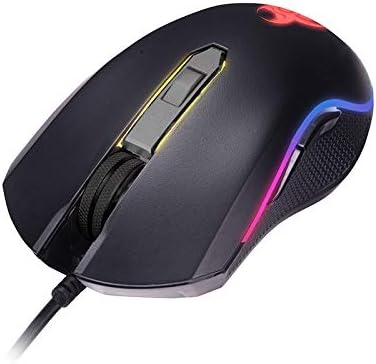
Resim 1.1: Üzeriview of the TRACER GAMEZONE IGNIS AVAGO 3050 Gaming Mouse. This image shows the mouse from a slightly elevated angle, highlighting its ergonomic design, scroll wheel, and the integrated RGB lighting along its sides.
2. Paket İçeriği
Paketin içerisinde tüm ürünlerin mevcut olduğundan emin olun:
- TRACER GAMEZONE IGNIS AVAGO 3050 4000DPI USB Gaming Mouse
- Kullanım Kılavuzu (bu belge)
3. Ürün Özellikleri
- High Precision Optical Laser: Equipped with an AVAGO 3050 optical sensor for superior tracking accuracy.
- Ayarlanabilir DPI: Supports DPI switching up to 4000 DPI for customizable sensitivity.
- 6 Özelleştirilebilir Düğme: Provides six programmable buttons for enhanced control during gameplay.
- RGB Aydınlatma: Integrated internal RGB lighting for a modern and aggressive aesthetic.
- USB Bağlantısı: Standard USB connection for wide compatibility with PC and Mac platforms.
- Sliding Base: Designed for smooth operation on various surfaces, including mouse mats.

Resim 3.1: Yan view of the gaming mouse, showcasing the ergonomic shape, textured grip on the side, and the vibrant RGB light strip running along the edge.
4. Kurulum
Follow these steps to set up your TRACER GAMEZONE IGNIS AVAGO 3050 Gaming Mouse:
- Fareyi Paketinden Çıkarın: Fareyi ambalajından dikkatlice çıkarın.
- Bilgisayara Bağlan: Farenin USB konektörünü PC veya Mac'inizdeki kullanılabilir bir USB bağlantı noktasına takın.
- Sürücü Kurulumu: The mouse is plug-and-play. Your operating system will automatically detect and install the necessary drivers. No additional software installation is typically required for basic functionality.
- Atama: En iyi performansı elde etmek için fareyi düz, temiz bir yüzeye veya fare altlığına yerleştirin.

Resim 4.1: Ön view of the gaming mouse, showing the USB cable extending from the front, the scroll wheel, and the primary left and right click buttons.
5. Kullanım Talimatları
The TRACER GAMEZONE IGNIS AVAGO 3050 Gaming Mouse is designed for intuitive use. Here are the basic operating principles:
5.1. Temel Fare İşlevleri
- Sol tık: Birincil eylem düğmesi.
- Sağ tık: Secondary action button, often used for context menus.
- Kaydırma tekerleği: Used for vertical scrolling. Can also be pressed as a middle button.
5.2. DPI Ayarlaması
The mouse features a dedicated DPI button (usually located behind the scroll wheel) to cycle through different sensitivity settings. Press this button to instantly change the DPI (Dots Per Inch) to match your preference or game requirements. The mouse supports multiple DPI levels up to 4000 DPI.
5.3. Button Customization
The TRACER GAMEZONE IGNIS AVAGO 3050 mouse has 6 customizable buttons. While basic functionality is plug-and-play, advanced customization (such as remapping buttons or creating macros) typically requires third-party software compatible with generic gaming mice, as Tracer may not provide proprietary software for this model. Refer to your operating system's mouse settings or third-party utility software for advanced configuration options.
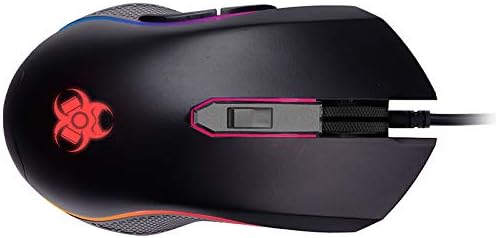
Resim 5.1: Yukarıdan aşağıya view of the gaming mouse, clearly showing the scroll wheel, the DPI adjustment button behind it, and the left and right click buttons. The Tracer logo with RGB lighting is visible at the rear.
6. Bakım
Oyun farenizin uzun ömürlü ve en iyi performansı göstermesi için aşağıdaki bakım yönergelerini izleyin:
- Temizlik: Farenin yüzeyini silmek için yumuşak ve kuru bir bez kullanın. İnatçı kirler için hafifçe silin.ampBezi su veya hafif bir temizleme solüsyonuyla yıkayın. Sert kimyasallardan veya aşındırıcı malzemelerden kaçının.
- Sensör Temizleme: Periodically clean the optical sensor on the underside of the mouse with a cotton swab lightly dampened with rubbing alcohol. Ensure no lint is left behind.
- Kablo Bakımı: USB kablosunun hasar görmesini önlemek için keskin bükümlerden veya aşırı çekmelerden kaçının.
- Depolamak: Kullanılmadığı zamanlarda fareyi aşırı sıcaklıklardan ve doğrudan güneş ışığından uzakta, temiz ve kuru bir ortamda saklayın.
7. Sorun Giderme
If you encounter issues with your TRACER GAMEZONE IGNIS AVAGO 3050 Gaming Mouse, refer to the following common problems and solutions:
| Sorun | Olası Neden | Çözüm |
|---|---|---|
| Fare yanıt vermiyor | Gevşek USB bağlantısı, arızalı USB portu, sürücü sorunu. |
|
| İmleç düzensiz veya düzgün hareket etmiyor. | Dirty optical sensor, unsuitable surface, software interference. |
|
| DPI düğmesi hassasiyeti değiştirmiyor. | Düğme arızası, yazılım çakışması. |
|
8. Özellikler
| Özellik | Detay |
|---|---|
| Model Adı | GAMEZONE IGNIS AVAGO 3050 4000DPI |
| Ürün Model Numarası | TRAMYS46085 |
| Marka | İzleyici |
| Bağlantı Teknolojisi | USB |
| Hareket Algılama Teknolojisi | Laser, Optical (AVAGO 3050) |
| DPI Aralığı | 4000 DPI'a kadar (ayarlanabilir) |
| Düğme Sayısı | 6 |
| Donanım Platformu | Mac, PC |
| Ürün Ağırlığı | 12.3 ons (yaklaşık 348.7 gram) |
| Paket Boyutları | 7.87 x 5.91 x 1.97 inç |
| Üretici | İZLEYİCİ |
| İlk Mevcut Tarih | 4 Şubat 2019 |
9. Garanti ve Destek
For warranty information and technical support, please refer to the official Tracer webÜrünü satın aldığınız yerel satıcıyla iletişime geçin veya web sitesini ziyaret edin. Garanti talepleri için satın alma belgenizi saklayın.
Üretici: İZLEYİCİ