giriiş
Thank you for choosing the MARVO KG925G Mechanical Gaming Keyboard. This manual provides essential information for setting up, operating, maintaining, and troubleshooting your new keyboard. Please read this manual carefully before use to ensure optimal performance and longevity of your device.
Paket İçeriği
Paketin içinde tüm öğelerin mevcut olduğundan emin olun:
- MARVO KG925G Mechanical Gaming Keyboard
- Kullanım Kılavuzu (bu belge)
Kurmak
Sistem Gereksinimleri
- İşletim Sistemi: Windows 8 veya üzeri
- Mevcut USB 2.0 portu
Klavyeyi Bağlama
- Bilgisayarınızda kullanılabilir bir USB 2.0 bağlantı noktası bulun.
- Plug the USB connector of the MARVO KG925G keyboard into the USB port.
- İşletim sistemi gerekli sürücüleri otomatik olarak algılayıp yükleyecektir. Bu işlem birkaç dakika sürebilir.
- Once the drivers are installed, the keyboard's backlighting will illuminate, indicating it is ready for use.
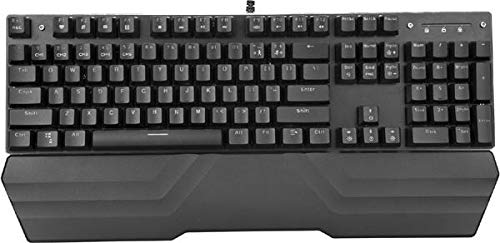
Image: The MARVO KG925G Mechanical Gaming Keyboard with its USB cable connected, ready for use. The keyboard features a wrist rest and illuminated keys.
Kullanım Talimatları
Temel Klavye İşlevleri
The MARVO KG925G functions as a standard QWERTY keyboard for typing and general computer use.
Multimedya Tuşları
The keyboard includes dedicated multimedia functions, typically accessed via the Fn key combined with the F-keys (F1-F12). Refer to the keycap legends for specific functions such as volume control, media playback, and launching applications.
- Fn + F1-F12: Access various multimedia and system functions.
Arka Aydınlatma Kontrolü
The MARVO KG925G features customizable backlighting. Specific key combinations are used to change lighting modes, brightness, and speed. Consult the keyboard's keycap legends or the manufacturer's website for detailed instructions on advanced lighting customization.
- Aydınlatma Modları: Typically cycled using a dedicated key or Fn + a specific key (e.g., Scroll Lock, Pause Break, or a dedicated lighting key).
- Parlaklık Ayarı: Genellikle tarafından kontrol edilir Fn + Up/Down arrow keys.
Bakım ve Özen
Doğru bakım, klavyenizin uzun ömürlü olmasını ve yüksek performans göstermesini sağlar.
- Temizlik: Use a soft, dry cloth to wipe the keyboard surface. For deeper cleaning, use a can of compressed air to remove dust and debris from between the keycaps. Avoid using harsh chemicals or abrasive materials.
- Dökülmeler: In case of liquid spills, immediately unplug the keyboard from your computer. Turn it upside down to drain any liquid and allow it to dry completely for at least 24-48 hours before reconnecting. Do not attempt to use the keyboard while it is wet.
- Depolamak: Klavyeyi serin, kuru ve doğrudan güneş ışığından ve aşırı sıcaklıklardan uzak bir yerde saklayın.
Sorun giderme
If you encounter issues with your MARVO KG925G keyboard, refer to the following common solutions:
| Sorun | Olası Çözüm |
|---|---|
| Klavye yanıt vermiyor. |
|
| Backlighting is not working. |
|
| Keys are not registering correctly. |
|
Özellikler
- Modeli: KG925G
- Marka: MARVO
- Bağlantı: USB 2.0
- Klavye Türü: Mekanik Oyun Klavyesi
- Özellikler: Illumination, Wrist Rest, Multimedia Keys
- Uyumlu İşletim Sistemi: Windows 8 ve üzeri
- Boyutlar: Yaklaşık 47.5 x 18.7 x 8.4 cm (18.7 x 7.4 x 3.3 inç)
Garanti ve Destek
For warranty information and technical support, please refer to the warranty card included with your product or visit the official MARVO webSite. Satın alma belgenizi garanti talepleriniz için saklayın.


