giriiş
This manual provides essential information for the installation, operation, and maintenance of your SilverStone SST-ST65F-GS 650W 80 Plus Gold Fully Modular ATX Power Supply. The SST-ST65F-GS is designed to meet the demands of modern desktop computers, offering a compact, fully modular design with 80 PLUS Gold level efficiency. It features a 650W maximum DC output, strict voltage regulation, low ripple and noise, and a silent 120mm fan for continuous 24/7 operation at 40°C.
Güvenlik Bilgileri
- Always disconnect the AC power cord from the wall outlet before installing, removing, or cleaning the power supply unit (PSU).
- PSU yüksek hacimlitage bileşenleri. PSU'yu açmayın casing. İçerisinde kullanıcının müdahale edebileceği herhangi bir parça bulunmamaktadır.
- Ensure the PSU is installed in a well-ventilated area. Do not block the fan or ventilation openings.
- Yalnızca bu güç kaynağıyla birlikte verilen modüler kabloları kullanın. Üçüncü taraf kabloların kullanılması, güç kaynağına veya bağlı bileşenlere zarar verebilir.
- Connect the correct cables to the appropriate ports on the PSU and your system components. Incorrect connections can cause severe damage.
- Bu ürün kişisel bilgisayar sistemlerinde kullanılmak üzere tasarlanmıştır. Başka bir amaçla kullanmayınız.
- Güç kaynağını sudan, nemden ve aşırı sıcaklıklardan uzak tutun.
Paket İçeriği
Kurulumdan önce paketteki tüm öğelerin eksiksiz olduğundan emin olun.
- SilverStone SST-ST65F-GS 650W Power Supply Unit
- Modular Cable Set (including ATX 24-pin, EPS/ATX 8-pin, PCIe 6+2-pin, SATA, Peripheral 4-pin cables)
- AC Güç Kablosu
- Montaj Vidaları
- Kablo Bağları / Cırt Cırtlı Kayışlar
- Kullanım Kılavuzu / Garanti Bilgileri

Image: The SilverStone SST-ST65F-GS power supply unit shown with its full set of modular cables, mounting screws, and documentation.
Ürün Bittiview
The SilverStone SST-ST65F-GS is a high-performance, fully modular power supply designed for reliability and efficiency. Key features include:
- 650 Watt Maximum DC Output: Sağlar ample power for most gaming and workstation systems.
- Kompakt Tasarım: With a depth of 140mm, it allows for easy integration into various PC cases.
- 100% Modular Cables: Enables users to connect only the necessary cables, reducing clutter and improving airflow.
- 80 PLUS Altın Sertifikası: Ensures high power efficiency, reducing heat generation and operating costs.
- Class-Leading Single +12V Rail: Delivers stable and reliable power to demanding components.
- Strict Voltage Yönetmeliği: Maintains output voltages within 3% of the nominal value.
- Düşük Dalgalanma ve Gürültü: Ensures clean power delivery to sensitive components.
- 24/7 Continuous Power Output: Capable of sustained operation at 40°C ambient temperature.
- Silent Running 120mm Fan: Operates with a minimum noise level of 18dBA for quiet performance.
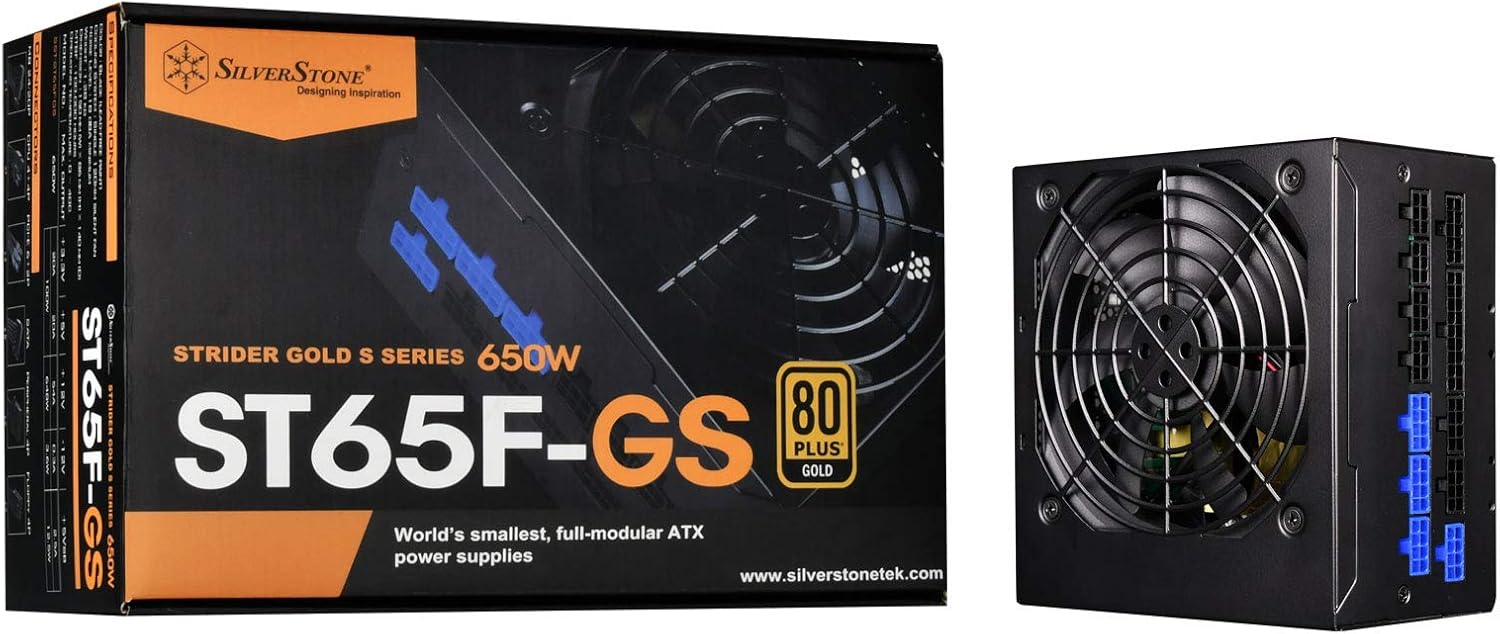
Image: The SilverStone SST-ST65F-GS power supply unit alongside its retail packaging, highlighting its compact size and 80 PLUS Gold certification.

Resim: Açılı bir view of the SilverStone SST-ST65F-GS power supply, showing the fan grill and modular cable connectors.

Resim: Yakın çekim view of the fully modular cable connection panel on the SilverStone SST-ST65F-GS, with blue connectors for main power and black for peripherals.

Resim: Yukarıdan aşağıya view of the 120mm cooling fan and grill on the SilverStone SST-ST65F-GS power supply.

Resim: Arka view of the SilverStone SST-ST65F-GS power supply, showing the AC power inlet, ventilation grille, and the main power switch.
Kurulum ve Yükleme
- Sisteminizi Hazırlayın: Bilgisayarınızın tamamen kapalı olduğundan ve fişinin prizden çekildiğinden emin olun. PSU montaj alanına erişmek için bilgisayar kasanızı açın.
- Eski PSU'yu çıkarın (eğer varsa): Eski güç kaynağınızın tüm kablolarını çıkarın ve montaj vidalarını çıkarın. Eski güç kaynağını dikkatlice kasadan dışarı kaydırın.
- Yeni PSU'yu Takın: Slide the SilverStone SST-ST65F-GS into the designated PSU bay in your computer case. Align the screw holes and secure the PSU with the provided mounting screws. Ensure the fan is facing the correct direction for optimal airflow (typically facing down if there's a bottom vent, or up if there isn't).
- Modüler Kabloları Bağlayın:
- Main ATX Power (20+4 pin): Connect the 24-pin cable to the corresponding port on the PSU and the motherboard.
- CPU Power (4+4 pin EPS/ATX): Connect the 8-pin (or 4+4 pin) CPU power cable to the PSU and the motherboard's CPU power connector.
- PCIe Power (6+2 pin): Connect the necessary PCIe cables to the PSU and your graphics card(s). Each 6+2 pin connector can be used for either 6-pin or 8-pin PCIe power.
- SATA Gücü: SATA güç kablolarını SSD'lerinize, HDD'lerinize ve optik sürücülerinize bağlayın.
- Peripheral (Molex) Power: Connect peripheral cables for case fans, older drives, or other accessories as needed.
Önemli: Ensure all cable connections are firm and correctly oriented. Do not force connectors.
- Kablo yönetimi: Route cables neatly to improve airflow and aesthetics within your case. Use the provided cable ties or Velcro straps.
- Kapağı kapatın ve AC güç kaynağına bağlayın: Tüm dahili bağlantılar yapıldıktan sonra bilgisayar kasasını kapatın. AC güç kablosunu güç kaynağının girişine ve ardından bir duvar prizine veya aşırı gerilim koruyucusuna bağlayın.
- Güç Açık: Flip the power switch on the back of the PSU to the "I" (On) position. Then, power on your computer.
Kullanım Talimatları
The SilverStone SST-ST65F-GS power supply operates automatically once installed and powered on. It is designed for continuous operation under normal computing loads.
- Güç Açma/Kapatma: Use the main power switch on the back of the PSU to completely cut power to the unit. For daily use, power your computer on and off via the operating system or case power button.
- Fan Çalışması: The integrated 120mm fan will automatically adjust its speed based on the PSU's internal temperature and load to maintain optimal cooling and quiet operation.
- Yeterlik: The 80 PLUS Gold certification indicates high efficiency, meaning less power is wasted as heat, contributing to lower energy consumption and a cooler system.
Bakım
Doğru bakım, güç kaynağınızın uzun ömürlü olmasını ve optimum performans göstermesini sağlar.
- Toz Temizleme: Periodically (e.g., every 6-12 months), disconnect the PSU from AC power and use compressed air to gently clean dust from the fan grille and ventilation openings. Do not open the PSU casing.
- Hava Akışını Sağlayın: Make sure that the PSU's intake and exhaust vents are not obstructed by cables, dust, or other components within the PC case. Good airflow is crucial for cooling.
- Kablo Denetimi: Occasionally check that all modular cables are securely connected to both the PSU and your components.
Sorun giderme
Güç kaynağınızla ilgili sorunlarla karşılaşırsanız, aşağıdaki genel sorun giderme adımlarına bakın:
- Güç Yok:
- AC güç kablosunun hem güç kaynağına hem de duvar prizine güvenli bir şekilde bağlı olduğundan emin olun.
- Check that the power switch on the back of the PSU is in the "I" (On) position.
- Verify all modular cables are correctly and firmly seated in the PSU and connected components (motherboard, CPU, GPU).
- Duvar prizinde güç olduğundan emin olmak için başka bir cihazla deneyin.
- Sistem Kararsızlığı/Çökmeler:
- Sisteminizin güç gereksinimlerinin güç kaynağının 650W kapasitesini aşmadığından emin olun.
- Gevşek kablo bağlantılarını kontrol edin.
- Monitor system temperatures to ensure components are not overheating, which can be exacerbated by poor PSU performance or airflow.
- Yüksek Fan Sesi:
- Güç kaynağı fanındaki ve havalandırma deliklerindeki toz birikintilerini temizleyin.
- Bilgisayar kasasının içinde yeterli hava akışı olduğundan emin olun.
- If the noise is excessive and persistent even under low load, contact SilverStone support.
If these steps do not resolve your issue, please contact SilverStone customer support for further assistance.
Özellikler
| Özellik | Şartname |
|---|---|
| Marka | GümüşTaş |
| Model Numarası | SST-ST65F-GS |
| Seri | Strider Gold S |
| Maximum DC Output | 650W |
| 80 PLUS Sertifikası | Altın |
| Form Faktörü | ATX |
| Modüler Tip | Tamamen Modüler |
| Soğutma Yöntemi | 120mm Fan (Silent running, 18dBA minimum) |
| Cilttage Yönetmeliği | Strict 3% |
| Dalgalanma ve Gürültü | Düşük %3 |
| Continuous Output Temperature | 40°C (24/7 operation) |
| Boyutlar (UxGxY) | 5.91 x 5.51 x 3.39 inç (150 x 140 x 86 mm) |
| Ürün Ağırlığı | 2.83 pound (1.28 kg) |
| Uyumlu Cihazlar | Kişisel Bilgisayar |
| Bağlayıcı Türü | ATX |
Garanti ve Destek
SilverStone Technology provides a limited warranty for its power supply units. Please refer to the warranty information included in your product package for specific terms and conditions, including warranty duration and coverage details. You can also visit the official SilverStone Technology website for the most up-to-date warranty policy and to access customer support resources.
For technical support, troubleshooting assistance beyond this manual, or warranty claims, please contact SilverStone Technology customer service through their official webalan:


