1. Giriş
This manual provides detailed instructions for the installation, operation, and maintenance of your TooQ TQE-2528B 2.5-inch SATA USB 3.1 Gen1 HDD Enclosure. This device allows you to convert a 2.5-inch SATA I/II/III hard disk drive or solid-state drive into an external storage solution, connecting via USB 3.1 Gen1 for high-speed data transfer.
2. Paket İçeriği
Lütfen pakette tüm öğelerin mevcut olduğundan emin olun:
- TooQ TQE-2528B 2.5-inch SATA USB 3.1 Gen1 HDD Enclosure
- USB 3.0 Type-A to Micro-B Cable
- Kullanım Kılavuzu (bu belge)

Image 2.1: The TooQ TQE-2528B enclosure shown with its included USB 3.0 cable.
3. Ürün Bittiview
The TooQ TQE-2528B is designed for ease of use and portability. Key features include:
- Compatible with 2.5-inch SATA I/II/III HDDs and SSDs up to 9.5mm height.
- USB 3.1 Gen1 (USB 3.0) interface for data transfer speeds up to 5.0 Gbps.
- Tool-free installation for quick setup.
- LED indicator for connection status and data access.
- Powered directly via USB port.
3.1. Bileşen Tanımlaması
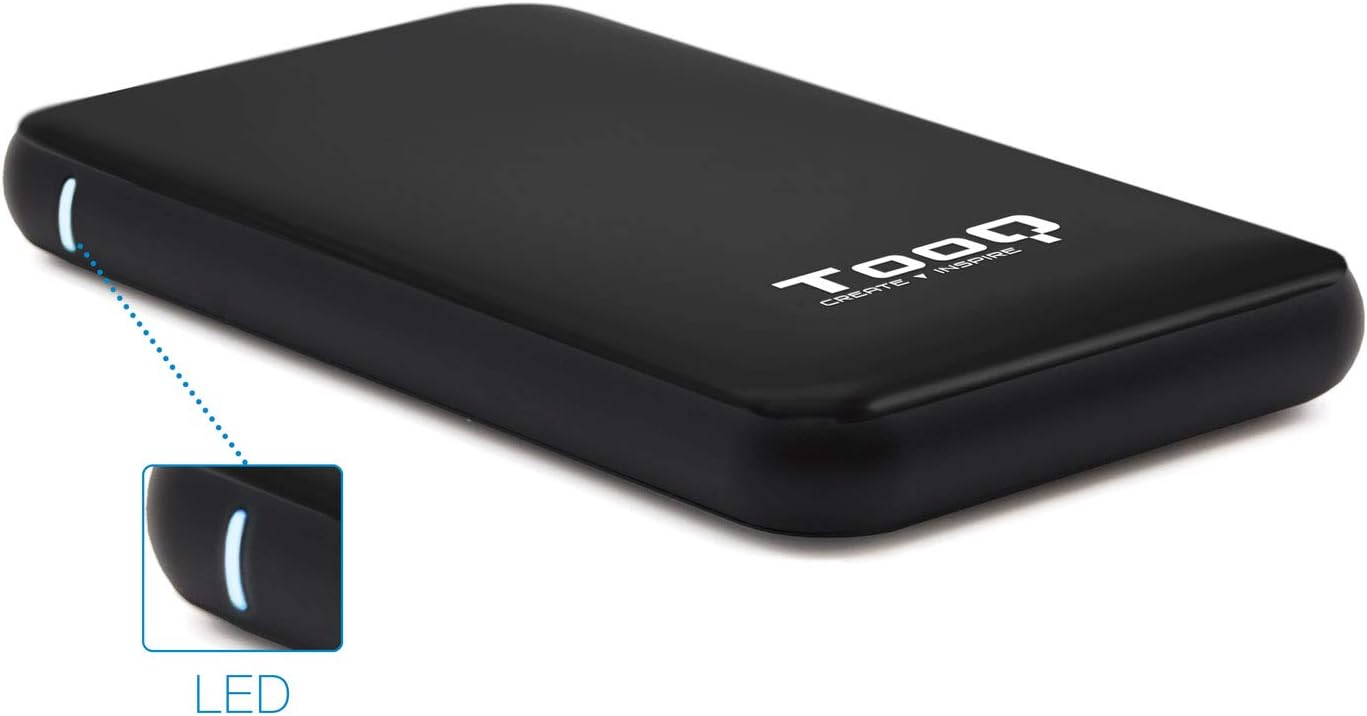
Image 3.1: The enclosure features an LED indicator on the side, which illuminates to show power and data activity.

Image 3.2: The rear of the enclosure includes a power button and a Micro-USB port for connection.
4. Setup: Hard Drive Installation
Follow these steps to install a 2.5-inch SATA HDD or SSD into the enclosure:
- Muhafazayı Açın: Gently slide the top cover of the enclosure to open it. The design allows for tool-free access.
- Sürücüyü Bağlayın: Align your 2.5-inch SATA HDD/SSD with the SATA connector inside the enclosure. Carefully push the drive into the connector until it is firmly seated. Ensure the drive is flush with the internal tray.
- Muhafazayı Kapatın: Slide the top cover back into place until it clicks securely.
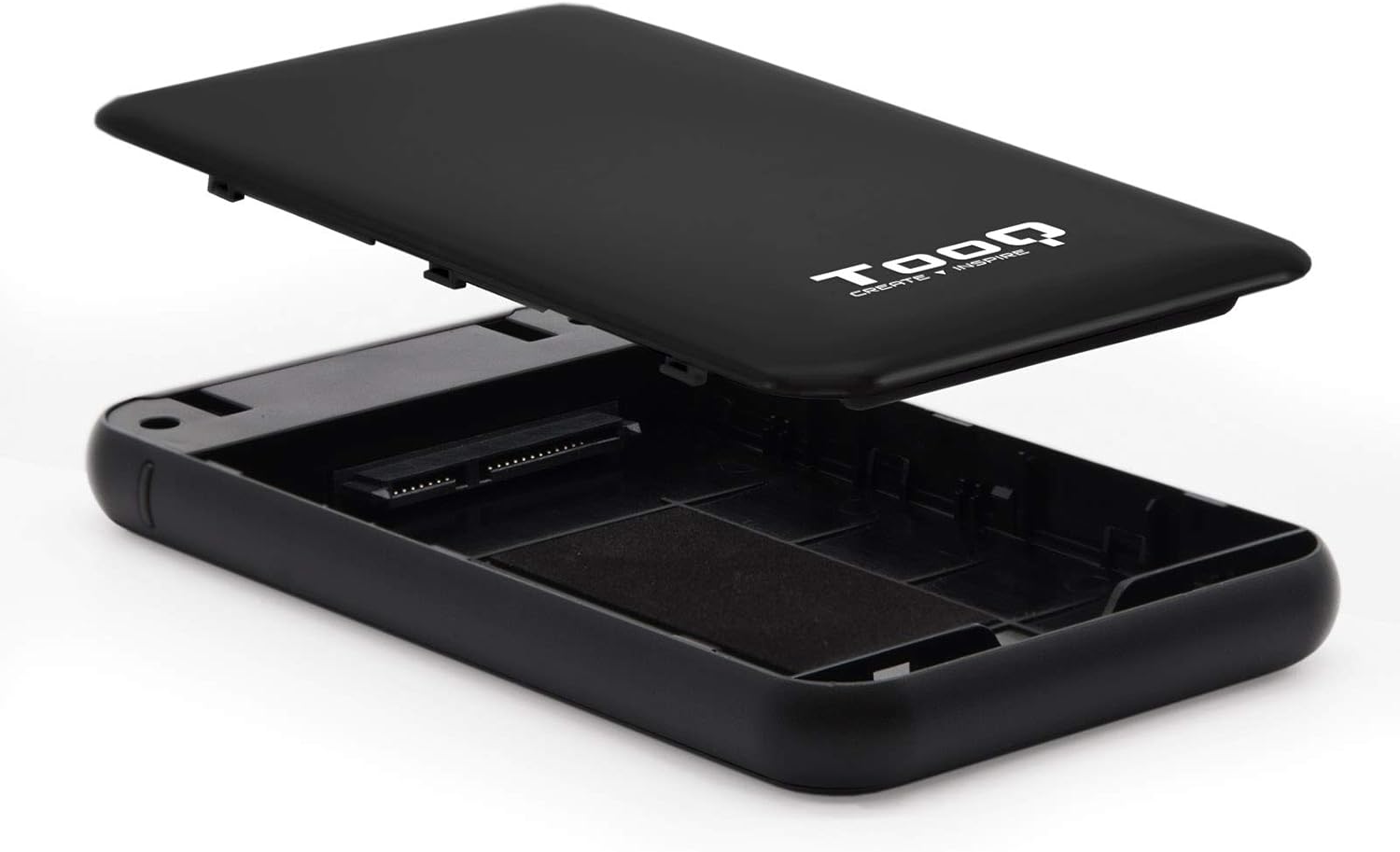
Image 4.1: The enclosure opened, revealing the internal SATA data and power connector for a 2.5-inch drive.
5. Kullanım Talimatları
After installing your hard drive, connect the enclosure to your computer:
- USB Kablosunu Bağlayın: Plug the Micro-B end of the included USB 3.0 cable into the enclosure's Micro-USB port.
- Bilgisayara Bağlan: Plug the Type-A end of the USB cable into an available USB port on your computer. For optimal performance, use a USB 3.0 or USB 3.1 Gen1 port.
- Güç Açık: If the enclosure has a power button (refer to Image 3.2), press it to turn on the device. The LED indicator (Image 3.1) will illuminate, indicating power and connection status.
- Sürücüye Erişim: Your operating system should automatically detect the new storage device.
- New Drives: If you are using a brand new hard drive, it may need to be initialized and formatted before use. Refer to your operating system's disk management tools for this process.
- Existing Drives: If the drive contains data, it should appear as a removable drive in 'My Computer' (Windows) or on the desktop (macOS).

Image 5.1: The TooQ TQE-2528B enclosure connected to a laptop, demonstrating a typical usage scenario.
6. Bakım
To ensure the longevity and optimal performance of your enclosure:
- Muhafazayı temiz ve tozdan uzak tutun. Temizlik için yumuşak ve kuru bir bez kullanın.
- Cihazı aşırı sıcaklıklara, neme veya doğrudan güneş ışığına maruz bırakmaktan kaçının.
- Do not drop or subject the enclosure to strong impacts.
- Always safely eject the drive from your operating system before disconnecting the USB cable to prevent data corruption.
7. Sorun Giderme
If you encounter issues with your TooQ TQE-2528B enclosure, refer to the following common solutions:
- Sürücü Algılanmadı:
- USB kablosunun hem muhafazaya hem de bilgisayara güvenli bir şekilde bağlı olduğundan emin olun.
- Bilgisayarınızdaki farklı bir USB bağlantı noktasına bağlanmayı deneyin.
- Verify that the hard drive is correctly seated within the enclosure's SATA connector.
- Bilgisayarınızın Disk Yönetimi (Windows) veya Disk Yardımcı Programı (macOS) uygulamasını kullanarak sürücünün tanınıp tanınmadığını ancak başlatılmamış veya biçimlendirilmemiş olup olmadığını kontrol edin.
- Test the enclosure with a different 2.5-inch SATA drive, if available, to rule out a drive issue.
- Yavaş Veri Aktarımı:
- Ensure you are connected to a USB 3.0 or USB 3.1 Gen1 port on your computer. Connecting to a USB 2.0 port will result in slower speeds.
- İşletim sisteminizin ve sürücülerinizin güncel olduğundan emin olun.
- Enclosure Does Not Power On:
- Ensure the USB cable is properly connected and providing power. The enclosure is bus-powered.
- Bilgisayarınızda farklı bir USB bağlantı noktası deneyin.
8. Özellikler
| Model Numarası | TQE-2528B |
| Uyumlu Sürücüler | 2.5-inch SATA I/II/III HDD/SSD (up to 9.5mm height) |
| Arayüz | USB 3.1 Gen1 (USB 3.0) |
| Veri Aktarım Hızı | 5.0 Gbps'ye kadar |
| Güç Kaynağı | USB Bus-powered (5 Volts) |
| Malzeme | ABS Plastik |
| Boyutlar (U x G x Y) | 13.5 cm x 8 cm x 1.6 cm (yaklaşık 5.3 x 3.1 x 0.6 inç) |
| Ağırlık | 50 g (yaklaşık 0.11 lbs) |
| İşletim Sistemi Uyumluluğu | Universal (Windows, macOS, Linux) |

Image 8.1: Technical drawing illustrating the dimensions of the TooQ TQE-2528B enclosure.
9. Garanti ve Destek
TooQ products are designed for reliability and performance. This product comes with a standard manufacturer's warranty. For specific warranty terms and conditions, please refer to the warranty card included with your product or visit the official TooQ webalan.
For technical support, frequently asked questions, or to download the latest drivers (if applicable), please visit the official TooQ support webSite üzerinden veya müşteri hizmetleri departmanıyla iletişime geçin. İletişim bilgileri genellikle ürün ambalajında veya resmi web sitesinde bulunabilir. webalan.
Üretici: TOOQ
Küresel Ticari Ürün Numarası (GTIN): 08433281008304