1. Giriş
This manual provides comprehensive instructions for the setup, operation, and maintenance of your Google Chromecast 3 streaming device. Please read this guide thoroughly to ensure proper use and to maximize your device's capabilities.
1.1. Kutuda Neler Var?
- Google Chromecast 3 device
1.2. Ürün Bittiview
The Google Chromecast 3 is a media streaming device that plugs into the HDMI port of your television. It allows you to cast content from your mobile device or computer to your TV, enabling you to enjoy videos, music, and more on a larger screen.

Şekil 1: Ön view of the Google Chromecast 3 device, showcasing its compact, circular design with the Google 'G' logo.
2. Kurulum Talimatları
2.1. Connecting Your Chromecast
- Televizyona bağlanın: Plug the Chromecast device into an available HDMI port on your television.
- Güce Bağlanın: Connect the USB power cable to the Chromecast device and then plug the other end into a power adapter (not included, typically a standard USB wall adapter) and into a wall outlet. Alternatively, you can plug the USB cable into an available USB port on your TV if it provides sufficient power.
- HDMI Girişini Seçin: Turn on your TV and select the HDMI input that your Chromecast is connected to. You should see the Chromecast setup screen.
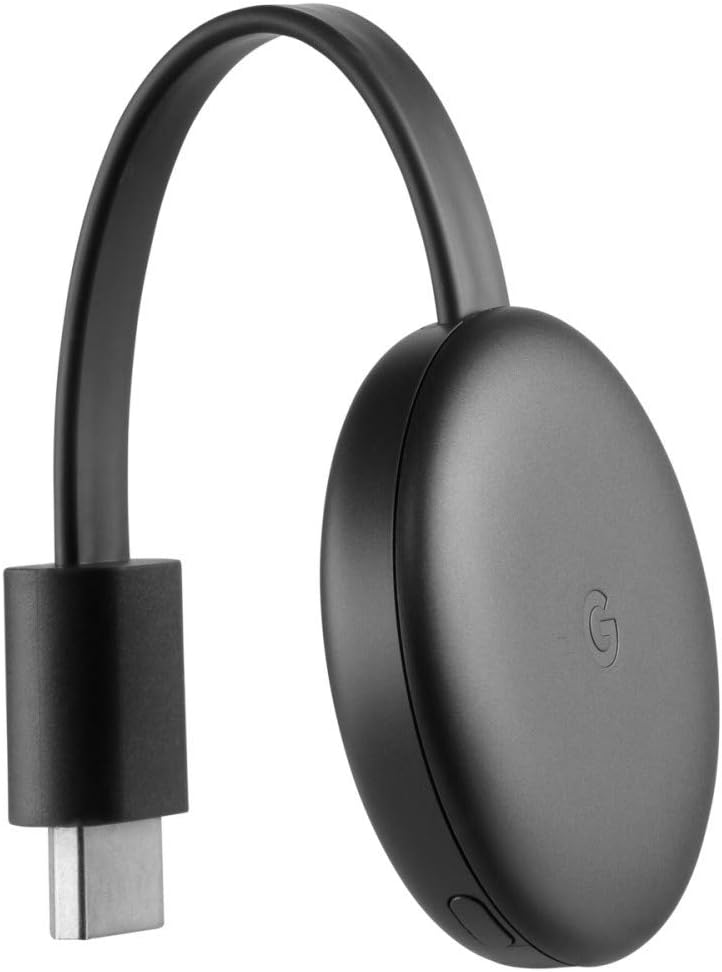
Şekil 2: Yan view of the Google Chromecast 3, illustrating the integrated HDMI connector ready to plug into a television.

Şekil 3: Alt view of the Google Chromecast 3, highlighting the micro-USB power input port and a small button.
2.2. İlk Yapılandırma
- Google Home uygulamasını indirin: On your smartphone or tablet, download and install the Google Home app from the App Store (iOS) or Google Play Store (Android).
- Google Home uygulamasını açın: Launch the Google Home app and follow the on-screen instructions to set up your new device. Ensure your mobile device is connected to the same Wi-Fi network you intend to use for Chromecast.
- Wi-Fi'ye bağlanın: The app will guide you through connecting your Chromecast to your home Wi-Fi network.
- Link Google Account: You may be prompted to link your Google account to the Chromecast.
3. Kullanım Talimatları
3.1. Casting Content
Once setup is complete, you can begin casting content from compatible applications on your mobile device or computer.
- Open a Compatible App: Launch an application that supports Chromecast, such as Disney Plus, Netflix, Prime Video, Spotify, or YouTube.
- Yayın simgesine dokunun: Look for the Cast icon ▶︎ (a rectangle with a Wi-Fi signal in the corner) within the app. Tap this icon.
- Chromecast'inizi Seçin: A list of available casting devices will appear. Select your Google Chromecast 3 (GA00439-DE) from the list.
- Start Casting: The content from your app will now appear on your TV screen. Your mobile device acts as a remote control.
3.2. Oynatmayı Kontrol Etme
Playback controls (play, pause, volume, skip) are typically available within the casting app on your mobile device. You can also use the Google Home app for basic controls.
4. Bakım
4.1. Temizlik
To clean your Chromecast device, gently wipe it with a soft, dry, lint-free cloth. Do not use liquid cleaners or abrasive materials.
4.2. Yazılım Güncellemeleri
Chromecast devices automatically receive software updates when connected to the internet. Ensure your device remains connected to power and Wi-Fi to receive the latest features and security enhancements.
5. Sorun Giderme
5.1. Yaygın Sorunlar ve Çözümleri
- Chromecast Not Found:
- Ensure your mobile device is on the same Wi-Fi network as your Chromecast.
- Verify the Chromecast is powered on and connected to the correct HDMI input on your TV.
- Restart your Wi-Fi router, Chromecast, and mobile device.
- Televizyonda Görüntü Yok:
- Check that the Chromecast is securely plugged into the HDMI port.
- Televizyonunuzun doğru HDMI girişine ayarlandığından emin olun.
- Televizyonunuzda farklı bir HDMI portu deneyin.
- Casting Issues (Buffering, Disconnections):
- Check your Wi-Fi signal strength. Move the Chromecast closer to your router if possible.
- İnternet bağlantınızın istikrarlı ve yayın akışı için yeterince hızlı olduğundan emin olun.
- Close other applications on your mobile device that might be consuming bandwidth.
- Fabrika ayarları: If issues persist, you can perform a factory reset. With the Chromecast powered on, press and hold the button on the side of the device for at least 15 seconds. The LED light will blink, then change color, and the TV screen will go blank as the device resets.
6. Özellikler
| Özellik | Detay |
|---|---|
| Model Numarası | GA00439-DE |
| Marka | |
| Ürün Boyutları | 2.04 x 2.04 x 0.54 inç |
| Ürün Ağırlığı | 1.4 ons |
| Bağlantı Teknolojisi | HDMI, Wi-Fi |
| Bağlayıcı Türü | HDMI |
| Çözünürlük | 1080p |
| Desteklenen İnternet Hizmetleri | Disney Plus, Netflix, Prime Video, Spotify, YouTube |
| Denetleyici Türü | Uygulama Kontrolü |
| Renk | Siyah |
7. Garanti ve Destek
Garanti bilgileri ve teknik destek için lütfen resmi Google destek sayfasına başvurun. website or contact Google customer service. Details regarding your product's warranty period and terms of service can typically be found on the manufacturer's webalan.
Çevrimiçi destek: support.google.com/chromecast


