
1. Kurulum
1.1 Paket İçeriği
Başlamadan önce pakette tüm öğelerin mevcut olduğundan emin olun:
- EXFIT FBS-S1000 Wireless Bluetooth Headphones
- USB Şarj Kablosu
- Ek Kulaklık Uçları (çeşitli boyutlarda)
- Kullanım Kılavuzu (bu belge)
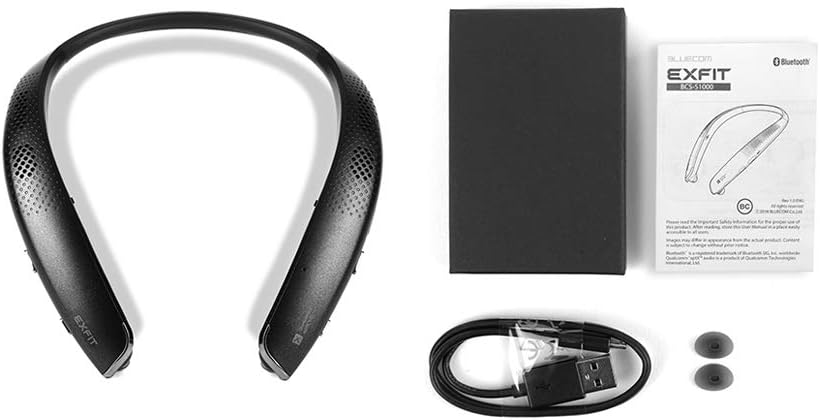
Resim 1.1: Package contents of the EXFIT FBS-S1000 headphones, showing the neckband unit, USB charging cable, and spare ear tips.
1.2 Kulaklıkların Şarj Edilmesi
The headphones come with a built-in rechargeable battery. Before first use, fully charge the device.
- Connect the small end of the provided USB charging cable to the charging port on the headphones.
- USB kablosunun büyük ucunu bir USB güç adaptörüne (dahil değildir) veya bir bilgisayarın USB portuna bağlayın.
- LED göstergesi şarj durumunu gösterecektir (örneğin, kırmızı şarj oluyor, mavi tamamen şarj oluyor).
- A full charge typically takes approximately 2 hours. The battery provides up to 25 hours of usage in in-ear mode and 7 hours in external speaker mode.
1.3 Bluetooth Eşleştirme
Kulaklıklarınızı bir cihaza bağlamak için:
- Kulaklıkların kapalı olduğundan emin olun.
- Eşleştirme modunu gösteren LED göstergesi mavi ve kırmızı renkte yanıp sönene kadar Güç düğmesini basılı tutun.
- Cihazınızda (akıllı telefon, tablet, bilgisayar) Bluetooth'u etkinleştirin ve kullanılabilir cihazları arayın.
- Select "EXFIT FBS-S1000" from the list of found devices.
- Bağlantı kurulduktan sonra, LED göstergesi periyodik olarak mavi renkte yanıp sönecektir.
- The headphones can connect to two devices simultaneously. To connect a second device, repeat the pairing process.
1.4 Kulaklıkların Takılması
For optimal sound quality and comfort, ensure the headphones are worn correctly and the ear tips fit properly.
- Place the neckband around your neck.
- Gently pull out the retractable earbuds.
- Insert the earbuds into your ears. Choose the ear tip size that provides a snug and comfortable fit to ensure good sound isolation.

Resim 1.2: Illustration demonstrating the correct way to insert the earbuds and how to select the appropriate ear tip size for a secure fit.
2. Kullanım Talimatları

Resim 2.1: Taraf view of the EXFIT FBS-S1000 headphones, highlighting the location of control buttons for power, volume, and multi-function.
2.1 Güç Açma/Kapatma
- Güç Açık: LED göstergesi mavi renkte yanıp sönene kadar Güç düğmesini yaklaşık 2 saniye basılı tutun.
- Kapat: Güç düğmesini yaklaşık 3 saniye basılı tutun; LED göstergesi kırmızı renkte yanıp sönecek ve ardından sönecektir.
2.2 Geri Çekilebilir Kulaklıklar
The headphones feature retractable earbuds for convenience.
- To extend the earbuds, gently pull them out from the neckband.
- To retract, press the earbud retraction button located on the side of the neckband. Guide the earbud back into its housing.
2.3 External Speakers
In addition to earbuds, the headphones include external speakers for an alternative listening experience.
- To activate external speakers, retract the earbuds into the neckband. The audio will automatically switch to the external speakers.
- To switch back to earbuds, pull out the earbuds and insert them into your ears.
2.4 Çağrı Yönetimi
- Çağrıyı Cevapla/Sonlandır: Çok işlevli düğmeye bir kez basın.
- Çağrıyı Reddet: Çok fonksiyonlu düğmeye yaklaşık 2 saniye basılı tutun.
- Son Numarayı Tekrar Ara: Çok işlevli düğmeye iki kez basın.
2.5 Müzik Oynatma
- Oynat/Duraklat: Çok işlevli düğmeye bir kez basın.
- Sonraki Parça: Sesi Açma tuşuna basılı tutun.
- Önceki parça: Sesi Azaltma düğmesini basılı tutun.
2.6 Ses Kontrolü
- Sesi arttır: Sesi Açma tuşuna basın.
- Sesi Azalt: Sesi Azalt tuşuna basın.
2.7 Voice Assistant (Siri/Google Assistant)
The headphones are compatible with Siri and Google Assistant.
- To activate your device's voice assistant, press the dedicated Voice Assistant button once.
3. Bakım
3.1 Temizlik
- Kulaklığınızı yumuşak ve kuru bir bezle silin.
- Aşındırıcı temizleyiciler, alkol veya kimyasal çözücüler kullanmayın.
- Regularly clean the ear tips to prevent wax buildup, which can affect sound quality.
3.2 Depolama
- Kulaklığınızı serin, kuru ve doğrudan güneş ışığından ve aşırı sıcaklıklardan uzak bir yerde saklayın.
- When not in use, retract the earbuds to protect them from damage.
3.3 Ear Tip Replacement
The ear tips are designed for a specific fit. If an ear tip is lost or damaged, use one of the provided spare ear tips. Ensure the replacement ear tip is securely attached to the earbud nozzle.
4. Sorun Giderme
| Sorun | Olası Neden | Çözüm |
|---|---|---|
| Kulaklık açılmıyor. | Pil zayıf. | Verilen USB kablosunu kullanarak kulaklığı tamamen şarj edin. |
| Cihazla eşleştirilemiyor. | Kulaklık eşleştirme modunda değil; cihazda Bluetooth kapalı; cihaz çok uzakta. | Ensure headphones are in pairing mode (flashing blue/red). Turn on Bluetooth on your device. Move device closer to headphones (within 10 meters). |
| Ses yok veya ses kalitesi düşük. | Volume too low; improper ear tip fit; device not connected. | Increase volume on headphones and connected device. Ensure ear tips are correctly sized and inserted. Verify Bluetooth connection. |
| Kulaklıklar düzgün bir şekilde geri çekilmiyor. | Tıkanma veya iç mekanizma sorunu. | Ensure no debris is blocking the retraction path. Do not force retraction. If issue persists, contact customer support. |
| Accidental calls when adjusting. | Multi-function button pressed inadvertently. | Be mindful of button placement when adjusting the neckband. The Multi-function button can redial the last number with a double press. |
5. Özellikler
- Model Adı: FBS-S1000
- Model Numarası: BCS-S1000
- Bağlantı Teknolojisi: Bluetooth
- Kablosuz İletişim Teknolojisi: Bluetooth
- Dahil Olan Bileşenler: Voice assistant button, Retractable buds
- Malzeme: Kauçuk, Silikon
- Uyumlu Cihazlar: Desktop computers, Tablets, Mobile phones
- Kontrol Yöntemi: Ses
- Özel Özellikler: Bluetooth, Kablosuz
- Ortalama Pil Ömrü: 25 Hours (in-ear mode)
- Ürün Ölçüleri: 16.79x16.64x1.55 cm
- Ağırlık: 204 gr
- Kulak Yerleşimi: Kulak içi
- Form Faktörü: Kulak içi
- Kulaklık girişi: USB (şarj için)
6. Garanti ve Destek
6.1 Sınırlı Garanti
EXFIT products are manufactured to the highest quality standards. This product is covered by a limited warranty against defects in materials and workmanship. Please refer to the warranty card included with your purchase or visit the official EXFIT webAyrıntılı garanti şartları ve koşulları için siteyi ziyaret edin.
6.2 Müşteri Desteği
For technical assistance, troubleshooting, or warranty inquiries, please contact EXFIT customer support. Contact information can typically be found on the product packaging or the official EXFIT webalan.
Not: Garanti talepleri için satın alma belgenizi saklayın.


