1. Giriş
This manual provides detailed instructions for the proper use and maintenance of your 70mai Dash Cam Omni (Model X200). Please read this manual thoroughly before operating the device to ensure optimal performance and safety. The 70mai Dash Cam Omni is designed to record your driving journey with advanced features for enhanced road safety and vehicle surveillance.
2. Paket İçeriği
Paketinizde tüm öğelerin mevcut olduğundan emin olun:
- 70mai Dash Cam Omni (Model X200)
- Güç kablosu
- Araba Şarj Cihazı
- Elektrostatik Etiket
- Isıya Dayanıklı Yapıştırıcı
- Kullanıcı Kılavuzu
3. Ürün Bittiview
Familiarize yourself with the components of your 70mai Dash Cam Omni.

Şekil 3.1: Ön view of the 70mai Dash Cam Omni, displaying the main camera lens at the bottom and the circular screen above it. The device has a sleek, dark gray and black finish.

Şekil 3.2: Taraf view of the 70mai Dash Cam Omni, showing two prominent red control buttons on the left side of the device. These buttons are used for navigation and function selection.
4. Kurulum ve Kurulum
Araç kameranızı aracınıza doğru şekilde takmak için şu adımları izleyin.
4.1 Dash Cam'in Montajı
- Araç içi kameranın monte edileceği ön cam bölgesini temizleyin.
- Apply the electrostatic sticker to the chosen area on the windshield. This helps protect your windshield and allows for easier removal.
- Attach the heat-resistant adhesive mount to the electrostatic sticker. Ensure it is firmly pressed against the surface.
- Slide the 70mai Dash Cam Omni onto the mount until it clicks into place.
- Net bir görüntü elde etmek için kamera açısını ayarlayın. view Yolun.
4.2 Güç Bağlantısı
- Connect the power cable to the dash cam's USB port.
- Route the power cable along the edge of the windshield and dashboard to the car's cigarette lighter socket.
- Araç şarj cihazını çakmak soketine takın.
- Araç kamerasını çalıştırmak için aracınızı çalıştırın.
4.3 İlk Yapılandırma
- Upon first power-on, the dash cam will guide you through initial settings such as language and time zone.
- İndir 70mai Uygulaması Akıllı telefonunuzun uygulama mağazasından.
- Open the app and follow the instructions to connect to your dash cam via Wi-Fi. This allows for live view, video playback, and settings management.
- Insert a compatible MicroSD card (Class 10 or higher, 16GB-128GB recommended) into the designated slot. Format the card through the dash cam's settings menu or the 70mai App before first use.
5. Araç Kamerasının Kullanımı
5.1 Temel Kayıt
Once powered on, the dash cam will automatically begin continuous loop recording. Videos are saved to the MicroSD card. In case of a collision, the G-sensor will trigger emergency recording, locking the footage üzerine yazmayı önlemek için.
5.2 360° Döndürme
The 70mai Dash Cam Omni features a 360° rotatable camera lens. You can manually adjust the lens to record the front, side, or even the interior of your vehicle. This flexibility allows for comprehensive coverage.
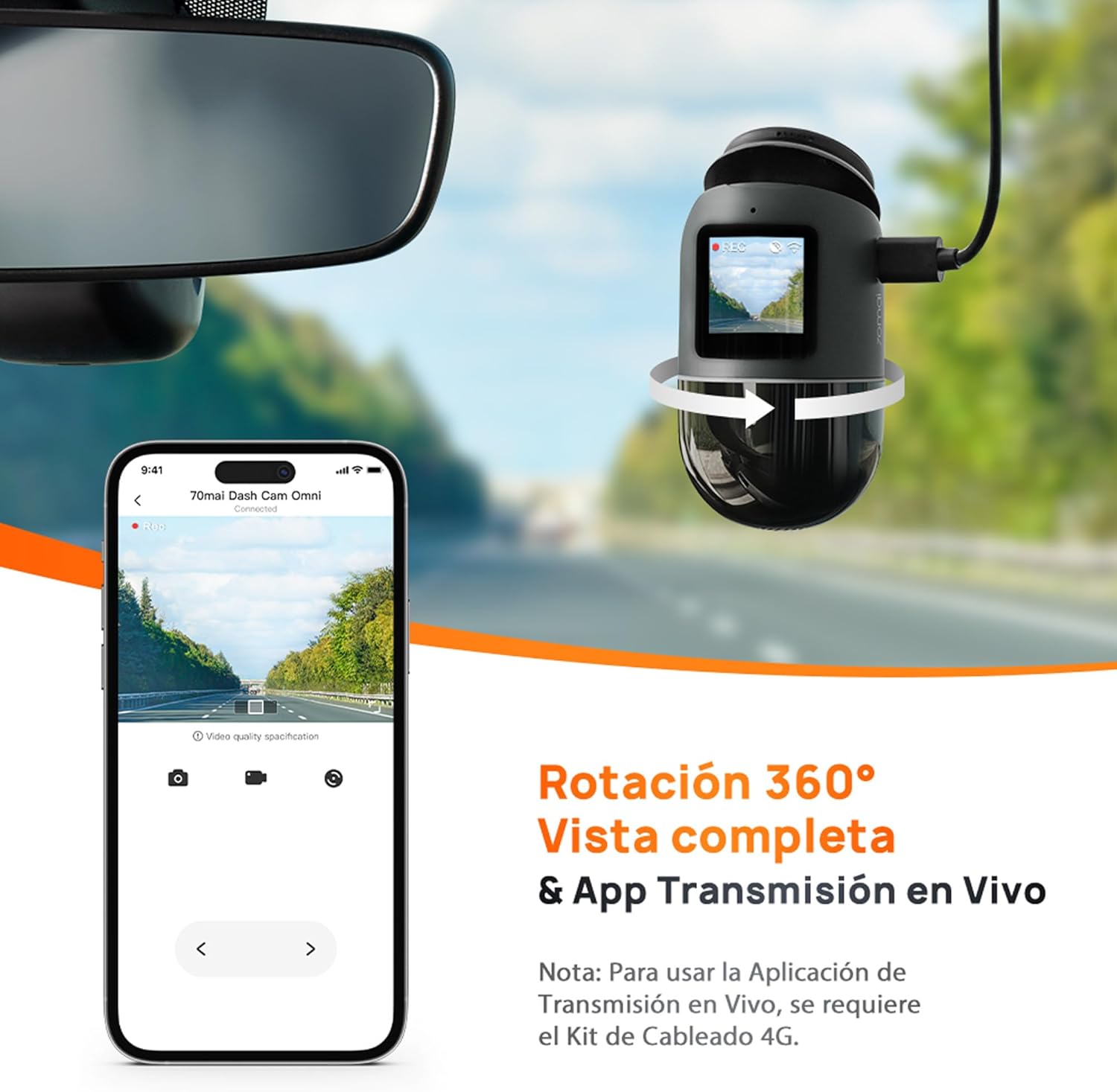
Şekil 5.1: The 70mai Dash Cam Omni demonstrating its 360-degree rotation capability, allowing for versatile recording angles. A connected smartphone screen shows a live feed from the camera, illustrating the live view özellik.
5.3 Park Gözetim Modu
When your vehicle is parked, the dash cam can enter Parking Surveillance Mode. This feature requires the optional 70mai Hardwire Kit (sold separately) for continuous power. In this mode, the dash cam monitors for impacts or suspicious movements around your vehicle.

Şekil 5.2: This image illustrates the advanced parking surveillance features of the 70mai Dash Cam Omni. It includes 24-hour parking monitoring, AI-powered motion detection to identify suspicious activity, and time-lapse recording for efficient storage of long parking periods. Note: These features require the 70mai Hardwire Kit.
5.4 AI Motion Detection
The integrated AI motion detection system can identify human figures around your parked vehicle, distinguishing them from other movements like swaying trees, reducing false alarms and saving storage space. This feature is part of the advanced parking surveillance system.

Şekil 5.3: This visual explains the AI Motion Detection capability, showing how the dash cam identifies and categorizes activity around a vehicle. It highlights areas of 'Normal' activity, 'Suspicious' movement, and potential 'Danger', indicating the system's ability to intelligently monitor the surroundings.
5.5 Integrated GPS and Car Finder
The built-in GPS module records your driving route and speed. When connected to the 70mai 4G Hardwire Kit (sold separately), the Car Finder function allows you to locate your parked vehicle via the 70mai App.

Şekil 5.4: This image demonstrates the integrated GPS and Car Finder features. A smartphone screen displays a map with a vehicle's location marked, indicating the ability to track and find your car. Note: The Car Finder function requires the 4G Hardwire Kit.
5.6 Gelişmiş Sürücü Destek Sistemleri (ADAS)
The 70mai Dash Cam Omni includes ADAS features to enhance driving safety. These systems provide real-time voice alerts for potential hazards.
- Şerit kalkış uyarısı: Aracınız şeritten çıkarsa sizi uyarır.
- Ön Çarpışma Uyarısı: Warns you of a potential collision with the vehicle ahead.
- Hareket Halindeki Trafik Başlangıcı Uyarısı: Notifies you when the traffic ahead starts moving.
- Yaya Uyarısı: Detects pedestrians in front of your vehicle.
- Cyclist/Motorcyclist Alert: Detects cyclists and motorcyclists in front of your vehicle.

Şekil 5.5: A diagram visually representing the Super ADAS sensors and their corresponding alerts. It shows different scenarios such as lane departure, detection of moving traffic, proximity to a front car, and the presence of pedestrians, cyclists, and motorcyclists, each triggering a specific warning icon.
6. Bakım
6.1 MicroSD Kart Yönetimi
Regularly format your MicroSD card (at least once a month) through the dash cam settings or the 70mai App to ensure optimal recording performance and prevent data corruption. Replace the MicroSD card if it shows signs of wear or error messages.
6.2 Cihazın Temizlenmesi
Use a soft, dry cloth to clean the dash cam's lens and body. Do not use abrasive cleaners or solvents, as they may damage the device. Ensure the lens is free of dust and smudges for clear video recording.
7. Sorun Giderme
Araç içi kameranızla ilgili sorunlarla karşılaşırsanız, aşağıdaki yaygın sorunlara ve çözümlere bakın:
- Araç kamerası açılmıyor:
- Ensure the power cable is securely connected to both the dash cam and the car charger.
- Check if the car charger is properly inserted into the cigarette lighter socket and if the socket is receiving power.
- Test with a different power source or cable if available.
- Kayıt duruyor veya footage bozulmuş:
- MicroSD kartı düzenli olarak biçimlendirin.
- Ensure you are using a high-quality MicroSD card (Class 10 or U1/U3 recommended).
- The MicroSD card may be full; enable loop recording or replace the card.
- Wi-Fi connection issues with the 70mai App:
- Araç kamerasının Wi-Fi özelliğinin etkinleştirildiğinden emin olun.
- Hem araç kameranızı hem de akıllı telefonunuzu yeniden başlatın.
- Ensure your smartphone is within close proximity to the dash cam.
- ADAS alerts are inaccurate or not working:
- Ensure the dash cam is correctly calibrated and mounted centrally on the windshield.
- Clean the windshield and the dash cam lens to ensure an unobstructed view.
- ADAS performance can be affected by weather conditions or poor road markings.
8. Özellikler
| Özellik | Detay |
|---|---|
| Marka | 70 mayıs |
| Model Adı | Dash Cam Omni (X200) |
| Renk | Siyah |
| Ekran Boyutu | 1.2 inç |
| Bağlantılar | USB |
| Uyumlu Cihazlar | Araba |
| Pil Bileşimi | Lityum iyon |
| Şarj edilebilir pil | Evet |
| Video Kayıt Çözünürlüğü | 1440p |
| Montaj Tipi | Ön Cam Bağlantısı |
| Alanı View | 140 Derece |
| Kontrol Yöntemi | Dokunmak |
| Ürün Boyutları (U x G x Y) | 15 cm x 7 cm x 13 cm |
9. Garanti ve Destek
Garanti bilgileri ve teknik destek için lütfen resmi 70mai'ye bakın. webSite üzerinden satın alabilir veya müşteri hizmetleriyle iletişime geçebilirsiniz. Garanti talepleriniz için satın alma belgenizi saklayın.


