The MOZA Air 2 is a professional 3-axis handheld gimbal stabilizer designed for DSLRs, mirrorless cameras, and pocket cinema cameras. It offers advanced stabilization, extended battery life, and intelligent features to enhance your videography experience. This manual provides essential information for setup, operation, and maintenance of your MOZA Air 2.
Paket İçeriği
Aşağıda listelenen tüm öğelerin paketinizde bulunduğunu doğrulayın:
Air2 Gimbal x 1
Lens support x 1
Lens support screw x 1
Follow focus install pipe x 2
Riser Plate x 2
tripod x 1
18650 battery x 4
Intelligent charger x 1
MOZA control cable - Micro USB x 1
MOZA control cable - Mini USB x 1
MOZA control cable - Panasonic x 1
MOZA control cable - Sony x 1
USB Type-C kablosu x 1
Kullanım kılavuzu x 1
Warning card x 1
Tool bag x 1
H2 Hexagon wrench x 1
3/8 turn 1/4 nut x 1
M3 x 10 hexagon socket countersunk flat cap head screw x 10
Follow focus support x 1
Ürün Bittiview
The MOZA Air 2 gimbal stabilizer is designed for professional filmmaking, offering robust support and precise control for various camera setups.
Figure 1: MOZA Air 2 Gimbal with a camera mounted, showcasinKompakt ve ergonomik tasarımıyla öne çıkıyor.
Key features include a maximum payload capacity of 9 lbs (4.2 kg), supporting a wide range of cameras. It features an OLED display for easy parameter customization and offers 4-axis control with 8 follow modes for versatile shooting scenarios.
Şekil 2: Ayrıntılı view of the MOZA Air 2's control panel, including the OLED display, multi-function dial, and various control buttons.
The gimbal also integrates with a newly developed ecosystem of accessories, such as the MOZA thumb controller, iFocus, camera cage, and camera backpack (sold separately), to provide comprehensive control over gimbal movement and camera functions.
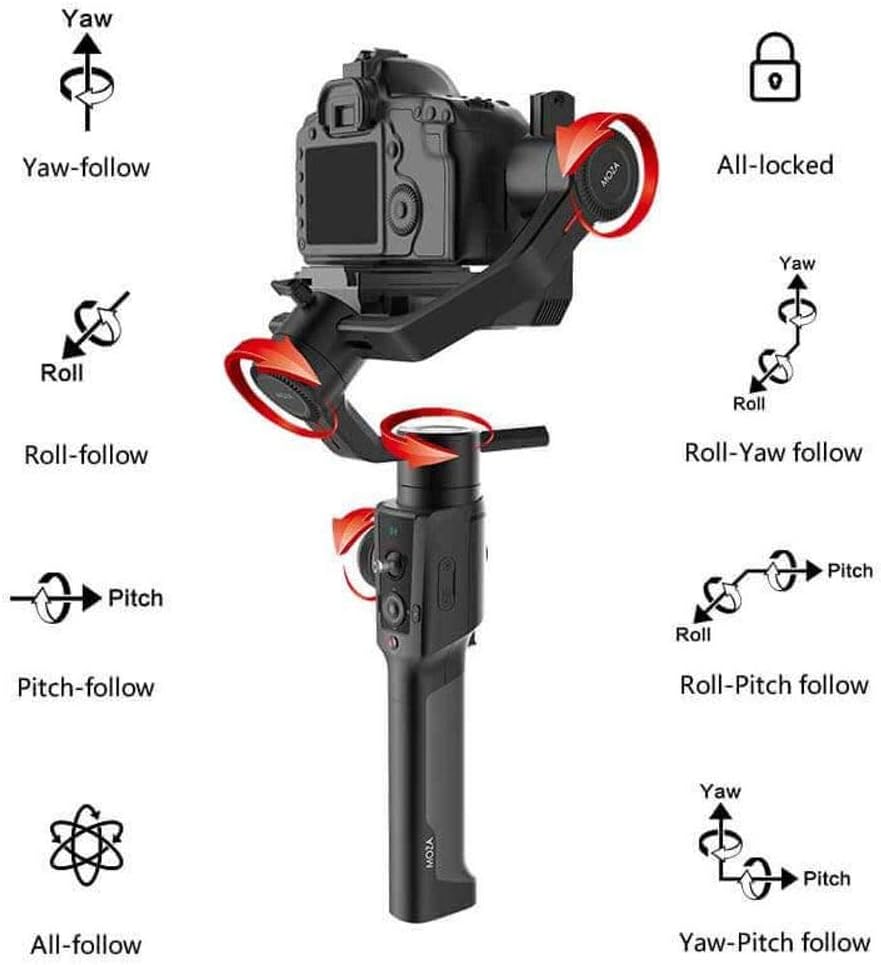
Figure 3: Visual representation of the MOZA Air 2's various operational modes, including Yaw, Roll, Pitch, and their respective follow modes, as well as All-locked and All-follow modes.
Kurmak
1. Pilin Takılması ve Şarj Edilmesi
The MOZA Air 2 is powered by four 18650 Li-on batteries. Ensure batteries are fully charged before first use.
Insert the four 18650 batteries into the battery compartment located in the handle. Ensure correct polarity.
Connect the intelligent charger to a power source and insert the batteries for charging. The charger's indicator lights will show charging status.
The MOZA Spark power supply system includes input and output ports for versatile power management. The input port allows for alternative power sources, while output ports can power the camera and other accessories.
2. Camera Mounting and Balancing
Proper balancing is crucial for optimal gimbal performance and battery efficiency. The MOZA Air 2 features quick-release plates and mechanical locks for easy setup.
Figure 4: The MOZA Air 2 gimbal highlighting the adjustable axes (tilt, roll, pan) for precise camera balancing.
Attach your camera to the MOZA quick release plate.
Mount the quick release plate with the camera onto the gimbal. Ensure it is securely locked.
Unlock each axis (tilt, roll, pan) one by one and adjust the camera position until it remains stable in any orientation without motor power. Use the lens support and screw if necessary for heavier lenses.
Once balanced, lock all axes.
Figure 5: MOZA Air 2 Gimbal with a camera connected, demonstrating the cable connection for camera control and power.
3. Kamera Bağlantısı
Connect your camera to the gimbal using the appropriate camera control cable (Micro USB, Mini USB, Panasonic, or Sony) to enable camera control features via the gimbal.
Video 1: An official MOZA video demonstrating the features and capabilities of the MOZA Air 2 gimbal stabilizer, including its design and operational aspects.
Çalışma Modları
The MOZA Air 2 offers various operating modes to suit different shooting requirements:
Yaw-follow: The camera follows the pan movement of the gimbal while tilt and roll axes are locked.
Roll-follow: The camera follows the roll movement of the gimbal while pan and tilt axes are locked.
Pitch-follow: The camera follows the pitch movement of the gimbal while pan and roll axes are locked.
All-follow: The camera follows all pan, tilt, and roll movements of the gimbal.
All-locked: Her üç eksen (yatay hareket, dikey hareket, dönme) de kilitlenerek kameranın sabit bir yöne bakması sağlanır.
Roll-Yaw follow: The camera follows roll and yaw movements.
Yaw-Pitch follow: The camera follows yaw and pitch movements.
Spor Vites Modu: Provides rapid response for fast-moving scenes.
Switch between modes using the gimbal's control buttons or the MOZA Assistant App.
Gelişmiş Özellikler
Smart Time-Lapse
The MOZA Air 2 features comprehensively upgraded time-lapse functions, offering up to 20 optimizations. This allows users to easily create various personalized and professional time-lapse videos, including motion-lapse, tracking time-lapse, and zoom time-lapse.
MOZA Spark Power Supply System
Equipped with four power ports, the MOZA Spark power supply system ensures extended working time. One input port allows for alternative power sources, while three output ports provide power to the camera and other accessories like follow focus systems, LED lights, and monitors. The integrated Battery Management System (BMS) enhances the gimbal's operational duration.
Desteklenen Kameralar
The MOZA Air 2 is compatible with a wide range of cameras, including but not limited to:
Kanon: 1D, 1DX, 1DX2, 5D Mark IV, 5D Mark III, 5D Mark II, 6D, 60D, 7D, 70D, 750D
For specific compatibility questions, please contact MOZA support.
Özellikler
Özellik
Detay
Ürün Boyutları
13.39 x 5.51 x 18.11 inç
Ürün Ağırlığı
3.64 pound (1650 Gram)
Model Numarası
MCG01
Piller
4 A pil gereklidir (dahil)
Maksimum Ağırlık Önerisi
9 Pound (4.2 kg)
Renk
Siyah
Uyumlu Cihazlar
Monitör, Kamera
Üretici
Gudsen
İlk Mevcut Tarih
19 Eylül 2018
UPC
712424355122
Bakım
To ensure the longevity and optimal performance of your MOZA Air 2 gimbal, follow these maintenance guidelines:
Gimbal'ı temiz tutun ve toz ve kirden arındırın. Temizlik için yumuşak, kuru bir bez kullanın.
Gimbal'ı aşırı sıcaklıklara veya neme maruz bırakmaktan kaçının.
Store the gimbal in its carrying case when not in use to protect it from impacts.
Tüm vidaların ve bağlantıların sağlam olduğundan emin olmak için düzenli olarak kontrol edin.
Ensure batteries are charged periodically even when not in use to maintain battery health.
Sorun giderme
This section addresses common issues you might encounter with your MOZA Air 2 gimbal.
Gimbal Not Powering On or Malfunctioning
Pilleri Kontrol Edin: Ensure all four 18650 batteries are fully charged and correctly inserted with proper polarity.
Pil Sağlığı: If batteries are old or frequently used, their capacity might degrade. Consider replacing them with new MOZA-approved 18650 batteries.
Yazılım güncellemesi: Ensure the gimbal's firmware is up to date. Outdated firmware can sometimes cause operational issues.
Yeniden kalibrasyon: If the gimbal behaves erratically or drifts, perform a re-calibration through the MOZA Assistant App.
Difficulty Balancing Camera
Payload Limit: Verify that your camera and lens setup does not exceed the 9 lbs (4.2 kg) payload capacity.
Eksen Kilitleri: Ensure all axis locks are disengaged when attempting to balance.
İnce Ayarlar: Use the fine-tuning knobs and sliding plates for precise balance adjustments on each axis.
Lens Support: For longer or heavier lenses, utilize the included lens support to prevent front-heavy imbalance.
Camera Control Issues
Correct Cable: Ensure you are using the correct camera control cable for your specific camera model.
Güvenli Bağlantı: Check that the control cable is securely connected to both the gimbal and the camera.
Kamera Ayarları: Some cameras require specific settings (e.g., USB mode) to enable external control. Refer to your camera's manual.
For persistent issues not covered here, please refer to the official MOZA support resources or contact customer service.
Garanti ve Destek
MOZA products are covered by a limited warranty. For detailed warranty information, product registration, and technical support, please visit the official MOZA webSite üzerinden veya müşteri hizmetleri departmanıyla iletişime geçin. Garanti talepleriniz için satın alma belgenizi saklayın.
For any questions regarding the use of your MOZA Air 2 Gimbal with your camera, please contact MOZA directly.
İlgili Belgeler - MCG01
MOZA Air Professional El Tipi Gimbal Kullanım Kılavuzu | Gudsen Technology Gudsen Technology'nin profesyonel el tipi gimbalı MOZA Air için Kullanım Kılavuzunu inceleyin. Aynasız kameralar ve 5.5 kg'a kadar DSLR'ler ile sinematik kamera hareketleri için gelişmiş özelliklerini, kurulumunu, kontrollerini ve bakımını öğrenin.
MOZA AirCross Gimbal Kullanım Kılavuzu ve Çalıştırma Rehberi MOZA AirCross kamera sabitleyicisinin kurulumu, kullanımı, uygulama kontrolü, sorun giderme ve teknik özellikleri de dahil olmak üzere profesyonel video ve fotoğrafçılık için kapsamlı bir kılavuz.
MOZA Mini-P Kullanım Kılavuzu: Taşınabilir 3 Eksenli Gimbal Sabitleyici Aynasız kameralar ve akıllı telefonlar için taşınabilir 3 eksenli gimbal sabitleyici olan MOZA Mini-P için kapsamlı kullanıcı kılavuzu; kurulum, çalıştırma ve Başlangıç Modu ve Nesne Takibi gibi gelişmiş özellikleri kapsar.
MOZA NANO SE Akıllı Telefon Gimbal Sabitleyici Kullanım Kılavuzu Bu kullanım kılavuzu, MOZA NANO SE akıllı telefon gimbal sabitleyicisinin kullanımı için kapsamlı talimatlar sunar. Kurulum, düğme işlevleri, MOZA Genie ile uygulama entegrasyonu, ürün yazılımı güncellemeleri, sorun giderme ve optimum mobil videografi için teknik özellikleri kapsar.
MOZA Mini-MI Hızlı Başlangıç Kılavuzu - Akıllı Telefon Gimbal Sabitleyici Bu hızlı başlangıç kılavuzuyla MOZA Mini-MI akıllı telefon gimbal'ınızı nasıl kuracağınızı, çalıştıracağınızı ve sorun gidereceğinizi öğrenin. Pil şarjı, telefon montajı, kontrol fonksiyonları, uygulama kullanımı ve teknik özellikler dahildir.
MOZA AirCross Gimbal Kullanım Kılavuzu Bu kullanıcı kılavuzu, profesyonel videografçılar ve fotoğrafçılar için MOZA AirCross gimbal'ına ilişkin kurulum, çalıştırma, kalibrasyon, ürün yazılımı güncellemeleri ve sorun giderme konularını kapsayan kapsamlı talimatlar sağlar.