1. Giriş
Thank you for choosing the NEDIS Automatic Lead Acid Battery Charger, model BACCH02. This charger is designed for safe and efficient charging and maintenance of 2V, 6V, and 12V lead-acid batteries. Please read this manual thoroughly before use to ensure proper operation and to prevent damage to the charger or battery.
2. Güvenlik Talimatları
Always observe the following safety precautions when using the battery charger:
- This charger is for indoor use only. Do not expose to rain or moisture.
- Çocukların erişemeyeceği yerde saklayınız.
- Gaz birikimini önlemek için şarj sırasında yeterli havalandırmayı sağlayın.
- Avoid sparks, flames, or smoking near the battery during charging. Batteries can produce explosive gases.
- Pillerle çalışırken göz koruması ve koruyucu kıyafet kullanın.
- Always disconnect the AC power supply before connecting or disconnecting the battery clamps.
- Kırmızı (+) cl'yi bağlayınamp akünün pozitif kutbuna ve siyah (-) kutba bağlayın.amp negatif pil terminaline.
- Donmuş, hasarlı veya şarj edilemeyen pilleri şarj etmeye çalışmayın.
- Şarj aletinin kapağını açmayın.asing. Tüm servis işlemlerini yetkili personele yaptırın.
- Elektrik kablosu hasarlı ise tehlikeyi önlemek için üretici, servis temsilcisi veya benzer şekilde yetkili kişiler tarafından değiştirilmelidir.
3. Ürün Bittiview
The NEDIS BACCH02 is a compact and automatic battery charger. It features a main unit with LED indicators and a voltage selection switch, connected to an AC power cable and DC output cables with battery clamps.

Image: The main unit of the NEDIS BACCH02 charger, showing the LED indicators for polarity and charge status, and the voltage seçim anahtarı.
Bileşenler:
- Şarj Ünitesi: Main body containing the electronics.
- Cilttage Seçim Anahtarı: Allows selection between 2V, 6V, and 12V charging modes.
- Polarity LED (Red): Indicates incorrect battery connection.
- Charge LED (Green): Indicates charging status (blinking for charging, solid for fully charged).
- Pil Clamps: Red (+) and Black (-) for connecting to the battery terminals.
- AC Güç Kablosu: For connecting to a wall outlet.
4. Kurulum
Pil şarj cihazınızı kurmak için şu adımları izleyin:
- Ensure Charger is Unplugged: Before making any connections, ensure the charger's AC power cable is disconnected from the wall outlet.
- Identify Battery Voltage: Hacmi belirletage of the battery you intend to charge (2V, 6V, or 12V).
- Select Correct Voltage: Sesi kullantage selection switch on the charger unit to set the appropriate voltage (2V, 6V, or 12V) for your battery.
- Pil Cl'yi bağlayınamps:
- Bağlan kırmızı (+) pil clamp pilin pozitif (+) terminaline.
- Bağlan siyah (-) pil clamp akünün negatif (-) terminaline.
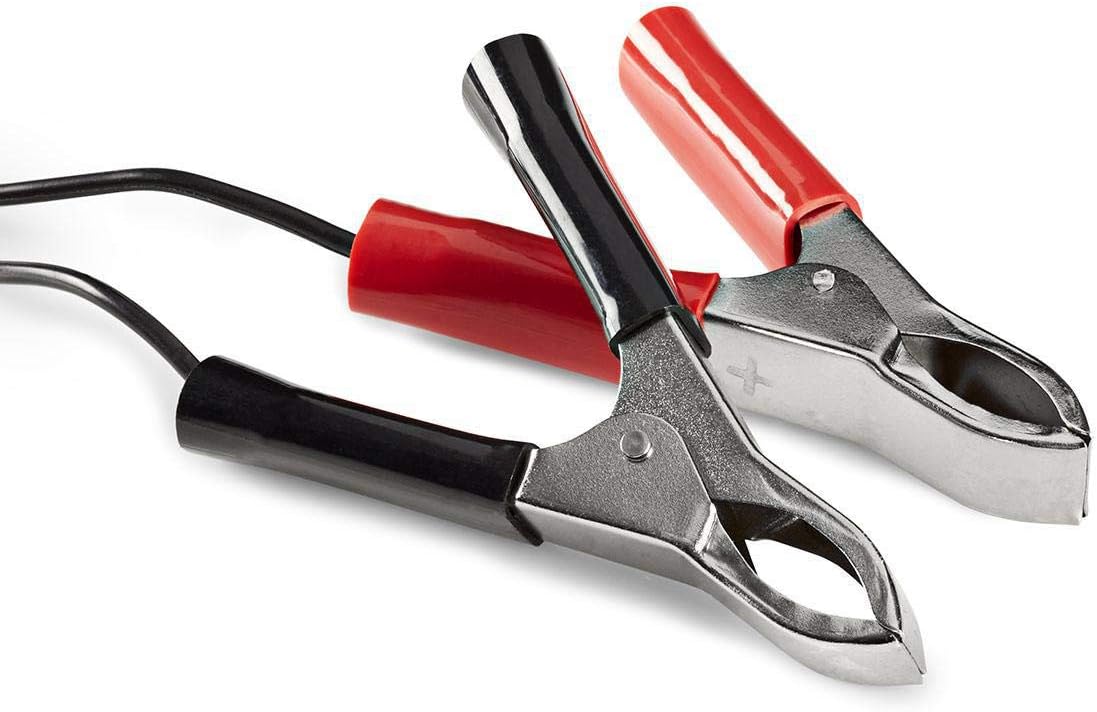
Image: Close-up of the red (positive) and black (negative) battery clamps.
- Güce Bağlanın: pil bir kez clamps are securely connected, plug the charger's AC power cable into a standard 220V wall outlet.
5. Kullanım Talimatları
The NEDIS BACCH02 is a fully automatic charger. Once connected to the battery and power, it will automatically begin the charging process.
Şarj İşlemi:
- Polarite Kontrolü: If the red 'Polarity' LED illuminates, it indicates that the battery clamps are connected incorrectly. Immediately unplug the charger from the AC outlet and correct the connections before plugging it back in.
- Şarj Göstergesi: The green 'Charge' LED will blink when the battery is actively charging.
- Tam Şarj Göstergesi: When the battery is fully charged, the green 'Charge' LED will stop blinking and remain solid. The charger will then automatically switch to a maintenance (float) charge mode to keep the battery at optimal capacity without overcharging.
Şarj Cihazının Bağlantısını Kesme:
To disconnect the charger after use:
- Unplug the charger's AC power cable from the wall outlet first.
- Disconnect the black (-) battery clamp from the negative terminal of the battery.
- Disconnect the red (+) battery clamp akünün pozitif terminalinden.
6. Bakım
Şarj cihazınızın uzun ömürlü olması için doğru bakım şarttır:
- Keep the charger clean and dry. Wipe with a soft, dry cloth. Do not use abrasive cleaners or solvents.
- Şarj cihazını kullanmadığınız zamanlarda serin ve kuru bir yerde saklayın.
- Regularly inspect the AC power cable, DC output cables, and battery clampHasar, aşınma veya korozyon belirtileri olup olmadığını kontrol edin. Gerekirse değiştirin.
7. Sorun Giderme
Şarj cihazınızla ilgili sorun yaşıyorsanız, aşağıdaki tabloya bakın:
| Sorun | Olası Neden | Çözüm |
|---|---|---|
| Charger not turning on / No LEDs lit | No power supply; Faulty outlet; Damaged cable. | Check AC power connection; Try a different outlet; Inspect cable for damage. |
| Red 'Polarity' LED is lit | Ters polarite bağlantısı. | Unplug charger, correct battery clamp connections (red to +, black to -), then plug back in. |
| Green 'Charge' LED not blinking / Battery not charging | Battery too deeply discharged; Incorrect voltage selected; Damaged battery. | Doğru hacmi sağlayıntage is selected; Battery may be beyond recovery; Have battery tested by a professional. |
| Charger unit feels excessively hot | Normal operation (some warmth is expected); Overload; Internal fault. | Ensure adequate ventilation; Disconnect immediately if excessively hot and contact support. |
8. Özellikler
| Özellik | Şartname |
|---|---|
| Örnek | BACCH02 |
| Ürün Model Numarası | 5412810284245 |
| Giriş Voltage | 220V AC |
| Çıkış Hacmitage | 2V / 6V / 12V DC (selectable) |
| Suitable Battery Capacity | 2.2 Ah'den 10 Ah'a |
| Koruma Özellikleri | Reverse Polarity, Short Circuit |
| Ürün Boyutları (U x G x Y) | 7x10x6 cm |
| Ürün Ağırlığı | 680 gram |
| Uyumluluk | CE |
| Renk | Siyah |
9. Garanti ve Destek
This product is covered by the standard warranty terms provided by the retailer at the time of purchase. For specific warranty details, please refer to your purchase documentation or contact the retailer directly.
For technical support, troubleshooting assistance beyond what is provided in this manual, or inquiries regarding parts and service, please contact your point of purchase or the manufacturer's customer service department.


