1. Giriş
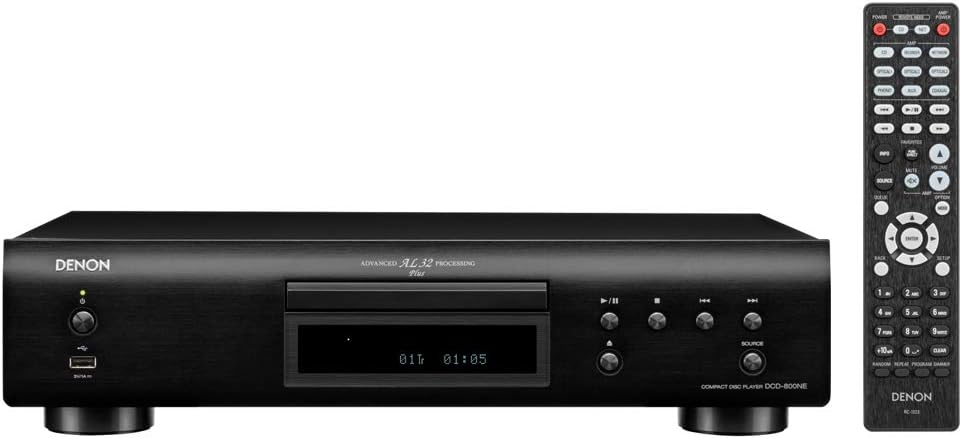
The Denon DCD-800NE is a single-disk CD player designed for high-resolution audio playback. It features an integrated USB port for playing various digital file formats. The player incorporates Advanced AL32 Processing Plus and an innovative circuitry structure to ensure accurate and interference-free sound reproduction, faithful to the original recording. It supports hi-res playback up to PCM192/24 and DSD 2.8 MHz/5.6 MHz via its USB port. The Pure Direct Mode allows for direct sound output to amplifiers, bypassing additional processing for clean and detailed audio. Its vibration-resistant design minimizes adverse audio effects, maintaining Denon's sound quality standards.

Şekil 1: Ön view of the Denon DCD-800NE CD Player with its remote control. The display shows track information and playback status.
2. Kurulum
2.1 Paketin açılması
Tüm bileşenleri ambalajından dikkatlice çıkarın. Aşağıdaki öğelerin mevcut olduğundan emin olun:
- Denon DCD-800NE CD Çalar
- Uzaktan kumanda (RC-1223)
- Two "AAA" batteries for the remote
- 47" Stereo RCA cable
- Owner's Manual on CD-ROM (for detailed instructions)
- Hızlı Başlangıç Kılavuzu
- Garanti Bilgileri
- Güvenlik Talimatları
2.2 Yerleştirme
DCD-800NE cihazını, doğrudan güneş ışığından, ısı kaynaklarından ve aşırı titreşimden uzak, sabit ve düz bir yüzeye yerleştirin. Cihazın etrafında yeterli havalandırma olduğundan emin olun.
2.3 Bağlantılar
Connect the DCD-800NE to your amplifier or receiver using the provided RCA cable or a digital audio cable (optical or coaxial, not included). For optimal sound quality, ensure all connections are secure.
Şekil 2: Rear panel connections of the DCD-800NE, including analog audio out (RCA), digital audio out (optical and coaxial), and IR control ports.
- Analog Ses Çıkışı: Connect the RCA cables from the "AUDIO OUT" jacks on the DCD-800NE to the corresponding analog input jacks on your amplifier (e.g., "CD IN").
- Dijital Ses Çıkışı: For digital connection, use an optical or coaxial digital cable (not supplied) to connect the "DIGITAL AUDIO OUT" (OPTICAL or COAXIAL) jack on the DCD-800NE to a digital input on your amplifier veya DAC.
- Güç Bağlantısı: Once all audio connections are made, connect the power cord to the DCD-800NE and then to an AC power outlet.
2.4 Uzaktan Kumanda Pilinin Takılması
Open the battery compartment on the back of the remote control and insert the two "AAA" batteries, ensuring correct polarity (+/-). Close the compartment.
3. Operasyon
3.1 Güç Açma/Kapatma
Cihazı açmak veya kapatmak için ön paneldeki güç düğmesine veya uzaktan kumandaya basın.
3.2 CD Oynatma
- Basın AÇIK/KAPALI Disk tepsisini açmak için düğmesine basın.
- CD'yi etiket yüzü yukarı bakacak şekilde disk tepsisine yerleştirin.
- Basın AÇIK/KAPALI Tepsiyi kapatmak için düğmeye tekrar basın. Oynatıcı diski okuyacaktır.
- Basın OYNAMAK oynatmayı başlatmak için düğmesine basın.
- Kullanın ATLAMAK buttons to navigate between tracks and the DURAKLAT or DURMAK oynatmayı kontrol etmek için düğmeler.
3.3 USB Oynatma
The DCD-800NE features a front USB-A port for playing audio files from USB storage devices (e.g., USB flash drives, external hard drives).
- Insert a USB storage device into the USB port on the front panel.
- Basın USB button on the front panel or remote to select the USB input.
- Use the navigation buttons on the remote to browse folders and select desired audio files.
- Basmak OYNAMAK to begin playback. The player supports hi-res formats like PCM192/24 and DSD 2.8 MHz/5.6 MHz, as well as MP3, WMA, and FLAC.
3.4 Saf Doğrudan Mod
Activate Pure Direct Mode to bypass digital processing circuits that can color the audio signal. This provides a cleaner, more direct sound path, ideal for critical listening. Refer to the full Owner's Manual for instructions on enabling this mode.
3.5 Integration with Denon 800NE Series
The DCD-800NE is designed to integrate seamlessly with other Denon 800NE series components, such as the PMA-800NE Integrated Amplifier and DNP-800NE Network Audio Player, for a complete high-fidelity system. A single remote control can operate the entire 800NE series.
Video 1: Bir fazlaview of the Denon 800NE series, demonstrating the DCD-800NE CD player's features, including its integration with the PMA-800NE amplifier and DNP-800NE network player, advanced processing, and vibration-resistant design. It highlights CD and USB playback capabilities.
4. Bakım
4.1 Ünitenin Temizlenmesi
Cihazın dış yüzeyini yumuşak, kuru bir bezle silin. Aşındırıcı temizleyiciler, cilalar veya çözücüler kullanmayın, çünkü bunlar yüzeye zarar verebilir. Sıvıları doğrudan cihazın üzerine püskürtmekten kaçının.
4.2 Temizleme Diskleri
Handle CDs by their edges. If a disc is dirty, wipe it gently from the center outwards with a soft, lint-free cloth. Do not use harsh chemicals or abrasive materials, as these can scratch the disc surface and affect playback quality.
4.3 Havalandırma
Ensure that the ventilation openings on the unit are not blocked. Proper airflow is essential to prevent overheating and maintain optimal performance.
5. Sorun Giderme
If you experience issues with your DCD-800NE, consult the following common troubleshooting steps before seeking professional service.
- Güç Yok:
- Check if the power cord is securely plugged into the unit and the AC outlet.
- Elektrik prizinin çalışır durumda olduğundan emin olun.
- Ses Yok:
- Verify that the audio cables are correctly connected between the DCD-800NE and your ampkaldırıcı/alıcı.
- Lütfen doğru giriş kaynağının seçildiğinden emin olun. ampkaldırıcı/alıcı.
- Check the volume level on both the DCD-800NE and your ampkaldırıcı/alıcı.
- Disc Does Not Play / Disc Error:
- Diskin temiz olduğundan ve üzerinde çizik veya leke olmadığından emin olun.
- Make sure the disc is inserted correctly with the label side up.
- Try playing a different disc to determine if the issue is with the player or the disc.
- Some discs may not be compatible (e.g., certain recordable CD-R/RW formats).
- USB Device Not Recognized / Files Not Playing:
- Ensure the USB device is formatted correctly (FAT16/FAT32).
- olup olmadığını kontrol edin. files are in a supported format (MP3, WMA, FLAC, WAV, DSD).
- The player supports up to 255 folders on a USB drive.
- Some USB devices may require external power or may not be compatible.
- Uzaktan Kumanda Çalışmıyor:
- Check if the batteries are inserted correctly and are not depleted.
- Ensure there are no obstructions between the remote control and the unit's IR sensor.
- Uzaktan kumandayı doğrudan üniteye doğrultun.
For more detailed troubleshooting, refer to the Owner's Manual on CD-ROM.
6. Özellikler
| Özellik | Detay |
|---|---|
| Ürün Boyutları | 10.5 x 17.12 x 4.5 inç |
| Ürün Ağırlığı | 9.48 pound |
| Model Numarası | DCD-800NE |
| Bağlantı Teknolojisi | USB |
| Dahil Bileşenler | CD player, Remote control (RC-1223), Two "AAA" batteries, 47" Stereo RCA cable, Owner's Manual on CD-ROM, Quick Start Guide, Warranty Information, Safety Instructions |
| İlk Mevcut Tarih | 13 Eylül 2018 |
Not: Özellikler önceden haber verilmeksizin değiştirilebilir.
7. Garanti Bilgileri
Denon products are manufactured to the highest quality standards. This product is covered by a limited warranty. Please refer to the "Warranty Information" document included in your product packaging or on the Owner's Manual CD-ROM for specific terms, conditions, and duration of the warranty applicable to your region. Keep your proof of purchase for warranty service.
8. Müşteri Desteği
For technical assistance, product inquiries, or service requests, please contact Denon customer support. You can find contact information on the official Denon website or in the "Quick Start Guide" included with your product.
Çevrimiçi Kaynaklar: Visit the official Denon webSıkça sorulan sorular, yazılım güncellemeleri ve ek destek materyalleri için site.