giriiş
The FLEXISPOT EN2 Electric Height Adjustable Standing Desk is designed to enhance your workspace by offering versatile sitting and standing options. Its expansive 55” x 28” eco-friendly whole-piece desktop provides ample space for multiple monitors, laptops, and other essentials, allowing you to confidently manage any work situation. The robust motor lift mechanism ensures smooth and quiet height adjustments, promoting a healthier and more productive work environment.

Figure 1: The FLEXISPOT EN2 Standing Desk in a typical office setup, showcasing its spacious black desktop and integrated accessories.
Kurulum ve Montaj
Your FLEXISPOT EN2 desk will be shipped in two separate packages, which may arrive on different days. Please ensure you have received both packages before beginning assembly. Some steps may require a drill, which is not included in the package. Follow the included assembly guide for detailed instructions.

Figure 2: Illustration showing the two separate packages for the desktop and desk frame.
Kullanım Talimatları
The desk features an electric height adjustable system and a digital memory control panel for convenient operation.
Yükseklik Ayarı
The motor lift mechanism allows for smooth height adjustments from 28 inches to 47.6 inches at a speed of 1 inch per second, with low noise (under 50 dB). Use the up and down arrow buttons on the control panel to manually adjust the desk height.

Figure 3: Digital memory control panel for height adjustment and presets.
Digital Memory Presets
The 6-button controller includes 4 programmable memory preset options. This allows you to save 4 desired desk heights for quick one-touch switching between sitting and standing positions throughout your day.
- Yukarı/aşağı oklarını kullanarak masayı istediğiniz yüksekliğe ayarlayın.
- Press the 'M' button (Memory) followed by one of the numbered preset buttons (1, 2, 3, or 4) to save the current height.
- To recall a saved height, simply press the corresponding numbered preset button.
Video 1: Demonstration of setting and using memory presets on the control keypad.
Çoklu Priz Kullanımı
The desk comes with a clamp power strip featuring 3 AC outlets (125V/12A) and 2 USB ports (5V/2A), with a maximum output of 1500W. This power strip can be clamped onto the desktop edge for convenient access to power for your devices.
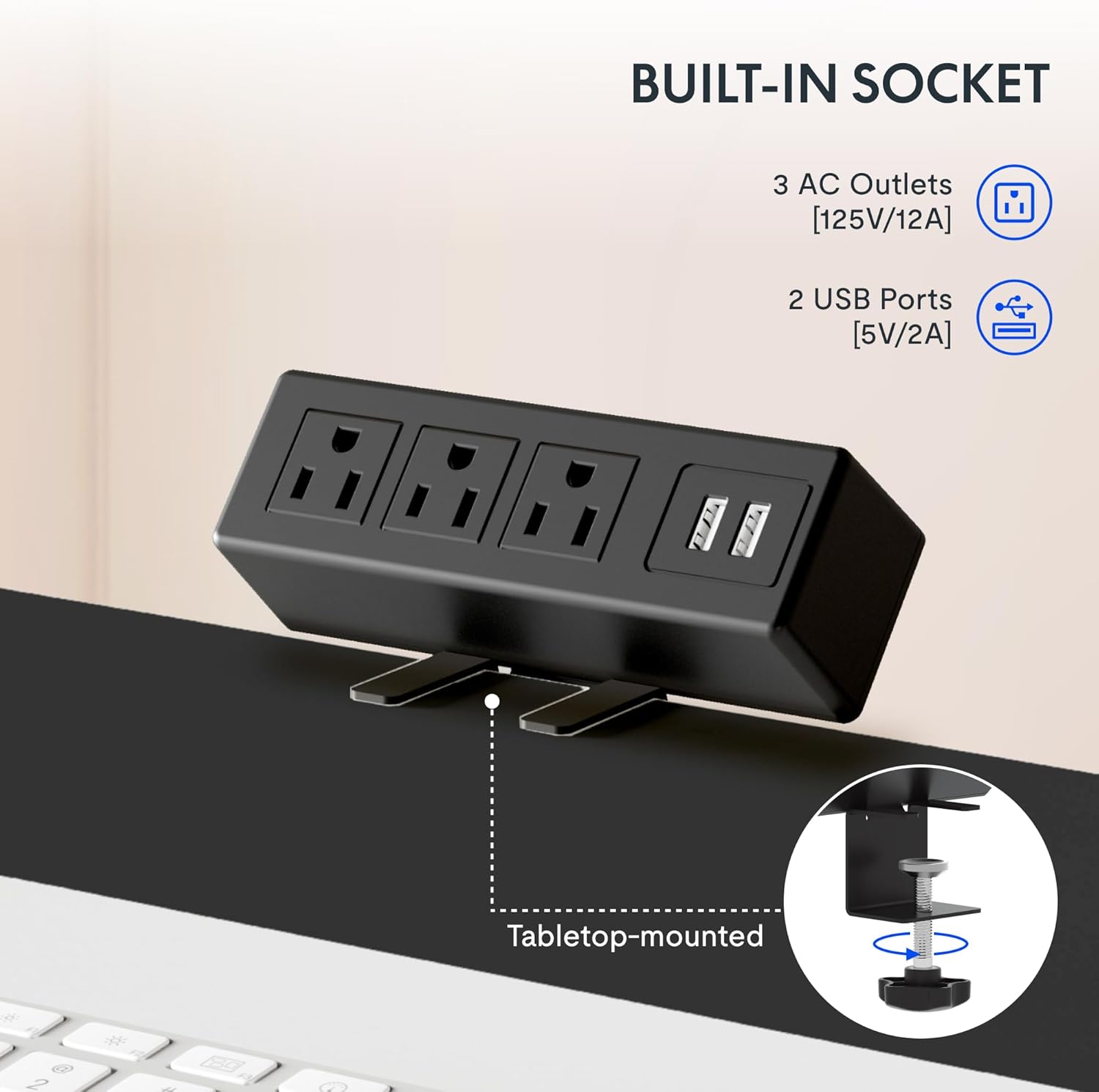
Figure 4: Built-in power strip with AC outlets and USB ports for convenient charging.
Özellikler
- Tüm Parça Masaüstü: The expansive 55” x 28” desktop is a single, eco-friendly piece, providing a smooth and stable work surface. This design is up to 30% more stable than multi-piece desktops.

Figure 5: Comparison of single-piece vs. two-piece desktop stability.
- Sağlam Yapı: An industrial-grade steel frame combined with the solid desktop allows for a maximum weight capacity of 154 lbs. Each desk leg undergoes 20,000 lift tests to ensure durability.
- Kablo yönetimi: The desk includes features to help manage cables, reducing clutter and maintaining a tidy workspace.

Figure 6: Before and after view of cable management under the desk.
- Desktop Friendly Hooks: Two hooks are included that can be installed on the side of the desk for hanging headphones, bags, or other items, keeping your desktop clear.
Video 2: Bittiview of FlexiSpot standing desk features, including height adjustment and cable management.
Bakım
To ensure the longevity and optimal performance of your FLEXISPOT EN2 desk, regular maintenance is recommended:
- Masaüstü yüzeyini düzenli olarak yumuşak bir bezle silin.amp cloth to remove dust and spills. Avoid abrasive cleaners.
- Check all screws and connections periodically to ensure they are secure. Tighten if necessary.
- Motoru ve elektrikli parçaları toz ve nemden uzak tutun.
- Avoid placing excessive weight on the desk beyond its stated capacity of 154 lbs.
Sorun giderme
If you encounter any issues with your FLEXISPOT EN2 desk, refer to the following common troubleshooting tips:
- Masa Hareket Etmiyor:
- Güç kablosunun hem masaya hem de çalışan bir duvar prizine güvenli bir şekilde takılı olduğundan emin olun.
- Check if any cables are tangled or obstructing the desk's movement.
- If an error code is displayed on the control panel, consult the detailed troubleshooting section in the full manual (if available) or contact customer support.
- Dengesiz Hareket:
- Verify that the desk is placed on a level surface. Adjust the adjustable feet if necessary.
- Ensure the weight on the desktop is evenly distributed and within the maximum capacity.
- Alışılmadık Sesler:
- A slight humming sound during adjustment is normal. If you hear grinding or loud noises, discontinue use and contact customer support.
Özellikler
| Özellik | Detay |
|---|---|
| Marka | ESNEKLİK |
| Model Numarası | E1B-R5530N |
| Masaüstü Boyutları | 55" Derinlik x 28" Genişlik |
| Yükseklik Ayar Aralığı | 28" ila 47.6" |
| Speed of Adjustment | saniyede 1 inç |
| Gürültü Seviyesi | Under 50 dBs |
| Ağırlık Kapasitesi | 154 kilo |
| Kontrol Paneli | 6-button with 4 memory presets |
| Güç şeridi | 3 AC outlets (125V/12A), 2 USB ports (5V/2A), 1500W Max Output |
| Taban Malzemesi | Alaşımlı Çelik |
| Üst Malzeme Türü | Alaşımlı Çelik |
Garanti ve Destek
The FLEXISPOT EN2 Standing Desk is covered by the following warranties:
- Frame, Motor, and other Mechanisms: 5 yıl garantilidir.
- Controller, Switch, and Electronics: 2 yıl garantilidir.
Teknik destek, garanti talepleri veya herhangi bir sorunuz için lütfen resmi FLEXISPOT web sitesini ziyaret edin. webSitelerini ziyaret edin veya doğrudan müşteri hizmetleriyle iletişime geçin. Garanti geçerliliği için satın alma fişinizi saklayın.
Video 3: Bir overview of the FlexiSpot brand and its commitment to ergonomic solutions.


